1. Киришүү
Thank you for choosing the Leadfan Android Stereo Radio. This unit is designed to enhance your driving experience with advanced features such as a 9-inch HD touchscreen, built-in Apple CarPlay, Android Auto, GPS navigation, Bluetooth 5.1, and support for a backup camera. This manual provides detailed instructions for installation, operation, maintenance, and troubleshooting to ensure optimal performance and longevity of your device.

Image 1.1: Leadfan Android Stereo Radio and included components (GPS antenna, backup camera, CarPlay/Android Auto icons).
2. Коопсуздук маалыматы
Please read all safety instructions carefully before installation and operation. Failure to follow these guidelines may result in injury, damage to the device, or vehicle. Always prioritize safe driving practices.
- Аппаратты айдоодон алаксыта тургандай иштетпеңиз.
- Кыска туташуулардын же электрдик коркунучтардын алдын алуу үчүн бардык зымдар туура туташтырылганын текшериңиз.
- Эгер кандайдыр бир кадамдарга ишене албасаңыз, орнотуу үчүн адиске кайрылыңыз.
- Экранды таза жана тоскоолдуктардан алыс кармаңыз.
3. Пакеттин мазмуну
Төмөндө тизмеленген нерселердин баары пакетиңизде бар экенин текшериңиз:
- Leadfan Android Stereo Radio Unit
- Камера
- Арткы View Камера кабели
- USB кабелдери (бир нече)
- GPS антеннасы
- RCA кабели
- Электр кабели
- User Manual
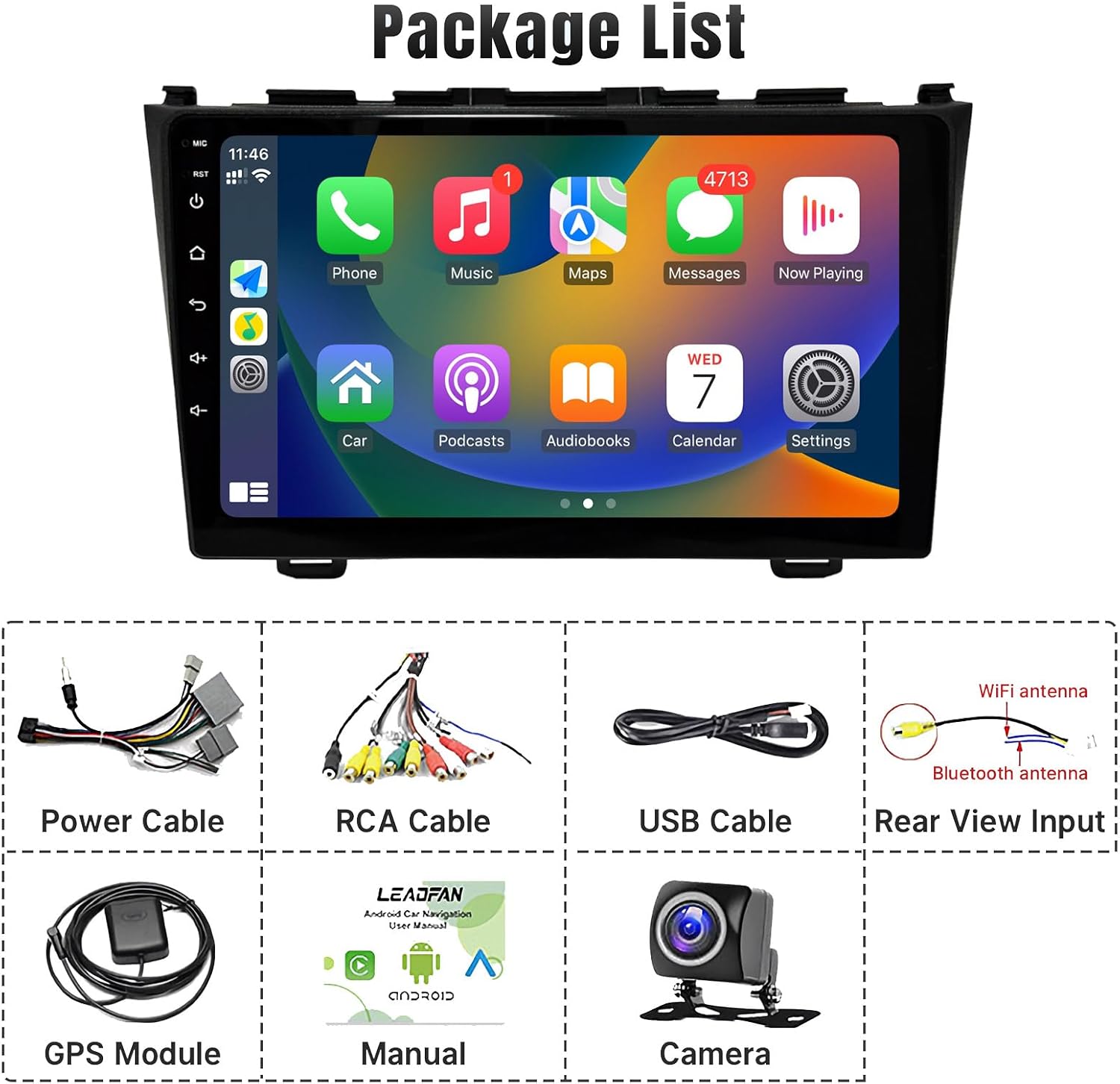
Сүрөт 3.1: Пакеттин мазмунунун визуалдык көрсөтүлүшү.
4. Орнотуу жана орнотуу
This section guides you through the physical installation and initial setup of your stereo radio.
4.1 Vehicle Compatibility and Pre-installation Check
This unit is specifically designed for Honda CRV models from 2007 to 2011. It features a plug-and-play wiring harness for simplified installation.

Image 4.1: Comparison of the car dashboard before and after installing the Leadfan stereo.
Маанилүү эскертүү: If your original car is equipped with a factory screen or additional speakers on the front dashboard (as shown in Figure 4.2), you may need to purchase an additional CANBUS wiring harness for proper functionality. Please verify your vehicle's specific configuration before proceeding.

Image 4.2: Specific car configurations that may require an additional CANBUS wiring harness.
4.2 Зымдар жана монтаждоо
The unit comes with a simplified wiring harness designed for easy connection. Connect the power cable, RCA cables, USB cables, and GPS antenna as per the provided wiring diagram. Ensure all connections are secure.

Image 4.3: Illustration of the simpler plug-and-play wiring provided with this product compared to traditional complex wiring.
For the backup camera installation, connect the camera to the dedicated rear view input. The screen will automatically switch to the camera view when the vehicle is in reverse. Refer to the wiring diagram for the reversing camera for detailed connection instructions.

Image 4.4: Detailed wiring diagram for the reversing camera.
4.3 Баштапкы күйгүзүү
Once all connections are made, turn on your vehicle's ignition. The stereo unit should power on automatically. Follow any on-screen prompts for initial setup, such as language selection or time zone settings.
5. Иштөө нускамалары
This section details the various functions and features of your Leadfan Android Stereo Radio.
5.1 Сенсордук экран интерфейси
The unit features a responsive 9-inch HD touchscreen. Navigate through menus and applications by tapping, swiping, and pinching. The larger display area provides a more comfortable viewing experience compared to smaller screens.

Image 5.1: Visual comparison highlighting the larger 9-inch display area of the Leadfan stereo.
5.2 Apple CarPlay жана Android Auto
The stereo supports wireless Apple CarPlay and Android Auto. Connect your iOS or Android smartphone via Wi-Fi and Bluetooth using the pre-installed 'Zlink' app. This allows access to navigation, phone contacts, messages, music, and voice assistants (Siri/Google Assistant) directly from the stereo screen.

Image 5.2: The stereo display showing the Apple CarPlay and Android Auto interfaces.

Image 5.3: Demonstrates wireless CarPlay and Android Auto functionality, including voice command capabilities.
5.3 GPS навигациясы
The unit comes with built-in offline maps. For online navigation, connect to a Wi-Fi hotspot. You can download various navigation apps from the app store.

Image 5.4: The GPS navigation screen displaying a map and various navigation app icons.

Image 5.5: GPS navigation in use, showing a driver's perspective with the map on the stereo screen.
5.4 FM радиосу
Tune into your favorite radio stations using the built-in FM tuner. The unit supports unlimited preset stations and includes an equalizer for sound adjustment.

Image 5.6: The FM radio interface with frequency display and an overlay of the equalizer settings.
5.5 Bluetooth 5.1
Connect your smartphone via Bluetooth 5.1 for hands-free calling and audio streaming. Access your phone contacts and call history directly from the stereo.
Image 5.7: The Bluetooth interface showing a dial pad and contact list for hands-free calling.
5.6 Mirror Link
The Mirror Link function allows you to display your smartphone's screen directly onto the stereo. This supports both Android and iOS devices.
5.7 Reverse Function (Backup Camera)
When the vehicle is shifted into reverse, the screen automatically displays the view from the connected backup camera. The camera features a 170-degree ultra-wide angle, IP68 waterproof design, and IR night vision for improved safety.

Image 5.8: The stereo display showing the live feed from the backup camera with parking guidelines.
5.8 Рулду башкаруу (SWC)
After correct wiring and learning the steering wheel buttons in the system settings, you can control various functions of the stereo directly from your vehicle's steering wheel, such as volume, track skipping, and call management.
Image 5.9: The steering wheel control learning interface on the stereo, showing button assignments.
5.9 Бөлүнгөн экран функциясы
The split-screen feature allows you to run two applications simultaneously on the display, such as navigation on one side and music playback on the other.

Image 5.10: The stereo screen demonstrating the split-screen feature with two applications running concurrently.
5.10 UI Desktop Switching
The system offers 38 different UI themes for desktop switching, allowing you to customize the appearance of your stereo interface.

Image 5.11: A collage of different UI desktop themes available for customization.
6. Техникалык тейлөө
To ensure the longevity and optimal performance of your Leadfan Android Stereo Radio, follow these maintenance guidelines:
- Экранды тазалоо: Бир аз жумшак, түксүз кездемени колдонуңуз dampсуу же электроника үчүн атайын иштелип чыккан экран тазалагыч менен эритип алыңыз. Абразивдүү материалдардан же катуу химиялык заттардан алыс болуңуз.
- Программалык камсыздоо жаңыртуулары: Periodically check for system updates through the device's settings menu (if available) to ensure you have the latest features and bug fixes.
- Экологиялык шарттар: Аппаратты экстремалдык температурага, түз күн нуруна узак убакытка же ашыкча нымдуулукка дуушар кылуудан алыс болуңуз.
- Кабелдик байланыштар: Occasionally check all connected cables to ensure they are secure and free from damage.
7. Кыйынчылыктарды
If you encounter issues with your stereo radio, refer to the following common problems and solutions:
| Көйгөй | Мүмкүн себеп | Чечим |
|---|---|---|
| Күч жок | Туура эмес зымдар; Сактагыч күйүп кеткен; Унаанын кубаттуулук көйгөйү. | Check power cable connections; Inspect vehicle's fuse box; Consult a professional. |
| Үн жок | Speaker wiring issues; Volume too low; Incorrect audio output settings. | Verify speaker connections; Increase volume; Check audio settings in the system. |
| GPS иштебейт / так эмес | GPS antenna not connected or poorly positioned; No internet connection for online maps. | GPS антеннасынын коопсуз туташтырылганын жана ачык экенин текшериңиз view of the sky; Connect to Wi-Fi for online maps. |
| Bluetooth туташуу маселелери | Bluetooth иштетилген эмес; Түзмөк табылбай жатат; Тоскоолдук. | Ensure Bluetooth is on for both devices; Make stereo discoverable; Try re-pairing. |
| Камдык камера көрүнбөйт | Camera wiring incorrect; Camera faulty; Reverse trigger not connected. | Check camera power and video connections; Ensure reverse trigger wire is connected to vehicle's reverse light. |
If the problem persists after trying these solutions, please contact Leadfan customer support for further assistance.
8. Техникалык шарттар
Detailed technical specifications for the Leadfan Android Stereo Radio:
| Өзгөчөлүк | Спецификация |
|---|---|
| Операция системасы | Android 11 |
| Дисплей өлчөмү | 9 дюйм |
| Display Resolution | 1280x720 HD |
| RAM | 2 ГБ |
| ROM | 32 ГБ |
| Процессор | 4-CORE |
| Bluetooth версиясы | 5.1 |
| Байланыш | Bluetooth, WiFi |
| Өзгөчөлүктөр | Apple CarPlay, Android Auto, Mirror Link, GPS Navigation, Touchscreen, Waterproof (camera) |
| Аудио чыгаруу режими | Стерео |
| Монтаж түрү | Куралдар тактасы |
| Элемент Салмагы | 2.5 фунт |
| Продукциянын өлчөмдөрү | 2.5 x 2.5 x 2.5 дюйм |
9. Кепилдик жана колдоо
9.1 Кепилдик маалыматы
The Leadfan Android Stereo Radio comes with a 1 жылдык кепилдик сатып алынган күндөн тартып. Бул кепилдик өндүрүштүк кемчиликтерди камтыйт жана 12 айдын ичинде алмаштыруунун жеткиликтүүлүгүн камсыз кылат.

Image 9.1: Warranty icon indicating 12 months replacement.
9.2 Кардарларды колдоо
Leadfan is committed to providing excellent customer service. We offer:
- Quick Reply Within 24 Hours
- 60 Days No Worry Return Policy
- Lifetime After-Sales Consult and Technical Support

Image 9.2: Leadfan's commitment to customer satisfaction and support.
If you have any questions or require technical assistance, please contact Leadfan via Amazon Email or visit the official Leadfan Store: Leadfan Amazon Store.


