1. Киришүү
Thank you for choosing the pxton PX-666S Walkie Talkie. This manual provides essential information for the safe and efficient operation of your device. The PX-666S is a versatile two-way radio designed for various applications, offering reliable communication with features such as VOX, noise reduction, and a built-in flashlight. This device has been certified by the FCC (FCC ID: 2AX68GTR8).
The pxton PX-666S walkie talkie is compatible with PX-888S, PX-777S, and PX-888S Pro models, allowing them to be used together and share programming tools and cables (programming cable sold separately).
2. Пакеттин мазмуну
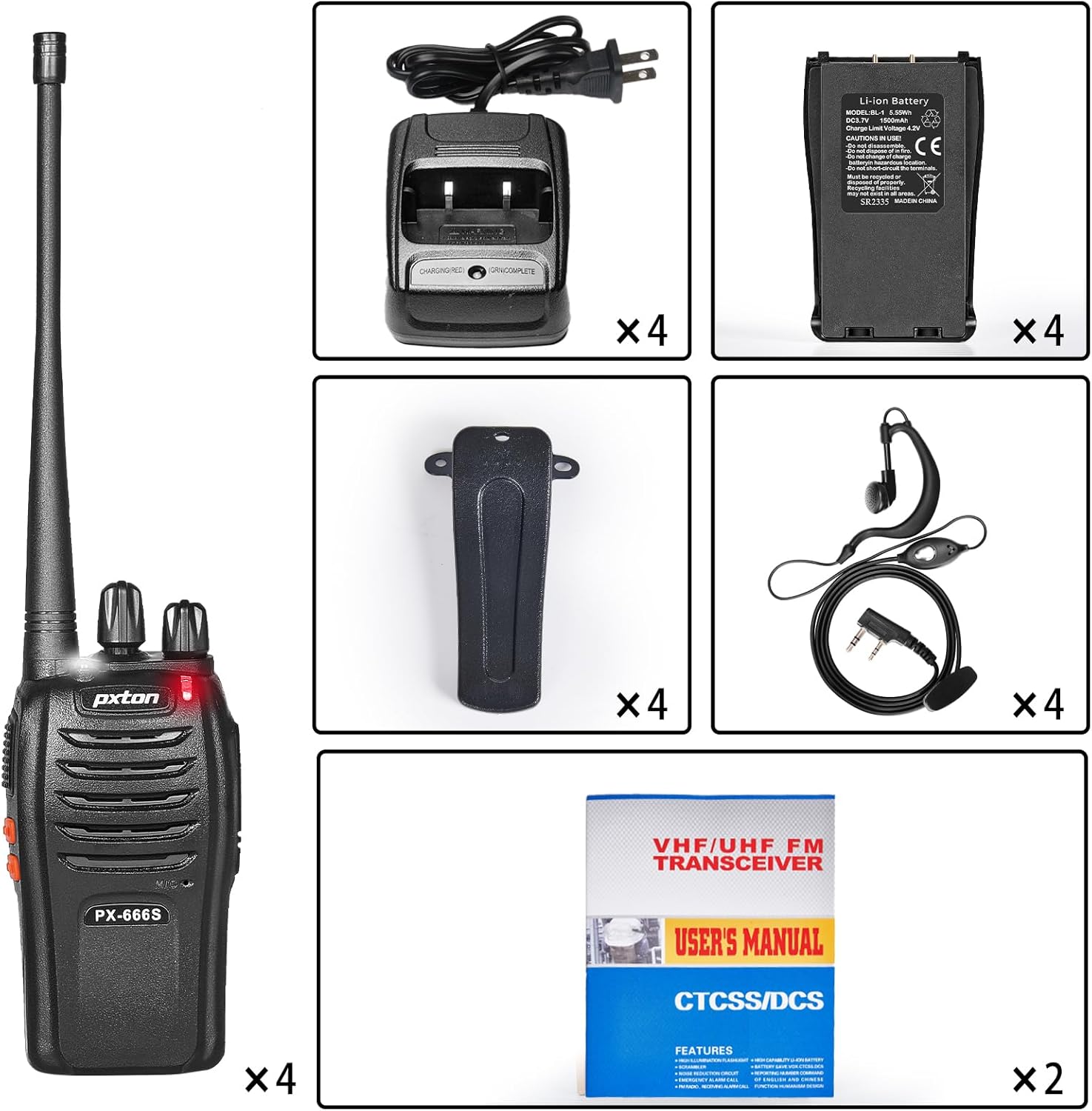
Upon opening your pxton PX-666S package, please verify that all the following items are included:
- 4 x pxton PX-666S Walkie Talkies
- 4 x Charging Docks
- 4 х 1500 мАч литий-иондук батарейкалар
- 4 x Белдик клиптер
- 4 х Наушник
- 2 x User Manuals
3. Продукт бүтүп калдыview
The pxton PX-666S walkie talkie is designed for ease of use and durability. Familiarize yourself with the device's components and features for optimal performance.
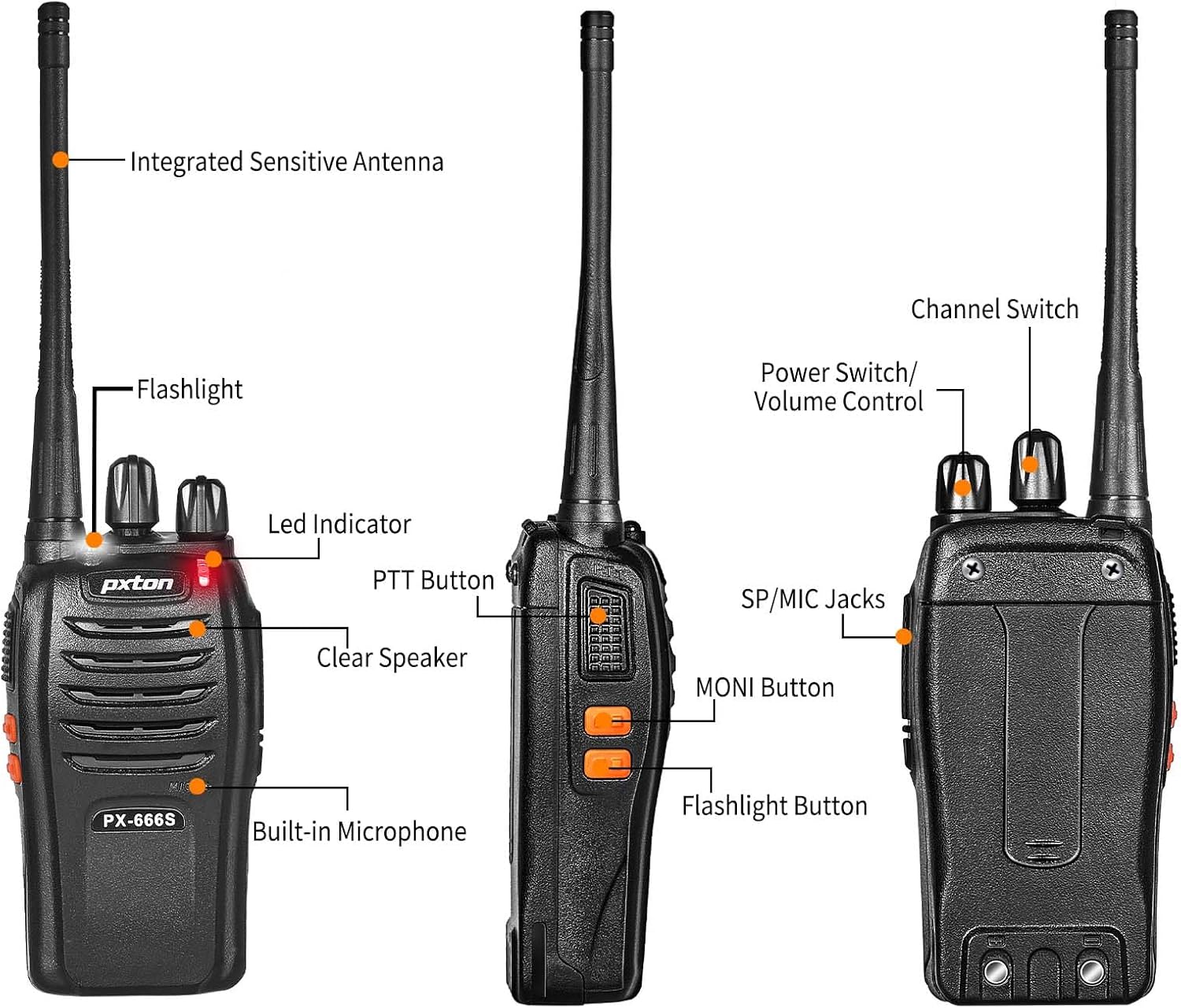
Негизги компоненттер:
- Integrated Sensitive Antenna: For optimal signal transmission and reception.
- Кол чырак: Built-in LED light for illumination.
- LED көрсөткүчү: Displays operational status (e.g., transmitting, receiving, low battery).
- PTT баскычы (баскыч менен сүйлөшүү): Өтүү үчүн басып туруңуз, кабыл алуу үчүн коё бериңиз.
- Clear Speaker: Аудио чыгаруу үчүн.
- Камтылган микрофон: Үн киргизүү үчүн.
- SP/MIC Jacks: For connecting external audio accessories like earphones.
- MONI Button (Monitor): Temporarily disables squelch to listen for weak signals.
- Каналды которуштуруу: Rotary knob to select desired communication channel.
- Кубатты которгуч/Үнү башкаруу: Rotary knob to turn the device on/off and adjust volume.

4. Орнотуу
4.1 Батареяны орнотуу
- Рация өчүрүлгөнүн текшериңиз.
- Аппараттын артындагы батарея бөлүкчөсүнүн капкагын табыңыз.
- Slide the cover down or unclip it to remove.
- 1500 мАч литий-иондук батареяны салып, контакттар туура тегизделгенин текшериңиз.
- Батарея уясынын капкагын ордуна коюп, аны бекитиңиз.
4.2 Батареяны заряддоо
Before first use, fully charge the battery. A full charge typically takes 3-4 hours.
- Connect the charging dock to a power outlet using the provided adapter.
- Place the walkie talkie (with battery installed) into the charging dock.
- The LED indicator on the charging dock will show the charging status (e.g., red for charging, green for fully charged).
- Remove the walkie talkie once charging is complete.

4.3 Аксессуарларды тиркөө
- Кур клип: Align the belt clip with the screw holes on the back of the walkie talkie and secure it with the provided screws.
- Наушник: Insert the earphone plug into the SP/MIC jacks on the side of the walkie talkie.
5. Иштөө нускамалары
5.1 Күйгүзүү/өчүрүү жана үндү башкаруу
Rotate the Power Switch/Volume Control knob clockwise to turn the walkie talkie on. Continue rotating to increase the volume. Rotate counter-clockwise to decrease volume and turn the device off.
5.2 Канал тандоо
The PX-666S features 16 memory channels. Rotate the Channel Switch knob to select your desired communication channel. Ensure all radios in your group are set to the same channel for communication.
5.3 Берүү жана кабыл алуу
- Өткөрүш үчүн: Press and hold the PTT (Push-to-Talk) button on the side of the walkie talkie. Speak clearly into the microphone. Release the PTT button when you finish speaking.
- Кабыл алуу үчүн: PTT баскычы басылбаганын текшериңиз. Рация тандалган каналдагы сигналдарды автоматтык түрдө кабыл алат.
5.4 VOX Function (Voice Operated Transmission)
The VOX function allows for hands-free operation. When activated, the radio will automatically transmit when it detects your voice, without needing to press the PTT button. The PX-666S offers 5 levels of VOX sensitivity adjustment. Refer to the full user manual for detailed programming instructions to enable and adjust VOX sensitivity.
5.5 Мониторинг функциясы
Press the MONI button to temporarily disable the squelch function. This allows you to listen to very weak signals that might otherwise be filtered out, or to check if a channel is clear before transmitting.
5.6 Скандоо функциясы
The scanning function allows the radio to automatically scan through all available channels to find active conversations. Refer to the full user manual for instructions on how to activate and use the scanning feature.
5.7 Фонар
The PX-666S includes a built-in LED flashlight. Press the Flashlight Button (if present, or refer to specific button mapping in the full manual) to turn the flashlight on or off.
5.8 Шашылыш сигнал
In an emergency, the walkie talkie can activate an alarm. Consult the full user manual for specific instructions on how to trigger and deactivate the emergency alarm function.
5.9 Noise Reduction and Automatic Squelch
The PX-666S features noise reduction technology and automatic squelch to ensure clear audio by filtering out background noise and weak signals. These functions operate automatically.
5.10 TOT (Time-Out Timer)
The Time-Out Timer (TOT) limits the duration of a transmission to prevent accidental continuous transmission and conserve battery life. If the PTT button is held down for longer than the preset time, the radio will stop transmitting.
5.11 Low Battery Alert and Power Saving Mode
The walkie talkie will provide an alert when the battery level is low. It also features a power-saving mode to extend battery life during periods of inactivity.

6. Байланыш диапазону
The actual communication range of the pxton PX-666S walkie talkies can vary significantly based on environmental conditions and terrain. Typical ranges are:
- Open Areas (e.g., flat terrain, mountain peaks): 3 мильге чейин
- Suburban or Countryside: Болжол менен 1.2 миль
- City Limits (with buildings and obstructions): Around 0.6 miles

7. Техникалык тейлөө
7.1 Батареяга кам көрүү
- Always use the original pxton 1500mAh Lithium-Ion battery and charging dock.
- Do not disassemble, short-circuit, or dispose of batteries in fire.
- Батареяларды экстремалдык температурага тийгизүүдөн сактаңыз.
- Радио узак убакыт бою колдонулбаса, батареяны чыгарып алыңыз.
7.2 Тазалоо
Clean the walkie talkie with a soft, damp cloth. Do not use harsh chemicals or abrasive cleaners. Ensure the device is dry before use or charging.
7.3 Сактоо
Store the walkie talkie in a cool, dry place away from direct sunlight and extreme temperatures.
8. Кыйынчылыктарды
If you encounter issues with your pxton PX-666S walkie talkie, please refer to the following common problems and solutions:
| Көйгөй | Мүмкүн себеп | Чечим |
|---|---|---|
| Күч жок | Батарея туура орнотулган эмес же заряды түгөнгөн. | Батарея туура орнотулганын текшериңиз. Батареяны толугу менен кубаттаңыз. |
| Өткөрүп же кабыл албайт | Туура эмес канал тандалды; диапазондон тышкары; батареянын заряды аз. | Verify all radios are on the same channel. Move closer to other radios. Charge battery. |
| Аудио сапаты начар / Статикалык | Weak signal; interference; volume too low. | Move to an area with fewer obstructions. Adjust volume. Use MONI button to check for weak signals. |
| Radio transmits continuously (TOT) | PTT button stuck or held too long. | Release PTT button. Check for physical obstruction of PTT button. |
| Батареянын иштөө мөөнөтү кыска | Battery not fully charged; old battery; frequent transmissions. | Ensure battery is fully charged. Consider replacing old batteries. Utilize power-saving mode. |
If the problem persists, please contact pxton customer support for assistance.
9. Техникалык шарттар
| Өзгөчөлүк | Спецификация |
|---|---|
| Модель номери | PX-666S |
| Элемент Салмагы | 2.82 фунт (4 пакет үчүн) |
| Продукциянын өлчөмдөрү | 9.9 x 4.4 x 6.9 дюйм |
| Батарея түрү | 1500mAh литий-ион (кошулган) |
| Тtage | 3.7 вольт |
| Каналдардын саны | 16 |
| Жыштык диапазону | UHF |
| Сүйлөшүү диапазону максималдуу | 3 Miles (open areas) |
| Өзгөчөлүктөр | Automatic Squelch, Battery Saver Mode, Long Range, Rechargeable, Voice Operated Transmission (VOX), Noise Reduction, TOT, Flashlight, Monitoring, Scan Function, Emergency Alarm |
| Сууга туруктуулук деңгээли | Сууга чыдамдуу |
| Өндүрүүчү | Shenzhen Puxintong Electronics Co.Ltd |
10. Кепилдик жана колдоо
pxton offers a 30-day unconditional return policy for your product. Additionally, pxton provides lifelong after-sales service for the PX-666S walkie talkies. If you encounter any issues or require assistance, please do not hesitate to reach out to pxton customer support. We are committed to helping you resolve any problems.
For support, please visit the official pxton store or contact their customer service channels.


