1. Киришүү
Thank you for choosing the pxton PX-10R Dual Band Handheld Two-Way Radio. This manual provides essential information for the safe and efficient operation of your device. Please read this manual thoroughly before using the radio and retain it for future reference.
2. Коопсуздук маалыматы
Коопсуз иштөөнү жана оптималдуу иштөөнү камсыз кылуу үчүн, төмөнкү сактык чараларын сактаңыз:
- FCC шайкештиги: This device complies with Part 15 of the FCC Rules. Operation is subject to the condition that this device does not cause harmful interference. FCC ID: 2AX68PX-10R.
- Батареянын коопсуздугу: Use only the specified battery pack. Do not disassemble, crush, or expose the battery to extreme temperatures or fire. Dispose of batteries properly.
- Антеннага кам көрүү: Do not hold the antenna directly during transmission. Avoid touching the antenna with bare skin when the radio is transmitting.
- Суу каршылык: The PX-10R is rated IP54 for water resistance, meaning it is protected from dust and splashing water. It is not designed for submersion. Ensure all ports are sealed when exposed to moisture.
- Угуу коргоо: Do not operate the radio at high volume levels for extended periods to prevent hearing damage.
3. Пакеттин мазмуну
Таңгактан чыгаргандан кийин, төмөндө көрсөтүлгөн нерселердин бардыгы бар экенин жана жакшы абалда экендигин текшериңиз:
- 1 x pxton PX-10R Ham Radio
- 1 x 1800mAh литий-иондук батарея
- 1 x Fast Charger Dock
- 1 x Belt Clip
- 1 x Lanyard
- 1 x User Manual
4. Продукт бүтүп калдыview
Familiarize yourself with the components of your pxton PX-10R radio.
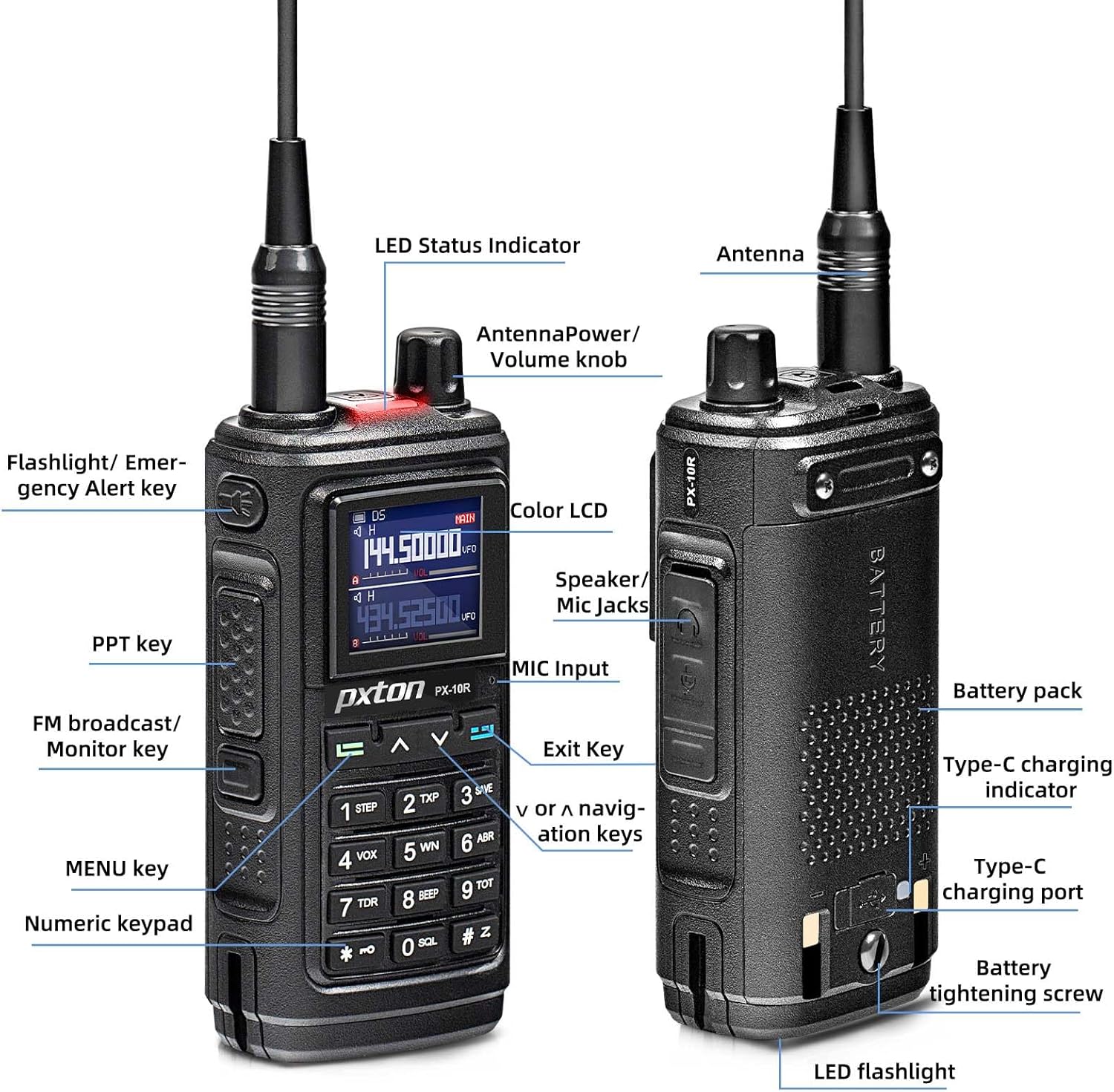
Figure 4.1: PX-10R Component Diagram
This diagram illustrates the various parts of the radio, including the antenna, LED status indicator, power/volume knob, flashlight/emergency alert key, PTT key, FM broadcast/monitor key, MENU key, numeric keypad, color LCD, speaker/mic jacks, MIC input, exit key, navigation keys, battery pack, Type-C charging indicator, Type-C charging port, battery tightening screw, and LED flashlight.

Figure 4.2: PX-10R in Charging Dock
The pxton PX-10R radio is shown seated in its dedicated charging dock, indicating its charging status with an illuminated LED.
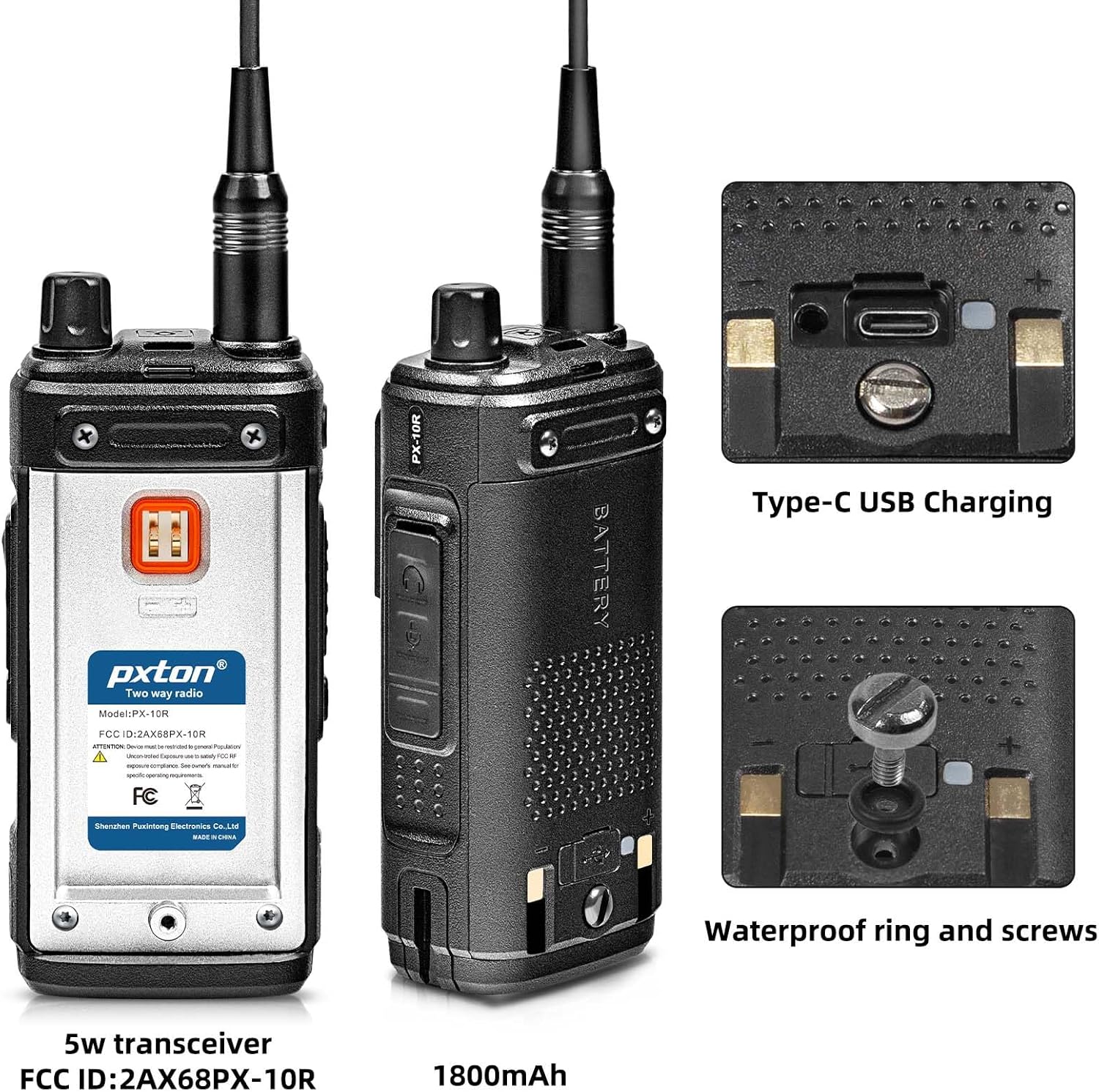
Figure 4.3: PX-10R Rear View and Charging Port
This image highlights the rear of the radio, showcasing the Type-C USB charging port and the waterproof ring and screws designed for enhanced durability and protection against elements.
5. Орнотуу
5.1 Батареяны орнотуу
- Батарея блогун радионун арткы жагындагы оюктар менен тегиздеңиз.
- Батарея блогун ордуна чыкылдаган үн чыкканча өйдө жылдырыңыз.
- Secure the battery with the tightening screw if applicable.
5.2 Батареяны заряддоо
The PX-10R offers two charging methods:

5.1-сүрөт: Заряддоо параметрлери
The radio can be charged using the included fast charger dock or directly via its USB Type-C port, allowing for versatile charging from power banks, computers, or car chargers.
- Кубаттоочу докту колдонуу: Place the radio into the charging dock. Ensure the charging contacts align. The indicator light on the dock will show charging status.
- Using USB Type-C: Connect a USB Type-C cable to the radio's charging port and to a compatible USB power source (e.g., power bank, computer, car charger).
5.3 Антеннаны бекитүү
Антеннаны сааттын жебеси боюнча радионун үстүндөгү туташтыргычка манжа менен бекем болгуча бураңыз. Ашыкча катуулабаңыз.
5.4 Belt Clip and Lanyard Attachment
Attach the belt clip to the designated slot on the back of the radio. The lanyard can be attached to the loop on the radio for secure carrying.
6. Иштөө нускамалары
6.1 Негизги операция
- Күйгүзүү/өчүрүү: Rotate the Power/Volume knob clockwise to turn on the radio. Rotate counter-clockwise until it clicks to turn off.
- Үндү тууралоо: Угуунун үнүн тууралоо үчүн Кубат/Үн баскычын буруңуз.
- Канал тандоо: Use the Up/Down navigation keys to select desired channels. The PX-10R supports 999 channels.
- Push-to-Talk (PTT) Key: Press and hold the PTT key on the side of the radio to transmit. Release to receive.
- Меню навигациясы: Press the MENU key to access the radio's settings. Use the Up/Down keys to navigate and the MENU key again to confirm selections. The Exit key can be used to return to the previous screen or exit the menu.
6.2 Өркүндөтүлгөн функциялар
- Wireless Frequency Copy:

Figure 6.1: Wireless Frequency Copy Function
To use, activate the Wireless Frequency Copy function via the menu. Position the PX-10R near the transmitting radio and follow the on-screen prompts to copy its frequency.
This feature allows the PX-10R to copy the frequency of another walkie-talkie with a single button press, enabling seamless communication across different brands and models without computer programming. - 10 NOAA Weather Channels:

6.2-сүрөт: NOAA аба ырайы каналдары
Access the NOAA weather channels through the radio's menu. The radio can scan these channels to provide weather alerts.
The radio supports NOAA weather forecast service, scanning 10 NOAA channels to provide real-time weather alerts, enhancing safety during outdoor activities. - VOX Mode (Voice Operated Transmission): Activate VOX mode in the menu for hands-free operation. The radio will transmit automatically when it detects your voice. Adjust VOX sensitivity (9 levels available) for optimal performance.
- Dual Band / Dual Watch: The PX-10R operates on both UHF and VHF bands. Dual Watch allows you to monitor two different frequencies simultaneously.
- Super Flashlight:

Figure 6.3: Super Flashlight in Use
Press the dedicated Flashlight/Emergency Alert key to turn the flashlight on or off.
The integrated dual LED flashlight provides powerful illumination, useful in low-light conditions or emergencies. - CTCSS/DCS: Use Continuous Tone-Coded Squelch System (CTCSS) or Digital Coded Squelch (DCS) to filter out unwanted conversations on a channel.
- DTMF: Dual-Tone Multi-Frequency signaling is supported for various control functions.
- Жогорку/Төмөн кубаттуулукту тандоо: Adjust the transmit power output (high or low) to conserve battery life or extend range as needed.
- Auto Keypad Lock: Enable this feature in the settings to automatically lock the keypad after a period of inactivity, preventing accidental key presses.
- Channel Scan Monitoring: Scan through programmed channels to find active transmissions.
- Busy Channel Lockout (BCLO): Prevents transmission on a channel that is already in use.
- 10-Level Squelch Adjustment: Adjust the squelch level to suppress background noise and receive only strong signals.
- Ойготкуч саат: The radio includes an alarm clock function.
- Same-Frequency Calling: Allows direct communication on the same frequency.
7. Техникалык тейлөө
- Тазалоо: Радионун бетин жумшак, гamp кездеме. Катуу химиялык заттарды же абразивдүү тазалагычтарды колдонбоңуз.
- Батареяга кам көрүү: Fully charge the battery before first use. For long-term storage, charge the battery to about 50% and store in a cool, dry place. Avoid fully discharging the battery.
- Сактагыч: Радиону кургак, чаңсыз чөйрөдө, түз күн нурунан жана өтө жогорку температурадан алыс сактаңыз.
8. Кыйынчылыктарды
If you encounter issues with your PX-10R, refer to the following common problems and solutions:
| Көйгөй | Мүмкүн себеп | Чечим |
|---|---|---|
| Радио күйбөйт. | Батарея аз же туура орнотулган эмес. | Батареяны заряддаңыз же туура түрдө кайра орнотуңуз. |
| Өткөрүп же кабыл албайт. | Incorrect frequency/channel, antenna loose, or busy channel lockout active. | Verify frequency/channel, check antenna connection, or disable busy channel lockout. |
| Аудио сапаты начар. | Low battery, squelch level too high, or out of range. | Charge battery, adjust squelch level, or move closer to the other radio. |
| Баскычтоп жооп бербей жатат. | Баскычтоптун кулпусу активдүү. | Disable keypad lock (refer to specific key combination in full manual if available). |
9. Техникалык шарттар
| Өзгөчөлүк | Спецификация |
|---|---|
| Модель номери | PX-10R |
| Бренд | pxton |
| Каналдардын саны | 999 |
| Жыштык диапазону | UHF VHF Dual Band |
| Батарея түрү | 1800mAh литий-ион (кошулган) |
| Тtage | 7.4 вольт |
| Сууга туруктуулук деңгээли | IP54 (Суу өткөрбөйт) |
| Элемент Салмагы | 1.26 фунт |
| Продукциянын өлчөмдөрү | 8.07 x 4.33 x 4.72 дюйм |
| Өзгөчөлүктөр | Call Alert, Dual Band, Voice Operated Transmission (VOX), Weather Alert (NOAA), Wireless Frequency Copy, Super Flashlight |
| Өндүрүүчү | Shenzhen Puxintong Electronics Co.Ltd |
| Дата биринчи жеткиликтүү | 2-март, 2024-жыл |
10. Кепилдик жана колдоо
The pxton PX-10R comes with a 60-day unconditional return policy and lifetime after-sales service. For any issues, questions, or technical support, please contact pxton customer service through the platform where you purchased the product or refer to the contact information provided in your product packaging.


