Introduction
Thank you for choosing the FosPower Emergency Weather Radio (Model D8). This multi-functional device is designed to provide reliable communication, power, and illumination during emergencies, power outages, or outdoor activities. With its robust features and multiple charging methods, it ensures you stay connected and prepared.

Image: The FosPower Emergency Weather Radio (Model D8) in orange and black, shown charging a smartphone via its USB port. The radio features a digital display, a flashlight on one end, and a compass on its strap.
Продукт бүттүview
Familiarize yourself with the key components of your FosPower Emergency Weather Radio:
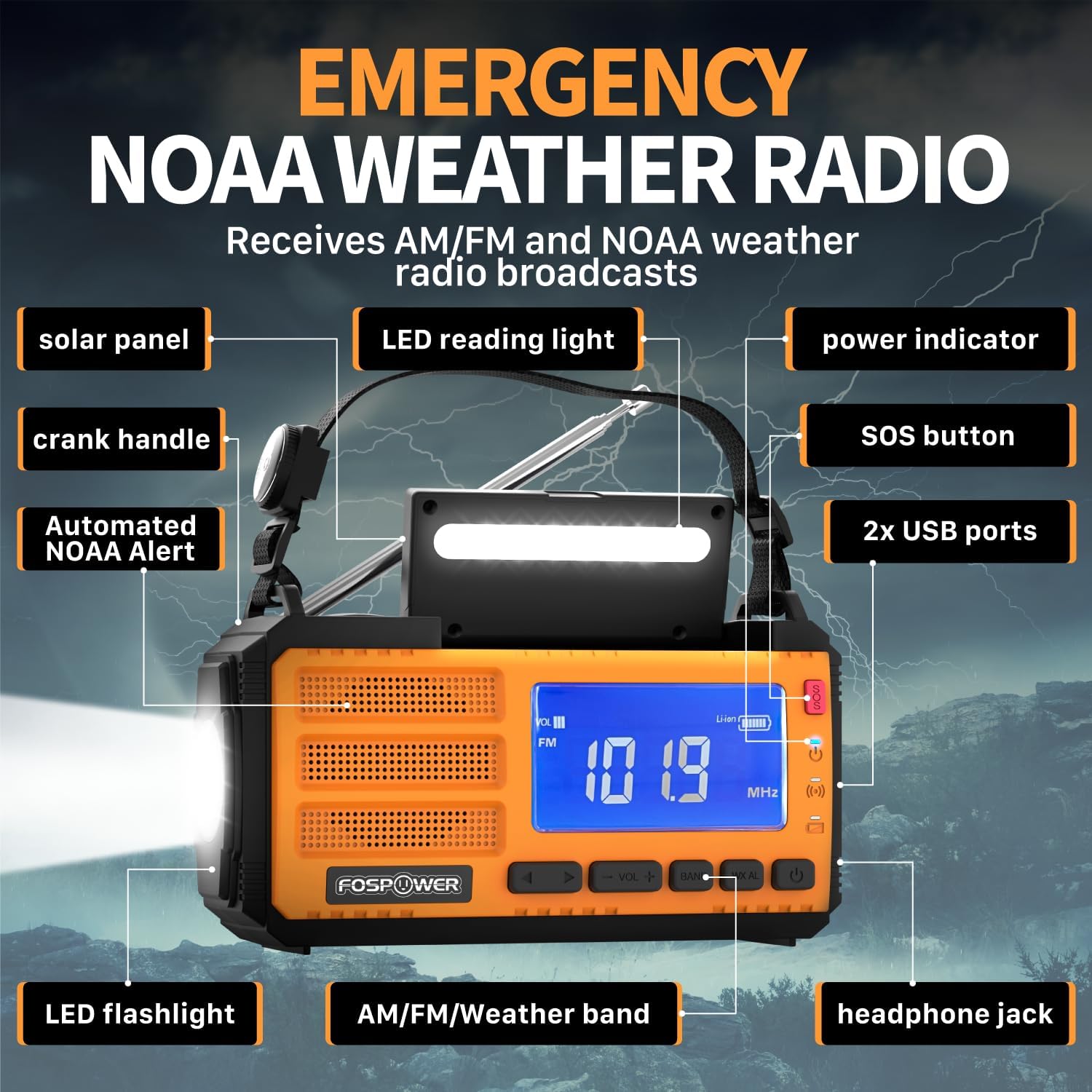
Image: A detailed diagram highlighting the various components of the FosPower Emergency Weather Radio, including the solar panel, LED reading light, power indicator, SOS button, USB ports, LED flashlight, AM/FM/Weather band controls, headphone jack, and crank handle.
- Күн панели: Located on top for solar charging.
- Кранка туткасы: Foldable handle for manual power generation.
- LED фонарик: Integrated on one end for directional lighting.
- LED окуу жарыгы: Located under the solar panel for ambient light.
- USB порттору: For charging external devices and recharging the radio.
- SOS баскычы: Шашылыш учурларда катуу сирена жана жаркылдаган жарыкты күйгүзөт.
- Күч көрсөткүчү: Учурдагы батареянын деңгээлин көрсөтөт.
- AM/FM/Weather Band Controls: Buttons for radio tuning and volume.
- Гарнитура уячасы: Жеке угуу үчүн 3.5 мм порт.
- Automated NOAA Alert: Feature to monitor local NOAA channels.
- Holding Strap with Compass: For portability and navigation.
Жайгашуу
Баштапкы заряддоо
Before first use, it is recommended to fully charge the radio using the USB-C charging cable. Connect the USB-C end to the radio's input port and the USB-A end to a compatible USB power adapter (not included) or computer USB port. The power indicator lights will show charging progress.
Камтылган компоненттер
- FosPower Emergency Weather Radio (Model D8)
- Holding Strap with Compass
- USB-Aдан USB-Cге заряддоо кабели
Иштөө нускамалары
Радио операциясы
- Күйгүзүү/өчүрүү: Радиону күйгүзүү же өчүрүү үчүн кубат баскычын басыңыз.
- Топтун тандоосу: Press the 'BAND' button to cycle through AM, FM, and NOAA Weather Band (WB) frequencies.
- тюнинг: Use the 'TUNE +/-' buttons to manually adjust the frequency. For automatic scanning, press and hold the 'TUNE +/-' button.
- Үндү көзөмөлдөө: Use the 'VOL +/-' buttons to increase or decrease the volume.
- Антенна: Extend the telescopic antenna fully for optimal FM and Weather Band reception. For AM, rotate the radio for best signal.
Light Functions

Image: The FosPower Emergency Weather Radio demonstrating its flashlight function on one end and its reading light function, which is located beneath the solar panel.
- Кол чырак: Press the dedicated flashlight button to turn it on. Some models may have multiple brightness settings or a strobe function, which can be cycled by pressing the button repeatedly.
- Окуу жарыгы: Lift the solar panel to reveal the LED reading light. Press the reading light button to turn it on.
SOS сигнализациясы
In an emergency, press and hold the 'SOS' button. This will activate a loud siren and a flashing light to attract attention. Press the button again to deactivate the alarm.

Image: The FosPower Emergency Weather Radio with a red pulsating light indicating the SOS alarm is active, set against a backdrop of a stormy sky with lightning.
Заряддоо параметрлери
The FosPower Emergency Weather Radio offers three versatile charging methods to ensure power availability in any situation:

Сүрөт: Үч жакындан тартылган сүрөт views of the FosPower Emergency Weather Radio demonstrating its multiple power sources: USB charging port, solar panel, and hand-crank.
- USB-C заряддоо: For the fastest and most efficient charge, use the provided USB-C cable to connect the radio to a USB power source.
- Күн кубаты: Place the radio with the solar panel facing direct sunlight. This method is ideal for maintaining charge or for slow charging in outdoor environments.
- Кол менен кубаттоо: Extend the hand crank and rotate it clockwise or counter-clockwise at a steady pace. This method provides power for short bursts of use or to generate enough charge for other charging methods.
Power Bank функциясы
The radio features a 37000mWh (10000mAh) power bank, allowing you to charge your USB-powered devices, such as smartphones, during emergencies or when off-grid. Connect your device to the radio's USB output port using your device's charging cable.

Image: The FosPower Emergency Weather Radio set against a natural background, highlighting its "37000mWh INTERNAL BATTERIES" and stating "High-capacity batteries support all day use."
Техникалык тейлөө
- Тазалоо: Радиону жумшак, кургак чүпүрөк менен сүртүңүз. Абразивдүү тазалагычтарды же эриткичтерди колдонбоңуз.
- Сактагыч: Радиону салкын, кургак жерде, түз күндүн нурунан жана экстремалдык температурадан алыс сактаңыз.
- Батареяга кам көрүү: Батареянын иштөө мөөнөтүн оптималдаштыруу үчүн, эгерде үзгүлтүксүз колдонулбаса, радиону жок дегенде үч айда бир жолу толук кубаттаңыз.
Проблемаларды чечүү
| Көйгөй | Мүмкүн себеп | Чечим |
|---|---|---|
| Радио күйбөй жатат. | Батарея аз же түгөнүп калган. | Charge the radio using USB-C, solar, or hand-crank methods. |
| Радио кабыл алуу начар. | Антенна узартылган эмес же сигналдын начар аймагы. | Fully extend the telescopic antenna. Try repositioning the radio or moving to an open area. For AM, rotate the radio. |
| Тышкы түзмөк заряддалбай жатат. | Radio battery too low or incorrect cable. | Радионун жетиштүү заряддалганын текшериңиз. Түзмөгүңүзгө шайкеш келген USB кубаттоо кабелин колдонуңуз. |
| Фонарь/Окуу жарыгы иштебей жатат. | Батареянын заряды аз же жарык баскычы туура эмес басылган. | Charge the radio. Ensure the light button is pressed firmly. |
Техникалык шарттар
- Продукциянын өлчөмдөрү: 6.89 x 3.15 x 3.86 дюйм
- Элемент Салмагы: 1.43 фунт
- Модель номери: FOSPWB-2436PP
- Батарея: 1 Литий Полимердик батарейка (кошулган)
- Кубат булагы: Solar, Battery, Handcrank
- Колдоого алынган радио топтору: AM, FM, WB (Weather Band)
- Өзгөчө өзгөчөлүгү: Built-In Flashlight, SOS Alarm, Power Bank
- Байланыш технологиясы: USB
Кепилдик жана колдоо
FosPower offers a Чектелген Өмүр бою Кепилдик for this product. For any inquiries or support needs, please contact FosPower customer service. Details regarding the warranty and how to reach support can typically be found on the manufacturer's official webсайт же сатып алуу платформасы аркылуу.
Join millions of satisfied customers with our limited lifetime warranty, backed by our experienced and dedicated USA based customer service.


