Introduction
Thank you for choosing the Reobiux Security Camera Outdoor with Dual Lens. This advanced security system is designed to provide comprehensive surveillance for your home or business, featuring 2.5K/6MP resolution, auto-tracking, human detection, color night vision, and two-way audio. This manual will guide you through the setup, operation, and maintenance of your new security cameras.

Image: Two Reobiux outdoor security cameras, showcasing their design and the accompanying mobile application interface.
Кутуда эмне бар
Сураныч, таңгактын ичиндегисин кылдаттык менен текшериңиз. Эгерде кандайдыр бир буюмдар жок болсо же бузулуп калса, кардарларды колдоо кызматына кайрылыңыз.
- Reobiux Security Cameras (2 units)
- User Manual
- Орнотуу бурамасы
- Power Cables (10-foot)

Сүрөт: Продукциянын таңгагына кирген бардык буюмдардын визуалдык көрүнүшү.
Продукт бүттүview
The Reobiux security camera features a unique dual-lens design for comprehensive coverage and advanced monitoring capabilities.

Image: Detailed diagram illustrating the fixed and rotating lenses, along with the 355° pan and 90° tilt functionality of the camera.
Негизги компоненттер:
- Туруктуу линза: Provides a stable view of a primary area.
- Айлануучу линза: Offers broader coverage with 355° pan and 90° tilt capabilities.
- Инфракызыл диоддор: For clear night vision in low light.
- Жарыктар: For full-color night vision and alarm illumination.
- Микрофон: Аудио киргизүү жана эки тараптуу байланыш үчүн.
- Баяндамачы: Аудио чыгаруу жана эки тараптуу байланыш үчүн.
- Антенналар: Wi-Fi аркылуу туруктуу байланыш үчүн.
- Монтаждык база: Коопсуз орнотуу үчүн.
Орнотуу колдонмосу
1. Колдонмону жүктөп алуу жана аккаунтту каттоо
- Activate Permissions: Ensure Bluetooth and 2.4GHz Wi-Fi are enabled on your smartphone.
- Колдонмону жүктөп алыңыз: Scan the QR code below or search for "iCSee" in the App Store (iOS) or Google Play Store (Android).
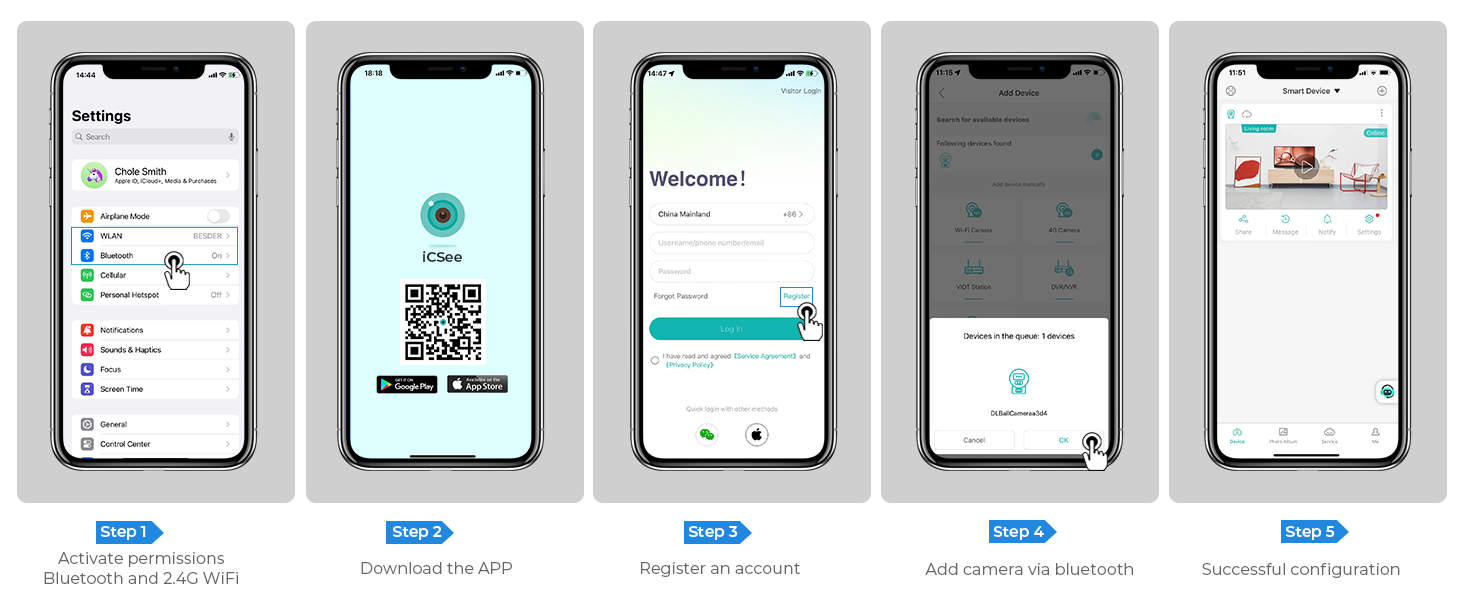
Image: Step-by-step guide for app download, account registration, and device configuration.
Alternatively, download the iCSee app directly from: http://d.xmeye.net/CSee
- Каттоо эсебин каттоо: Open the iCSee app and follow the on-screen instructions to register a new account.
- Add Camera via Bluetooth: Once logged in, select "Add Device" and choose to add the camera via Bluetooth. The app will guide you through the pairing process.
- Successful Configuration: After successful pairing, your camera will be ready for use.
2. Камераны кубаттоо
Connect the provided power cable to the camera's power input port and then plug it into a standard electrical outlet. The camera will power on and initiate its startup sequence.
3. Network Connection Options
- Wi-Fi туташуусу: The camera supports 2.4GHz Wi-Fi networks only. During app setup, select your Wi-Fi network and enter the password.
- Ethernet кабелдик туташуу: For a more stable connection, you can connect the camera directly to your router using an Ethernet cable.
- Personal Hotspot: In situations where Wi-Fi is unavailable, the camera can also connect via a personal hotspot from your smartphone.
4. Камераны орнотуу
The camera is designed for both indoor and outdoor use and can be ceiling-mounted. Choose a location that provides optimal viewing angles and is within range of your Wi-Fi network or Ethernet connection.
- Бургулоо пункттарын белгилөө: Use the mounting template (if provided) or the camera base to mark the drilling points on the desired surface.
- Бургулоо тешиктери: Drill holes at the marked points. Insert wall anchors if mounting on drywall or masonry.
- Базаны коргоо: Attach the camera's mounting base to the surface using the provided screws.
- Камераны тиркөө: Securely attach the camera unit to the mounted base.

Image: The camera installed outdoors, highlighting its robust IP66 waterproof design suitable for various weather conditions.
Иштөө нускамалары
1. Түз эфир View жана Ойнотуу
Access the iCSee app to view жаша фооtage from your cameras. You can switch between the fixed and rotating lens views. The app also allows you to review foo жазылганtage stored on the SD card or cloud.

Image: The dual-screen feature in the iCSee app, displaying simultaneous views from the fixed and rotating lenses.
2. Панорамалоо, эңкейтүү жана санариптик масштабдоо
Use the iCSee app to remotely control the rotating lens. You can pan the camera 355° horizontally and tilt it 90° vertically to cover a wide area. The camera also supports 5x digital zoom to view майда-чүйдөсүнө чейин.

Сүрөт: үстүнкү view demonstrating the camera's extensive 355° pan and 90° tilt range, covering a large residential area.
3. Motion Tracking and Human Detection
The camera is equipped with advanced motion tracking. When human motion is detected, the rotating lens will automatically track the subject's movement. You will receive real-time alerts on your smartphone via the iCSee app, capturing images or video of the activity.

Image: The camera's alarm features, including real-time push notifications, siren, and light activation upon detecting suspicious activity.
4. Эки тараптуу аудио
With the built-in microphone and speaker, you can communicate with visitors or deter intruders directly through the iCSee app from anywhere.

Image: Illustration of the two-way audio function, allowing communication with individuals near the camera.
5. Түнкү көрүү режимдери
The camera offers three night vision modes, selectable via the app, to ensure clear visibility up to 30 meters (98 feet) in various lighting conditions:
- Толук түстүү түнкү көрүнүш: Utilizes built-in spotlights to provide vivid, full-color images even in complete darkness.
- Инфракызыл түнкү көрүнүш: Uses infrared LEDs for clear black-and-white images in low-light conditions.
- Акылдуу көрүнүш: Аныкталган кыймыл же жарык шарттарына жараша инфракызыл жана толук түстүү режимдердин ортосунда автоматтык түрдө которулат.

Image: Visual comparison of infrared night vision and full-color night vision capabilities at night.
6. Сактоо параметрлери
- Micro SD картасы: Supports up to 128GB micro SD card for local storage of recordings. (Card not included)
- Булуттагы сактагыч: Optional cloud storage service available for secure, remote access to your video recordings.
7. Smart Home интеграциясы
The Reobiux camera is compatible with NVR systems for continuous recording and can be integrated with Amazon Alexa for convenient voice control.

Image: The camera's compatibility with smart home devices like Amazon Alexa for voice-controlled viewing.
Техникалык тейлөө
- Тазалоо: Дайыма камеранын линзасын жана корпусун жумшак, гamp чаңды жана кирди тазалоо үчүн кездеме. Катуу химиялык заттарды же абразивдүү тазалагычтарды колдонбоңуз.
- Программалык камсыздоонун жаңыртуулары: Check the iCSee app periodically for firmware updates to ensure optimal performance and security.
- Электр камсыздоо: Ensure the power cable is securely connected and not damaged.
- Экологиялык шарттар: While IP66 rated, avoid prolonged exposure to extreme temperatures outside the operating range (-20°C to 55°C) or direct high-pressure water jets.
Проблемаларды чечүү
| Көйгөй | Мүмкүн себеп | Чечим |
|---|---|---|
| Камера оффлайн режиминде/Wi-Fi'га туташа албай жатат | Incorrect Wi-Fi password; Camera too far from router; 5GHz Wi-Fi network used; Network interference. |
|
| Сүрөттүн сапаты начар | Кир линза; жетишсиз жарыктандыруу; Тармактын өткөрүү жөндөмдүүлүгү маселелери. |
|
| Кыймылды аныктоо иштебей жатат | Detection sensitivity too low; Detection zone not set correctly; Obstructions in view. |
|
| Эки тараптуу аудио көйгөйлөр | Колдонмодо микрофон/динамик үнсүз; Үнү өтө төмөн; Тармактын кечигүүсү. |
|
Техникалык шарттар
| Өзгөчөлүк | Деталь |
|---|---|
| Модель номери | A9Q-2PCS |
| Video Resolution | 2.5K/6MP (2048p) |
| Натыйжалуу дагы эле чечим | 3 депутат |
| Линзалар | Dual Lens (Fixed and Rotating) |
| Pan/Tilt диапазону | Пан 355°, Тилт 90° |
| Digital Zoom | 5x |
| Түнкү көрүү диапазону | 30 метрге чейин (98 фут) |
| Түнкү көрүү режимдери | Full-color, Infrared, Smart Vision |
| Байланыш | 2.4GHz Wi-Fi, Ethernet, Bluetooth, ONVIF, RTSP |
| Сактагыч параметрлери | Микро SD карта (128 ГБ чейин), Cloud Storage |
| Аудио | Эки тараптуу аудио (Киргизилген микрофон жана динамик) |
| аныктоо | Human Detection, Motion Tracking |
| Alerts | Real-time App Notifications, Siren, Light Alarm |
| Аба ырайына каршылык | IP66 суу өткөрбөйт |
| Power Source | Электр зымдары (12 вольт, 3 ватт) |
| Иштөө температурасы | 55°Сге чейин |
| Өлчөмдөрү (L x W x Y) | 5.88 x 4.68 x 6.2 дюйм |
| Салмагы | 2.75 фунт |
| Шайкеш түзмөктөр | Smartphone, Tablet, Laptop, NVR Systems, Amazon Alexa |
| Башкаруу ыкмасы | iCSee колдонмосу |
Кепилдик жана колдоо
Reobiux provides dedicated customer support for its products. For any technical assistance, warranty claims, or inquiries, please contact our 24/7 online customer support team. Refer to your purchase documentation for specific warranty terms and conditions.

Image: Reobiux customer support representative ready to assist.


