Introduction
Thank you for choosing the VTech ES2051 Digital Cordless Phone. This manual provides comprehensive instructions for setting up, operating, and maintaining your new phone system. The ES2051 is designed for ease of use, featuring a digital answering machine, call blocking capabilities, volume amplification, and an antibacterial plastic construction for enhanced hygiene.
Please read this manual thoroughly before using your phone to ensure proper operation and to take full advantagанын өзгөчөлүктөрүнүн д.
Коопсуздук маалыматы
Өрт, электр шок жана адамдардын жаракат алуу коркунучун азайтуу үчүн бул продуктуну колдонууда ар дайым негизги коопсуздук чараларын сактаңыз.
- Бул каражатты суунун жанында же нымдуу абалда колдонбоңуз.
- Avoid using the phone during a thunderstorm. There may be a remote risk of electric shock from lightning.
- Бул өнүмдү агып чыккан жерге жакын жерде газ чыккандыгы жөнүндө билдирүү үчүн колдонбоңуз.
- Use only the power adapter and batteries provided with this product.
- Do not dispose of batteries in a fire. They may explode. Check with local codes for special disposal instructions.
- Тазалоодон мурун бул продуктуну розеткадан сууруп алыңыз. Суюктук же аэрозоль тазалоочу каражаттарды колдонбоңуз. Жарнама колдонууamp тазалоо үчүн кездеме.
Пакеттин мазмуну
Пакетиңизде бардык буюмдар бар экенин текшериңиз:
- Main Base Unit with Digital Answering Machine
- Cordless Handset(s) (typically two for this model)
- Handset Charger(s) (for additional handsets)
- Кубаттуу адаптер(дер)
- Телефон линиясы
- NiMH AAA Rechargeable Batteries (4 included)
- Колдонуучунун Колдонмосу (бул документ)
Жайгашуу
1. Негизги блокту туташтыруу
- Кубат адаптеринин кичинекей учун негизги блоктун арткы жагындагы кубат уячасына сайыңыз.
- Plug the large end of the power adapter into a wall outlet not controlled by a wall switch.
- Plug one end of the telephone line cord into the telephone jack on the back of the base unit.
- Телефон линиясынын экинчи учуна телефон уячасына сайыңыз.
2. Батареяларды орнотуу жана заряддоо
- Телефондун артындагы батарея бөлүкчөсүнүн капкагын ачыңыз.
- Insert the supplied NiMH AAA batteries, observing the correct polarity (+ and -).
- Батарея уясынын капкагын жабыңыз.
- Place the handset in the base unit or charger to charge. The handset will beep, indicating it is charging.
- Колдонуудан мурун телефонду кеминде 16 саат заряддаңыз. Батареянын оптималдуу иштеши үчүн, колдонулбай турган учурда телефонду заряддагычтын ичинде кармаңыз.

Image: The VTech ES2051 Digital Cordless Phone system, showing the main base with one handset and a charging cradle for the second handset, ready for setup.
Иштөө нускамалары
Чалууларды кабыл алуу жана кабыл алуу
- Чалуу үчүн: Басыңыз TALK / FLASH or СПИКЕР, андан кийин телефон номерин териңиз.
- Чалууга жооп берүү үчүн: Басыңыз TALK / FLASH or СПИКЕР телефон шыңгыраганда.
- Чалууну аяктоо үчүн: Басыңыз ӨЧҮРҮҮ/ТААЗ же трубканы кайра түбүнө/кубаттагычка салыңыз.
Санариптик жооп берүүчү машина
The integrated digital answering machine can record up to 30 minutes of messages. It automatically answers calls when you are unavailable.
- Ойнотулган билдирүүлөр: Басыңыз ОЙНОО/ТОКТОТУУ базалык бирдикте.
- Кабарларды жок кылуу: Басыңыз ЖОК билдирүү ойнотуу учурунда.
- Recording an Announcement: Follow the instructions in the full manual for custom outgoing message recording.

Image: A woman interacting with the VTech ES2051 phone, highlighting the digital message counter on the base unit, which indicates the number of new messages.
Чалуу бөгөттөөчү
The selective call blocking feature allows you to block up to 100 unwanted numbers, preventing them from ringing your phone.
- Номерди бөгөттөө үчүн: Чалуу учурунда же Чалуучуну аныктоо журналынан баскычын басыңыз ЧАКЫРУУ БЛОКУ button (often represented by a specific icon) and follow the on-screen prompts to add the number to the blacklist.
- Бөгөттөлгөн номерлерди башкаруу: Access the call block list through the handset menu to review or remove blocked numbers.

Image: A visual representation of the call blocker feature, showing a family in a kitchen setting with an icon indicating unwanted calls are being blocked.
Көлөм Ampөмүрлүү
Көлөм amplification feature enhances incoming sounds and voices, improving clarity and volume in the handset earpiece. This is particularly useful for users with hearing impairments or those who prefer a louder audio experience.
- Activating/Adjusting: Чалуу учурунда атайын баскычты басыңыз ҮН КӨШӨТҮҮ button (often indicated by a speaker icon with a plus sign) or use the volume up/down keys to increase the earpiece volume.
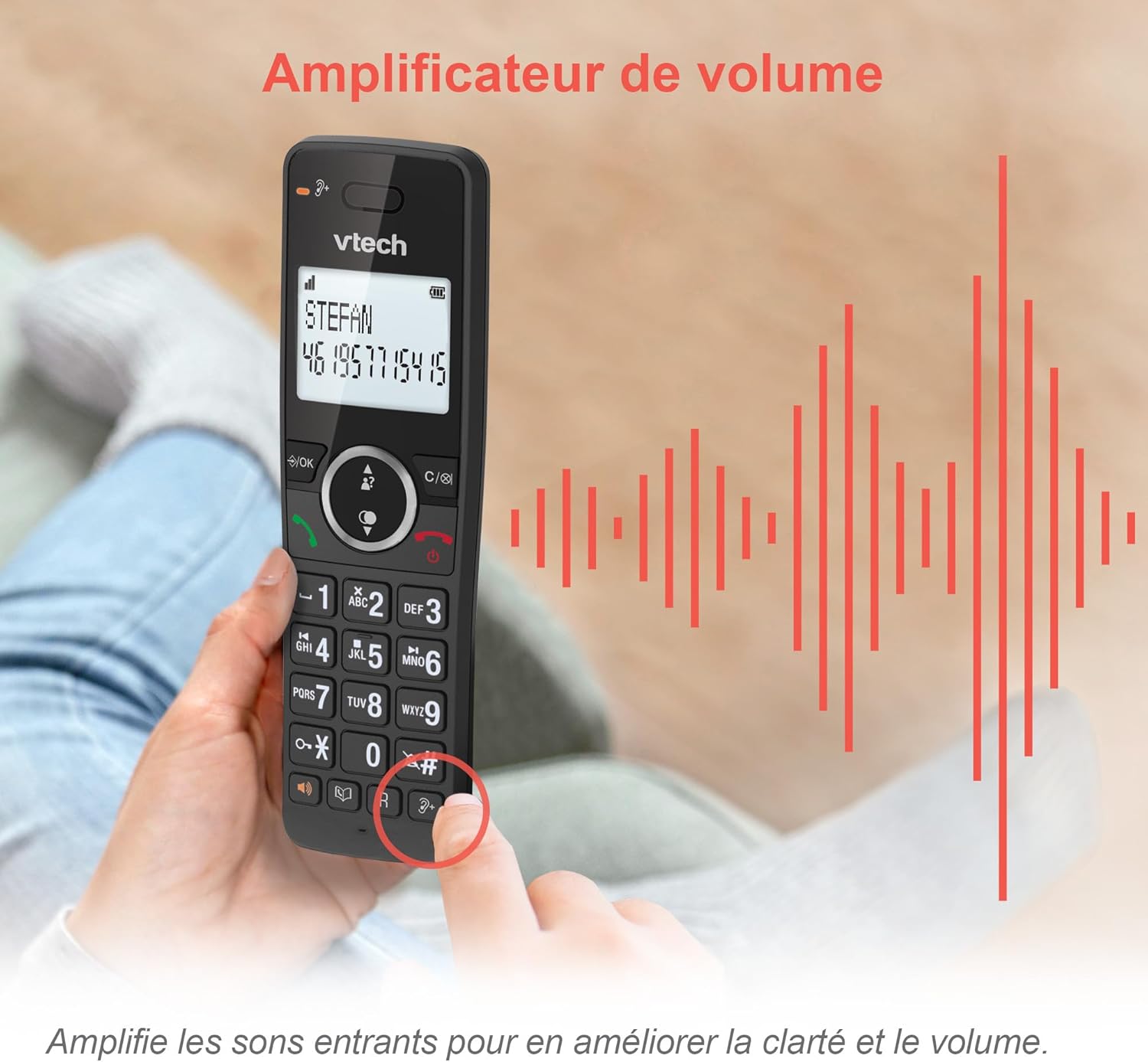
Image: A hand holding the VTech ES2051 handset, with graphic sound waves emanating from the earpiece, illustrating the volume amplification feature.
Conference Function
The conference function allows multiple users to participate in a single conversation. You can set up a three-way conference call with two internal callers (handsets) and one external caller.
- Конференц-чалууну баштоо: Refer to the detailed instructions in the full manual for specific steps on how to add a third party to an ongoing call.

Image: Three people engaged in a conversation, visually representing the three-way conference call capability of the VTech ES2051 phone system.
Интерком функциясы
The intercom feature allows you to communicate between handsets within your home without using the landline. This is useful for calling family members in different rooms.
- Домофонду колдонуу: басыңыз ИНТЕРКОМ button (if available) or access the intercom function through the handset menu, then select the desired handset to call.
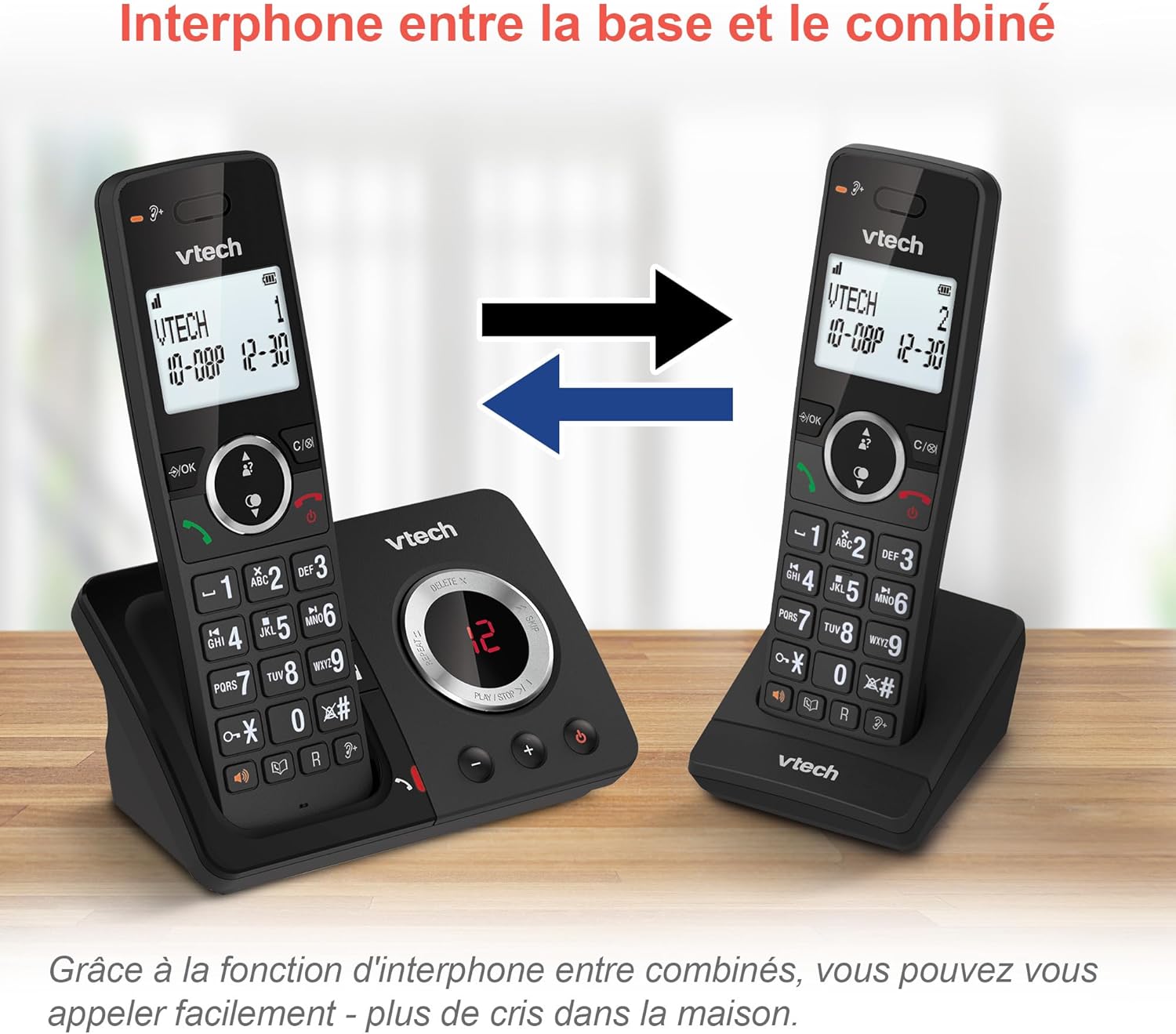
Image: A diagram showing two VTech ES2051 handsets with arrows indicating communication between them, illustrating the intercom feature.
Phonebook and Call Features
The phone includes a 100-name and number phonebook, 8 speed dial keys, and a backlit screen and keypad for easy visibility.
- Байланыштарды сактоо: Navigate to the phonebook menu to add, edit, or delete contacts.
- Тез терүү: Assign frequently called numbers to the 8 speed dial keys for quick access.
- Чалуучуну аныктоо журналы: Review the last 20 incoming calls with Caller ID information.
- Кайра терүү: Access the list of the last 10 dialed numbers for quick redialing.

Сүрөт: Сүрөттөрдүн коллажы көрсөтүлөтasing various VTech ES2051 phone features, including the 100-entry phonebook, call display, redial function, and an 18-hour talk time battery life indicator.
ЭКО режими
The ECO mode automatically adjusts and minimizes the radio frequency power based on the distance between the handset and the base unit. This feature helps conserve energy and reduce power consumption.
Техникалык тейлөө
Телефонду тазалоо
The VTech ES2051 is made with antibacterial plastic and features a seamless, easy-to-clean design. To clean your phone:
- Unplug the base unit from the wall outlet and telephone line.
- Телефондун беттерин жумшак, гamp кездеме. Суюктук же аэрозолдук тазалоочу каражаттарды колдонбоңуз.
- Ensure the phone is completely dry before plugging it back in.
Батареяга кам көрүү
- Use only the supplied rechargeable NiMH AAA batteries.
- Батареяларды отко таштабаңыз.
- Эгер телефон узак убакыт бою колдонулбаса, агып кетпеш үчүн батарейкаларды алып салыңыз.
Проблемаларды чечүү
If you experience any issues with your VTech ES2051 phone, try the following troubleshooting steps:
| Көйгөй | Чечим |
|---|---|
| Терүү үнү жок | Ensure the telephone line cord is securely plugged into both the base unit and the wall jack. Check if other phones on the same line are working. |
| Чалууларды кабыл алуу же жасоо мүмкүн эмес | Check the power connection to the base unit. Ensure the handset batteries are charged. If using a DSL service, you may need a DSL filter. |
| Handset displays "Out of Range" or "No Power at Base" | Move the handset closer to the base unit. Ensure the base unit's power adapter is securely plugged in. |
| Автомототолог билдирүүлөрдү жаздырбай жатат | Check if the answering machine is turned ON. Ensure there is enough recording time available (max 30 minutes). |
| Аудио сапаты начар же статикалык | Телефонду негизги блокко жакыныраак жылдырыңыз. Негизги блокту тоскоолдуктарды жаратышы мүмкүн болгон башка электрондук түзүлүштөрдүн (мисалы, микротолкундар, Wi-Fi роутерлери) жанына коюудан алыс болуңуз. |
If the problem persists after trying these steps, please refer to the VTech support webсайтка же кошумча жардам алуу үчүн кардарларды тейлөөгө кайрылыңыз.
Техникалык шарттар
| Өзгөчөлүк | Деталь |
|---|---|
| Бренд | VTech |
| Модель номери | ES2051 |
| Түс | кара |
| Телефон түрү | Зымсыз |
| Жооп берүү системасынын түрү | Санарип |
| Жооп берүүчү машина жазуу убактысы | 30 мүнөткө чейин |
| Шайкеш түзмөктөр | Landlines, Answering Machine |
| Батареялар | 4 AAA - камтылган |
| Батареянын курамы | NiMH |
| Power Source | Батарея менен иштейт |
| Материал | Пластик (антибиотиктер) |
| Терүүчү түрү | Жөнөкөй баскычтоп |
| Элементтин өлчөмдөрү (L x W x Y) | 18.3 x 13.5 x 11 сантиметр |
| Келип чыккан өлкө | Кытай |
Кепилдик жана колдоо
VTech products are manufactured to high-quality standards. For information regarding warranty coverage, please refer to the warranty card included with your product or visit the official VTech webсиздин аймак үчүн сайт.
For technical support, frequently asked questions, or to download the full user manual, please visit the VTech support section online or contact their customer service helpline. Contact details can typically be found on the VTech webсайтында же продуктунун таңгагында.


