1. Киришүү
This manual provides comprehensive instructions for the iggual VFD 7-inch POS Display, Model IGG319086. This device is designed to enhance transaction transparency for both customers and operators in Point of Sale (POS) environments. Please read this manual thoroughly before operating the device to ensure proper setup and functionality.

Figure 1: iggual VFD 7-inch POS Display. This image shows the front view of the VFD display unit mounted on its adjustable stand, displaying sampтекст.
2. Продукттун өзгөчөлүктөрү жана спецификациялары
The iggual VFD 7-inch POS Display offers robust features for reliable operation:
- Дисплей түрү: Вакуумдук флуоресценттик дисплей (VFD)
- Character Capacity: 40 characters (20 columns x 2 lines)
- Жарыктык: 500 - 1,000 cd/m²
- Character Type: 95 Alphanumeric, 32 International Character font
- Арип: 5x7 dot matrix
- Символдун өлчөмү: 9.02 (H) x 5.25 (W) мм
- Туташуу интерфейси: USB-A (built-in USB cable)
- Кабелдин узундугу: 1.5 метр
- Жөнгө салынуучу бийиктик: From 263 mm (min) to 395 mm (max)
- Viewбурч: Максималдуу 128°
- Горизонталдык айлануу: Максималдуу 355°
- Вертикалдуу айлануу: 0° - 38°
- Command Modes: LD220, EP-POS D101, AEDEX, UTC/S, UTC/P, ADM788, DSP800, CD5220, EMAX, LOGIC CONTROL
- Орточо жашоо мөөнөтү: 30,000 саат
- Энергияны керектөө: 5V to 24V (DC)
- Элемент Салмагы: 2.64 фунт (болжол менен 1.2 кг)
3. Орнотуу жана орнотуу
Follow these steps to set up your iggual VFD POS Display:
3.1 Пакеттен чыгаруу
Carefully remove all components from the packaging. Ensure the display unit, stand, and USB cable are present.
3.2 Физикалык Ассамблея
- Attach the display unit to the adjustable column.
- Secure the adjustable column to the base.
- Adjust the height of the display column to your preferred viewing level. The height can be adjusted from 263 mm to 395 mm.

Figure 2: Display Dimensions. This image illustrates the physical dimensions of the iggual VFD display, including its panel size, base size, and adjustable height range.
3.3 Дисплейди туташтыруу
- Locate the built-in USB-A cable extending from the display unit.
- Connect the USB-A connector to an available USB port on your Point of Sale (POS) system or computer.
- The display is powered via the USB connection.

Figure 3: Connection Interface. This image shows the USB-A connection interface and the 1.5-meter cable length for the iggual VFD display.
3.4 Driver Installation (if required)
In most modern operating systems, the display will be recognized automatically as a standard HID (Human Interface Device) or serial device. If your POS software or operating system requires specific drivers, please refer to your POS system's documentation or the iggual support webдрайверлерди жүктөө үчүн сайт.
4. Операция
Once connected and recognized by your POS system, the iggual VFD display will begin to show information transmitted from your POS software.
4.1 Displaying Information
The display operates by receiving commands and data from your POS software. Ensure your POS application is configured to output data to the VFD display using one of the supported command modes (e.g., LD220, EP-POS D101, AEDEX, UTC/S, UTC/P, ADM788, DSP800, CD5220, EMAX, LOGIC CONTROL).
4.2 Тууралоо Viewing Angle and Rotation
The display unit offers flexibility for optimal viewing:
- Горизонталдык айлануу: The display can be rotated horizontally up to 355° on its stand.
- Вертикалдуу айлануу: The display head can be tilted vertically from 0° to 38°.
- Viewбурч: The VFD technology provides a wide viewing angle of up to 128°.

Figure 4: Adjustable Properties. This image illustrates the horizontal and vertical rotation capabilities, as well as the wide viewing angle of the VFD display.

Figure 5: Character and Brightness Specifications. This image highlights the display's character capacity (40 characters, 2 lines) and brightness range (500-1000 cd/m²).
5. Техникалык тейлөө
Proper maintenance ensures the longevity and optimal performance of your VFD display.
- Тазалоо: Use a soft, dry, lint-free cloth to clean the display surface. For stubborn smudges, slightly dampчүпүрөккө суу же жумшак, абразивдүү эмес экран тазалагыч. Суюктуктарды түздөн-түз дисплейге чачпаңыз.
- Катуу химиялык заттардан алыс болуңуз: Do not use alcohol, ammonia-based cleaners, or abrasive materials, as these can damage the display surface.
- Экологиялык шарттар: Operate the display within recommended temperature and humidity ranges to prevent damage. Avoid exposing the unit to extreme temperatures or direct sunlight for extended periods.
6. Кыйынчылыктарды
If you encounter issues with your iggual VFD display, refer to the following troubleshooting steps:
- Дисплей бош:
- Ensure the USB cable is securely connected to both the display and the POS system/computer.
- Verify that the POS system/computer is powered on and functioning correctly.
- Check if the POS software is configured to send data to the display.
- Try connecting the display to a different USB port or another computer to rule out port issues.
- Incorrect characters or garbled text:
- Confirm that the correct command mode is selected in your POS software, matching one of the supported modes (LD220, EP-POS D101, etc.).
- Ensure the baud rate settings in your POS software match the display's default or configured baud rate.
- Check for any driver updates for the display or your POS system.
- Дисплей күңүрт же бүлбүлдөп жатат:
- Ensure the display is receiving adequate power from the USB port. Try a powered USB hub if available.
- Check for environmental factors like extreme temperatures.
- Эгер көйгөй чечилбесе, техникалык колдоо менен байланышыңыз.
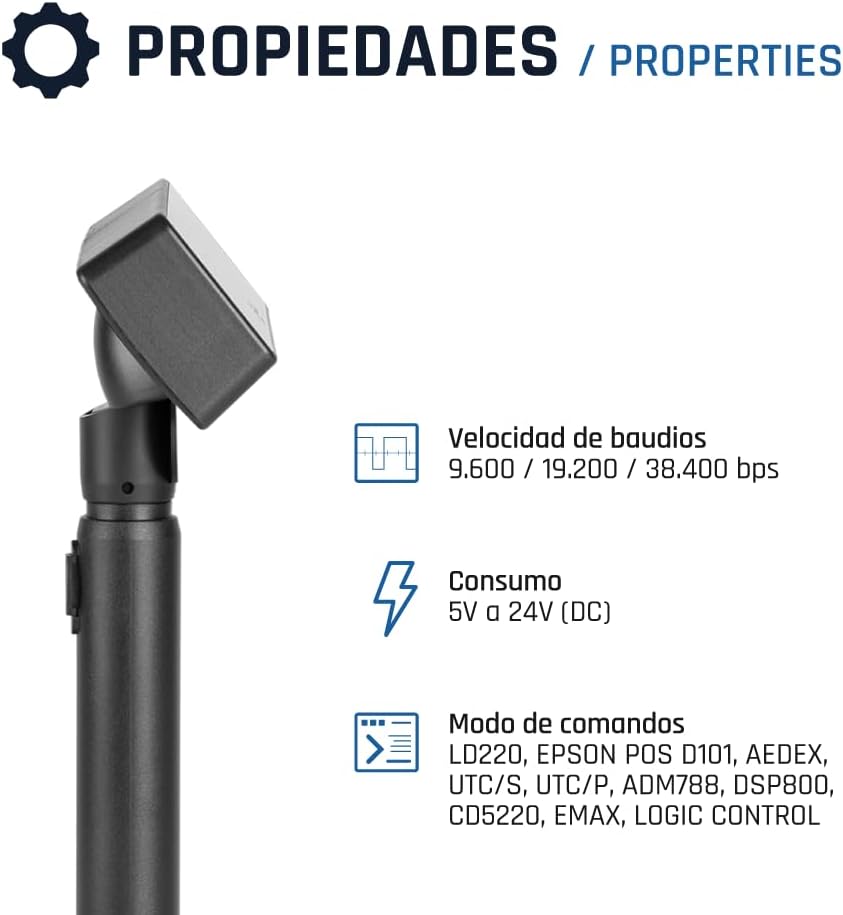
Figure 6: Technical Specifications. This image details the supported baud rates (9.600 / 19.200 / 38.400 bps), power consumption (5V to 24V DC), and command modes for the display.
7. Кепилдик жана колдоо
For warranty information, please refer to the warranty card included with your product or visit the official iggual website. If you require technical assistance or have questions not covered in this manual, please contact iggual customer support through their official channels.
Онлайн колдоо: www.iggual.com/support


