1. Киришүү
This manual provides detailed instructions for the setup, operation, and maintenance of your CZEview ZY-D1 Babyphone. Please read this manual thoroughly before using the device to ensure proper functionality and safety. The CZEview ZY-D1 is designed to help you monitor your baby with advanced features such as 2K Ultra HD video, AI-powered detection, two-way audio, and environmental monitoring.
2. Пакеттин мазмуну
- CZEview ZY-D1 Babyphone Camera
- Кубаттуу адаптер жана кабель
- Монтаждоочу аксессуарлар (дубалга орнотуу үчүн)
- Колдонуучунун Колдонмосу (бул документ)
3. Продукт бүтүп калдыview жана өзгөчөлүктөрү
Чехияview ZY-D1 Babyphone offers a comprehensive monitoring solution with the following key features:
- 2K Ultra HD видео: Так жана деталдуу видеобайкоо жүргүзүүнү камсыз кылат.
- 360° AI Tracking: Intelligent AI technology tracks movements, ensuring no blind spots with 355° horizontal and 90° vertical rotation.
- Ыкчам эскертмелер: Receive immediate alerts for detected motion, noise, or crying.
- Эки тараптуу аудио: Communicate with your baby remotely using the built-in microphone and speaker.
- Stable Dual-Band Wi-Fi: Compatible with both 2.4 GHz and 5 GHz Wi-Fi networks for reliable connectivity.
- Инфракызыл түнкү көрүнүш: Clear monitoring even in low-light or dark conditions.
- Comfort Night Light & Lullabies: Features a looping night light and 14 pre-installed lullabies to soothe your baby.
- Температура жана нымдуулук мониторинги: Keep track of the nursery environment.
- Уйкунун анализи: Monitor and analyze your baby's sleep patterns.
- Alexa интеграциясы: Seamlessly integrates with Amazon Alexa for voice control and viewing.

Сүрөт 1: Чехияview ZY-D1 Babyphone camera, featuring a white body and colorful ears, designed for monitoring infants.
4. Орнотуу
4.1 Күйгүзүү
- Connect the provided power cable to the camera's power port.
- Кубат адаптерин стандарттуу электр розеткасына сайыңыз.
- Камера күйөт жана индикатор анын абалын көрсөтөт.
4.2 Колдонмону орнотуу
- Scan the QR code provided on the product packaging or in the quick start guide to download the official CZEview колдонмо.
- Колдонмону смартфонуңузга же планшетиңизге орнотуңуз.
- Жаңы аккаунтка катталыңыз же сизде мурунтан эле бар болсо кириңиз.
4.3 Wi-Fi туташуусу
- CZE ачыңызview app and follow the on-screen instructions to add a new device.
- Select your Wi-Fi network (supports both 2.4 GHz and 5 GHz).
- Wi-Fi сырсөзүңүздү киргизиңиз.
- The app will guide you through pairing the camera with your network. This usually involves scanning a QR code displayed on your phone with the camera lens.
- Once connected, the camera's indicator light will change, and you will see the live feed in the app.

Сүрөт 2: Illustration of the CZEview Babyphone's compatibility with both 5GHz and 2.4GHz dual-band Wi-Fi for a stable connection.
4.4 Камераны орнотуу
Чехияview ZY-D1 Babyphone can be placed on a flat surface or mounted to a wall. If wall mounting, use the provided accessories and ensure the camera is securely fastened at a safe distance from the crib, out of reach of children.
5. Иштөө нускамалары
5.1 Live View жана панорамалоо/кыйшайтуу башкаруусу
- CZE ачыңызview app and select your camera to view жандуу тоют.
- Use the on-screen controls to pan (355° horizontal) and tilt (90° vertical) the camera lens to adjust the viewбурч.
- The automatic tracking feature will detect and follow moving objects within its field of view.
5.2 Эки тараптуу аудио

Сүрөт 3: A parent using the CZEview app on a smartphone to engage in two-way communication with a baby in a crib.
- Түз эфирде view, колдонмодогу микрофон сүрөтчөсүн таптаңыз.
- Speak into your phone's microphone to transmit your voice through the camera's speaker.
- Release the microphone icon to listen to your baby.
5.3 AI Detection and Notifications

Сүрөт 4: Чехияview Babyphone camera positioned near a baby in a crib, highlighting its intelligent AI detection capabilities for motion, noise, and crying.
- Access the detection settings in the app.
- Enable Motion Detection, Noise Detection, and Cry Detection as needed.
- Жалган сигналдарды азайтуу үчүн сезгичтик деңгээлин тууралаңыз.
- You will receive instant push notifications on your smartphone when an event is detected.
5.4 Night Vision and Lullabies

Сүрөт 5: Чехияview Babyphone emitting a soft glow as a night light, with musical notes floating around a sleeping baby, illustrating its infrared night vision and lullaby features.
- Түнкү көрүнүш аз жарыкта автоматтык түрдө иштетилет.
- To play lullabies or activate the night light, navigate to the respective controls in the app.
- Select from the 14 available lullabies to soothe your baby.
5.5 Температуранын жана нымдуулуктун мониторинги
The app displays real-time temperature and humidity readings from the camera's environment. You can set alerts for specific temperature or humidity ranges.
5.6 Sleep Analysis

Сүрөт 6: A visual representation of a sleep analysis timeline on a smartphone screen, showing snapshots of a baby at different times during sleep.
Чехияview app provides a timeline view of your baby's activity, which can be used to analyze sleep patterns. Review recorded events and snapshots to understand sleep duration and disturbances.
5.7 Amazon Alexa интеграциясы
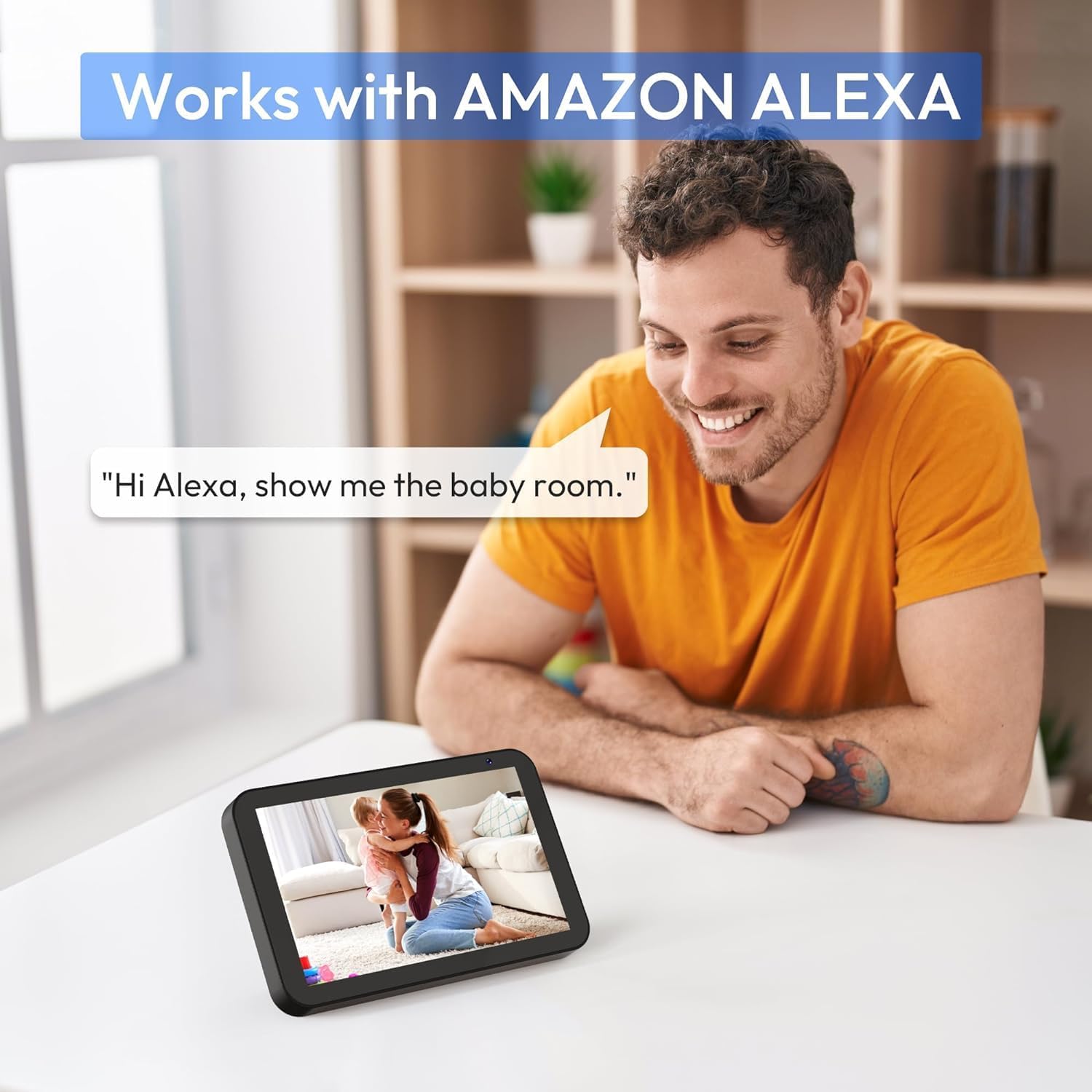
Сүрөт 7: A person interacting with an Amazon Echo Show device, displaying the live feed from the CZEview Babyphone, demonstrating Alexa integration.
- CZE'ни иштетүүview skill in your Amazon Alexa app.
- CZE'ңизди байланыштырыңызview Alexa менен эсеп.
- Use voice commands such as "Alexa, show me the baby room" to view the camera feed on compatible Alexa devices.
5.8 Multi-User Access and SD Card Recording
- Үй-бүлөлүк бөлүшүү: You can invite family members to view the camera feed through the app. Invited users may have limited control functions compared to the primary account holder.
- Жергиликтүү сактагыч: Insert an SD card (not included) into the camera's designated slot for local video recording and to enable certain features like playing lullabies directly from the camera.
6. Техникалык тейлөө
- Тазалоо: Камеранын линзасын жана корпусун тазалоо үчүн жумшак, кургак чүпүрөктү колдонуңуз. Суюк тазалагычтарды же аэрозолдорду колдонбоңуз.
- Программалык камсыздоонун жаңыртуулары: Оптималдуу аткарууну жана коопсуздукту камсыз кылуу үчүн колдонмону такай текшерип туруңуз.
- Жайгашкан жери: Ensure the camera is placed in a well-ventilated area and not exposed to extreme temperatures or direct sunlight.
7. Кыйынчылыктарды
- Кубат жок: Ensure the power cable is securely connected to both the camera and the power outlet. Try a different outlet.
- Wi-Fi туташуу маселелери: Verify your Wi-Fi password. Ensure the camera is within range of your router. Restart your router and the camera. Confirm your network is 2.4 GHz or 5 GHz compatible.
- Сүрөттүн сапаты начар: Check your internet connection speed. Ensure the camera lens is clean and free from obstructions. Adjust the video quality settings in the app if available.
- Начар аудио сапаты: Ensure there are no obstructions near the camera's microphone or speaker. Check the volume settings in the app.
- Билдирмелер алынган жок: Check app notification settings on your phone and within the CZEview app. Ensure the camera is connected to Wi-Fi.
- Камера жооп бербей жатат: Unplug the camera, wait 10 seconds, and plug it back in to restart.
8. Техникалык шарттар
| Өзгөчөлүк | Спецификация |
|---|---|
| Модель номери | ZY-D1 |
| Зымсыз байланыш технологиясы | Wi-Fi (2.4 GHz & 5 GHz) |
| Viewбурч | 360 Degrees (355° horizontal, 90° vertical) |
| Материал | Пластик |
| Элементтин өлчөмдөрү (L x W x Y) | 12.7 x 7.62 x 7.62 см |
| Connectivity Protocol | Wi-Fi |
| Controller Type | Amazon Alexa |
| Монтаж түрү | Дубалга орнотуу |
| Түс | Ак |
| Компоненттер камтылган | Кабель |
| Сунушталган Колдонуулар | Babyphone, Baby Monitoring, Night Vision |
9. Коопсуздук маалыматы
- Keep the camera and all accessories out of reach of children.
- Do not place the camera or its power cord within 1 meter (3 feet) of the crib or playpen to prevent strangulation hazards.
- Use only the provided power adapter. Using unauthorized adapters may damage the device and void the warranty.
- Аппаратты сууга, нымдуулукка же экстремалдык температурага тийгизбеңиз.
- Түзмөктү өз алдынча ачууга же оңдоого аракет кылбаңыз. Жардам алуу үчүн кардарларды колдоо кызматына кайрылыңыз.
10. Кепилдик жана колдоо
For warranty information and customer support, please refer to the warranty card included in your product packaging or visit the official CZEview website. If you encounter any issues not covered in this manual, please contact CZEview жардам үчүн кардарларды тейлөө.


