1. Бүттүview
1.1 Продукт сүрөттөмөсү
The PNI GreenHouse SC1800C PRO Solar Inverter is a central component for small off-grid solar systems, suitable for areas with or without grid electricity. It provides a continuous output of 3000W with a pure sine wave, making it suitable for various household lighting installations and other small electronic motors, including refrigerators, pumps, tools, and charging devices for phones, laptops, and TVs.
1.2 Негизги өзгөчөлүктөрү
- Maximum photovoltaic panel input power: 2000 W.
- Максималдуу DC киргизүү томtage from photovoltaic panels: 30 - 120 VDC (Vmp).
- Maximum solar charge current: 30 A input from panels, 60 A output to batteries.
- Solar charging efficiency: 98%.
- MPPT solar charger type.
- Номиналдуу чыгаруу томtage: 230 V.
- Rated output power: 3000 W (under ideal conditions with proportional battery count and 100% charged batteries).
- Maximum apparent power: 6000 VA (peak, 0.5 seconds under ideal conditions).
- Чыгуу томtage waveform: Pure sine wave.
- Output signal frequency: 50, 60 Hz.
- Киргизүү тtage: 230 В AC.
- Grid connection for backup.
- Compatible with 24V batteries: AGM, lead-acid, gel, flooded lithium-ion.
- Minimum battery start voltage: 23 V (cold start voltagжана).
- Integrated high-frequency inverter type (switching).
- Inverter efficiency: 90% ~ 93% (100% charged battery).
- Typical transfer time: 10 ms (UPS, VDE) 20 ms (APL).
- Line mode efficiency: > 95% (rated R load, fully charged battery).
- Hybrid operating modes: SBU – Solar/Battery/Utility, Solar Utility (UPS).
- AC charge voltage: 230 V.
- Maximum AC charge current: 30 A.
- Automatic switching: Solar - Batteries - Grid.
- Энергияны үнөмдөө функциясы.
- Multiple protections.
- Көп функциялуу дисплей.
- Dedicated menu for advanced settings.
- Monitoring with PC software (USB cable included).
- Remote monitoring from mobile/PC (with optional WiFi USB dongle).
1.3 Пакеттин мазмуну
- PNI GreenHouse SC1800C PRO Solar Inverter
- USB кабели
- User Manual
- PNI Smart Dongle-WLAN (for WiFi monitoring)
2. Коопсуздук маалыматы
Орнотуудан жана иштетүүдөн мурун бардык нускамаларды жана эскертүүлөрдү кылдат окуп чыгыңыз. Бул нускамаларды аткарбоо электр шокуна, өрткө же оор жаракатка алып келиши мүмкүн.
- Квалификациялуу кадрларды: Орнотуу жана тейлөө квалификациялуу кызматкерлер тарабынан аткарылышы керек.
- Электр шок коркунучу: Бул аппарат жогорку вольт менен иштейтtages. Do not open the casing unless specifically instructed.
- Батареянын коопсуздугу: Batteries can produce explosive gases. Ensure proper ventilation. Do not smoke or allow sparks or flames near batteries. Wear eye protection.
- Туура желдетүү: Install the inverter in a well-ventilated area to prevent overheating.
- Экологиялык шарттар: Avoid exposure to rain, snow, spray, or any liquids. Operate within the specified temperature range (-26 °C to 80 °C).
- Негиздөө: Инвертордун жергиликтүү электрдик коддорго ылайык туура жерге туташтырылганын текшериңиз.
- Кубатты өчүрүү: Always disconnect all power sources (solar, battery, AC grid) before performing any wiring or maintenance.
3. Продукциянын компоненттери
3.1 PNI GreenHouse SC1800C PRO Solar Inverter

Сүрөт 3.1: Алдыңкы view of the PNI GreenHouse SC1800C PRO Solar Inverter, showing the display and control buttons.

3.2-сүрөт: Арткы view of the PNI GreenHouse SC1800C PRO Solar Inverter, illustrating the various connection ports for solar panels, batteries, AC input, and AC output.
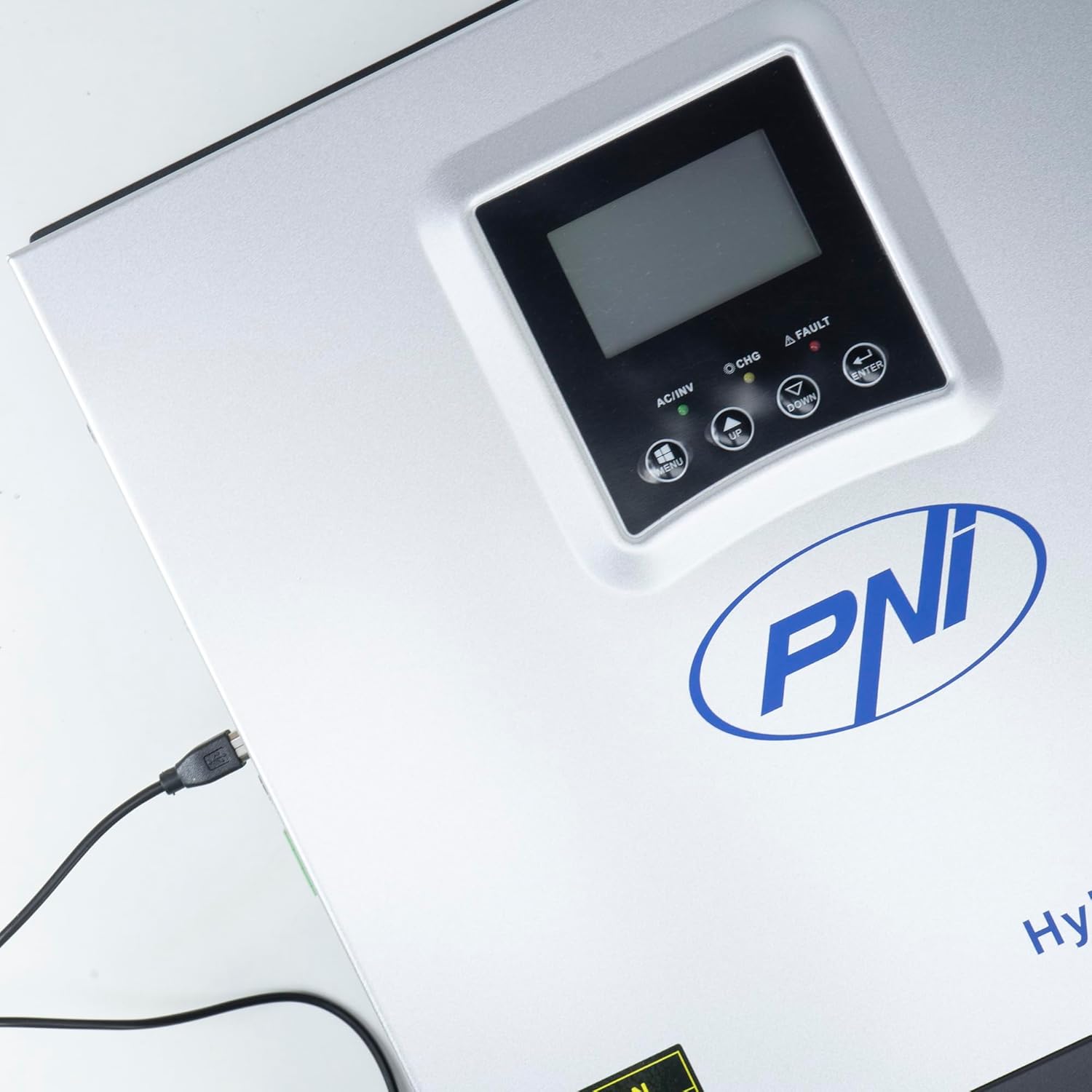
Figure 3.3: Close-up of the USB connection port on the inverter, used for PC monitoring.
3.2 PNI Smart Dongle-WLAN (Optional)

Figure 3.4: The PNI Smart Dongle-WLAN, an optional accessory for remote WiFi monitoring of the inverter.

Figure 3.5: The PNI Smart Dongle-WLAN connected to the inverter's dedicated port for WiFi communication.
4. Орнотуу жана орнотуу
4.1 Дубалга орнотуу
The inverter is designed for wall mounting. Choose a location that is dry, well-ventilated, and protected from direct sunlight and moisture. Ensure sufficient clearance around the unit for proper airflow and heat dissipation. Use appropriate mounting hardware for your wall type.
4.2 Системанын туташуу диаграммасы

Figure 4.1: Basic application diagram showing the connections between solar panels, utility grid, generator, inverter, battery, and home loads. Note: Generator, PV modules, WiFi module, and battery are not included with the inverter unless specified.
4.3 Зымдарды туташтыруу
Follow the diagram above and the labels on the inverter for correct wiring. Ensure all connections are secure and properly insulated. It is highly recommended that a qualified electrician performs all wiring.
- Күн панелинин туташуу: Connect your solar panels to the designated PV input terminals. Observe correct polarity (positive to positive, negative to negative). The maximum DC input voltage 120 VDC.
- Батарея туташуу: Connect the 24V battery bank to the battery terminals. Ensure correct polarity. The inverter supports AGM, lead-acid, gel, and flooded lithium-ion batteries.
- AC киргизүү (тармак/генератор): Connect the AC utility grid or a generator to the AC input terminals. This provides backup power and can charge batteries.
- AC чыгышы (жүктөөлөр): Үй тиричилик жүктөрүңүздү AC чыгуучу терминалдарына туташтырыңыз.
4.4 Баштапкы кубаттуулук
After all connections are made and verified:
- Батарея өчүргүчтү күйгүзүңүз.
- Turn on the solar panel breaker (if applicable).
- Turn on the AC input breaker (if connected to grid/generator).
- Turn on the inverter's power switch.
- Observe the display for status indicators and initial readings.
5. Иштөө режимдери
The PNI GreenHouse SC1800C PRO offers intelligent energy management with several configurable operating modes:
- Solar Priority Mode (SBU): In this mode, the inverter prioritizes power consumption from solar energy. If solar power is insufficient, it will draw from batteries. The utility grid acts as a backup.
- Батареянын артыкчылыктуу режими: The inverter prioritizes drawing power from the batteries. Solar energy will charge the batteries. The utility grid is used only when battery voltage drops below a set threshold.
- Utility Priority Mode (UPS): This mode prioritizes power from the utility grid. Solar energy will charge the batteries. The inverter switches to battery power only when the grid is unavailable, functioning as an Uninterruptible Power Supply (UPS).
These modes can be configured via the inverter's multifunction display and dedicated menu for advanced settings.
5.1 Мониторинг
The inverter supports monitoring through:
- PC Software (USB): Connect the inverter to a PC using the provided USB cable and dedicated software for detailed monitoring and analysis of parameters.
- Remote Monitoring (WiFi - Optional): With the optional PNI Smart Dongle-WLAN, you can monitor the inverter remotely via a mobile application or web интерфейс.
6. Техникалык тейлөө
Regular maintenance ensures optimal performance and longevity of your inverter. Always disconnect all power sources before performing any maintenance.
- Тазалоо: Инвертордун сыртын мезгил-мезгили менен кургак чүпүрөк менен тазалап туруңуз. Желдетүүчү тешиктердин чаң жана таштандылардан тазаланганын текшериңиз. Суюк тазалоочу каражаттарды колдонбоңуз.
- Туташуу текшерүүлөрү: Annually inspect all wiring connections (solar, battery, AC input/output) for tightness and signs of corrosion. Tighten any loose connections.
- Батареяны текшерүү: Эгерде коргошун-кислоталуу батареяларды колдонсоңуз, электролит деңгээлин жана терминалдардын абалын батарея өндүрүүчүсүнүн көрсөтмөлөрүнө ылайык текшериңиз.
- Экологиялык текшерүү: Орнотуу чөйрөсү белгиленген температуранын жана нымдуулуктун чегинде болушун камсыз кылыңыз.
7. Кыйынчылыктарды
Бул бөлүм жалпы маселелер боюнча жетекчиликти камсыз кылат. Татаал маселелер боюнча квалификациялуу тейлөө кызматкерлерине кайрылыңыз.
| Көйгөй/Ойготкуч | Мүмкүн себеп | Чечим |
|---|---|---|
| Батарея аз сигнал | Батарея көлөмүtage төмөнкү көлөмдөн төмөнtage warning threshold. | Check battery charge level. Ensure solar panels are producing power or AC input is connected for charging. Reduce load. |
| Battery Disconnected Alarm | Battery cables are loose or disconnected. | Safely disconnect all power sources and check battery connections. Reconnect securely. |
| Overvoltage Ойготкуч | Киргизүү тtage (PV or AC) exceeds safe limits. | Verify solar panel array voltage or AC input voltage. Ensure it is within the inverter's specifications. |
| AC ашыкча жүктөн коргоо | Connected loads exceed the inverter's output capacity. | Reduce the total load connected to the inverter. Check individual appliance power consumption. |
| Чыгуу күчү жок | Inverter off, low battery, overload, or fault. | Check if the inverter is powered on. Verify battery voltage. Check for overload or fault codes on the display. |
8. Техникалык шарттар
| Өзгөчөлүк | Спецификация |
|---|---|
| Бренд | ПНИ |
| Модель номери | PNI-SC1800P-DG |
| Номиналдуу кубаттуулук | 3000 Вт |
| Чоку күч | 6000 VA (0.5 seconds) |
| Батарея Voltage | 24 V |
| Макс. PV киргизүү күчү | 2000 Вт |
| Макс. PV Input Voltage (Vmp) | 30 - 120 В туруктуу ток |
| MPPT Solar Charge Current | 60 A (output to batteries) |
| AC Input Voltage | 230 V |
| AC Output Voltage | 230 V |
| Output Waveform | Таза синус толкуну |
| Чыгуу жыштыгы | 50/60 Гц |
| Макс. AC кубаттоо тогу | 30 А |
| Inverter Efficiency | 90% ~ 93% |
| Иштөө температурасы | -26 °Cден 80 °Cге чейин |
| Өлчөмдөрү (L x W x Y) | 29 x 12 x 35 см |
| Салмагы | 6.9 кг |
| Күтүү режиминдеги керектөө | ≈ 25 W (Energy saving mode ≈ 12.5 W) |
| Байланыш | USB, Optional WiFi Dongle |
9. Кепилдик жана колдоо
Кепилдик жөнүндө маалымат жана техникалык колдоо алуу үчүн, сатып алган нерсеңиз менен кошо берилген документтерди караңыз же сатуучуга кайрылыңыз. Кепилдик боюнча дооматтар үчүн сатып алгандыгыңызды тастыктаган документти сактап коюңуз.


