1. Introduction and Overview
The Phomemo M832 is a portable thermal printer designed for convenience and efficiency. It utilizes advanced direct thermal technology, eliminating the need for ink, toner, or ribbons. This printer supports various thermal paper sizes, including US Letter (8.5" x 11") and A4, making it suitable for a wide range of printing tasks on the go. Its compact design and wireless connectivity options ensure you can print documents, receipts, and more, wherever you are.

Image 1.1: The Phomemo M832 printer highlighting its versatility and support for multiple thermal paper sizes.
Негизги өзгөчөлүктөрү:
- Сыясыз термикалык басып чыгаруу: No need for ink cartridges, toner, or ribbons, reducing operational costs.
- Зымсыз Bluetooth байланышы: Connects to iOS and Android phones/tablets via the "Phomemo" app.
- USB зымдуу туташуу: Compatible with Windows (7 and later), macOS (10.14 and later), Linux, and Chrome OS via USB cable.
- Кеңири кагаз шайкештиги: Supports US Letter (8.5" x 11"), A4, and thermal paper rolls of 10 cm, 8.14 cm, and 5.8 cm widths.
- Жогорку чечим: Так жана так басып чыгаруу үчүн 300 dpi.
- Портативдик дизайн: Lightweight and compact, ideal for travel, home, office, or school use.
- Узак мөөнөттүү батарея: Built-in 2600 mAh rechargeable battery, capable of printing up to 150 US Letter sheets on a full charge.
2. Пакеттин мазмуну
Сураныч, төмөнкү нерселер үчүн кутучаны белгилеңиз:
- 1 x Phomemo M832 Portable Thermal Printer (Gray)
- 1 x Phomemo M832 Printer Case
- 1 x USB Data Cable (80 cm)
- 1 x User Manual
- 1 x Thermal Paper Roll (21 x 28 cm, US Letter size)
- Additional thermal paper rolls (10 cm, 8.14 cm, 5 cm widths) may be included depending on the package.
3. Продукциянын диаграммасы

Image 3.1: Phomemo M832 printer with its protective case and a document being printed. The image illustrates the compact size and functionality.
The Phomemo M832 printer features a minimalist design. Key components include the paper input slot, paper output slot, power button, status indicator light, and USB-C port for charging and wired connection.
4. Орнотуу
4.1 Принтерди заряддоо
Before initial use, fully charge the printer. Connect the provided USB-C cable to the printer's USB-C port and the other end to a compatible USB power adapter (not included) or a computer's USB port. The status indicator light will show charging status (e.g., red for charging, green for fully charged). The printer has a 2600 mAh rechargeable battery.
Эскертүү: Do not use chargers with an output above 5V. Fast charging is not supported.
4.2 Термикалык кагазды жүктөө
- Принтердин кагаз капкагын ачыңыз.
- Insert the thermal paper roll or stack of thermal sheets into the paper compartment, ensuring the printable side faces the print head.
- Кагаз багыттагычтарын кагаздын туурасына туура келгидей кылып тууралаңыз.
- Close the paper cover. Ensure the paper is loaded correctly to prevent jams.
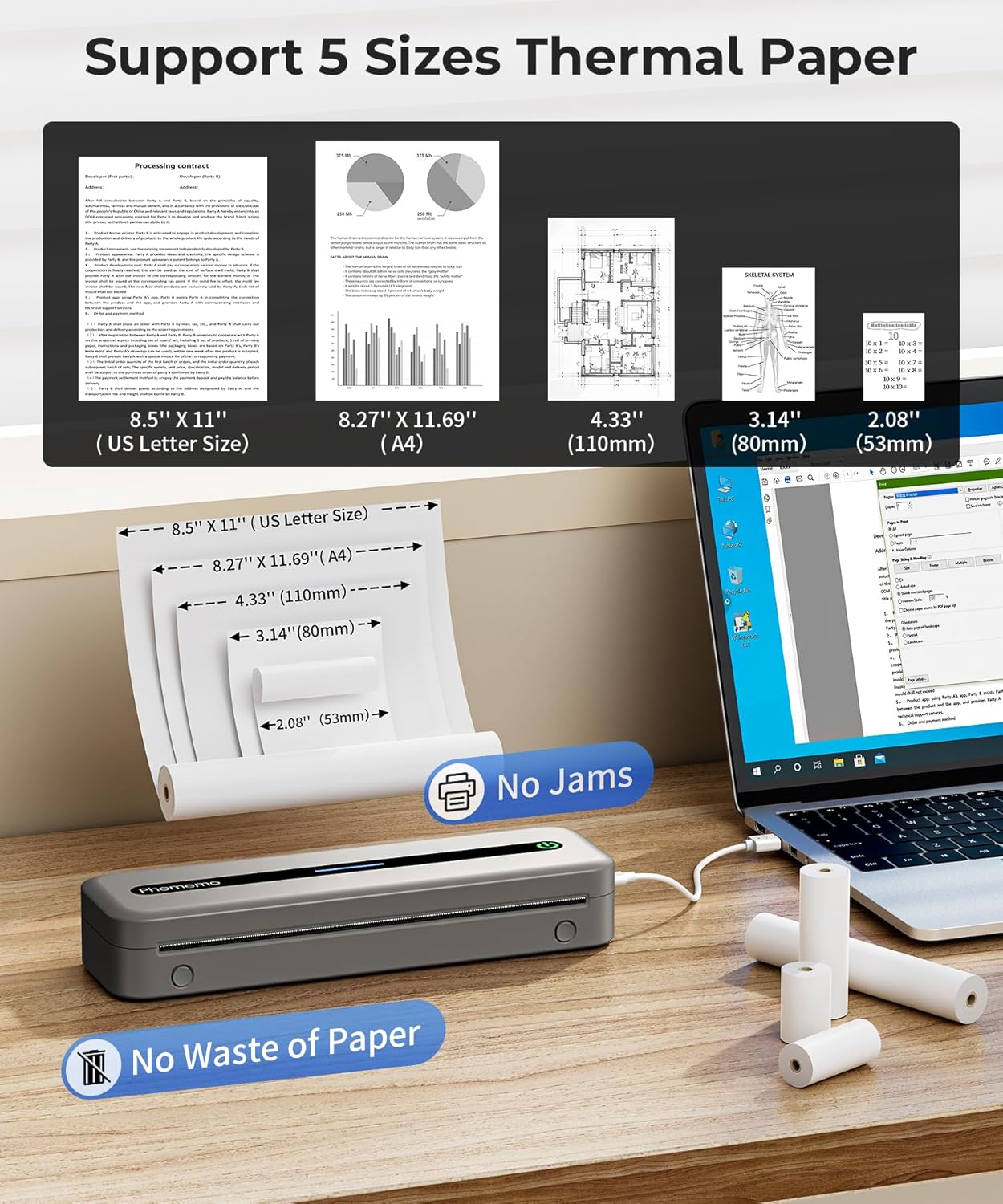
Image 4.1: The Phomemo M832 printer demonstrating its compatibility with five different thermal paper sizes, including US Letter and A4, and highlighting jam-free operation.
5. Иштөө нускамалары
5.1 Күйгүзүү/өчүрүү
- Күйгүзүү үчүн: Press and hold the power button until the status indicator light illuminates.
- Өчүрүү үчүн: Press and hold the power button until the status indicator light turns off.
5.2 Connecting via Bluetooth (for Phones/Tablets)
The Phomemo M832 connects to iOS and Android devices exclusively through the "Phomemo" application.
- Download the "Phomemo" app from the App Store (iOS) or Google Play Store (Android).
- Ensure your printer is powered on and Bluetooth is enabled on your phone or tablet.
- Open the Phomemo app and follow the in-app instructions to search for and connect to your M832 printer.
- Туташкандан кийин, колдонмонун ичинде басып чыгаруу үчүн документтерди же сүрөттөрдү тандай аласыз.
Маанилүү: Do not attempt to connect the printer directly via your phone's or tablet's Bluetooth settings. Connection must be initiated through the Phomemo app.

Image 5.1: Demonstrates connecting the Phomemo M832 printer to a mobile device using Bluetooth via the dedicated Phomemo application.
5.3 Connecting via USB (for Laptops/PCs)
The Phomemo M832 can be connected to Windows, macOS, Linux, and Chrome OS computers via a USB data cable.
- Принтериңиз күйгүзүлгөнүн текшериңиз.
- Connect the printer to your computer using the provided USB data cable.
- Your computer may automatically install the necessary drivers. If not, drivers can be downloaded from the official Phomemo webсайт.
- Once drivers are installed, the printer will appear in your computer's list of available printers. You can then print documents as you would with any standard printer.
Маанилүү: The Phomemo M832 does not support Bluetooth connection with laptops or PCs; only USB wired connection is available for these devices.

Image 5.2: Illustrates the USB wired connection between the Phomemo M832 printer and a laptop, compatible with various operating systems.
6. Техникалык тейлөө
6.1 Басып чыгаруу башын тазалоо
Басып чыгаруу сапатын сактоо үчүн, басып чыгаруучу башты үзгүлтүксүз тазалап туруңуз. Жумшак, түксүз кездемени бир аз колдонуңузampened with isopropyl alcohol. Gently wipe the print head surface. Ensure the printer is powered off and completely dry before use.
6.2 Батареяга кам көрүү
- Батареяны бат-баттан толук кубаттап калуудан алыс болуңуз.
- If storing the printer for an extended period, charge it to approximately 50% every three months to preserve battery life.
- Do not expose the printer to extreme temperatures.
6.3 Сактоо
Store the printer in a cool, dry place away from direct sunlight and excessive dust. When not in use, it is recommended to store the printer in its protective case to prevent damage.

Image 6.1: The Phomemo M832 protective case, designed to shield the printer from impacts and organize accessories.
7. Кыйынчылыктарды
| Көйгөй | Мүмкүн себеп | Чечим |
|---|---|---|
| Принтер күйбөй жатат. | Батарея аз же кубат баскычы туура басылган жок. | Charge the printer. Press and hold the power button for a few seconds. |
| Bluetooth аркылуу туташуу мүмкүн эмес. | Not using the Phomemo app, Bluetooth is off, or printer is out of range. | Ensure you are connecting through the Phomemo app. Turn on Bluetooth on your device. Move the printer closer to your device (within 10 meters). |
| Poor print quality or blank pages. | Incorrect paper loading, low battery, or dirty print head. | Reload paper correctly (printable side facing print head). Charge the printer. Clean the print head as per maintenance instructions. |
| Кагаз тыгылышы. | Кагаз туура эмес жүктөлдү же бөтөн нерсе кирди. | Power off the printer. Carefully open the paper cover and remove any jammed paper. Ensure paper is loaded straight. |
| Printer not recognized by PC via USB. | Жок же эскирген драйверлер. | Download and install the latest drivers from the official Phomemo website. Try a different USB port or cable. |
8. Техникалык шарттар
| Өзгөчөлүк | Деталь |
|---|---|
| Модел | M832 |
| Басма технологиясы | Түз жылуулук |
| Print Resolution | 300 dpi |
| Байланыш | Bluetooth (for phones/tablets), USB-C (for laptops/PCs) |
| Шайкеш түзмөктөр | iOS (10+), Android (8+), Windows (7+), macOS (10.14+), Linux, Chrome OS |
| Максималдуу медиа өлчөмү | 21 x 28 cm (US Letter / A4) |
| Колдоого алынган кагаз өлчөмдөрү | 8.5'' x 11'' (US Letter), A4, 4.33'' (110mm), 3.14'' (80mm), 2.08'' (53mm) |
| Макс барак киргизүү сыйымдуулугу | 150 барак |
| Батарея | 2600 mAh rechargeable Lithium Polymer |
| Басып чыгаруу ылдамдыгы (монохромдуу) | 5 промилле |
| Продукциянын өлчөмдөрү | 34.8 x 10.6 x 7.9 см (13.7 x 4.17 x 3.11 дюйм) |
| Продукт Салмагы | 700 г (1.54 фунт) |
| Эс | 64 MB |
9. Кепилдик жана колдоо
Phomemo products are designed for reliability and performance. For specific warranty details, please refer to the warranty card included with your product or visit the official Phomemo website. If you encounter any issues or have questions regarding your Phomemo M832 printer, please contact Phomemo customer support for assistance.
Кардарларды колдоо: Please visit the Phomemo official webсайтка кириңиз же колдоо үчүн продуктунун таңгагында көрсөтүлгөн байланыш маалыматына кайрылыңыз.


