1. Продукт бүтүп калдыview
The ID-COOLING FROZN A410 DK is an all-black single tower CPU air cooler designed for efficient heat dissipation. It features two 120mm FDB fans in a push-pull configuration and four direct contact heat pipes to effectively manage CPU temperatures. With a total height of 152mm, it offers broad compatibility with various chassis models and ensures non-interference with RAM and PCIe slots. The cooler supports a wide range of Intel and AMD sockets, including the latest LGA1700/1851 and AM4/AM5 platforms, providing a hassle-free installation experience.
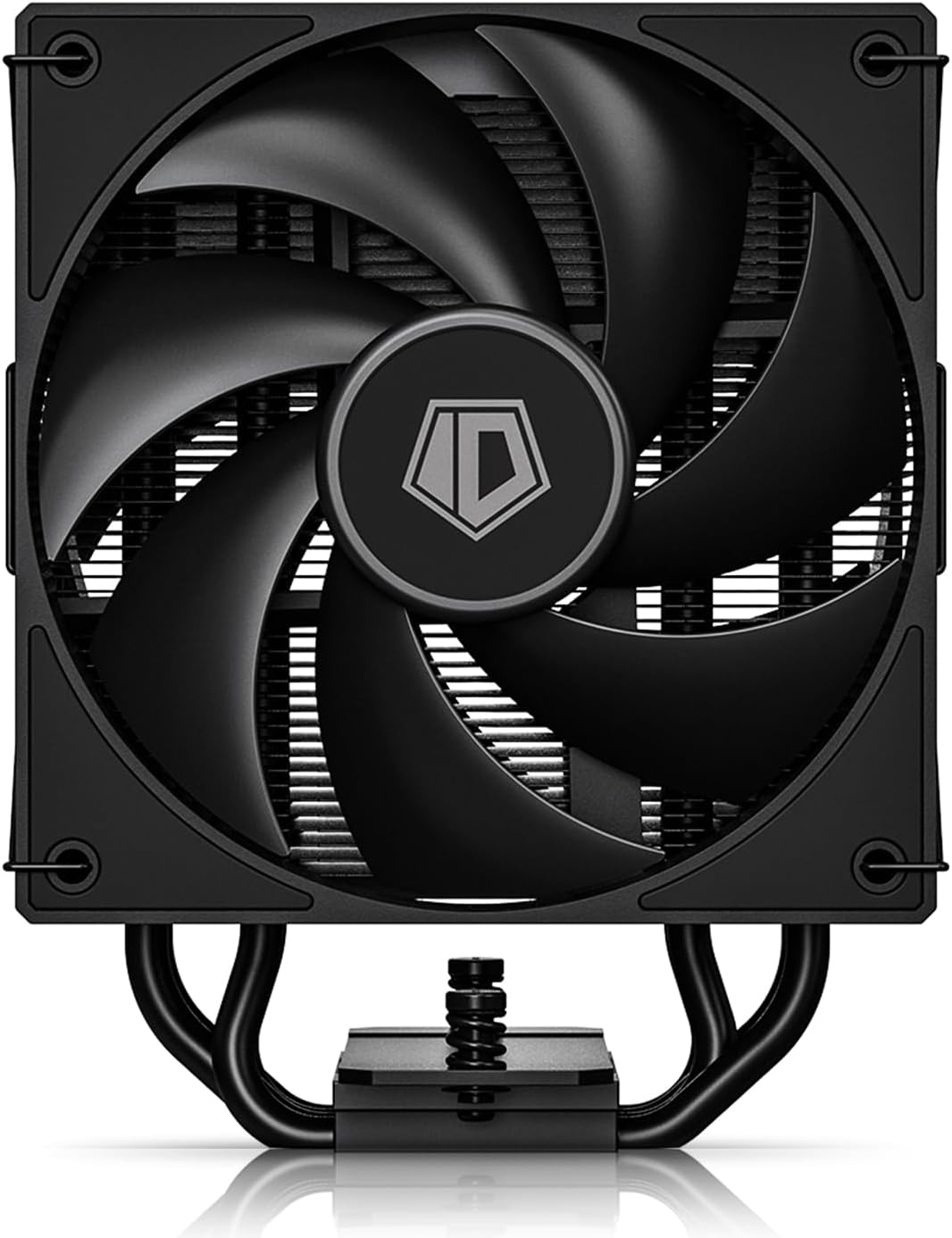
1-сүрөт: Негизги view of the ID-COOLING FROZN A410 DK CPU Cooler.
2. Негизги өзгөчөлүктөрү
- Better Heat Dissipation: Single tower design with 4 heat pipes and two 120mm FDB fans in a push-pull configuration for excellent CPU cooling.
- Compact Бийиктиги: 152mm total height ensures compatibility with a wide range of PC chassis.
- RAM Compatibility: Designed to avoid interference with memory modules and PCIe slots.
- Direct Contact Heat Pipes: Four Ø6mm direct contact heat pipes with exclusive technology for effective heat transfer.
- PWM күйөрмандары: Dual 120mm PWM fans offer automatic speed control and ultra-quiet operation (Max. Air Flow: 78.25CFM; Noise Level: 29.85dB(A) Max.).
- Эч кыйынчылыксыз орнотуу: Compatible with Intel LGA1700/1851/1200/1150/1151/1155/1156 and AMD AM4/AM5 sockets.
- Эстетикалык кайрылуу: All-black layout blends seamlessly into most computer cases.
3. Кутуда эмне бар
The ID-COOLING FROZN A410 DK CPU Cooler package includes:
- Жылыткыч
- 2x 120 мм муздатуучу желдеткичтер
- Mounting Hardware (for Intel and AMD sockets)
- Термикалык май
- 1-to-2 4-pin PWM Fan Splitter

Figure 2: Included components for the FROZN A410 DK CPU Cooler.
4. Орнотуу боюнча колдонмо
Follow these steps for proper installation of your ID-COOLING FROZN A410 DK CPU Cooler. Refer to the video guides for visual assistance.
4.1. Intel LGA1700/1851/1200/115X Installation
- Арткы бетин даярдоо: Adjust the Intel backplate screws to the corresponding positions (pull outward for LGA1851/1700, pull inward for LGA1200/115X). Place the backplate through the back of the motherboard.
- Install Standoffs and Brackets: Install the rubber Intel standoffs and Intel bracket in sequence. Secure the bracket with screws.
- Термикалык майлоо: Clean the CPU surface. Peel off the protective sticker from the copper plate of the heatsink. Apply a thin, even layer of thermal grease to the CPU surface.
- Жылытуучу раковинаны орнотуу: Carefully place the heatsink onto the CPU, aligning it with the mounting holes. Secure it by tightening the two screws on each side.
- Attach Fans: Use the provided fan clips to secure both 120mm fans to the heatsink tower in a push-pull configuration. Ensure the airflow direction is correct (typically, one fan pushes air into the heatsink, and the other pulls it through).
- Желдеткичтерди туташтырыңыз: Connect the two fan cables to the 1-to-2 4-pin splitter. Then, connect the splitter to the CPU_FAN header on your motherboard.
4.2. AMD AM4/AM5 орнотуусу
- Кашааларды алып салуу: Remove the original AMD plastic retention frame from the motherboard, but keep the stock backplate.
- Install Standoffs and Brackets: Install the red AMD standoffs and the universal AMD bracket. Secure them with screws.
- Термикалык майлоо: Clean the CPU surface. Peel off the protective sticker from the copper plate of the heatsink. Apply a thin, even layer of thermal grease to the CPU surface.
- Жылытуучу раковинаны орнотуу: Carefully place the heatsink onto the CPU, aligning it with the mounting holes. Secure it by tightening the two screws on each side.
- Attach Fans: Use the provided fan clips to secure both 120mm fans to the heatsink tower in a push-pull configuration. Ensure the airflow direction is correct.
- Желдеткичтерди туташтырыңыз: Connect the two fan cables to the 1-to-2 4-pin splitter. Then, connect the splitter to the CPU_FAN header on your motherboard.
Installation Video Guide (Intel & AMD)
Video 1: Official installation guide for the FROZN A410 DK CPU Cooler, demonstrating steps for both Intel and AMD platforms.
Продукт бүттүview and Installation Tips
Видео 2: Кыскача маалыматview of the FROZN A410 DK, highlighting key features and providing additional installation tips.
5. Иштөө нускамалары
Once installed, the FROZN A410 DK CPU Cooler operates automatically via the motherboard's PWM fan control. Ensure your motherboard BIOS settings are configured for optimal fan curves to balance cooling performance and noise levels.
- BIOS/UEFI Орнотуулары: Access your motherboard's BIOS/UEFI to customize fan speed curves. You can set fan speeds to increase with CPU temperature for better cooling under load or decrease for quieter operation at idle.
- Температура мониторинги: Use system monitoring software (e.g., HWMonitor, CPU-Z) to keep track of your CPU temperatures to ensure it stays within safe operating limits.
- Аба агымын оптималдаштыруу: Ensure good airflow within your PC case by properly arranging other case fans to complement the push-pull configuration of the CPU cooler.
6. Техникалык тейлөө
Үзгүлтүксүз техникалык тейлөө CPU муздаткычыңыздын узак иштөөсүн жана оптималдуу иштешин камсыз кылууга жардам берет.
- Чаңды тазалоо: Periodically clean dust from the heatsink fins and fan blades using compressed air or a soft brush. Ensure the fans are not spinning during cleaning.
- Термикалык паста: Reapply thermal paste if you remove the heatsink for any reason. Old thermal paste can dry out and reduce cooling efficiency.
- желдеткич текшерүү: Check fan cables for secure connections and ensure fan blades are free from obstructions.
7. Кыйынчылыктарды
If you encounter issues with your CPU cooler, consider the following:
- Жогорку CPU температурасы:
- Check if the heatsink is securely mounted and making proper contact with the CPU.
- Verify that thermal paste was applied correctly and is not dried out.
- Ensure fans are spinning and not obstructed.
- Check BIOS/UEFI fan settings to ensure an aggressive enough fan curve.
- Ашыкча желдеткич ызы-чуу:
- Check for dust buildup on fans and heatsink.
- Ensure fan cables are not hitting fan blades.
- Adjust BIOS/UEFI fan settings to a quieter fan curve if temperatures allow.
- Айланбаган күйөрмандар:
- Verify that the fan splitter is correctly connected to both fans and the CPU_FAN header on the motherboard.
- Check motherboard BIOS/UEFI settings to ensure fan control is enabled.
8. Техникалык шарттар
| Өзгөчөлүк | Спецификация |
|---|---|
| Продукциянын өлчөмдөрү | Узундугу 4.72" x Туурасы 3.85" x Бийиктиги 5.98" (Узундугу 120 мм x Туурасы 98 мм x Бийиктиги 152 мм) |
| Бренд | ID-COLING |
| Кубат туташтыргычынын түрү | 4-пин PWM |
| Ватtage (TDP) | 230 ватт |
| Муздатуу ыкмасы | Аба |
| Шайкеш түзмөктөр | Desktop CPUs (Intel LGA1700/1851/1200/1150/1151/1155/1156, AMD AM4/AM5) |
| Ызы-чуу деңгээли | 29.85 dB(A) Max |
| Максималдуу айлануу ылдамдыгы | 2000 RPM |
| Аба агымынын кубаттуулугу | 78.25 CFM |
| Элемент Салмагы | 2.61 фунт |
9. Кепилдик жана колдоо
For warranty information and technical support, please refer to the official ID-COOLING webсайтка же түздөн-түз кардарларды тейлөөгө кайрылыңыз. Кепилдик дооматтар үчүн сатып алуу дүмүрчөгүңүздү сактаңыз.


