1. Киришүү
Thank you for choosing the BOBLOV A27 2K Body Worn Camera. This manual provides essential information for the proper setup, operation, and maintenance of your device. Please read it thoroughly before using the camera to ensure optimal performance and longevity. The A27 camera is designed for various applications, including personal security, law enforcement, cycling, and delivery services, offering 2K Ultra HD video recording, a 180° rotatable lens, WiFi connectivity, and integrated white lights for low-light conditions.
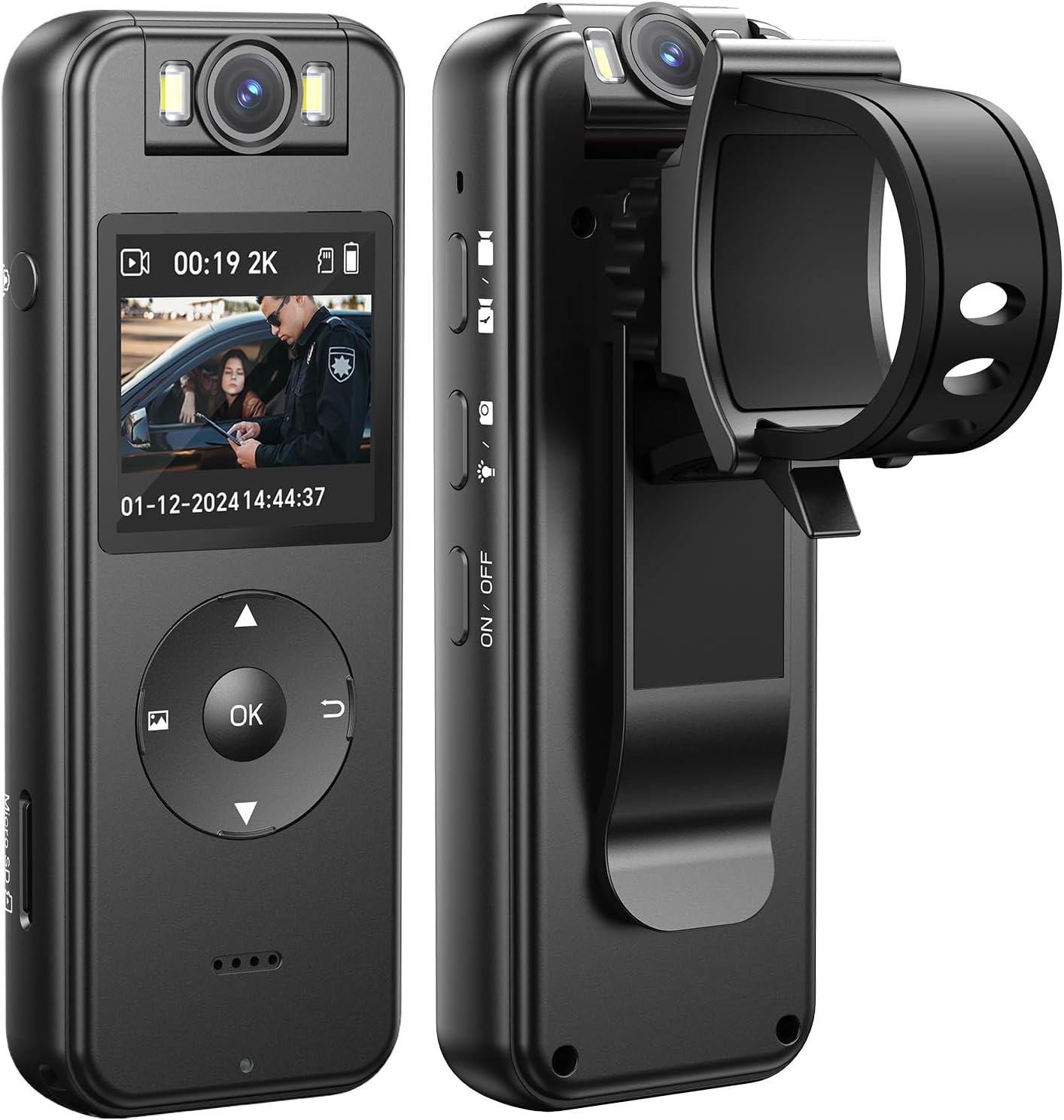
Алдыңкы жана каптал view of the BOBLOV A27 Body Worn Camera, showcasing its compact design, LCD screen, control buttons, and rotatable lens.
2. Продукт бүтүп калдыview
2.1. Пакеттин мазмуну
Пакетиңизде бардык буюмдар бар экенин текшериңиз:
- BOBLOV A27 Body Camera x1
- Bike Mount x1
- USB кабели x1
- Колдонуучунун колдонмосу x1

Contents of the BOBLOV A27 package laid out on a desk, including the A27 Body Camera, USB Cable, Bike Mount, and User Manual.
2.2. Camera Components and Controls
Familiarize yourself with the camera's physical features:
- 180° айлануучу линза: Allows for flexible recording angles.
- LCD дисплей: Жашоо үчүн view, ойнотуу жана менюну багыттоо.
- Башкаруу баскычтары: Power, Record, Menu, Navigation (Up/Down/OK), Back.
- Ак жарыктар: Integrated for illumination in dim environments.
- Микро SD карта слоту: Supports up to 256GB external memory.
- USB-C порту: Заряддоо жана маалыматтарды өткөрүү үчүн.
- Камтылган клип: For attaching to clothing or gear.

Illustration of the 180° rotating lens feature of the BOBLOV A27, showing the camera from various angles to highlight its flexibility.
3. Орнотуу
3.1. Батареяны заряддоо
Before first use, fully charge the camera. Connect the camera to a power source using the provided USB-C cable. The charging indicator will show the charging status. A full charge typically takes approximately 2.5 hours and provides up to 4 hours of video recording (1080P, IR&Screen Off).

The BOBLOV A27 camera connected via USB-C for charging, highlighting its 1400mAh battery and approximately 4 hours of video recording time.
3.2. Micro SD картаны салуу
The camera requires a Micro SD card (not included, unless specified in the package) for storing recordings. It supports cards up to 256GB. Insert the Micro SD card into the designated slot until it clicks into place. Ensure the camera is powered off before inserting or removing the card.

Hands inserting a Micro SD card into the BOBLOV A27 camera, illustrating the external memory card support up to 256GB.
3.3. Күйгүзүү / Өчүрүү
- Күйгүзүү үчүн: Экран жарык болгонго чейин Кубат баскычын басып, кармап туруңуз.
- Өчүрүү үчүн: Камера өчкөнгө чейин Күйгүзүү баскычын басып, кармап туруңуз.
3.4. Баштапкы орнотуулар
Upon first power-on or after a reset, you may need to set the date and time. Navigate through the menu using the directional buttons and confirm with the OK button.
3.5. WiFi Connection (Viidure App)
The A27 supports WiFi connectivity for real-time viewing and data transfer to your smartphone. Download the "Viidure" app from your device's app store. Follow the in-app instructions to connect your camera. The connection range is approximately 10 meters.
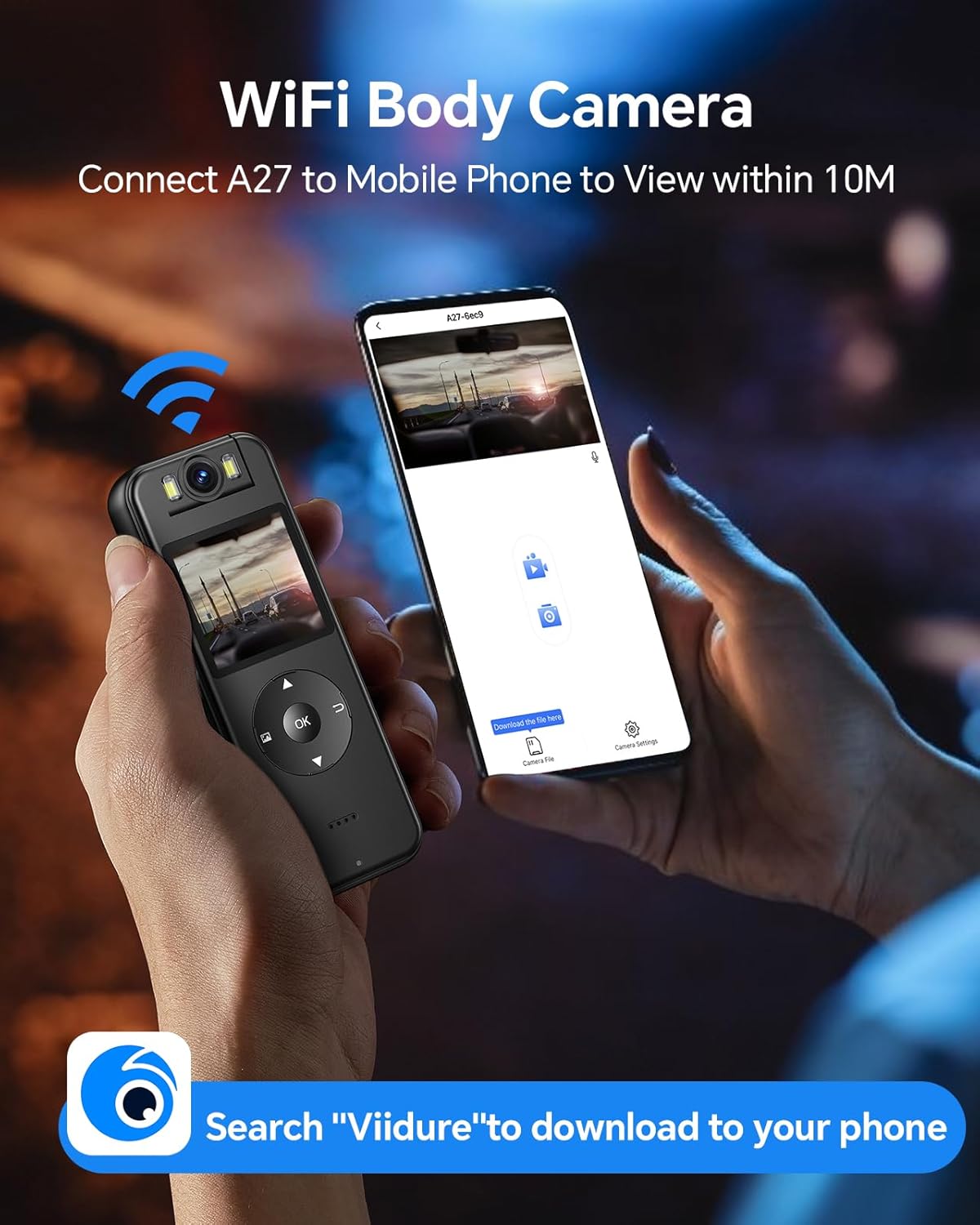
Image depicting the WiFi connectivity of the BOBLOV A27, showing the camera connected to a smartphone displaying the 'Viidure' app interface.
4. Иштөө нускамалары
4.1. Видео жаздыруу
Press the Record button once to start video recording. Press it again to stop. The camera will save the video file to the Micro SD card.

The BOBLOV A27 camera being worn by an individual in a meeting setting, demonstrating its 2K/1440P Ultra HD recording capability.
4.2. Сүрөт тартуу
While in standby mode, press the Photo button (if available, or a specific menu option) to capture a still image.
4.3. Using the 180° Rotatable Lens
The camera's lens can be manually rotated 180 degrees to capture footage from various angles without repositioning the entire device. Adjust the lens to your desired orientation before recording.

An image demonstrating the manual image rotation feature, showing how the camera can adjust orientation for different perspectives.
4.4. Activating White Lights
In low-light conditions, activate the built-in white lights to illuminate the scene and enhance recording clarity. Refer to the camera's menu or a dedicated button for this function.

A scene at night with the BOBLOV A27's white light illuminating a subject, indicating its use for capturing evidence in low-light conditions.
4.5. Ойнотуу жана File Башкаруу
Сиз кайра аласызview recorded videos and photos directly on the camera's LCD display. Navigate to the playback menu. To manage files, connect the camera to a computer via USB or use the Viidure app.

A user holding the BOBLOV A27 camera, showing its LCD display for easy playback and setup.
4.6. Using the Bike Mount
Attach the bike mount to your bicycle handlebars. Securely clip the BOBLOV A27 camera onto the mount, ensuring it is stable before riding. This allows for hands-free recording during cycling activities.

The BOBLOV A27 camera mounted on a bicycle handlebar using the included bike mount, demonstrating its use for cycling.
5. Техникалык тейлөө
5.1. Аспапты тазалоо
Камера корпусун жумшак, кургак чүпүрөк менен сүртүңүз. Линза үчүн чийилип калбашы үчүн атайын линза тазалоочу чүпүрөктү жана эритмени колдонуңуз. Катуу химиялык заттарды же абразивдүү материалдарды колдонбоңуз.
5.2. Батареяга кам көрүү
To prolong battery life, avoid extreme temperatures. Charge the battery regularly, even if the camera is not in frequent use, to prevent deep discharge.
5.3. Сактоо
Store the camera in a cool, dry place away from direct sunlight and moisture when not in use.
5.4. Микропрограмманы жаңыртуу
Periodically check the official BOBLOV website or the Viidure app for available firmware updates. Updates can improve performance, add features, or fix bugs. Follow the provided instructions carefully when performing an update.
6. Кыйынчылыктарды
If you encounter issues with your BOBLOV A27 camera, refer to the following common problems and solutions:
- Камера күйбөй жатат: Батарея заряддалганын текшериңиз. Кубат булагына туташып, кайра аракет кылыңыз.
- Recording issues (e.g., 'Card Error'): Ensure a Micro SD card is properly inserted and formatted. Try a different, compatible Micro SD card.
- WiFi туташуу көйгөйлөрү: Ensure the Viidure app is installed and updated. Check that the camera's WiFi is enabled. Keep the camera and smartphone within 10 meters.
- Видеонун сапаты начар: Ensure the lens is clean. Check recording resolution settings in the camera menu.
- Түзмөк жооп бербей жатат: Perform a soft reset by pressing and holding the Power button for an extended period (e.g., 10-15 seconds) until it restarts. If a reset button is available, use a thin object to press it.
7. Техникалык шарттар
| Өзгөчөлүк | Деталь |
|---|---|
| Бренд | БОБЛОВ |
| Модель номери | 02US-64GBA27 |
| Видео тартуунун резолюциясы | 2K |
| Объективдин айлануусу | 180° |
| Батарея сыйымдуулугу | 1400 мАч литий полимери |
| Видео жаздыруу убактысы | Up to 4 hours (1080P, IR&Screen Off) |
| Байланыш технологиясы | USB, WiFi |
| Flash эс тутум түрү | Micro SD (256 ГБ чейин) |
| Screen Size | 1.3 дюйм |
| Өзгөчөлүктөр | Body Camera, White Lights |
| Элемент Салмагы | 12.3 унция |
| Продукциянын өлчөмдөрү | 6 x 4.1 x 5.2 дюйм |

Technical drawing showing the dimensions of the BOBLOV A27 Body Camera in millimeters and inches, along with its net weight.
8. Кепилдик маалыматы
BOBLOV products typically come with a limited warranty covering manufacturing defects. Please refer to the warranty card included with your product or visit the official BOBLOV webдеталдуу кепилдик шарттары жана шарттары үчүн сайт. Кепилдик дооматтар үчүн сатып алганыңыздын далилин сактаңыз.
9. Кардарларды колдоо кызматы
For technical assistance, troubleshooting beyond this manual, or warranty inquiries, please contact BOBLOV customer support. Contact information can usually be found on the official BOBLOV website or on the packaging of your product. When contacting support, please have your model number (02US-64GBA27) and purchase details ready.

Collage of images showing various application scenarios for the BOBLOV A27 camera: delivering goods, cycling, law enforcement, and walking a dog.


