1. Киришүү
Welcome to the ACwO DwOTS Fire user manual. These innovative earbuds offer a unique dual-style design, providing both in-ear and half-in-ear options within a single charging case. Designed for versatility and high-quality audio, the DwOTS Fire earbuds feature advanced connectivity, extended battery life, and intuitive controls to enhance your listening experience.

Image: ACwO DwOTS Fire earbuds showcasing both half-in-ear and in-ear styles from a single case.
2. Кутуда эмне бар
Пакетиңизде бардык буюмдар бар экенин текшериңиз:
- 2 x Set of Wireless Earbuds (one in-ear, one half-in-ear)
- 1 x Type-C Fast Charging Cable
- 4 x Extra Earmuffs (for in-ear style)
- 1 x Кепилдик картасы
- 1 x Scan Me Card

Image: The ACwO DwOTS Fire earbuds and charging case.
3. Орнотуу жана жупташтыруу
3.1 Баштапкы жупташтыруу
- Кулакчындардын кубатталганын текшериңиз.
- Заряддоо кутучасын ачыңыз. Кулакчындар жупташтыруу режимине автоматтык түрдө кирет.
- Түзмөгүңүздө (смартфон, планшет ж.б.) Bluetooth иштетиңиз.
- Издөө available devices and select "ACwO Fire" or "ACwO DwOTS Fire" to connect.
- Туташкандан кийин, сиз аудио сунушту угасыз жана кулакчындардагы индикатор өзгөрөт.
3.2 Dual Connectivity
The ACwO DwOTS Fire earbuds offer unique dual connectivity options:
- Connect Each Pair to Two Different Devices: Ideal for sharing your listening experience.
- Connect Both Pairs to a Single Device: Perfect for watching movies or listening to music together with a loved one. This feature is available only for devices with dual audio connectivity (e.g., certain Android devices).

Image: Illustration of the dual connectivity feature, showing two pairs of earbuds.
Steps for Dual Sharing (Connecting Both Pairs to a Single Device):
- Connect both 'ACwO DwOTS Fire' and 'ACwO Fire +' with your device's Bluetooth.
- Once both pairs are connected, scroll down your device's notification panel and click on 'Media Output'.
- One pair will already be selected. Select the other pair to enable dual audio.
- You can now listen on both pairs of your earbuds simultaneously.

Image: Visual guide for setting up dual sharing on a compatible device.
4. Иштөө нускамалары
4.1 Интуитивдик сенсордук башкаруу элементтери
The earbuds feature intuitive touch controls for easy management of music, calls, and voice assistants. Refer to the included 'Scan Me Card' for a detailed diagram of touch functions.
- Ойнотуу/тындыруу: Кулакчындарды бир жолу таптаңыз.
- Кийинки трек: Оң кулакчынды эки жолу таптаңыз.
- Мурунку трек: Сол кулакчынды эки жолу таптаңыз.
- Чалууга жооп берүү/аяктоо: Кулакчындарды бир жолу таптаңыз.
- Чакырууну четке кагуу: Кулакчындардын бирин дагы көпкө басыңыз.
- Үн Жардамчысын жандыруу: Кулакчындарды үч жолу таптаңыз.
4.2 EQ режимдери
Customize your audio experience with 3 preset EQ modes, offering a total of 3+3 EQ options across the two earbud styles. Switch between modes to suit your preference for deep bass, balanced sound, or enhanced treble.
- Оюн режими: Optimized for immersive gaming audio with low latency.
- Театр режими: Enhanced soundstage for movies and videos.
- Балансталган режим: Provides a neutral and clear audio profile жалпы угуу үчүн.

Image: ACwO DwOTS Fire earbuds with a visual representation of available EQ modes.
4.3 Үн жардамчысы
Easily access your device's voice assistant by triple-tapping either earbud. Compatible with "Ok Google" and "Hey Siri" for hands-free control.
5. Заряддоо
5.1 Earbuds and Case Charging
The ACwO DwOTS Fire earbuds provide up to 52 hours of music playtime with the charging case. The case supports both wired and wireless charging.
- Зымдуу кубаттоо: Connect the provided Type-C fast charging cable to the charging port on the case and a power source.
- Зымсыз кубаттоо: Place the charging case on a compatible wireless charging pad (wireless charger not included). The indicator light on the case will show charging status.

Image: ACwO DwOTS Fire charging case highlighting 52 hours of playtime.

Image: 'One On, One Charging' feature for extended use.
6. Техникалык тейлөө
6.1 Сууга жана терге туруктуулук
The earbuds are IPX5 water and sweat resistant, making them suitable for workouts and outdoor activities. This rating protects against low-pressure water jets from any direction. Do not submerge the earbuds in water.

Image: ACwO DwOTS Fire earbuds demonstrating IPX5 water and sweat resistance.
6.2 Тазалоо
Regularly clean your earbuds and charging case with a soft, dry, lint-free cloth. Avoid using abrasive materials or harsh chemicals. For the in-ear style, gently remove and clean the earmuffs with water and mild soap, ensuring they are completely dry before reattaching.
7. Техникалык шарттар
| Өзгөчөлүк | Деталь |
|---|---|
| Модель аты | DwOTS Fire |
| Байланыш технологиясы | Зымсыз (Bluetooth V5.3) |
| Аудио драйвер түрү | 13mm Real Drivers |
| Noise Control | AI-ENC with Quad Mics, Passive Noise Cancellation |
| Оюн убактысы | 52 саатка чейин (заряддоо кутусу менен) |
| Кечигип калуу | Up to 45ms (Ultra-low) |
| Сууга туруктуулук деңгээли | IPX5 (Суудан коргоочу) |
| Заряддоо | Type-C Fast Charging, Wireless Charging Capability |
| Башкаруу ыкмасы | Touch Controls, Voice Assistant (Ok Google, Hey Siri) |
| Наушник формасы | In-Ear, Half-in-Ear |
| Элемент Салмагы | 43 г |
| Продукциянын өлчөмдөрү | 5.6 x 5.6 x 1.8 см |
| Материал | Пластик |
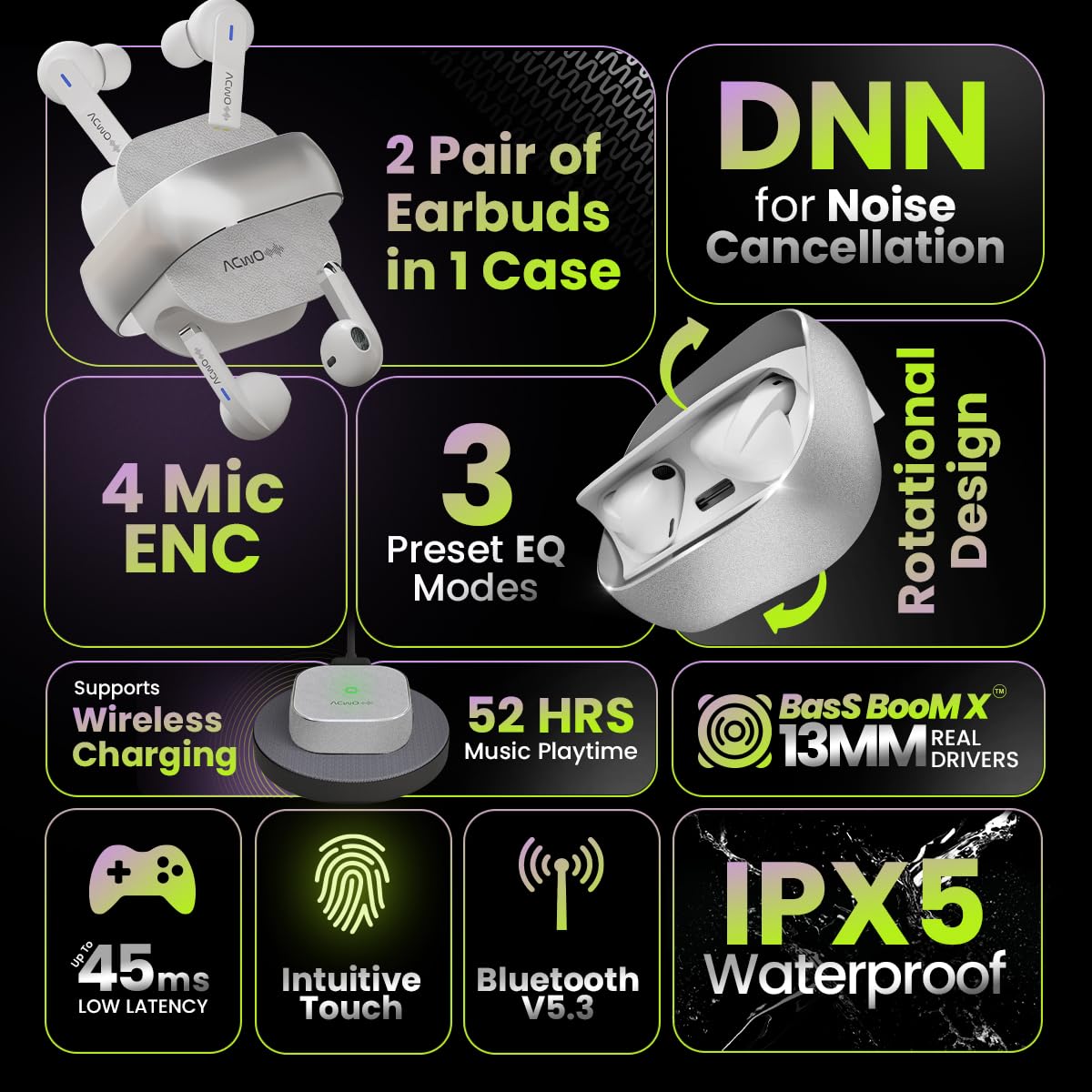
Image: Summary of ACwO DwOTS Fire key features.
8. Кыйынчылыктарды
8.1 Кулакчындар жупташтырылбайт
- Ensure earbuds are charged and the case lid is open.
- Түзмөгүңүздүн Bluetooth'ун өчүрүп, күйгүзүңүз.
- Bluetooth тизмеңизден түзмөктү унутуп, кайра жупташтырып көрүңүз.
- Reset the earbuds (refer to the 'Scan Me Card' for specific reset instructions).
8.2 Үн жок же үнү төмөн
- Түзмөгүңүздөгү жана гарнитураңыздагы үн деңгээлин текшериңиз.
- Кулакчындар кулагыңызга туура орнотулганын текшериңиз.
- Кулакчындын динамиктеринен жана кубаттоочу контакттардан ар кандай таштандыларды тазалаңыз.
- Кулакчындарды түзмөгүңүзгө кайра туташтырыңыз.
8.3 Заряддоо маселелери
- Заряддоо кабели корпуска да, кубат булагына да бекем туташтырылганын текшериңиз.
- If using wireless charging, ensure the case is correctly placed on a compatible wireless charging pad.
- Check for any obstructions on the charging contacts of the earbuds and inside the case.
- Башка заряддоо кабелин же кубат адаптерин колдонуп көрүңүз.
9. Кепилдик жана колдоо
The ACwO DwOTS Fire earbuds come with a standard brand warranty. Please refer to the included Warranty Card for specific terms and conditions.
Кардарларды колдоо:
For any queries, technical assistance, or warranty claims, please contact ACwO customer support:
- Электрондук почта: help@acwo.com
- Телефон: +91 9320420001
- Өндүрүүчү: ACWO LIFESTYLE PRIVATE LIMITED, Borivali, Mumbai, Maharashtra - 400092, India


