1. Киришүү
Welcome to the user manual for your Jooeniok L81 Smart Watch. This guide provides detailed instructions on how to set up, operate, and maintain your device, ensuring you get the most out of its features. The Jooeniok L81 is designed to enhance your daily life with its communication, fitness tracking, and health monitoring capabilities.
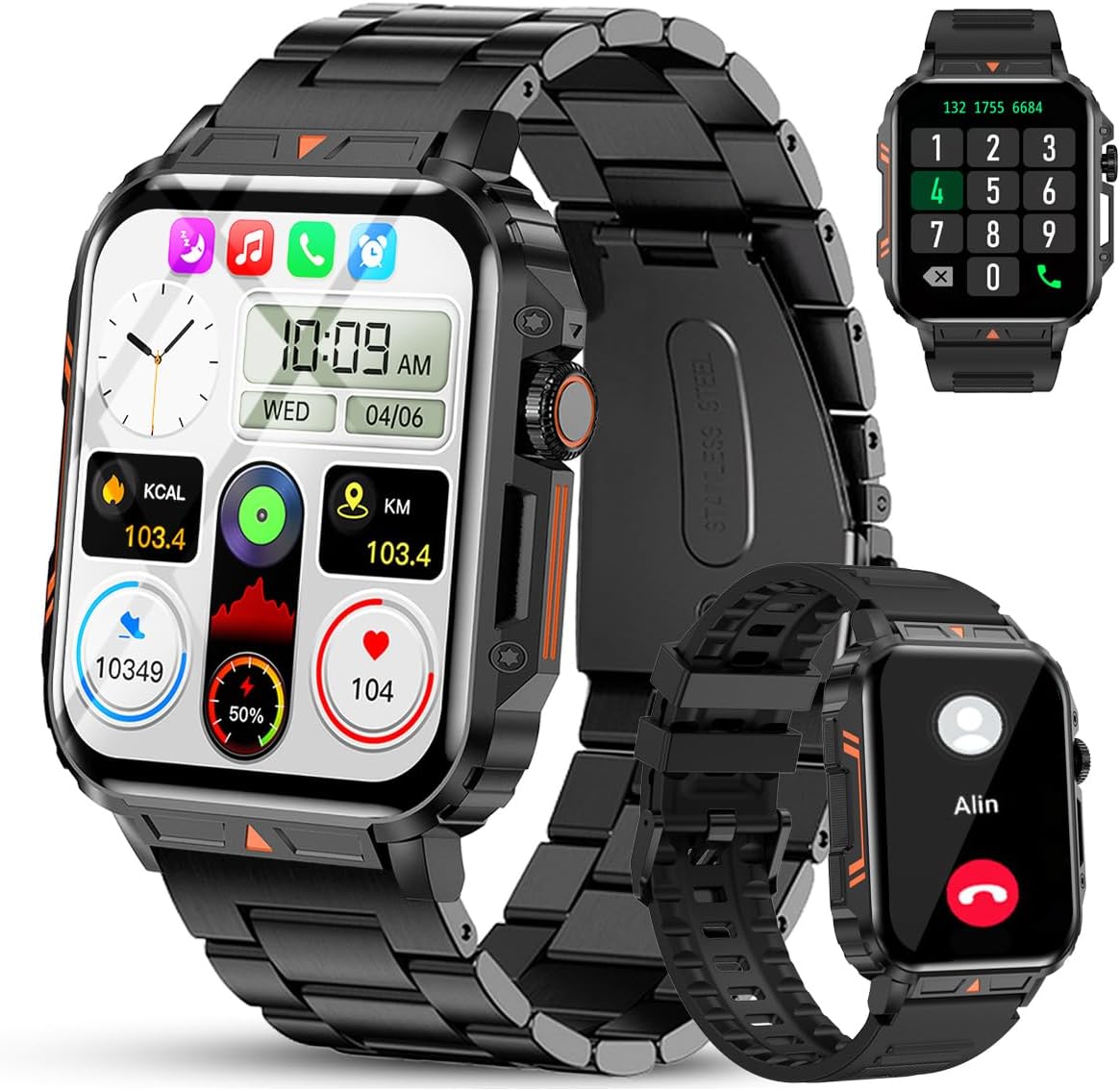
Image 1.1: The Jooeniok L81 Smart Watch, showcasing its main display and interchangeable straps.
2. Негизги өзгөчөлүктөрү
- Bluetooth Calling & Message Alerts: Make and receive calls, read messages, and receive notifications from various apps directly on your watch.
- 1.95'' HD Touch Screen & DIY Dial: Enjoy a clear display and personalize your watch face.
- 112+ Спорт режимдери: Track a wide range of activities including running, cycling, badminton, and hiking.
- IP68 Суу өткөрбөйт: Suitable for daily use, hand washing, and outdoor activities in rain. (Note: Not recommended for diving, showering, or sauna.)
- Ден соолук мониторинги: Monitor heart rate, blood oxygen (SpO2), blood pressure, and sleep patterns.
- Узак мөөнөттүү батарея: Узак пайдалануу үчүн 340mAh батарейка менен жабдылган.
- Көп функциялуу: Includes features like timer, alarm, stopwatch, weather, calendar, water reminder, sedentary reminder, and remote photo control.
3. Орнотуу колдонмосу
3.1. Акылдуу саатты кубаттоо
Before initial use, fully charge your Jooeniok L81 Smart Watch. Connect the magnetic charging cable to the charging contacts on the back of the watch and plug the USB end into a standard USB power adapter (not included) or a computer's USB port. The watch display will indicate charging status.

Image 3.1: Illustration of the watch dimensions and the location of the charging contacts.
3.2. Колдонмону орнотуу жана жупташтыруу
- Колдонмону жүктөп алыңыз: Scan the QR code provided in the watch's quick start guide or search for the official companion app (e.g., "FitCloudPro" or similar, check packaging for exact name) in the Apple App Store (for iOS) or Google Play Store (for Android).
- Bluetooth иштетүү: Смартфонуңузда Bluetooth иштетилгенин текшериңиз.
- Колдонмону ачуу: Орнотулган колдонмону ишке киргизип, аккаунт түзүү же кирүү үчүн экрандагы көрсөтмөлөрдү аткарыңыз.
- Түзмөк кошуу: Within the app, navigate to the "Device" or "Add Device" section. The app will search for available Bluetooth devices. Select "L81" or the corresponding device name when it appears.
- Жупташтыруу ырастоо: Жупташтыруу өтүнүчү саатыңызда жана телефонуңузда пайда болушу мүмкүн. Эки түзмөктө тең жупташууну ырастаңыз.
- Уруксаттарды берүү: Колдонмонун туура иштеши үчүн керектүү уруксаттарды (мисалы, эскертмелер, жайгашкан жер, байланыштар) бериңиз.
Саат Android 5.1 жана андан жогорку версиялары, ошондой эле iOS 10.0 жана андан жогорку версиялары менен шайкеш келет.
3.3. Initial Settings and Language
After successful pairing, the watch should automatically synchronize time and language settings with your phone. If the watch displays an incorrect language, navigate to the watch's settings menu (usually by swiping down from the main screen or pressing the side button to access the app list, then finding the 'Settings' icon). Look for 'Language' or 'System' settings to change it to English or your preferred language.
4. Иштөө нускамалары
4.1. Негизги навигация
- Сенсордук экран: Менюларды жана функцияларды чабыттоо үчүн солго/оңго, өйдө/ылдый сүрүңүз. Тандоо үчүн таптаңыз.
- Каптал баскычы: Press to return to the main screen or access the app list. Long press for power options.
- Crown Button (if present): Rotate to scroll through lists or adjust settings, press to select.
4.2. Bluetooth чалуулары жана эскертмелери
Once paired, your watch can handle calls and display notifications. Ensure Bluetooth is connected and the companion app has the necessary permissions.
- Чалууларды жасоо: Чалууларды баштоо үчүн саатыңыздагы тергичке же байланыштар тизмесине кириңиз.
- Чалууларды кабыл алуу: When a call comes in, you can answer or reject it directly from the watch.
- Эскертмелер: Swipe down from the main screen or access the notification center to view incoming messages from SMS, WhatsApp, Facebook, and other apps.
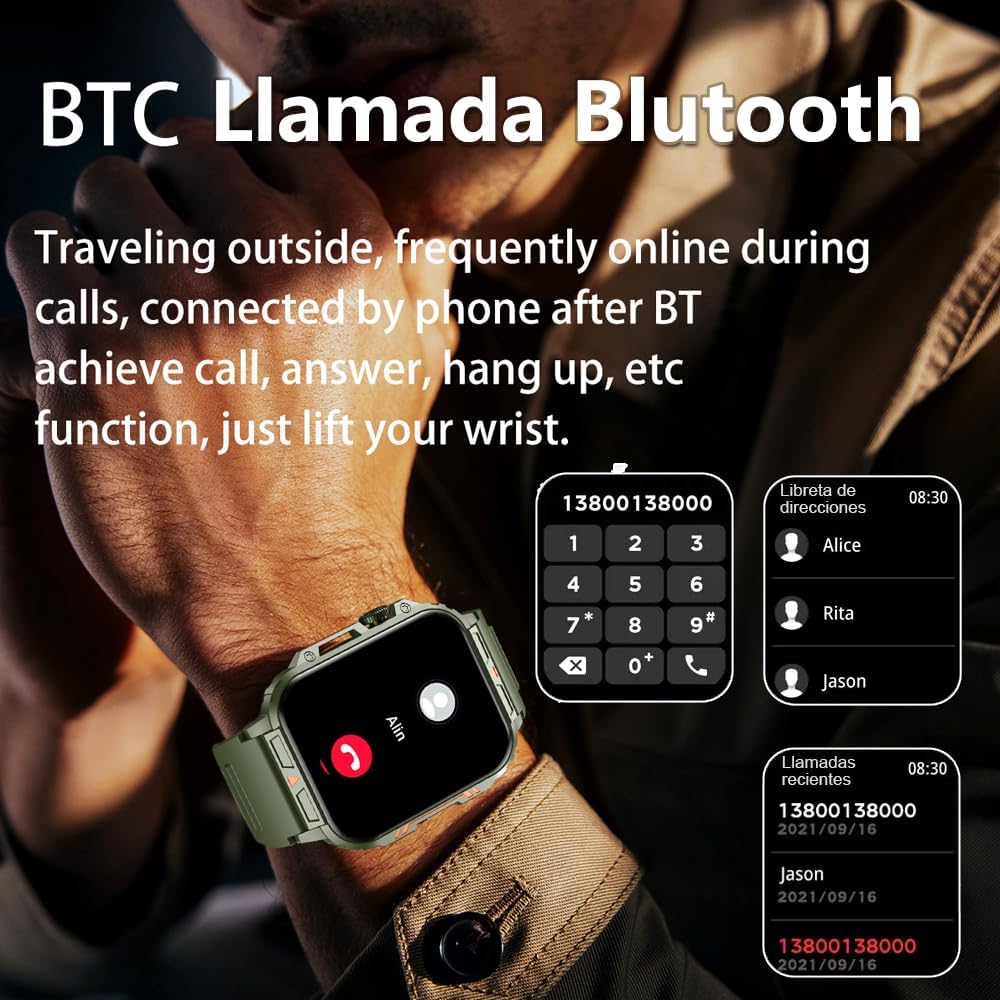
Image 4.1: The watch screen showing an incoming call and the dial pad for making calls.

Image 4.2: The watch displaying notifications from various social media and messaging applications.
4.3. Спорт режимдери
The watch supports over 112 sports modes. To access them, navigate to the 'Sports' or 'Workout' section on your watch. Select your desired activity to start tracking. The watch will record steps, distance, and calories.

Image 4.3: Icons representing various sports modes available on the watch.
4.4. Ден соолуктун мониторинги
The Jooeniok L81 provides continuous monitoring of several health metrics. Access these features through the watch's menu or the companion app.
- Жүрөктүн кагышы: The watch uses an optical sensor to monitor your heart rate. View саат боюнча реалдуу убакыт дайындары же колдонмодогу деталдуу тренддер.
- Blood Oxygen (SpO2) & Blood Pressure: Initiate a measurement from the watch. Results are displayed on the screen and recorded in the app for historical analysis.
- Уйкунун мониторинги: Wear the watch to bed for automatic sleep tracking. It analyzes deep sleep, light sleep, and awake times, providing a comprehensive sleep quality report in the app.
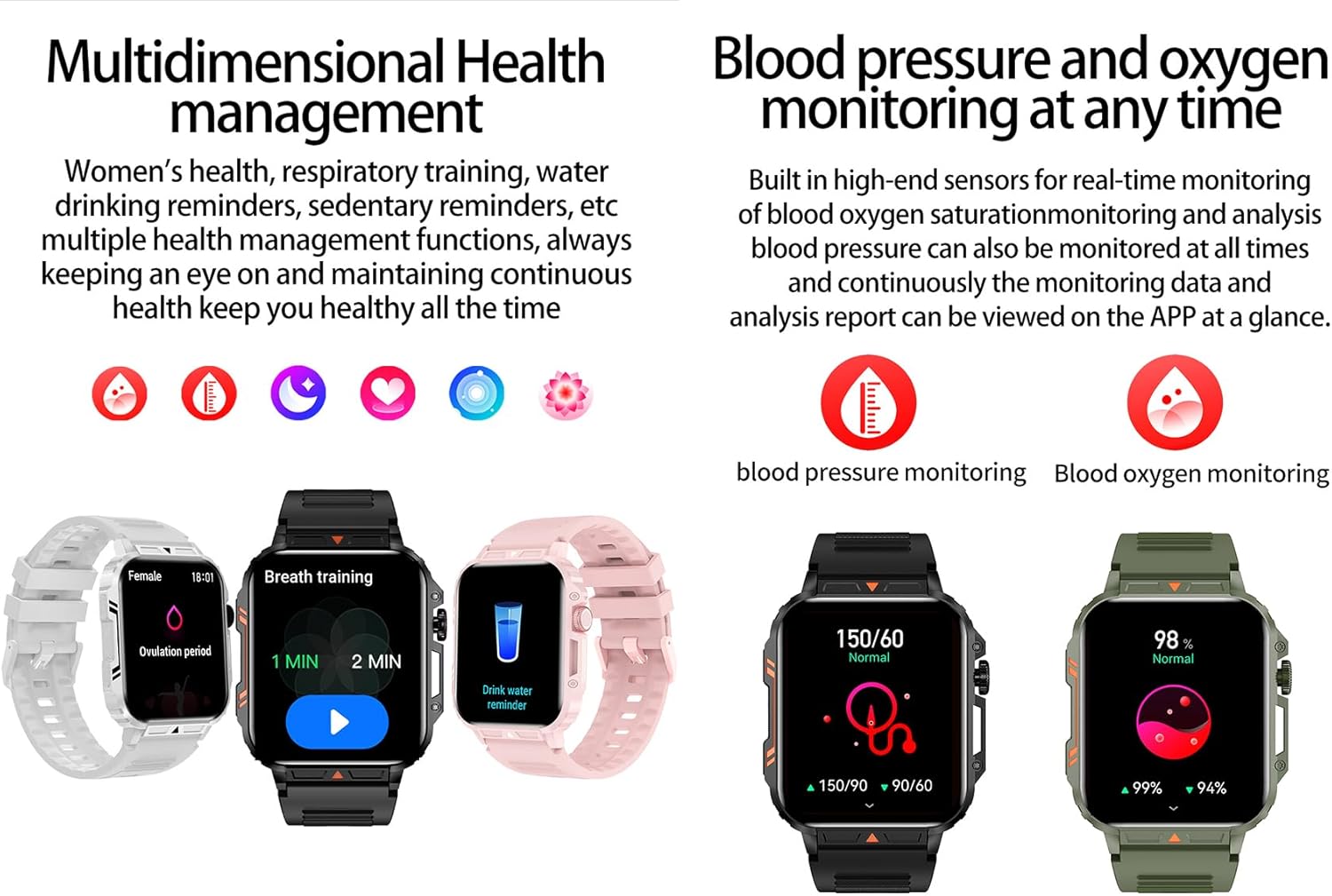
Image 4.4: Watch screens showing blood pressure and blood oxygen monitoring results.

Image 4.5: Watch screens showing real-time heart rate and a summary of sleep data.
4.5. AI Intelligent Voice Function
After connecting the watch to your phone via Bluetooth, activate the voice function on the watch. This allows you to use voice commands to open applications, check weather, make calls, or navigate, offering a hands-free experience.
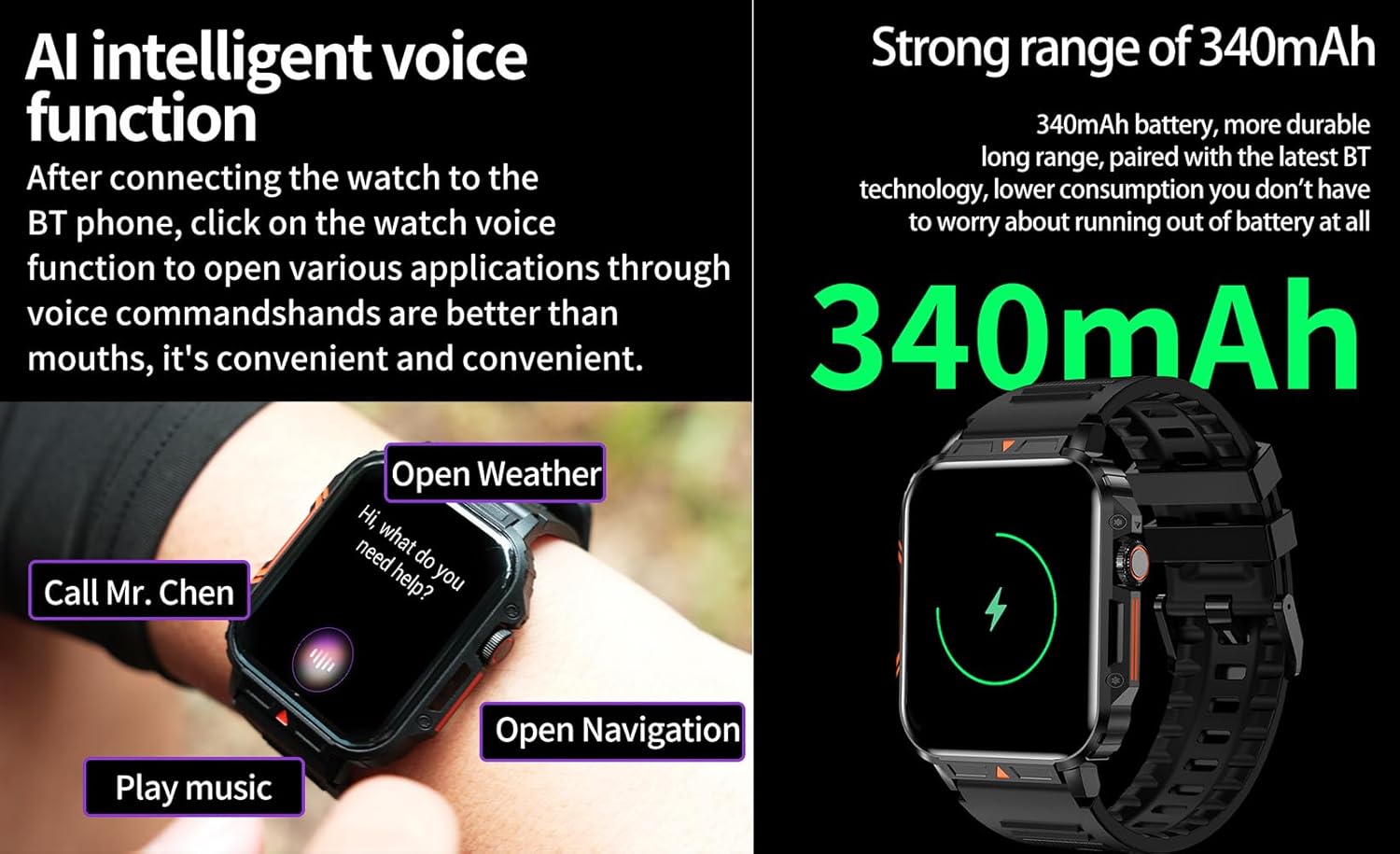
Image 4.6: The watch screen illustrating the AI voice assistant interface with example буйруктары.
4.6. Өз колуңуз менен жасалган циферблат
Personalize your watch face by using the DIY dial feature within the companion app. You can often upload custom images or choose from a variety of pre-designed watch faces.
5. Техникалык тейлөө
5.1. Сууга туруктуулук
The Jooeniok L81 Smart Watch is IP68 waterproof and dustproof. This means it is resistant to dust and can withstand immersion in water up to 1.5 meters for up to 30 minutes. It is suitable for daily use, hand washing, and light rain.
Маанилүү: Саат экен жок recommended for diving, hot showers, or saunas, as steam and high water pressure can compromise the seals and cause damage.

Image 5.1: The watch shown with water splashes, indicating its water resistance.
5.2. Тазалоо
Теринин кыжырданышын алдын алуу жана анын иштешин сактоо үчүн саатыңызды жана бооңузду үзгүлтүксүз тазалап туруңуз. Жумшак, нымдуу каражатты колдонуңузamp cloth to wipe the screen and body. For the strap, follow the manufacturer's recommendations for the specific material (e.g., silicone, metal).
- Катуу химиялык заттарды же абразивдүү материалдарды колдонуудан алыс болуңуз.
- Ensure the watch is completely dry before charging or prolonged use.
5.3. Батареяга кам көрүү
Батареянын иштөө мөөнөтүн узартуу үчүн:
- Ашыкча температурадан сактаныңыз.
- Батареянын тез-тезден толугу менен түгөнүп калышына жол бербеңиз.
- Берилген кабель аркылуу саатты заряддаңыз.
Image 5.2: The watch screen highlighting its 340mAh battery capacity.
6. Кыйынчылыктарды
| Көйгөй | Мүмкүн чечим |
|---|---|
| Саат күйбөй жатат. | Саат толук заряддалганын текшериңиз. Аны заряддагычка кеминде 30 мүнөт туташтырыңыз. |
| Смартфон менен жупташтыруу мүмкүн эмес. |
|
| Incorrect language displayed. | Navigate to the watch's settings menu, find 'Language' or 'System' settings, and select your preferred language. If paired, the app might also have a language setting. |
| Touch screen unresponsive or intermittent. |
|
| Эскертмелер алынган жок. |
|
| Health monitoring data seems inaccurate. |
|
7. Техникалык шарттар
| Өзгөчөлүк | Деталь |
|---|---|
| Модель аты | L81 |
| Бренд | Jooeniok |
| Screen Size | 1.95 дюйм |
| Байланыш технологиясы | Bluetooth |
| Зымсыз байланыш стандарты | Bluetooth |
| Операция системасы | Android (compatible with Android 5.1+ and iOS 10.0+) |
| Эстутум сактоо сыйымдуулугу | 128 MB |
| Батарея | 1 литий-полимердик батарейка (340 мАч, кошо берилет) |
| Суу каршылык | IP68 |
| Өзгөчөлүктөр | Activity Tracker, Notifications, Phone Call, Time Display, Heart Rate Monitor, Blood Oxygen Monitor, Sleep Monitor, 112+ Sports Modes, AI Voice Function |
| Өлчөмдөрү (болжол менен) | Watch face: 44mm (width) x 52mm (height); Thickness: 12mm; Strap length: 260mm |
8. Кепилдик жана колдоо
The Jooeniok L81 Smart Watch is backed by a 365 күндүк кепилдик сатып алынган күндөн тартып. Бул кепилдик өндүрүштүк кемчиликтерди жана нормалдуу колдонуудагы бузулууларды камтыйт.
For technical support, warranty claims, or any questions regarding your product, please contact Jooeniok customer service through the retailer's platform or the contact information provided on the product packaging or official webсайт.
Кепилдикти текшерүү үчүн сатып алганыңыздын далилин сактап коюңуз.


