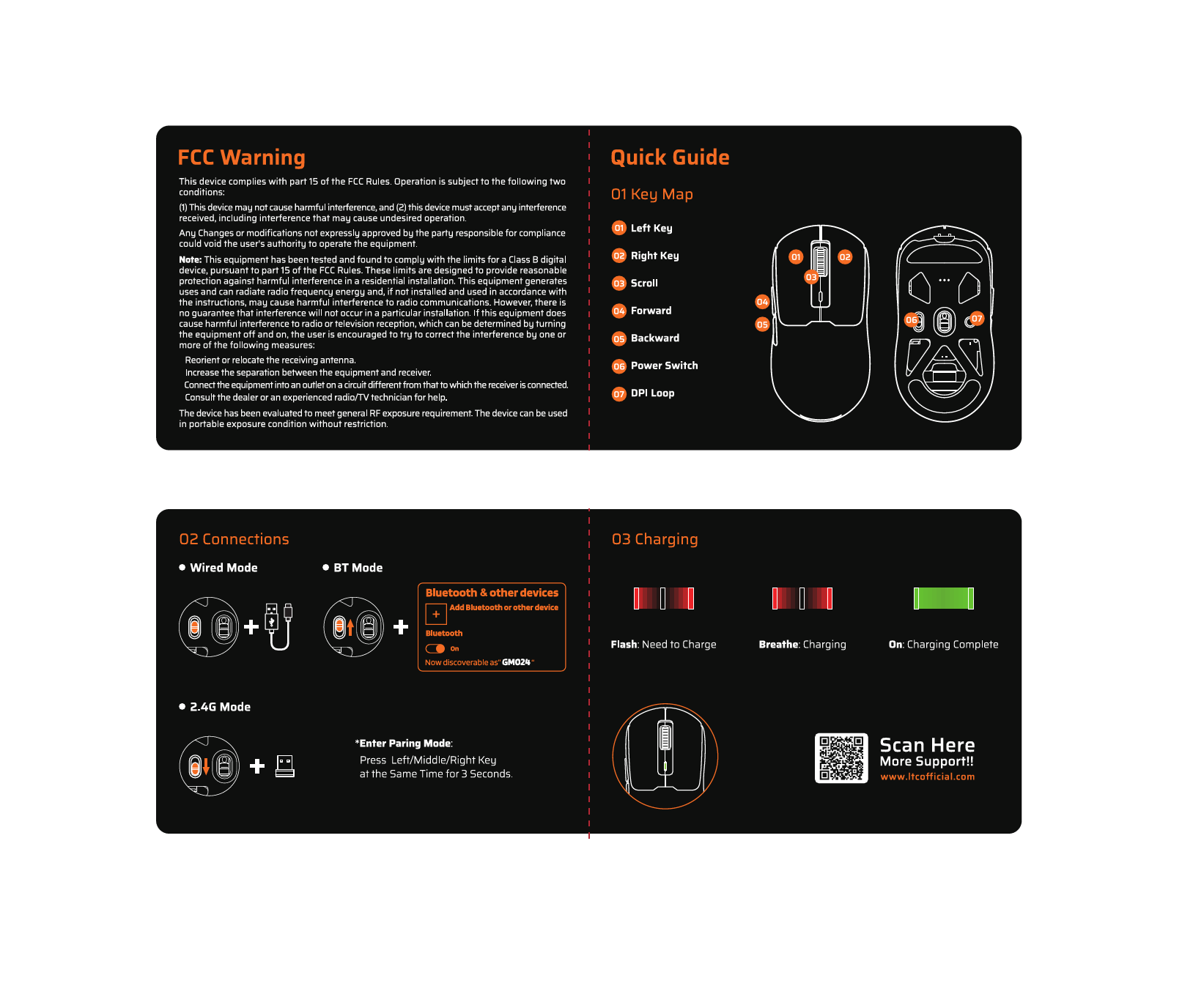
1. Киришүү
The LTC GM022 is an ultralight 3-mode wireless gaming mouse designed for precision and versatility. It features a high-performance PAW3395 sensor, multiple connectivity options, and a convenient RGB charging dock. This manual provides instructions for setting up, operating, maintaining, and troubleshooting your GM022 mouse.
Пакеттин мазмуну
- LTC GM022 Gaming Mouse
- RGB заряддоо док
- USB-C Cable
- 2.4G USB Receiver (stored in mouse)

LTC GM022 Wireless Gaming Mouse with RGB Charging Dock and 2.4G USB Receiver.
2. Орнотуу жана туташуу
The LTC GM022 mouse offers three connectivity modes: 2.4GHz wireless, Bluetooth 5.0, and wired USB-C. Select the mode that best suits your needs.

Diagram illustrating the three connectivity modes: 2.4GHz wireless, Bluetooth 5.1, and USB-C wired connection.
2.1. 2.4 ГГц зымсыз режим
- Чычкандын астындагы бөлүмдө сакталган 2.4G USB ресиверди табыңыз.
- USB ресиверди компьютериңиздеги жеткиликтүү USB портуна сайыңыз.
- Slide the mode switch on the bottom of the mouse to the "2.4G" position.
- Чычкан компьютериңизге автоматтык түрдө туташуу керек.
2.2. Bluetooth 5.0 режими
- Чычкандын астыңкы жагындагы режим которгучун "BT" абалына жылдырыңыз.
- Компьютериңизде же түзмөгүңүздө Bluetooth жөндөөлөрүн ачып, жаңы түзмөктөрдү издеңиз.
- Select "LTC GM022" from the list of available devices to pair.
2.3. Зымдуу USB-C режими
- Берилген USB-C кабелин чычкандын алдыңкы портуна туташтырыңыз.
- USB-C кабелинин экинчи учун компьютериңиздеги жеткиликтүү USB портуна туташтырыңыз.
- Чычкан зымдуу режимде иштейт жана бир эле учурда кубатталат.

Underside of the LTC GM022 mouse with labels for mode switch, dongle storage, PTFE feet, and DPI loop button.
3. Иштөө нускамалары
3.1. Баскыч функциялары
The LTC GM022 mouse features 5 programmable buttons:
- Сол чыкылдатуу: Негизги аракет.
- Оң чыкылдатуу: Кошумча аракет/контексттик меню.
- Ортоңку чыкылдатуу (сыдыруу дөңгөлөгү): Scroll up/down, click for universal scroll or other assigned function.
- Алга баскычы: Алга карай жылдырат web браузерлер же file изилдөөчүлөр.
- Артка баскычы: Артка карай багыт алат web браузерлер же file изилдөөчүлөр.

Illustration of the LTC GM022 mouse highlighting its five programmable buttons and their default assignments.
3.2. DPI тууралоо
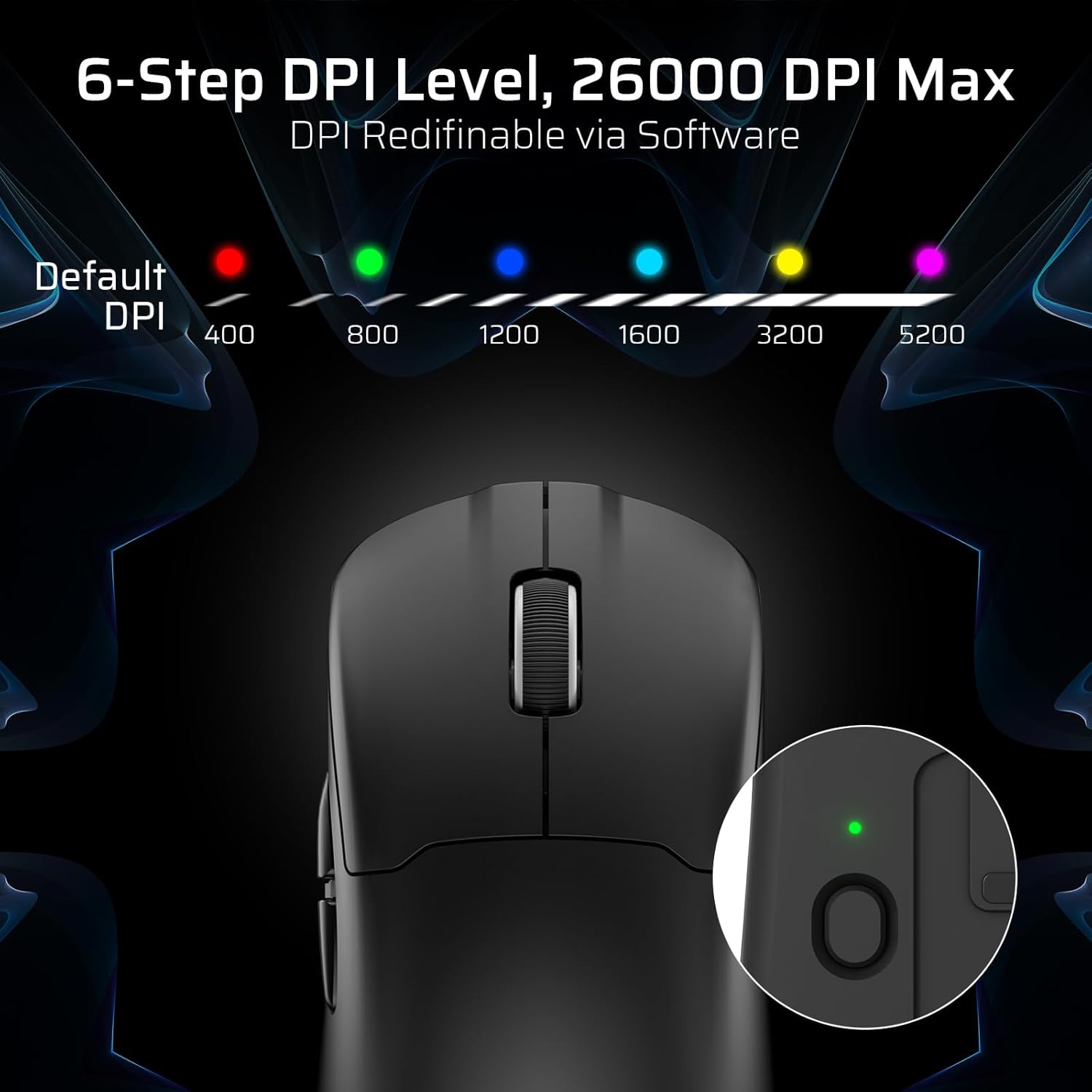
The mouse has a dedicated DPI button on its underside, allowing you to cycle through 6 preset DPI levels. Each level is indicated by a different LED color:
- 400 DPI (Red)
- 800 DPI (Green)
- 1200 DPI (Blue)
- 1600 DPI (Cyan)
- 3200 DPI (Yellow)
- 5200 DPI (Magenta)
These DPI levels can be further customized and redefined up to 26000 DPI using the LTC software.

Visual representation of the 6-step DPI levels (400, 800, 1200, 1600, 3200, 5200) and the corresponding LED indicator colors.
3.3. Программалык камсыздоону ыңгайлаштыруу
Download and install the official LTC software from the manufacturer's website to unlock full customization options. The software allows you to:
- Assign macros to buttons.
- Негизги функцияларды кайра картага түшүрүү.
- Redefine 6-step DPI levels up to 26000 DPI.
- Adjust polling rate (up to 1000Hz).
- Modify click and scroll speed.
- Батареянын абалын көзөмөлдөңүз.

Screenshot of the LTC software interface for customizing mouse settings, including key assignments, DPI, polling rate, and battery monitoring.
4. Чычканды заряддоо
The LTC GM022 mouse is equipped with a 400mAh battery and can be charged using the included magnetic RGB charging dock or directly via the USB-C cable.
4.1. Using the Magnetic Charging Dock
- Connect the USB-C cable to the charging dock and then to a power source (e.g., computer USB port, USB wall adapter).
- Place the mouse onto the charging dock. The magnetic connection will secure it in place, and charging will begin automatically.
- The RGB lighting on the dock will indicate charging status.
4.2. Direct USB-C Charging
- Connect the USB-C cable directly to the mouse's front port.
- USB-C кабелинин экинчи учун кубат булагына туташтырыңыз.
- Чычканды кубаттоо учурунда зымдуу режимде колдонсо болот.

The LTC GM022 mouse magnetically charging on its RGB illuminated dock, indicating a 400mAh battery.
5. Техникалык тейлөө жана кам көрүү
To ensure the longevity and optimal performance of your LTC GM022 mouse, follow these maintenance guidelines:
- Тазалоо: Чычкандын бетин сүртүү үчүн жумшак, кургак чүпүрөктү колдонуңуз. өжөр кир үчүн, бир аз гampчүпүрөктү суу же жумшак тазалоо эритмеси менен жууп салыңыз. Катуу химиялык заттардан же абразивдүү материалдардан алыс болуңуз.
- Сенсорго кам көрүү: Көз салуу тактыгын сактоо үчүн чычкандын астыңкы жагындагы оптикалык сенсорду чаңдан же таштандыдан таза кармаңыз.
- PTFE буттары: The mouse comes with durable PTFE feet for smooth gliding. If they show significant wear, replacement feet may be available from the manufacturer.
- Сактагыч: Чычканды көпкө чейин колдонбогондо, таза, кургак жерде сактаңыз.
Close-up of the mouse's underside, detailing the PTFE feet for smooth gliding and the inclusion of backup feet.
6. Кыйынчылыктарды
If you encounter issues with your LTC GM022 mouse, refer to the following common problems and solutions:
| Көйгөй | Мүмкүн чечим |
|---|---|
| Mouse not responding in 2.4G wireless mode | Ensure the USB receiver is securely plugged in. Check if the mouse mode switch is set to "2.4G". Try a different USB port. Ensure the mouse battery is charged. |
| Mouse not connecting via Bluetooth | Ensure the mouse mode switch is set to "BT". Make sure Bluetooth is enabled on your device. Remove previous pairings and re-pair the mouse. Ensure the mouse battery is charged. |
| Чычкан кубатталбай жатат | Ensure the USB-C cable is properly connected to both the dock/mouse and the power source. Verify the power source is active. Clean the charging contacts on the mouse and dock. |
| Так эмес көз салуу же курсордун артта калуусу | Clean the optical sensor on the underside of the mouse. Ensure you are using the mouse on a suitable surface (e.g., a mouse pad). Check for interference in wireless modes. Adjust DPI settings. |
| Баскычтар жооп бербейт | Ensure the mouse is powered on and connected. If using software, check button assignments. Try restarting your computer. |
If the issue persists after trying these solutions, please contact LTC customer support for further assistance.
7. Техникалык шарттар
Key technical specifications for the LTC GM022 Ultralight 3-Mode Wireless Gaming Mouse:
- Модел: GM022
- Байланыш: 2.4 ГГц зымсыз, Bluetooth 5.0, USB-C зымдуу
- Сенсор: PixArt PAW3395 оптикалык сенсор
- Макс DPI: 26000 DPI (6-step re-definable via software)
- Добуш берүү көрсөткүчү: 1000Hz
- Көз салуу ылдамдыгы: 650IPS
- Ылдамдатуу: 50G
- Баскычтар: 5 Программалануучу баскычтар
- Которуу мөөнөтү: 80 миллион чыкылдатуу
- Батарея: 400 мАч литий полимери
- Салмагы: Болжол менен 55 грамм (2.01 унция)
- Өлчөмдөрү: 4.7 x 2.44 x 0.04 дюйм
- Өзгөчөлүктөр: RGB Charging Dock, Ultralight Design, PTFE Feet

Деталдаштырылган view of the PixArt PAW3395 sensor specifications including 26K DPI Max, 1000Hz Polling Rate, 650 IPS Tracking Speed, and 50G Acceleration.

Illustration highlighting the durable switches with an 80 million click lifespan.
8. Кепилдик жана колдоо
LTC products are designed and manufactured to the highest quality standards. For information regarding warranty coverage, technical support, or to download the latest software and drivers, please visit the official LTC webсайтка же кардарларды тейлөө бөлүмүнө кайрылыңыз.
Сатып алуу квитанциясын кепилдик дооматтары үчүн сатып алуунун далили катары сактаңыз.