1. Киришүү
The TOPTECH AL-212 is a powerful and versatile wireless Bluetooth speaker designed to deliver high-fidelity sound with dynamic LED lighting. Featuring dual 12-inch woofers, it provides robust audio for various occasions, from home entertainment to outdoor parties. This manual provides detailed instructions for setting up, operating, and maintaining your speaker to ensure optimal performance.

Сүрөт: алдыңкы view of the AL-212 speaker, showcasing its dual 12-inch woofers and vibrant LED lighting.
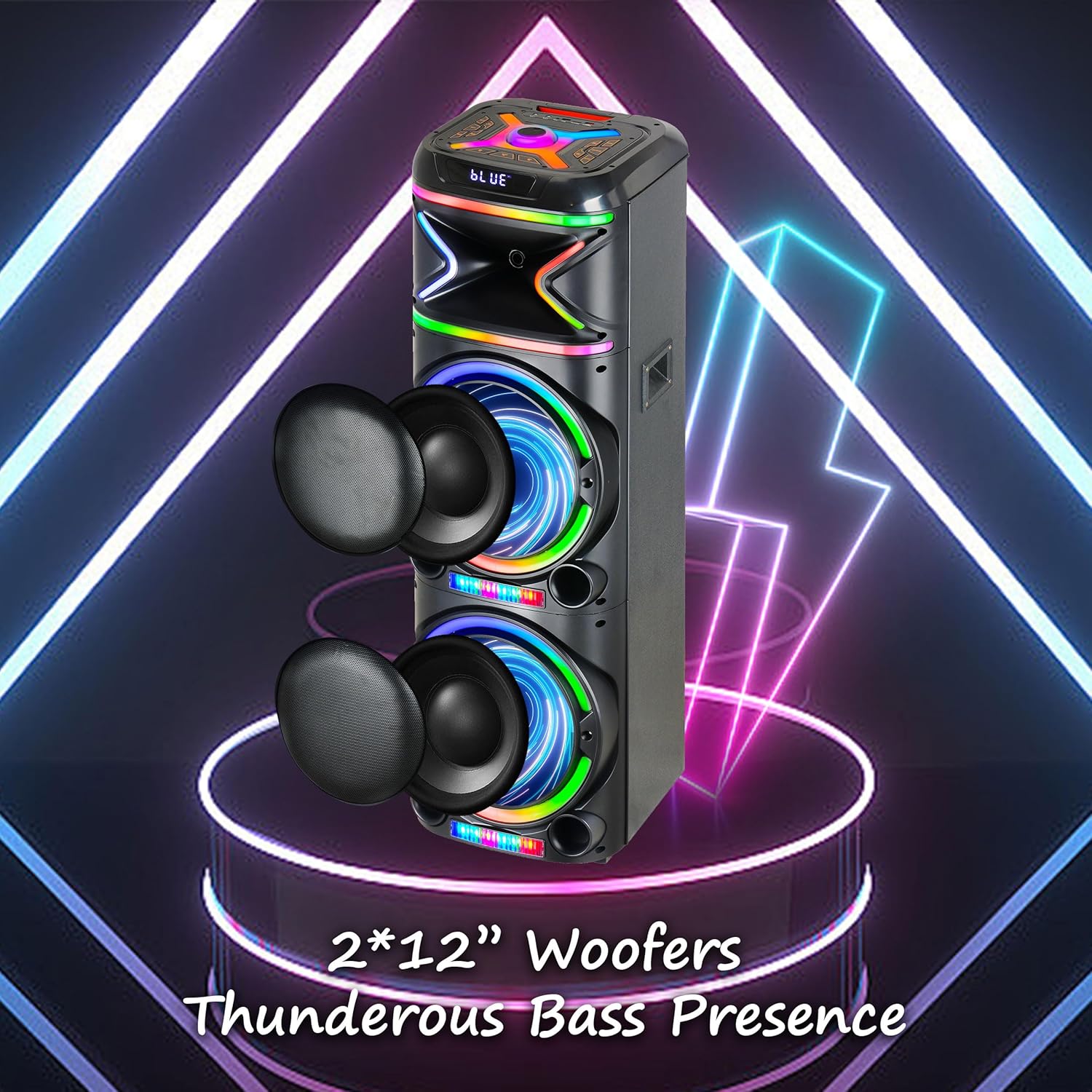
Сүрөт: Жакын план view emphasizing the two 12-inch woofers, responsible for the speaker's powerful bass and clear audio output.
2. Эмнелер камтылган
Сураныч, пакеттин мазмунун текшерип, бардык буюмдар бар экенин текшериңиз:
- AL-212 Wireless Bluetooth Speaker
- Алыстан башкаруу
- Зымдуу микрофон
- Кубаттуу адаптер
- Колдонуучунун Колдонмосу (бул документ)
- Кепилдик картасы

Image: Visual representation of the speaker's dimensions and the accessories included in the package: wireless microphone, remote control, and portable wheels.
3. Башкаруу каражаттары жана порттор
Familiarize yourself with the control panel and various input/output ports located on the top and rear of the speaker.
Жогорку панелдин башкаруу элементтери:

Сүрөт: деталдуу view of the speaker's top control panel, showing buttons for various functions and input ports.

Image: A simplified diagram highlighting the key control buttons and their functions on the speaker's interface.
- Кубат баскычы: Динамикти күйгүзөт же өчүрөт.
- Режим баскычы: Switches between Bluetooth, FM Radio, AUX, USB, and TF Card modes.
- Үн баскычы: Негизги үндү тууралайт.
- Микрофондун үн баскычы: Микрофондун үнүн тууралайт.
- Эхо баскычы: Adjusts the microphone echo effect.
- LED Mode Button: Changes the LED light patterns.
- Ойнотуу/тындыруу баскычы: Аудиону ойнотот же тындырат.
- Мурунку/Кийинки трек баскычтары: Мурунку же кийинки трекке өтүшөт.
- Жазуу баскычы: Records microphone input to USB/TF card.
- TWS баскычы: Чыныгы зымсыз стерео жупташтырууну баштайт.
Киргизүү / Чыгуу порттору:
- USB порт: For USB drive playback and charging external devices.
- TF карта уячасы: TF (MicroSD) картасын ойнотуу үчүн.
- AUX киргизүү (3.5 мм): Connect external audio devices via an audio cable.
- Микрофон киргизүү (6.35 мм): Зымдуу микрофонду туташтырыңыз.
- Гитара киргизүү (6.35 мм): Connect a guitar or other instrument.

Image: The AL-212 speaker displayed with icons representing its versatile connectivity options, including Bluetooth, USB, TF card, AUX, microphone, and remote control.
4. Орнотуу
4.1 Динамикти заряддоо
The AL-212 speaker is battery-powered. Before first use, fully charge the speaker using the provided power adapter. The charging indicator light will show the charging status and turn off when fully charged.
4.2 Баштапкы күйгүзүү
Press and hold the Power button on the top panel to turn on the speaker. You will hear a power-on prompt, and the LED lights will illuminate.
5. Иштөө нускамалары
5.1 Bluetooth жупташтыруу
- Turn on the speaker. It will automatically enter Bluetooth pairing mode, indicated by a flashing 'BLUE' on the display and an audible prompt.
- Смартфонуңузда, планшетиңизде же башка Bluetooth иштетилген түзмөгүңүздө Bluetooth'ду иштетиңиз.
- Издөө "AL-212" in the list of available devices and select it to connect.
- Once connected, you will hear a confirmation sound, and the 'BLUE' indicator will stop flashing.

Image: A smartphone screen showing the Bluetooth pairing menu, with the AL-212 speaker and a Bluetooth icon, illustrating the connection process.
5.2 Чыныгы зымсыз стерео (TWS) жупташтыруу
To achieve a stereo sound experience, you can pair two AL-212 speakers together using the TWS function.
- Ensure both AL-212 speakers are powered on and not connected to any Bluetooth device.
- Press the 'TWS' button on one of the speakers. It will emit a sound indicating it's searching for another speaker.
- Эки динамик автоматтык түрдө бири-бирине туташат. Туташтырылгандан кийин, сиз ырастоо үнүн угасыз.
- Now, connect your Bluetooth device to one of the paired speakers (the master speaker) as described in Section 5.1. Audio will play in stereo through both speakers.

Image: Two AL-212 speakers positioned outdoors, demonstrating the True Wireless Stereo (TWS) feature with a dotted line indicating the wireless connection between them.

Image: A simplified diagram showing two AL-212 speakers with a dotted line and 'TWS' label, illustrating the True Wireless Stereo connection.
5.3 USB/TF картасын ойнотуу
Insert a USB flash drive or TF (MicroSD) card into the respective port. The speaker will automatically switch to USB/TF mode and begin playing audio fileс. Ойноону көзөмөлдөө үчүн Ойнотуу/Тыным жана Мурунку/Кийинки трек баскычтарын колдонуңуз.
5.4 AUX киргизүү
Connect an external audio device (e.g., MP3 player, laptop) to the AUX input port using a 3.5mm audio cable. The speaker will automatically switch to AUX mode. Control playback from your connected device.
5.5 Микрофонду колдонуу
Connect the provided wired microphone to the Microphone Input port. Adjust the microphone volume using the 'Mic Vol' knob and add echo effects with the 'Echo' knob. You can sing along with music playing from any source.
5.6 FM радиосу
Press the 'Mode' button until you hear the FM radio prompt. Press the 'Play/Pause' button to auto-scan and save available FM stations. Use the Previous/Next Track buttons to switch between saved stations.
5.7 LED жарык режимдери
Press the 'LED Mode' button to cycle through different LED light patterns and effects. Press it repeatedly to find your preferred lighting display.

Image: The AL-212 speaker illuminated with its vibrant, multi-color LED lights, showcasing the dynamic light show feature.
5.8 Алыстан башкаруу функциялары
The included remote control provides convenient access to all speaker functions from a distance. Refer to the remote control diagram in the package for specific button layouts and functions.
6. Техникалык тейлөө
- Тазалоо: Динамиктин сыртын тазалоо үчүн жумшак, кургак чүпүрөктү колдонуңуз. Абразивдүү тазалоочу каражаттарды, момдорду же эриткичтерди колдонбоңуз.
- Сактагыч: Узак мөөнөткө колдонулбаганда, динамикти күн тийбеген жана өтө температурадан алыс, салкын, кургак жерде сактаңыз.
- Батареяга кам көрүү: Батареянын иштөө мөөнөтүн узартуу үчүн, динамикти тез-тез толук зарядсыздандырбаңыз. Колдонулбаса дагы, аны үзгүлтүксүз кубаттап туруңуз.
- Суу таасири: Бул динамик суу өткөрбөйт. Аны сууга же ашыкча нымдуулукка дуушар кылуудан алыс болуңуз.
7. Кыйынчылыктарды
If you encounter issues with your AL-212 speaker, please refer to the following common problems and solutions:
| Көйгөй | Мүмкүн себеп | Чечим |
|---|---|---|
| Динамик күйбөйт. | Батарея аз же түгөнүп калган. | Connect the speaker to the power adapter and charge it fully. |
| Үн чыгышы жок. | Үн өтө төмөн; Туура эмес режим тандалды; Түзмөк туура эмес туташтырылган. | Increase the speaker volume. Ensure the correct input mode (Bluetooth, AUX, USB/TF) is selected. Reconnect your device. |
| Bluetooth байланышы ишке ашпай калды. | Динамик жупташтыруу режиминде эмес; Түзмөк өтө алыс; Интерференция. | Ensure the speaker is in Bluetooth pairing mode. Move your device closer to the speaker. Avoid obstacles and other wireless devices. |
| Микрофон иштебей жатат. | Microphone not plugged in correctly; Mic volume is low. | Ensure the microphone is securely plugged into the correct input. Increase the 'Mic Vol' knob. |
| TWS жупташтыруу ишке ашпай калды. | Speakers are already connected to another device; Speakers are too far apart. | Disconnect both speakers from any Bluetooth devices. Ensure they are within close proximity (within 10 meters) during pairing. |
8. Техникалык шарттар
| Өзгөчөлүк | Деталь |
|---|---|
| Модель аты | AL-212-BK |
| Динамик түрү | Вуфер |
| Динамик өлчөмү | Кош 12 дюйм |
| Байланыш технологиясы | Bluetooth, көмөкчү, USB |
| Зымсыз байланыш технологиясы | Bluetooth |
| Bluetooth диапазону | 33 фут (10 метр) |
| Аудио чыгаруу режими | Стерео (2.0 Айланадагы үн каналынын конфигурациясы) |
| Өзгөчөлүктөр | LED Light, Built-In Microphone, USB Port, Display, FM Radio, Remote Control |
| Power Source | Батарея менен иштейт |
| Продукциянын өлчөмдөрү | 14.96"D x 7.48"W x 14.96"H |
| Түс | Кара |
| Монтаж түрү | Туруктуу, сайгыч |
| Өндүрүүчү | Top Tech Audio |
| UPC | 755824425927 |
9. Кепилдик жана колдоо
The TOPTECH AL-212 speaker comes with a Limited Warranty. Please refer to the included Warranty Card for detailed terms and conditions, including coverage period and claim procedures.
For technical support, troubleshooting assistance beyond this manual, or warranty inquiries, please contact TOPTECH customer service. Contact information can typically be found on the warranty card or the official TOPTECH webсайт.
Note: No official product videos from the seller were found to be embedded based on the provided criteria.


