1. Киришүү
This manual provides detailed instructions for the installation, operation, and maintenance of your ZSUS X99 P4 Motherboard Kit. This kit includes the ZSUS X99 P4 motherboard, an Intel Xeon E5-2650 V4 CPU, and 16GB of DDR4 RAM. Please read this manual thoroughly before beginning the installation process to ensure proper setup and optimal performance.
2. Пакеттин мазмуну
Carefully unpack the contents of your ZSUS X99 P4 Motherboard Kit. Verify that all items listed below are present and undamaged. If any items are missing or damaged, please contact your retailer.
- ZSUS X99 P4 Motherboard
- Intel Xeon E5-2650 V4 CPU (pre-installed or separate)
- 1 x 16GB DDR4 RAM Module
- I / O Shield
- SATA кабели(лери)

Image: Contents of the ZSUS X99 P4 Motherboard Kit, including the motherboard, CPU, RAM, and accessories.

Image: The ZSUS X99 P4 Motherboard and its I/O shield, securely packaged in anti-static bags.
3. Продукт бүтүп калдыview
The ZSUS X99 P4 motherboard is designed to support Intel LGA2011-3 processors, offering robust performance for various computing needs. Below is an overview of the key components and ports on the motherboard.

Сүрөт: деталдуу view of the ZSUS X99 P4 Motherboard with labels indicating various ports and connectors, including PS/2, USB 2.0, USB 3.0, Gigabit Ethernet, Audio, PCIe x16, PCIe x1, SATA, 4-pin CPU fan, 8-pin DC, 24-pin DC, DDR4 slots, and M.2 port.
Негизги компоненттер:
- CPU розеткасы: LGA2011-3, compatible with Intel Xeon E5 V3/V4 series processors.
- Чипсет: X99 or B85 (versions may vary).
- Эстутум Slots: 4 x DDR4 DIMM slots, supporting dual-channel memory up to 128GB at 2133MHz/2400MHz.
- PCIe Slots: Two PCIe x16 slots for graphics cards and one PCIe x1 slot for expansion cards.
- Сактагыч: One M.2 port (supports PCIe M.2 or SATA M.2) and multiple SATA ports (one SATA 3.0, two SATA 2.0).
- USB порттору: Four USB 2.0 interfaces and two USB 3.0 interfaces on the rear I/O, plus internal headers for additional USB 2.0 ports.
- Networking: Integrated Realtek Gigabit Ethernet.
- Аудио: Integrated audio interface with LINE OUT and LINE IN.

Image: The ZSUS X99 P4 Motherboard with the Intel Xeon E5 2650 V4 CPU installed in the LGA2011-3 socket and DDR4 RAM modules in the memory slots.
4. Техникалык шарттар
Detailed technical specifications for the ZSUS X99 P4 Motherboard Kit:
| Компонент | Спецификация |
|---|---|
| Motherboard Model | ZSUS X99 P4 |
| CPU розетка | Intel LGA2011-3 |
| Шайкеш келген CPU'лар | Intel Xeon E5 V3/V4 Series |
| Чипсет | X99 or B85 (randomly shipped) |
| Memory Type | DDR4 (Dual Channel) |
| Memory Slots | 4 x DDR4 DIMM |
| Эс тутумдун максималдуу сыйымдуулугу | 128 ГБ |
| Memory Clock Speed | 2133 MHz (up to 2400 MHz) |
| картриджа Slots | 2 x PCIe x16, 1 x PCIe x1 |
| M.2 Port | 1 (supports PCIe M.2 or SATA M.2) |
| SATA порттору | 1 x SATA 3.0, 2 x SATA 2.0 |
| USB порттору (арткы I/O) | 4 х USB 2.0, 2 х USB 3.0 |
| Ethernet | Realtek Gigabit Ethernet |
| Аудио | Integrated Audio (LINE OUT, LINE IN) |
| Power Connectors | 1 x 8-pin ATX, 1 x 24-pin ATX |
| Өлчөмдөр | 216 x 190 мм |
| Included CPU | Intel Xeon E5-2650 V4 (12 Cores/24 Threads) |
| CPU Base Frequency | 2.2 ГГц (2.9 ГГц Турбо чейин) |
| CPU кэши | 30 MB L3 Cache |
| CPU Lithography | 14 нм |
| Included RAM | 1 x 16GB DDR4 2133 MHz |

Image: The ZSUS X99 P4 Motherboard displaying its physical dimensions: 215mm width and 190mm length.
5. Орнотуу колдонмосу
Follow these steps to properly install the components and set up your motherboard kit.
5.1. CPU орнотуу
- CPU розеткасынын рычагы ачык экенин текшериңиз.
- Carefully align the CPU (Intel Xeon E5-2650 V4) with the socket, matching the golden triangle on the CPU to the triangle on the socket. Do not force the CPU into place.
- CPUну розеткага акырын түшүрүңүз.
- CPUну бекитүү үчүн розетка рычагын жабыңыз.
- Процессордун үстү жагына жука, тегиз термикалык пастаны сүйкөңүз.
- CPU муздаткычын өндүрүүчүнүн көрсөтмөлөрүнө ылайык орнотуңуз.

Image: The Intel Xeon E5-2650 V4 CPU, which is part of the kit.

Сүрөт: Жакын пландагы үстү view of the Intel Xeon E5-2650 V4 CPU, showing its integrated heat spreader.
5.2. RAM орнотуу
- Locate the DDR4 memory slots on the motherboard.
- Эстутум уясынын эки учундагы клиптерди ачыңыз.
- Align the notch on the DDR4 RAM module with the key in the memory slot.
- Press down firmly on both ends of the RAM module until the clips snap into place, securing the module.
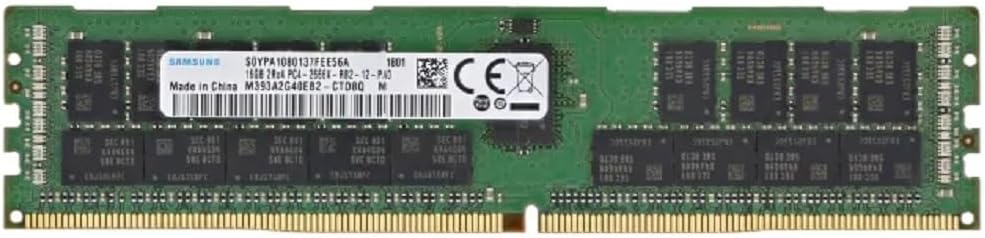
Image: A 16GB DDR4 RAM module, included in the kit, ready for installation.
5.3. Storage Device Installation (M.2 / SATA)
- For M.2 SSD: Locate the M.2 slot. Insert the M.2 SSD at an angle into the slot, then gently push it down and secure it with the provided screw.
- For SATA Drives: Connect one end of the SATA data cable to a SATA port on the motherboard and the other end to your SATA hard drive or SSD. Connect a SATA power cable from your power supply to the drive.
5.4. Электр байланыштары
- Электр булагыңыздагы 24-пиндүү ATX кубат туташтыргычын энелик платадагы 24-пиндүү кубат розеткасына туташтырыңыз.
- Connect the 8-pin ATX 12V power connector from your power supply to the 8-pin power socket near the CPU.
5.5. Перифериялык байланыштар
- Графикалык карта: Insert your graphics card into one of the PCIe x16 slots and secure it. Connect any necessary PCIe power cables from your power supply to the graphics card.
- Алдыңкы панелдин туташтыргычтары: Кубат баскычын, баштапкы абалга келтирүү баскычын, HDD LEDди, кубат LEDди жана алдыңкы панелдин USB/аудио баштарын энелик платадагы тиешелүү пиндерге туташтырыңыз. Туура пин дайындоо үчүн энелик плата диаграммасын караңыз.
- USB түзмөктөрү: Connect your keyboard, mouse, and other USB devices to the USB ports on the rear I/O panel.
- Ethernet: Connect an Ethernet cable to the Gigabit Ethernet port for network access.
- Аудио: Connect your speakers or headphones to the audio output port.
6. Иштөө нускамалары
6.1. Баштапкы жүктөө
- After all components are installed and connected, ensure your power supply is switched on.
- Компьютериңиздин корпусундагы кубат баскычын басыңыз.
- The system should power on and display the BIOS/UEFI splash screen.
6.2. BIOS/UEFI Орнотуу
Upon initial boot, you may need to enter the BIOS/UEFI setup to configure settings such as boot order, date/time, and enable specific features (e.g., NVMe support). Typically, you can enter the BIOS by pressing the DEL or F2 key during the boot process.
- Менюлар аркылуу жебе баскычтарын колдонуп жылдырыңыз.
- Керектүү оңдоолорду киргизиңиз.
- Save changes and exit the BIOS. The system will then restart.
6.3. Операциялық системаны орнотуу
Once the BIOS is configured, you can proceed with installing your preferred operating system (e.g., Windows, Linux) from a bootable USB drive or DVD.
7. Техникалык тейлөө
Regular maintenance helps ensure the longevity and stable operation of your motherboard kit.
- Чаңды тазалоо: Мезгил-мезгили менен кысылган абаны колдонуп, энелик платадан жана компоненттерден чаңды тазалап туруңуз. Тазалоодон мурун системанын өчүрүлгөнүн жана розеткадан ажыратылганын текшериңиз.
- Кабелдик башкаруу: Бардык кабелдер тыкан жана аба агымына тоскоол болбогонун текшериңиз.
- BIOS жаңыртуулары: Өндүрүүчүнү текшериңиз website for BIOS updates. Only update the BIOS if necessary and follow the instructions carefully.
- Драйвер жаңыртуулары: Keep your operating system and component drivers (chipset, graphics, audio, network) updated for optimal performance and stability.
8. Кыйынчылыктарды
If you encounter issues with your ZSUS X99 P4 Motherboard Kit, refer to the following common troubleshooting steps:
- Кубат жок:
- Бардык электр байланыштарын текшериңиз (24-пин ATX, 8-пин CPU, GPU кубаттуулугу).
- Кубат менен камсыз кылуу которгучу күйүп турганын текшериңиз.
- Башка система же электр менен жабдууну сыноочу менен кубат менен камсыздоону текшериңиз.
- Дисплей жок:
- Ensure the monitor is connected to the graphics card (not the motherboard, as this CPU/motherboard combo does not have integrated graphics).
- Графикалык картаны жана RAM модулдарын кайра орнотуңуз.
- Бир гана RAM таякчасы менен жүктөөгө аракет кылыңыз.
- Системанын туруксуздугу/бузуулар:
- CPU жана GPU температурасын текшерүү. Адекваттуу муздатууну камсыз кылыңыз.
- RAM каталарын текшерүү үчүн эстутум диагностикалык куралдарын иштетиңиз.
- Бардык айдоочулар жаңыртылганын текшериңиз.
- Жүктөө түзмөк табылган жок:
- SATA/M.2 кабелинин туташууларын текшериңиз.
- BIOS/UEFIде жүктөө тартибин текшериңиз.
- Ensure the operating system is properly installed on the drive.
For more complex issues, consider consulting online forums or professional technical support.
9. Кепилдик жана колдоо
Information regarding specific warranty terms and conditions for the ZSUS X99 P4 Motherboard Kit is not available in this manual. Please refer to the product packaging or contact your retailer for warranty details.
For technical support, please contact the vendor or retailer from whom you purchased this product. Keep your proof of purchase for any warranty claims or support inquiries.


