Продукт бүттүview
The PRYMEBLU® BT-503-V2 is a Bluetooth wireless Push-To-Talk (PTT) button and headset adapter designed to enhance communication for two-way radio users. This adapter allows for seamless integration of wireless headsets and other audio accessories with compatible radios, providing increased flexibility and convenience.
It is specifically designed for Motorola (X03) two-pin radios and similar models, including digital radios. The adapter features an easy pairing process and maintains its connection even if the radio is powered off or the adapter is removed.

Сүрөт: алдыңкы view of the PRYMEBLU BT-503-V2 adapter, showcasing its compact design and the PRYMEBLU V2 branding.
Орнотуу жана орнотуу
- Prepare Your Radio: Before connecting the PRYMEBLU adapter, always ensure your two-way radio is powered off. This prevents potential damage to both the radio and the adapter.
- Адаптерди туташтыруу: Insert the two-pin connector of the BT-503-V2 adapter into the accessory port of your compatible Motorola (X03) two-pin radio. Ensure a secure fit.
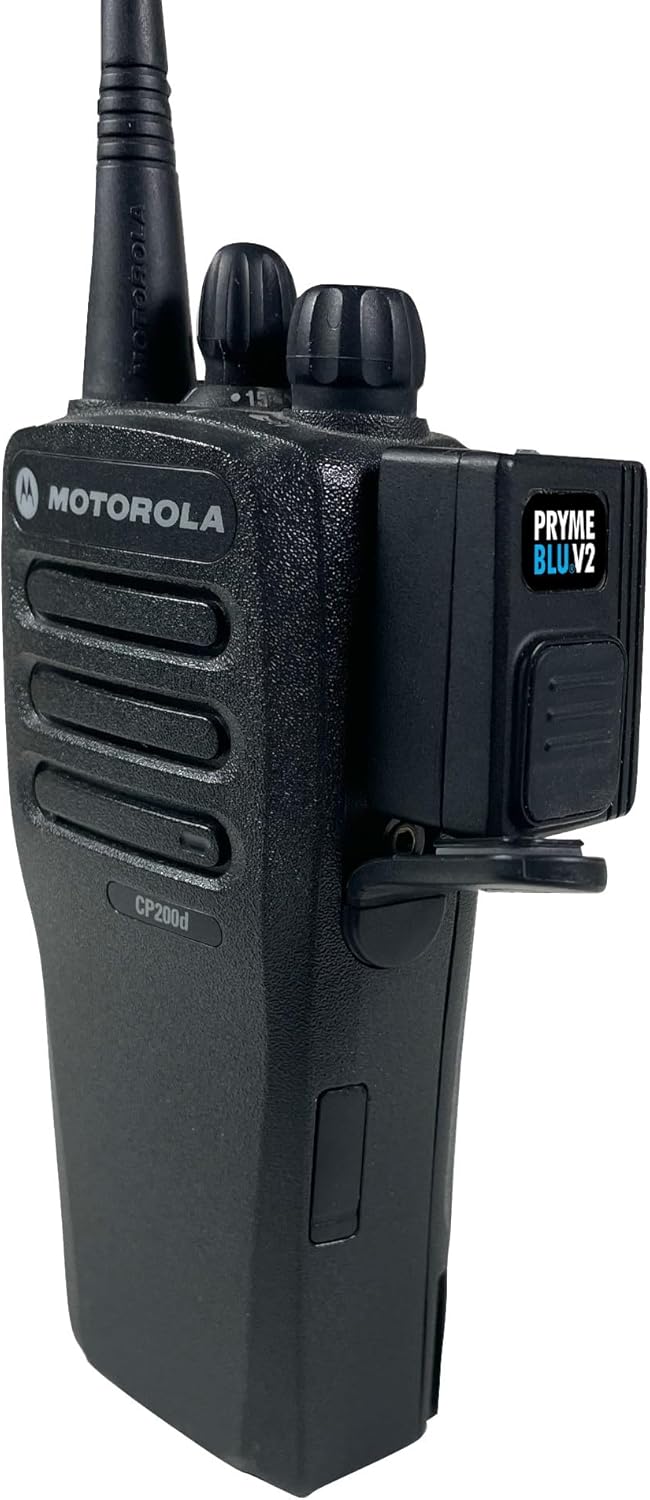
Image: The PRYMEBLU BT-503-V2 adapter securely connected to the side port of a Motorola two-way radio, demonstrating proper installation.
- Күйгүзүү: Once the adapter is securely connected, power on your two-way radio. The adapter will automatically power on with the radio.
- Pairing with a Wireless Headset:
- Put your wireless headset or audio accessory into pairing mode (refer to your headset's manual for specific instructions).
- The PRYMEBLU BT-503-V2 adapter will automatically attempt to pair with nearby Bluetooth devices in pairing mode.
- Once paired, the adapter stores the connection, meaning it will automatically reconnect to your headset even if the radio is turned off and on again, or if the adapter is temporarily removed.
- Заряддоо: The adapter can be charged via its USB port. Connect a standard USB charging cable to the adapter and a compatible USB power source.

Сүрөт: Жогорку view of the PRYMEBLU BT-503-V2 adapter with a USB charging cable inserted, illustrating the charging port location.
Note: This adapter is compatible with most available wireless headsets and other audio accessories. For Kenwood (and many imported radios) that also use two-pin connectors but with different spacing, please use the BT-501-V2 model.
Иштөө нускамалары
The PRYMEBLU BT-503-V2 offers flexible Push-To-Talk (PTT) options for transmitting audio through your radio.
- Using the On-Adapter PTT Button: Press and hold the large PTT button located on the side of the PRYMEBLU adapter to initiate transmissions. Release the button to stop transmitting.
- Using an Optional PRYME Wireless PTT: For added convenience, you can pair an optional PRYME wireless PTT button with the adapter. This allows for remote activation of transmissions without needing to reach for the adapter or radio. Refer to the specific instructions provided with your PRYME wireless PTT for pairing and operation.
- Аудио берүү: Once paired, all audio from your radio will be routed to your wireless headset, and your voice will be transmitted through the headset's microphone when the PTT is activated.
Техникалык тейлөө жана кам көрүү
Proper care and maintenance will ensure the longevity and optimal performance of your PRYMEBLU BT-503-V2 adapter.
- Тазалоо: Use a soft, dry cloth to wipe down the adapter. Avoid using harsh chemicals, solvents, or abrasive cleaners, as these can damage the device's surface and internal components.
- Сактагыч: Узак мөөнөткө колдонулбаганда, адаптерди салкын, кургак жерде, тике күндүн нурунан жана өтө температурадан алыс сактаңыз.
- Суу каршылык: The product is described as "Weather Resistant" (Resistente ao tempo). While it can withstand some exposure to elements, it is not fully waterproof. Avoid submerging the device in water or exposing it to heavy rain.
- Колдонуу: Handle the adapter with care. Avoid dropping it or subjecting it to strong impacts, which could damage internal circuitry.
Проблемаларды чечүү
If you encounter issues with your PRYMEBLU BT-503-V2 adapter, refer to the following common troubleshooting steps:
| Көйгөй | Мүмкүн болгон себеп / Чечим |
|---|---|
| Adapter not powering on. |
|
| Cannot pair with headset. |
|
| Гарнитурадан аудио жок. |
|
| Cannot transmit (PTT not working). |
|
Техникалык шарттар
Key technical specifications for the PRYMEBLU® BT-503-V2 adapter:
- Модел: BT-503-V2
- Шайкештик: Motorola (X03) two-pin radios and similar models, including digital radios. Compatible with most wireless headsets.
- Байланыш: Bluetooth зымсыз
- Өзгөчөлүктөр: Weather Resistant, Lightweight
- Кубат булагы: Primarily powered by the radio when connected; features a USB port for charging internal components.
- Продукциянын өлчөмдөрү: Not explicitly stated for the adapter itself, but packaging dimensions are approximately 19.05 x 17.78 x 6.35 cm (7.5 x 7 x 2.5 inches).
- Продукциянын салмагы (таңгакталган): Approximately 907 g (2 lbs). Note: This weight refers to the packaged product, likely for the 5-pack. The adapter itself is lightweight.
- Порттардын саны: 1 (for radio connection)
- ASIN: B0CZBZR71J
- UPC: 0638615223134

Image: Product packaging for the PRYMEBLU BT-503-V2 (5-pack), showing product details, compatibility, and manufacturer information. Note the UPC code and webсайт.
Кепилдик жана колдоо
For information regarding product warranty, returns, or technical support, please refer to the official Pryme webсайтка же түздөн-түз кардарларды тейлөөгө кайрылыңыз.
Официалдуу Webсайт: www.pryme.com
Pryme Store on Amazon: Visit Pryme Store
The product is available for purchase since March 28, 2024. For specific return policies, please consult the retailer where the product was purchased.


