1. Киришүү
ATTACK SHARK X85 Gasket механикалык клавиатурасын тандаганыңыз үчүн рахмат. Бул колдонмодо жаңы клавиатураңызды кантип орнотуу, иштетүү жана тейлөө боюнча кеңири көрсөтмөлөр берилген. Түзмөгүңүздүн оптималдуу иштешин жана узак мөөнөттүү иштешин камсыз кылуу үчүн колдонуудан мурун бул колдонмону кылдат окуп чыгыңыз.

ATTACK SHARK X85 механикалык клавиатурасы, көп функциялуу баскычы бар компакттуу 75% макетке ээ.
2. Пакеттин мазмуну
Төмөндө тизмеленген нерселердин баары пакетиңизге камтылганын текшериңиз:
- ATTACK SHARK X85 прокладкасынын механикалык клавиатурасы
- USB-C - USB-A кабели
- 2.4 ГГц зымсыз кабылдагыч
- Баскычтын капкагын жана которгучту тартуучу курал
- Кошумча баскычтоптор (Кызгылт көк түстөгү баскычтоптор)
- Колдонуучунун Колдонмосу (бул документ)
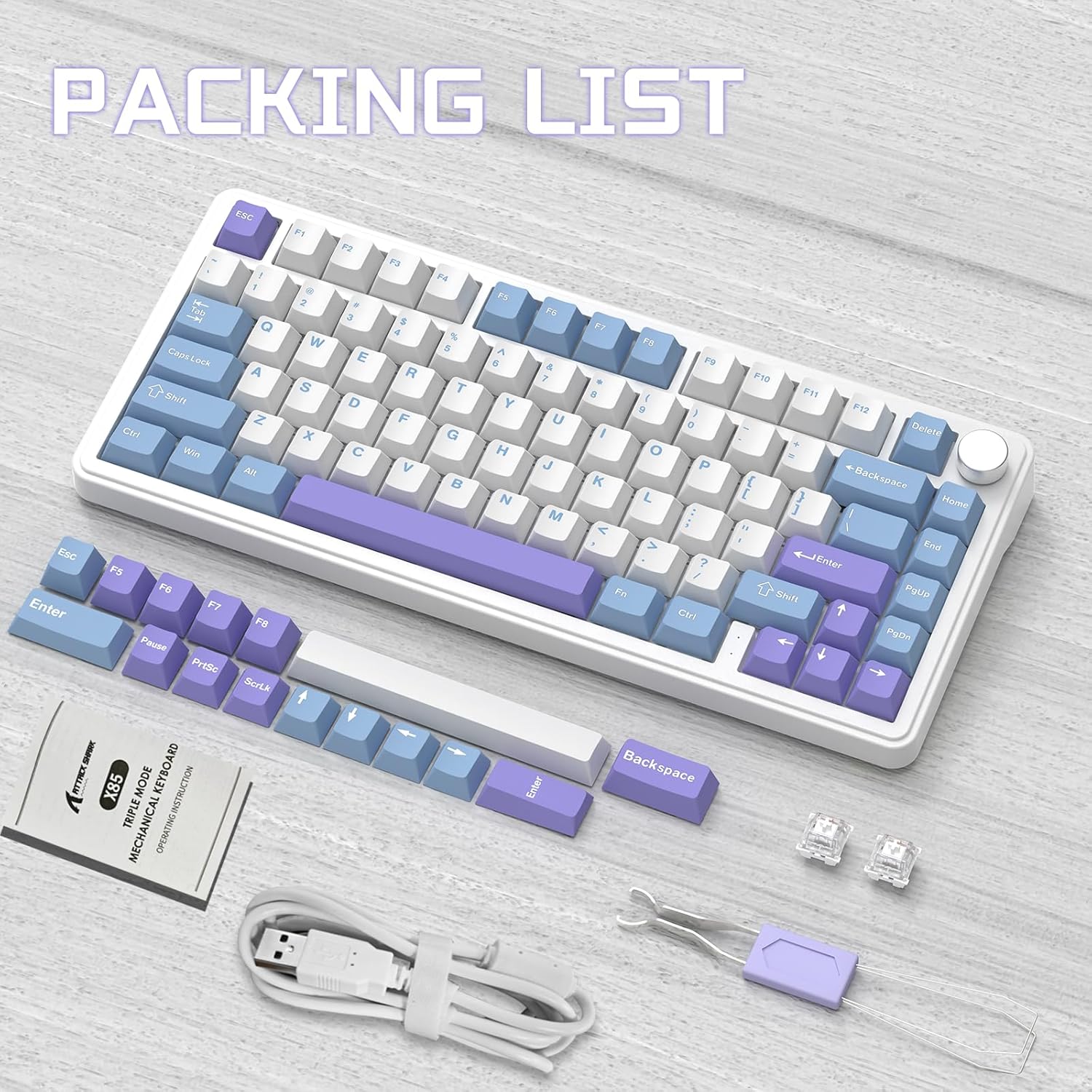
ATTACK SHARK X85 клавиатура топтомунун мазмуну, анын ичинде клавиатура, кабелдер, шаймандар жана кошумча баскычтоп капкактары.
3. Продукт бүтүп калдыview
3.1 Негизги өзгөчөлүктөрү
- 75% компакттуу жайгашуусу: Иш столунун мейкиндигин максималдуу түрдө пайдалануу үчүн 81 баскычтуу дизайн.
- Tri-Mode туташуу: Bluetooth 5.0, 2.4 ГГц зымсыз жана USB-C зымдуу туташууларын колдойт.
- Прокладканы орнотуунун дизайны: Жумшак жана ийкемдүү терүү сезимин берүү үчүн беш катмарлуу үн жана соккуну сиңирүүчү ички төшөмө (PORON көбүгү, IXPE которгуч төшөмө, PET үн күчөткүч төшөмө, астыңкы силикон төшөмө)
- Ыкчам алмаштыруучу которгучтар: Оңой ыңгайлаштыруу үчүн көпчүлүк 3-пиндүү механикалык өчүргүчтөр менен шайкеш келет.
- Көп функциялуу баскыч: Компьютердин үнүн жана клавиатуранын арткы жарыгынын жөндөөлөрүн башкарат.
- PBT баскычтоптору: Калың дубалдары бар бышык, эскирүүгө туруктуу ачкыч капкактар.
- RGB жарыктандыруу: 19 RGB режими, 7 монохром режими жана жөнгө салынуучу ылдамдыгы жана интенсивдүүлүгү бар толук түстүү жарык. Программалык камсыздоо аркылуу ыңгайлаштырууга болот.
- 5000 мАч Батарея: Автоматтык түрдө уйку режиминде энергияны үнөмдөө менен узак убакыт бою зымсыз колдонуу үчүн жогорку кубаттуулуктагы батарея.
- 100% Анти-Гостинг: Тез терүү же оюн ойноо учурунда бардык баскычтардын так жазылышын камсыздайт.
- Кеңири шайкештик: Windows жана Mac операциялык системалары менен толук шайкеш келет.
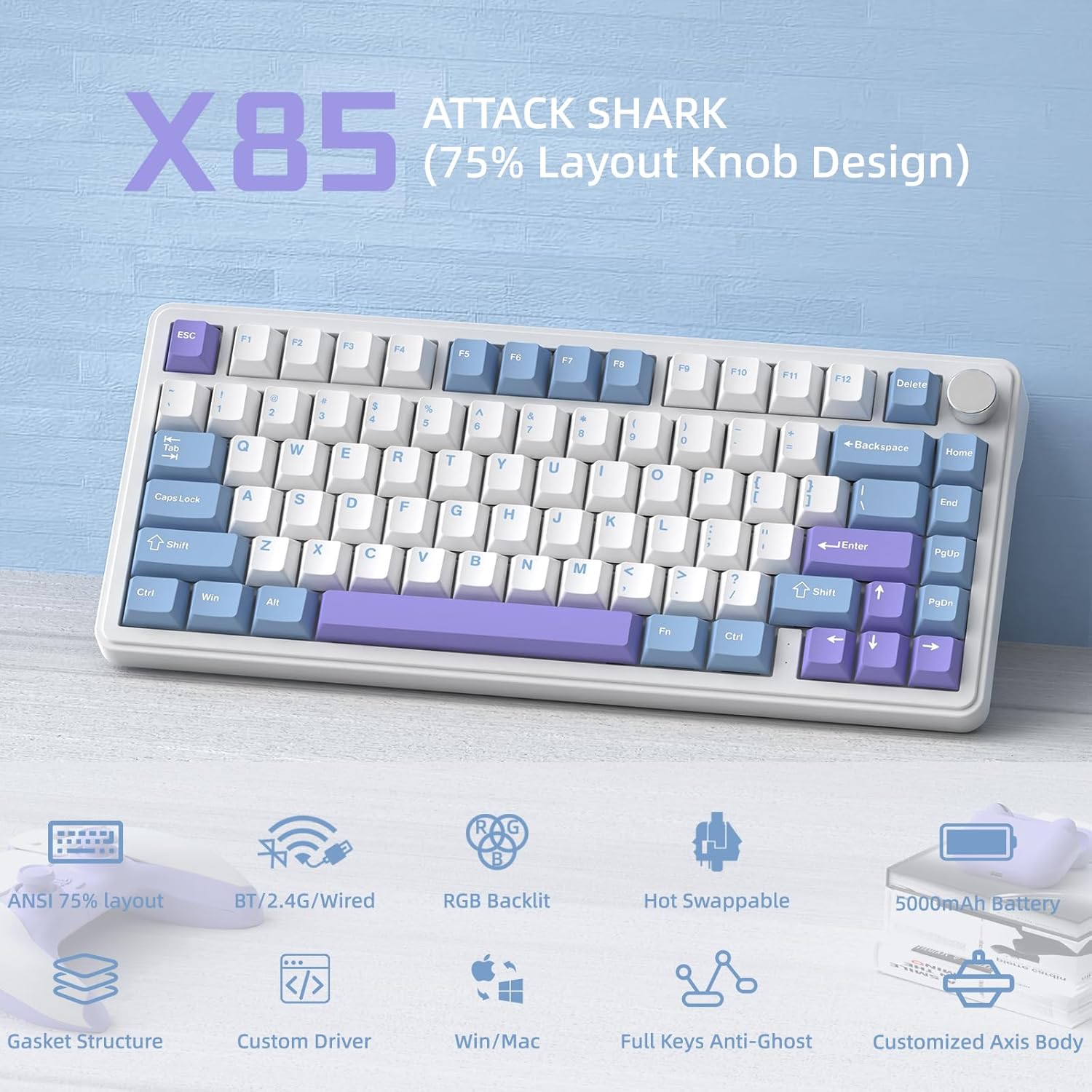
An overview ATTACK SHARK X85тин негизги өзгөчөлүктөрүнүн, анын ичинде анын 75% жайгашуусу, үч режимдүү туташуусу, RGB жарыктандыруусу жана ысык алмаштырылуучу дизайны.
3.2 Ички түзүлүш (Тыгыздоочу түзүлүш)
X85 акустиканы жана терүү сезимин жакшыртуу үчүн бир нече катмарлуу өркүндөтүлгөн прокладка орнотуу дизайнына ээ:
- баскыч
- PBT Keycaps
- Жогорку капкак
- Которуу
- ЖК горизонталдуу оюктуу позициялоочу плита
- PORON жууркан менен тигилген пахтадан жасалган
- IXPE которгуч тактасы
- PET үн күчөткүчү
- Бир ачкычтуу оюктуу PCB
- Которгуч отургучтун үнсүздөткүчүнүн астыңкы бөлүгү пахтадан жасалган
- Силикон аянтчасы
- Bottom Case

X85 клавиатурасынын беш катмарлуу толтургуч жана прокладка орнотуу түзүлүшүн көрсөткөн диаграмма, анын ар кандай ички компоненттерин көрсөтөт.
4. Орнотуу
4.1 Үч режимдүү туташуу
ATTACK SHARK X85 клавиатурасы үч туташуу режимин колдойт: Bluetooth, 2.4 ГГц зымсыз жана USB-C зымдуу. Туташуу режимин клавиатуранын арткы бетиндеги которгучту колдонуп оңой которуштурууга болот.

ATTACK SHARK X85 клавиатурасын Bluetooth, 2.4G зымсыз жана USB-C зымдуу режимдери аркылуу туташтыруу боюнча визуалдык колдонмо.
4.1.1 Bluetooth байланышы
- Баскычтоптун арткы жагындагы которгучту "BT" абалына коюңуз.
- Узак басуу Fn + Q, Fn + W, же Fn + E тиешелүү баскычтын арткы жарыгы тез күйгөнгө чейин үч секунддан ашык басып туруңуз. Бул жупташтыруу режимин билдирет.
- Түзмөгүңүздө (компьютер, планшет же смартфон) Bluetooth'ту күйгүзүп, "ATTACK SHARK X85" деп издеңиз.
- Туташуу үчүн клавиатураны тандаңыз. Туташтырылгандан кийин, баскычтын арткы жарыгы күйүп-өчүүнү токтотуп, туруктуу бойдон калат.
- Сиз үчкө чейин Bluetooth түзмөктөрүн жупташтырып, алардын ортосунда баскычын басуу менен которула аласыз Fn + Q, Fn + W, же Fn + E.
4.1.2 2.4 ГГц зымсыз байланыш
- 2.4 ГГц зымсыз кабыл алгычты (донгл) таңгактан табыңыз.
- Баскычтоптун арткы жагындагы которгучту "2.4G" абалына которуңуз.
- 2.4 ГГц зымсыз кабыл алгычты компьютериңиздеги жеткиликтүү USB портуна сайыңыз.
- Баскычтоп автоматтык түрдө туташышы керек. Эгер туташпаса, кабыл алгыч туура салынганын жана баскычтоп 2.4G режиминде экенин текшериңиз.
4.1.3 USB-C зымдуу туташуу
- Клавиатуранын арткы жагындагы которгучту "Line" (зымдуу) абалына которуңуз.
- Берилген USB-C кабелинин бир учун клавиатуранын USB-C портуна туташтырыңыз.
- USB-A кабелинин экинчи учун компьютериңиздеги жеткиликтүү USB портуна туташтырыңыз.
- Клавиатура стандарттуу USB клавиатурасы катары таанылат жана колдонууга даяр болот.
4.2 Операциялык системанын шайкештиги
ATTACK SHARK X85 клавиатурасы Windows жана Mac операциялык системалары менен толук шайкеш келет. Оптималдуу баскычтарды табуу үчүн "Win" жана "Mac" режимдеринин бирин тандоо үчүн клавиатуранын арткы жагындагы которгучту колдонуңуз.
5. Иштөө нускамалары
5.1 Көп функциялуу айланма туткасы
Баскычтоптун жогорку оң жагындагы баскыч бир нече функцияларды аткарат, үндү жана жарыкты жөндөөнү башкарат.

X85 клавиатурасында жарыктандыруу жана үн жөндөөлөрүн башкаруу үчүн көп функциялуу айланма баскычты колдонуу боюнча нускамалар.
- Которуу режимдери: Жарык режими жана Үн режиминин ортосунда которулуу үчүн баскычты үч секунддан ашык басып, кармап туруңуз.
- Жарык режими:
- Ар кандай жарык режимдери аркылуу өтүү үчүн бир жолу басыңыз.
- Арткы жарыктын жарыктыгын азайтуу үчүн солго бурулуңуз.
- Арткы жарыктын жарыктыгын жогорулатуу үчүн оңго буруңуз.
- Үн режими:
- Аудиону ойнотуу/үнсүз кылуу үчүн бир жолу басыңыз.
- Үндү азайтуу үчүн солго бурулуңуз.
- Үнүн катуулатуу үчүн оңго буруңуз.
5.2 RGB арткы жарыктандыруусун ыңгайлаштыруу
X85 клавиатурасы RGB жарыктандыруунун кеңири мүмкүнчүлүктөрүн сунуштайт. Жөндөөлөрдү түздөн-түз клавиатурадан же атайын программалык камсыздоо аркылуу тууралай аласыз.
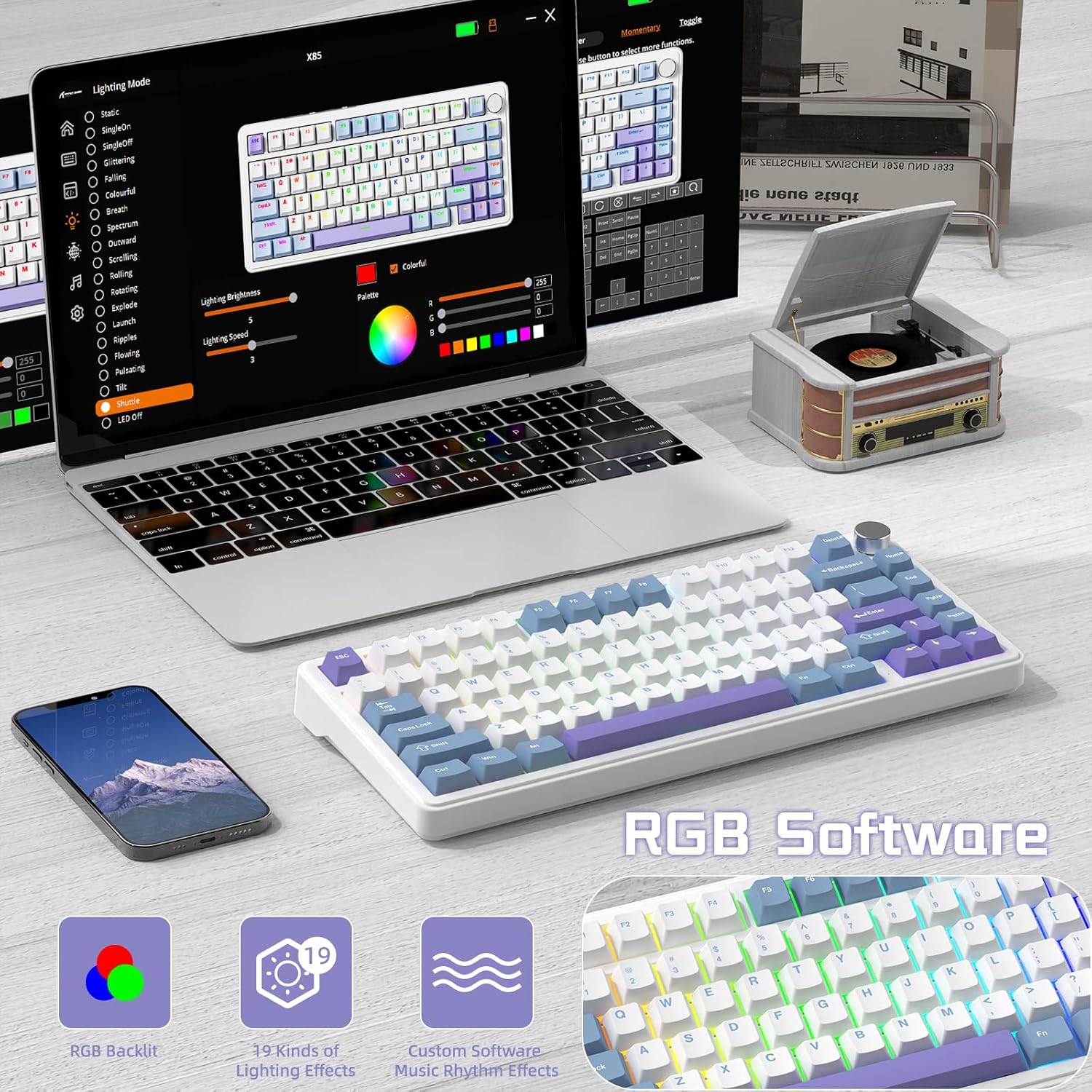
ATTACK SHARK X85 клавиатурасында RGB жарыктандыруусун жана башка жөндөөлөрдү ыңгайлаштыруу үчүн программалык интерфейс.
- Клавиатурадагы башкаруу элементтери:
- Жарык режиминдеги баскычты колдонуп, режимдерди алмаштырып, жарыктыгын тууралаңыз.
- Кошумча жарык эффекттери жана ылдамдыкты тууралоо үчүн клавиатуранын тез функция баскычтарын (адатта Fn айкалыштарын) караңыз.
- Программалык камсыздоону ыңгайлаштыруу:
- Өндүрүүчүнүн расмий сайтынан ATTACK SHARK программасын жүктөп алыңыз webсайт.
- Программа RGB эффекттерин, түстөрүн, ылдамдыгын жана жарыктыгын өркүндөтүлгөн ыңгайлаштырууга мүмкүндүк берет. Ошондой эле, ал ачкычтарды кайра картага түшүрүүнү жана макросторду түзүүнү сунушташы мүмкүн.
- Эскертүү: Программалык камсыздоо кытай тилинде болушу мүмкүн. Зарыл болсо, тилди англис тилине өзгөртүү үчүн программалык камсыздоонун ичиндеги жөндөөлөргө өтүңүз.
5.3 Ыкчам алмаштыруучу которгучтар
X85 ысык алмаштырылуучу PCB менен жабдылган, бул сизге механикалык которгучтарды ширетпестен оңой алмаштырууга мүмкүндүк берет. Бул терүү тажрыйбаңызды ыңгайлаштырууга мүмкүндүк берет.

X85 клавиатурасынын ысык алмаштыруу функциясынын демонстрациясы, анда которгучтарды кантип оңой алып салууга жана алмаштырууга болорун көрсөтүү.
- Баскыч капкагын алып салуу: Керектүү баскычтоптун капкагын акырын алып салуу үчүн баскычтоптун капкагын тартуучу куралды колдонуңуз.
- Которуштурууну алып салуу: Которгучтун үстүнкү жана астыңкы клиптерин кармап, акырын түз өйдө тартыңыз.
- Жаңы которгуч киргизүү: Жаңы 3-пиндүү механикалык өчүргүчтүн төөнөгүчтөрүн платадагы тешиктер менен тегиздеңиз. Өчүргүчтү ордуна чыкылдаган үн чыкканча акырын басыңыз. Төөнөгүчтөрдүн ийилбегенин текшериңиз.
- Баскыч капкагын алмаштыруу: Баскычтын капкагын жаңы өчүргүч сабына кайра салыңыз.
X85 3-пиндүү механикалык өчүргүчтөрдү колдойт. Бузулуп калбашы үчүн алмаштыруучу өчүргүчтөрдүн шайкештигин текшериңиз.
5.4 100% арбактарга каршы
Баскычтоп 100% арбактарды көрүүгө каршы функцияга ээ, башкача айтканда, бир эле учурда басылган бардык баскычтар так катталат, бул тез ойноо жана терүү үчүн абдан маанилүү.
6. Техникалык тейлөө
6.1 Клавиатураңызды тазалоо
- Тазалоодон мурун клавиатураны компьютерден ажыратыңыз.
- Баскыч капкактарынын ортосундагы чаңды жана калдыктарды үйлөө үчүн кысылган аба банкасын колдонуңуз.
- Бетти тазалоо үчүн, баскычтоптун капкактарын жана корпусун жумшак, бир аз сүртүңүзamp, түксүз кездеме. Ашыкча нымдуулуктан сактаныңыз.
- Катуу химиялык заттарды, абразивдүү тазалагычтарды же эриткичтерди колдонбоңуз.
6.2 Батареяга кам көрүү
X85 клавиатурасы 5000 мАч жогорку кубаттуулуктагы батарея менен жабдылган. Батареянын иштөө мөөнөтүн жана иштешин максималдуу түрдө жогорулатуу үчүн:

ATTACK SHARK X85 клавиатурасынын батареясынын иштөө мөөнөтү: жарык күйүп турганда 35 саат, жарык өчүрүлгөндө 75 саат.
- Биринчи колдонуудан мурун клавиатураны толук заряддаңыз.
- Батареянын заряды азайганда, USB-C кабелин туташтырып, кубаттаңыз.
- Баскычтоп бош турганда батареяны үнөмдөө үчүн автоматтык түрдө уйку режимине өтүү технологиясына ээ.
- Клавиатураны экстремалдык температурага тийгизүүдөн сактаңыз.
7. Кыйынчылыктарды
| Көйгөй | Мүмкүн чечим |
|---|---|
| Баскычтоп Bluetooth аркылуу туташпай жатат. |
|
| 2.4 ГГц зымсыз байланыш туруксуз же иштебей жатат. |
|
| Ачкычтар жооп бербей жатат же туура эмес терип жатат. |
|
| RGB арткы жарыгы иштебей жатат же күтүүсүздөн иштеп жатат. |
|
| Көп функциялуу баскыч жооп бербей жатат. |
|
8. Техникалык шарттар
| Өзгөчөлүк | Деталь |
|---|---|
| Бренд | ATTACK SHARK |
| Модел | X85 |
| Макет | 75% (81 ачкычтуу) |
| Байланыш | Bluetooth 5.0, 2.4 ГГц зымсыз, USB-C зымдуу |
| Батарея сыйымдуулугу | 5000mAh |
| Клавиатура материалы | PBT (полибутилентерефталат) |
| Которуу түрү | Ысык алмаштырууга болот (3 пиндүү механикалык өчүргүчтөрдү колдойт) |
| Арткы жарыктандыруу | RGB (19 режим, 7 монохром, толук түстүү) |
| Anti-Ghosting | 100% Anti-Ghosting |
| Шайкештик | Windows, Mac |
| Элемент Салмагы | 1.03 кг |
| Пакеттин өлчөмдөрү | 35.6 x 18.6 x 4.9 см |
9. Кепилдик жана колдоо
ATTACK SHARK X85 механикалык клавиатурасы стандарттуу өндүрүүчүнүн кепилдиги менен келет. Сураныч, таңгагыңызга кирген кепилдик картасын караңыз же расмий ATTACK SHARK дүкөнүнө баш багыңыз. webдеталдуу кепилдик шарттары жана шарттары үчүн сайт.
Техникалык колдоо, мүчүлүштүктөрдү оңдоо боюнча жардам же продуктуңуз боюнча кандайдыр бир суроолор боюнча, ATTACK SHARK кардарларды тейлөө кызматына алардын расмий өкүлү аркылуу кайрылыңыз webсайт же сатып алуу менен камсыз болгон байланыш маалыматы.


