Продукт бүттүview
The MONODEAL MD08 Air Conduction Headphones are designed for comfort and clear communication, featuring an open-ear design, Bluetooth 5.1 connectivity, and a noise-canceling microphone with a mute function. These headphones transmit sound through air conduction, providing an alternative to traditional in-ear or bone conduction devices, aiming to reduce pressure and discomfort during extended use.

Image: MONODEAL MD08 Air Conduction Headphones, showcasing the open-ear design and boom microphone.
Кутуда эмне бар
- Air Conduction Headphones (1 unit)
- USB-C кубаттоочу кабели (1 даана)
- Колдонуучунун колдонмосу (1 бирдик)
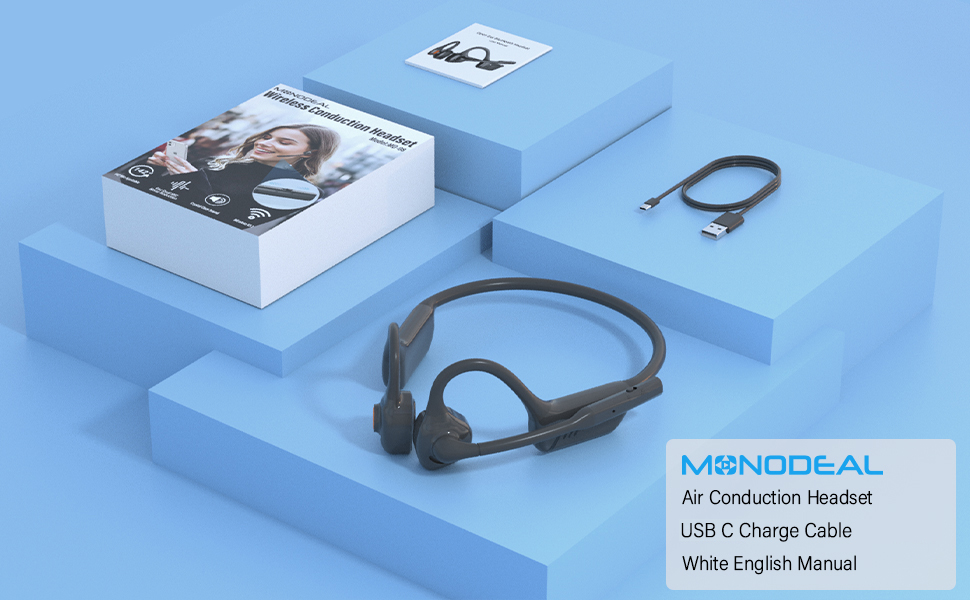
Image: The MONODEAL MD08 headphones, USB-C charging cable, and user manual laid out, representing the package contents.
Жайгашуу
1. Наушниктерди заряддоо
Before initial use, fully charge the headphones. Connect the provided USB-C charging cable to the charging port on the headphones and plug the other end into a compatible USB power source. A full charge typically takes approximately 2 hours.

Image: Diagram illustrating the charging process and battery life indicators: 8 hours usage, 36 hours standby, 2 hours charging time.
2. Bluetooth Жупташтыруу
To connect your MONODEAL MD08 headphones to a device:
- Наушниктердин өчүрүлгөнүн текшериңиз.
- Press and hold the multi-function button until the indicator light flashes red and blue, indicating pairing mode.
- Түзмөгүңүздө (смартфон, планшет, компьютер) Bluetooth иштетип, жеткиликтүү түзмөктөрдү издеңиз.
- Select "MD08" from the list of found devices to connect. A voice prompt will confirm successful pairing.
3. Multi-Point Connection (Connecting to Two Devices Simultaneously)
The MD08 headphones support connecting to two Bluetooth devices at the same time. This allows you to seamlessly switch between audio sources, for example, listening to music on your tablet and answering calls on your phone.
- 1-кадам: Pair the headphones with the first device (e.g., your phone) as described in the Bluetooth Pairing section.
- 2-кадам: Once connected to the first device, turn off Bluetooth on the first device. This will put the headphones back into pairing mode.
- 3-кадам: Pair the headphones with the second device (e.g., your tablet).
- 4-кадам: Turn Bluetooth back on for the first device. The headphones should automatically reconnect to both devices.
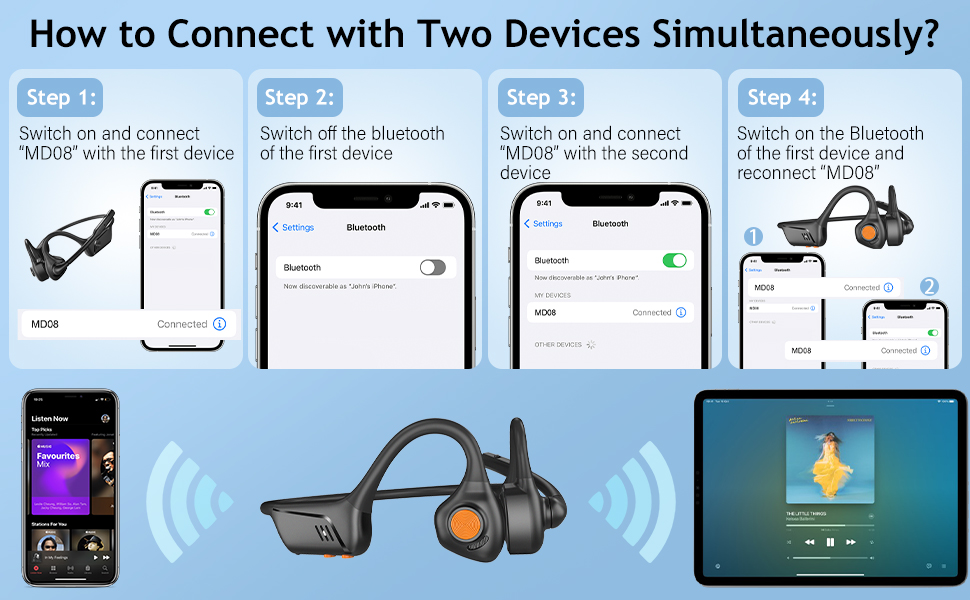
Image: Visual guide demonstrating the four steps to connect the MD08 headphones to two devices simultaneously, showing a phone and a tablet.
Иштөө нускамалары
1. Наушник тагынуу
Position the headphones with the speakers resting gently in front of your ears, allowing the sound to be transmitted through air conduction. The flexible band should rest comfortably around the back of your head. The open-ear design ensures you remain aware of your surroundings.

Image: A man wearing the MD08 headphones, illustrating the open-ear design and comfortable fit, emphasizing its lightweight nature (40g) and stable design.
2. Негизги башкаруу элементтери
The headphones feature a multi-functional button and volume controls for easy operation:
- Күйгүзүү/өчүрүү: Көп функциялуу баскычты басып, кармап туруңуз.
- Ойнотуу/тындыруу: Көп функциялуу баскычты бир жолу басуу.
- Чалууга жооп берүү/аяктоо: Кирүүчү же активдүү чалуу учурунда көп функциялуу баскычты бир жолу басыңыз.
- Чакырууну четке кагуу: Кирүүчү чалуу учурунда көп функциялуу баскычты басып, кармап туруңуз.
- Үнүн жогорулатуу/төмөндөтүү: Атайын үн баскычтарын колдонуңуз.
- Кийинки трек: Көп функциялуу баскычты эки жолу басыңыз.
- Мурунку трек: Көп функциялуу баскычты үч жолу басыңыз.
- Үн жардамчысын иштетүү (Siri/Google Жардамчысы): Көп функциялуу баскычты 2 секунд басып туруңуз.

Image: A user demonstrating the controls of the MD08 headphones, with icons indicating functions like Play/Pause, Skip Track, Control Calls, Volume+/-, and Voice Assistant.
3. Microphone Mute Function
The MD08 headphones feature a dedicated mute button on the microphone boom. During a call, you can easily touch this button to mute or unmute your microphone, providing privacy when needed.

Image: A woman using the MD08 headphones, highlighting the microphone mute function and environmental noise reduction technology, showing 96% noise filtered during calls.
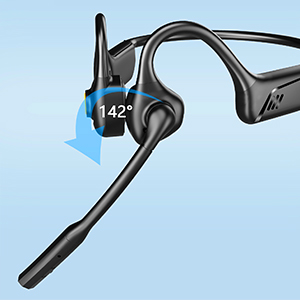
Image: Close-up of the MD08 microphone, showing its 142-degree rotation capability for optimal positioning.
Техникалык тейлөө
- Тазалоо: Кулакчындарды тазалоо үчүн жумшак, кургак чүпүрөктү колдонуңуз. Катуу химиялык заттарды же абразивдүү материалдарды колдонуудан алыс болуңуз.
- Сактагыч: Наушниктерди салкын, кургак жерде күндүн тике тийген нурунан жана экстремалдык температурадан алыс сактаңыз.
- Заряддоо: Батареянын иштөө мөөнөтүн узартуу үчүн, бат-баттан батарейканы толук зарядсыздандырбаңыз. Узак убакыт колдонулбаса да, гарнитураны үзгүлтүксүз заряддаңыз.
- Суу каршылык: While designed for active use, avoid submerging the headphones in water.
Проблемаларды чечүү
| Көйгөй | Чечим |
|---|---|
| Кулакчындар күйбөйт. | Наушниктердин толук заряддалганын текшериңиз. Кубат булагына туташып, кайра аракет кылыңыз. |
| Түзмөк менен жупташтыруу мүмкүн эмес. |
|
| Үн жок же үнү төмөн. |
|
| Микрофон иштебей жатат. |
|
| үзгүлтүктүү байланыш. |
|
Техникалык шарттар
| Өзгөчөлүк | Деталь |
|---|---|
| Модель аты | MD08 |
| Байланыш технологиясы | Зымсыз (Bluetooth) |
| Bluetooth версиясы | 5.1 |
| Bluetooth диапазону | 10 метрге чейин (33 фут) |
| Аудио драйвер түрү | Air Conduction Driver |
| Battery Life (Music/Talk Time) | 8 саатка чейин |
| Күтүү убактысы | 36 саатка чейин |
| Заряддоо убактысы | Болжол менен 2 саат |
| Заряддоо порту | USB-C |
| Салмагы | 1.41 унция (болжол менен 40 г) |
| Кулак жайгаштыруу | Ачык кулак |
| Noise Control | Активдүү ызы-чууну жокко чыгаруу (микрофон үчүн) |
| Өзгөчөлүктөр | Microphone Included, Multipoint Pairing, Rechargeable Battery, Volume Control, Mute Function |
Кепилдик жана колдоо
MONODEAL products are designed and manufactured to high-quality standards. For warranty information, technical support, or customer service inquiries, please refer to the contact information provided with your purchase or visit the official MONODEAL webсайт.
Manufacturer: MONODEAL


