1. Киришүү
The Cherub WMT-560 is a versatile, rechargeable clip-on device designed for musicians. It integrates a highly accurate tuner, a flexible metronome, and a practical tone generator into a single compact unit. Its fast response time and bright LCD display ensure clear visibility and efficient operation in various environments. The robust clamp design provides stable attachment to your instrument.
2. Продукт бүтүп калдыview
2.1 Компоненттер жана башкаруу элементтери
Familiarize yourself with the main components and controls of your WMT-560 unit:
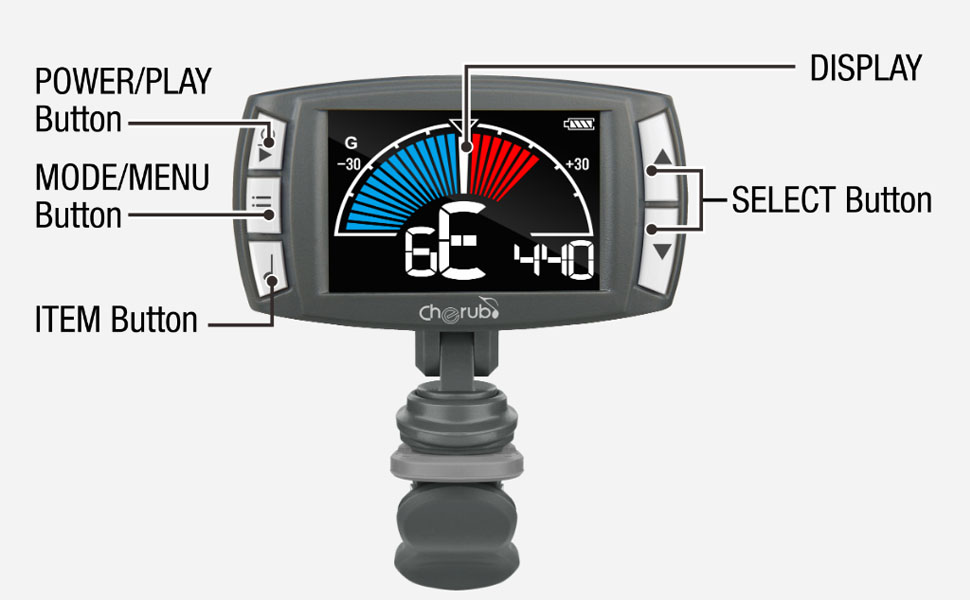
Image 2.1: Labeled diagram of the Cherub WMT-560, indicating the Power/Play button, Mode/Menu button, Item button, Select buttons (up/down), and the main display area.
- Power/Play Button: Used to turn the device on/off and to start/stop the metronome.
- Mode/Menu Button: Cycles through Tuner, Metronome, and Tone Generator modes. Also accesses menu settings within modes.
- Item Button: Used to select specific items or parameters within a menu.
- Select Buttons (Up/Down): Adjusts values (e.g., pitch, tempo) or navigates menu options.
- Дисплей: Shows tuning information, metronome settings, or tone generator pitch.
- Клип: Attaches the device securely to your instrument.
3. Орнотуу
3.1 Аппаратты заряддоо
The WMT-560 is equipped with an internal Li-Po battery. Before first use, or when the battery indicator shows low power, charge the device:
- Connect a standard USB-C cable to the charging port on the WMT-560.
- Connect the other end of the USB-C cable to a USB power source (e.g., computer, USB wall adapter).
- The display will indicate charging status. A full charge typically takes a few hours.
3.2 Тюнерди тиркөө
The WMT-560 features a newly designed clamp for stable attachment:
- Open the clip by pressing the levers.
- Attach the clip securely to the headstock of your guitar or other stringed instrument. Ensure the display is facing you for easy viewing.
- Adjust the angle of the display for optimal visibility.

Image 3.1: The Cherub WMT-560 tuner securely attached to the headstock of a guitar, demonstrating proper placement for tuning.
4. Иштөө режимдери
4.1 Күйгүзүү/өчүрүү
басып, кармап туруңуз Power/Play түзмөктү күйгүзүү же өчүрүү үчүн баскычын болжол менен 2 секунд басып туруңуз.
4.2 Тюнер режими
The WMT-560 offers fast and accurate tuning for various instruments.
Тюнер режимин тандоо
басыңыз Режим/Меню button repeatedly until 'Tuner' mode is displayed. The default tuning mode is Chromatic (C), but you can select specific instrument modes (Guitar, Bass, Ukulele, Violin) by pressing the пункт баскычын жана андан кийин колдонуу Тандоо тандоо үчүн баскычтар.
Tuning an Instrument
- Ensure the WMT-560 is securely clipped to your instrument's headstock.
- Pluck a single string on your instrument. The tuner will detect the pitch.
- The display will show the note name and a meter indicating whether the note is flat, sharp, or in tune.
- Adjust your instrument's tuning peg until the needle on the display is centered and the note name is correct. The display will typically turn green when in tune.

Image 4.1: The WMT-560 display in Tuner Mode, showing a note (G) and the tuning meter. A centered needle and green indication signify accurate tuning.
4.3 Метроном режими
The built-in metronome helps you practice with precise timing.
Activating Metronome
басыңыз Режим/Меню button repeatedly until 'Metronome' mode is displayed. The display will show the current tempo (BPM) and beat pattern.
Adjusting Tempo and Beat
- Adjusting BPM: колдонуу Тандоо buttons (Up/Down) to increase or decrease the Beats Per Minute (BPM) from 30 to 250.
- Темпти таптаңыз: басыңыз пункт button multiple times at your desired tempo. The WMT-560 will calculate and set the BPM automatically.
- Beat Pattern: басыңыз Режим/Меню button briefly to cycle through different beat patterns (e.g., 1/4, 2/4, 3/4, 4/4).
- Баштоо/Токтоо: басыңыз Power/Play button to start or stop the metronome click.

Image 4.2: A hand demonstrating the use of the Item button, which is used for functions like Tap Tempo in Metronome mode.
4.4 Tone Generator Mode
The tone generator produces a reference pitch for ear training or manual tuning.
Using Tone Generator
- басыңыз Режим/Меню button repeatedly until 'Tone Generator' mode is displayed.
- колдонуу Тандоо buttons (Up/Down) to choose the desired reference pitch (e.g., A4=440Hz).
- The WMT-560 will emit the selected tone.
5. Техникалык тейлөө
5.1 Батареяга кам көрүү
- Recharge the battery regularly to maintain optimal performance.
- Батареяны бат-баттан толук кубаттап коюудан качыңыз, анткени бул анын иштөө мөөнөтүн кыскартат.
- Аппаратты узак убакыт бою колдонбогондо салкын, кургак жерде сактаңыз.
5.2 Тазалоо
Аппаратты жумшак, кургак чүпүрөк менен сүртүңүз. Суюк тазалагычтарды же абразивдүү материалдарды колдонбоңуз.
6. Кыйынчылыктарды
| Көйгөй | Мүмкүн себеп | Чечим |
|---|---|---|
| Түзмөк күйбөйт. | Батарея аз же түгөнүп калган. | USB-C кабели аркылуу аппаратты заряддаңыз. |
| Tuner not detecting pitch accurately. | Improper attachment; noisy environment; incorrect mode. | Ensure the tuner is securely clipped to the headstock. Move to a quieter area. Verify the correct instrument mode is selected. |
| Metronome click is not audible. | Үн өтө төмөн же үнсүз. | Check metronome settings for volume control. |
| Дисплей күңүрт же жооп бербей жатат. | Батареянын аздыгы; аппараттын бузулушу. | Түзмөктү кубаттаңыз. Эгерде көйгөй чечилбесе, кардарларды тейлөө кызматына кайрылыңыз. |
7. Техникалык шарттар
- Реттөө диапазону: A0 (27.5Hz) - C8 (4186Hz)
- Тунинг режимдери: Хроматикалык, гитара, басс, укулеле, скрипка
- A4 жыштыгы: 430-450Hz (adjustable)
- Metronome Tempo Range: 30-250 BPM
- Согуу: 0, 1, 2, 3, 4, 5, 6, 7, 8, 9
- Ритм: ♩, ♪, ♫, ♬ (various subdivisions)
- Tone Generator Range: C4-B4
- Күч: Built-in Rechargeable Li-Po Battery
- Заряддоо порту: USB-C
- Өлчөмдөрү: Болжол менен 2.52 x 1.38 x 1.7 дюйм
- Салмагы: Болжол менен 1.3 унция
8. Кепилдик жана колдоо
Cherub products are designed for reliability and performance. For warranty information, technical support, or service inquiries, please refer to the official Cherub webсайтка же ыйгарым укуктуу дилериңизге кайрылыңыз. Сатып алуу квитанциясын кепилдик дооматтары үчүн сатып алуунун далили катары сактаңыз.


