Introduction
This manual provides comprehensive instructions for the setup, operation, maintenance, and troubleshooting of your MageGee Moon104 Wireless Mechanical Keyboard. Please read this manual thoroughly to ensure optimal performance and longevity of your device.

Image: The MageGee Moon104 Wireless Mechanical Keyboard, showcasing its full layout and the included USB receiver.
Пакеттин мазмуну
Пакетти ачканда, бардык буюмдар бар экенин текшериңиз:
- MageGee Moon104 Wireless Mechanical Keyboard
- USB-C - USB-A кабели
- 2.4GHz USB кабылдагычы
- Колдонуучунун Колдонмосу (бул документ)
Техникалык шарттар
| Өзгөчөлүк | Деталь |
|---|---|
| Модел | Moon104 |
| Өлчөмдөрү (L x W x Y) | 16.73" x 16.73" x 0.98" (42.49 см x 42.49 см x 2.49 см) |
| Элемент Салмагы | 2.33 фунт (1.06 кг) |
| Байланыш | USB-C зымдуу, 2.4 ГГц зымсыз, Bluetooth 3.0/5.0 |
| Баскычтоптун түрү | Механикалык, төмөн Profile |
| Которгучтар | Күрөң механикалык өчүргүчтөр |
| Арткы жарыктандыруу | RGB Backlit (Seven-color breathing system) |
| Шайкештик | Windows, macOS |
| Сунушталган колдонуу | Office |

Сүрөт: An overview of the MageGee Moon104 keyboard's key features, including its tri-mode connectivity, low-profile switches, RGB backlighting, and ergonomic design.
Жайгашуу
1. Баскычтопту заряддоо
Before first use, it is recommended to fully charge the keyboard using the provided USB-C cable. Connect the USB-C end to the keyboard and the USB-A end to a powered USB port on your computer or a wall adapter.

Сүрөт: жакын план view of the MageGee Moon104 keyboard showing the detachable USB-C cable connected to its port.
2. Баскычтопту туташтыруу
The MageGee Moon104 supports three connection modes: USB-C Wired, 2.4GHz Wireless, and Bluetooth.

Image: The MageGee Moon104 keyboard demonstrating its tri-mode connection capabilities, showing both wired USB-C and the 2.4GHz receiver in use.
2.1. USB-C зымдуу туташуусу
- Connect the USB-C end of the cable to the keyboard's port.
- USB-A учун компьютериңиздеги жеткиликтүү USB портуна туташтырыңыз.
- Баскычтоп автоматтык түрдө таанылып, колдонууга даяр болот.
2.2. 2.4 ГГц зымсыз туташуу
- Locate the 2.4GHz USB receiver (usually stored in a compartment on the keyboard or included separately).
- USB ресиверди компьютериңиздеги жеткиликтүү USB портуна сайыңыз.
- Баскычтоптон басыңыз Fn + Q to switch to 2.4GHz wireless mode. The indicator light will confirm the connection.
2.3. Bluetooth туташуусу
- Баскычтоптон басыңыз Fn + W or Fn + E to select a Bluetooth channel (BT1 or BT2). The indicator light will flash, indicating pairing mode.
- On your device (computer, laptop, smart TV), enable Bluetooth and search for new devices.
- Select "MageGee Moon104" from the list of available devices to pair.
- Жупташкандан кийин клавиатурадагы индикатор жарыгы катуу болуп калат.
Иштөө нускамалары
1. Switching Between Connection Modes
To switch between the three connection modes, use the following key combinations:
- Fn + TAB: Switch to USB-C Wired Mode
- Fn + Q: Switch to 2.4GHz Wireless Mode
- Fn + W: Switch to Bluetooth Channel 1 (BT1)
- Fn + E: Switch to Bluetooth Channel 2 (BT2)
2. RGB арткы жарыкты башкаруу
The keyboard features an RGB backlight system with multiple effects and brightness levels.

Image: The MageGee Moon104 keyboard displaying its vibrant RGB backlighting across the keys.
- Жарыктыкты жөндөө: Колдонуу Fn + ↑ (increase brightness) and Fn + ↓ (decrease brightness).
- Жеңилдетилген режимдерди өзгөртүү: Колдонуу Fn + → or Fn + ← to cycle through different RGB effects.
- Ылдамдыкты жөндөө: Колдонуу Fn + - (decrease speed) and Fn + = (increase speed) for dynamic lighting effects.
3. Windows/macOS Compatibility Switch
The keyboard includes a physical switch to toggle between Windows and macOS layouts for optimal key mapping.

Image: A close-up of the MageGee Moon104 keyboard highlighting the physical switch to select between Windows and Mac operating system compatibility.
- табыңыз WIN/MAC switch on the side or back of the keyboard.
- Slide the switch to the appropriate operating system setting.
4. Функционалдык баскычтар (F1-F12)
The F-keys often have secondary functions accessible by pressing them in combination with the Fn key. Refer to the keycaps for specific icons indicating these functions (e.g., media control, volume, brightness).
Эргономикалык дизайн
The MageGee Moon104 is designed with ergonomics in mind to reduce wrist strain during extended use. It features low-profile mechanical switches and adjustable tilt feet.

Image: The MageGee Moon104 keyboard positioned on a desk, showcasing its ergonomic profile and comfortable typing angle.
- Жөнгө салынуучу эңкейиш буттары: Extend the feet on the underside of the keyboard to adjust the typing angle to your preference.
- Төмөн Проfile Которгучтар: Төмөн профессионалfile design of the mechanical switches contributes to a flatter keyboard, reducing the need for excessive wrist extension.
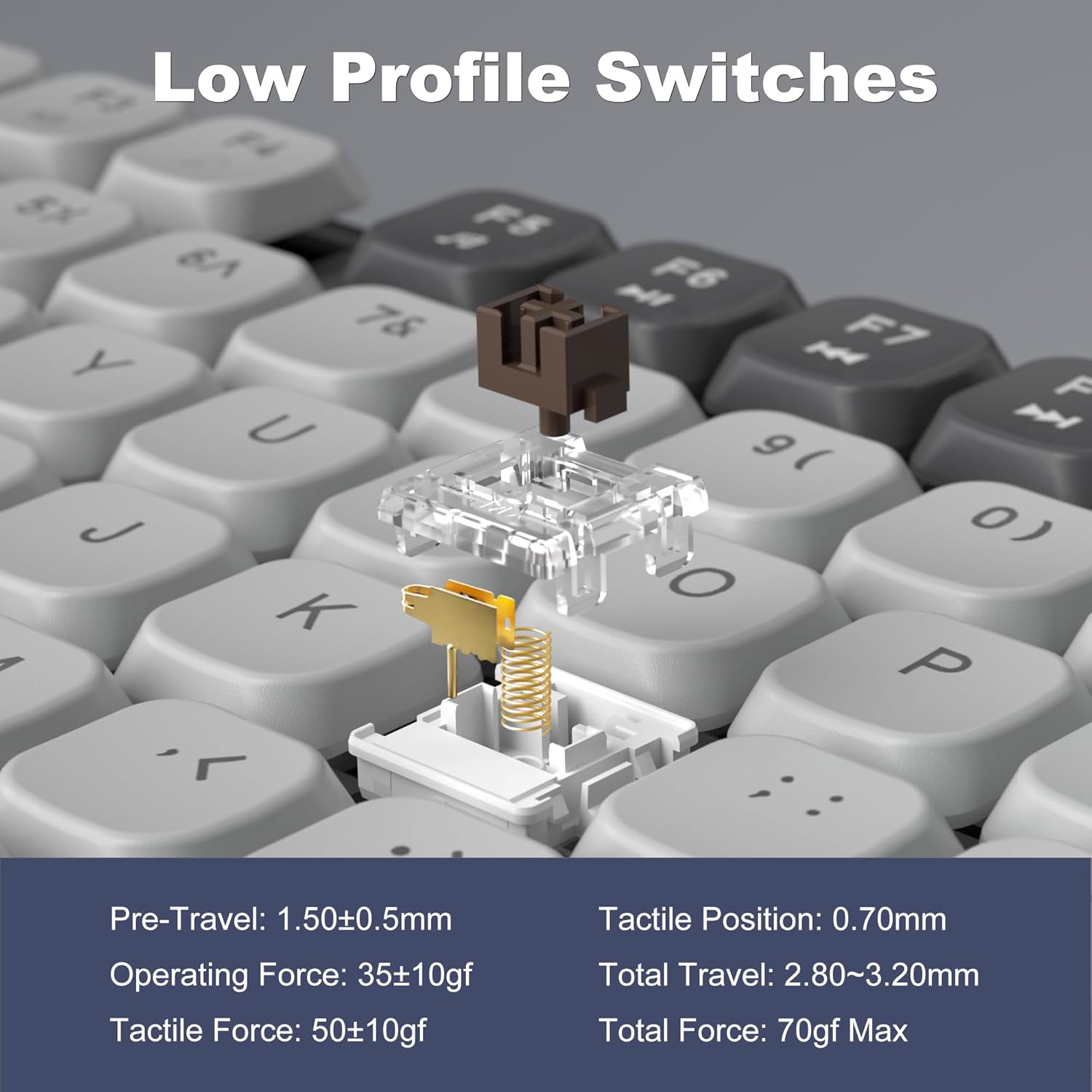
Image: A detailed diagram illustrating the internal structure and operational specifications of the low-profile mechanical switches used in the MageGee Moon104 keyboard.
Техникалык тейлөө
Клавиатураңыздын узак иштөөсүн жана оптималдуу иштешин камсыз кылуу үчүн төмөнкү тейлөө көрсөтмөлөрүн аткарыңыз:
- Тазалоо: Баскычтоптун бетин сүртүү үчүн жумшак, кургак чүпүрөктү колдонуңуз. Тереңирээк тазалоо үчүн, кысылган абаны клавиатуранын капкактарынын ортосундагы чаңды жана калдыктарды тазалоо үчүн колдонуңуз. Катуу химиялык заттарды же абразивдүү материалдарды колдонуудан алыс болуңуз.
- Сактагыч: Узак мөөнөткө колдонулбаганда, клавиатураны салкын, кургак жерде, тике күндүн нурунан жана өтө температурадан алыс сактаңыз.
- Батареяга кам көрүү: Батареянын тез-тез толук зарядын жоготуп алуудан алыс болуңуз. Батареянын иштөө мөөнөтүн сактоо үчүн клавиатураны үзгүлтүксүз кубаттап туруңуз.
Проблемаларды чечүү
If you encounter issues with your MageGee Moon104 keyboard, refer to the following common solutions:
- Баскычтоп жооп бербейт:
- Баскычтоп кубатталганын текшериңиз.
- Verify the correct connection mode is selected (Wired, 2.4GHz, or Bluetooth).
- 2.4 ГГц үчүн, USB кабыл алгыч бекем сайылганын текшериңиз.
- For Bluetooth, ensure the keyboard is paired and within range of your device. Try re-pairing if necessary.
- If using wired mode, try a different USB port or cable.
- Арткы жарык иштебейт же туура эмес:
- Check backlight brightness settings using Fn + ↑.
- Жарыктандыруу режимдери аркылуу айланыңыз Fn + → or Fn + ←.
- Клавиатуранын батареясы жетиштүү заряддалганын текшериңиз.
- Катталбаган ачкычтар же эки жолу терүү:
- Clean the affected key with compressed air to remove any debris.
- Баскычтоп толук кубатталганын текшериңиз.
- If the issue persists, try connecting the keyboard to a different device to rule out software or driver issues on your primary computer.
- Function Keys (F1-F12) Not Working:
- басып жатканыңызды текшериңиз Fn key in combination with the desired F-key for secondary functions.
- Verify the keyboard is set to the correct operating system (Windows/Mac) using the physical switch.
Кепилдик жана колдоо
MageGee provides a 1-year warranty for the Moon104 Wireless Mechanical Keyboard. If you encounter any product issues or have questions, please contact MageGee customer support via Amazon email. They aim to reply within 24 hours and provide a satisfactory solution.
Колдоо үчүн, кириңиз Amazon'догу MageGee дүкөнү or contact their customer service directly through your Amazon order details.


