1. Introduction and Overview
The Ditec RM-L 1370 is a universal replacement remote control designed for a wide range of Sony Bravia televisions. This remote offers direct compatibility with various Sony LCD, LED, UHD, OLED, and QLED 4K Ultra HD Smart Android TV models, eliminating the need for complex programming or pairing. It features dedicated hotkeys for popular streaming services like YouTube and Netflix for convenient access.

Image: The Ditec RM-L 1370 remote control, highlighting its compatibility as a single remote solution for Sony TVs.
2. Орнотуу жана алгачкы колдонуу
This remote control is designed for immediate use without any setup or programming. Simply insert the required batteries, and it will be ready to operate your compatible Sony TV.
2.1 Батареяны орнотуу
- Пульттун артындагы батарея отсегин табыңыз.
- Батарея бөлүмүнүн капкагын жылдырып ачыңыз.
- Insert two (2) AAA batteries (not included), ensuring correct polarity (+ and - terminals).
- Батарея уясынын капкагын бекем жабыңыз.

Сүрөт: Арткы view батарея бөлүмүнүн жайгашкан жерин көрсөткөн алыстан башкаруу пультунун сүрөтү.
2.2 Биринчи колдонуу
Once batteries are installed, point the remote control towards your Sony TV and press the Power button. The remote should operate your TV without any further configuration.
3. Иштөө нускамалары
The Ditec RM-L 1370 remote control provides all standard functions for your Sony Bravia TV, along with convenient shortcut buttons.
3.1 Негизги функциялар
- Кубат баскычы: Телевизорду күйгүзөт же өчүрөт.
- Сан баскычтары (0-9): Түз канал тандоо үчүн.
- Үнүн жогорулатуу/төмөндөтүү: Телевизордун үнүн тууралайт.
- Канал өйдө/төмөн: Телеканалдарды өзгөртөт.
- Навигация панели (Өйдө/Төмөн/Сол/Оң/Кирүү): Менюда навигация жана тандоо үчүн.
- Үй баскычы: Accesses the TV's Smart Home screen or main menu.
- Return/Back Button: Мурунку экранга же менюга кайтат.
- Параметрлер баскычы: Контекстти сезгич параметрлерди көрсөтөт.
3.2 Өзгөчөлүктөр
- YouTube Hotkey: Directly launches the YouTube application.
- Netflix Hotkey: Netflix тиркемесин түз ишке киргизет.
The remote features an enhanced infrared sensor for a farther transmitting distance, allowing effective control up to 50 feet.

Image: The remote control demonstrating its farther distance sensor, capable of operating up to 50 feet.
4. Шайкештик
The Ditec RM-L 1370 universal remote is compatible with a wide range of Sony Bravia LCD, LED, UHD, OLED, and QLED 4K Ultra HD Smart Android TVs. It is designed to replace many original Sony remote models, including but not limited to:
- RMT-TX100U, RMT-TX102U
- RMF-TX200U, RMF-TX201U, RMF-TX220U
- RMT-TX300U, RMF-TX310U
- RMT-TX500U, RMF-TX520U, RMF-TX600U
- And many other Sony TV remote models.
For a comprehensive list of compatible Sony TV remote models, please refer to the image below:
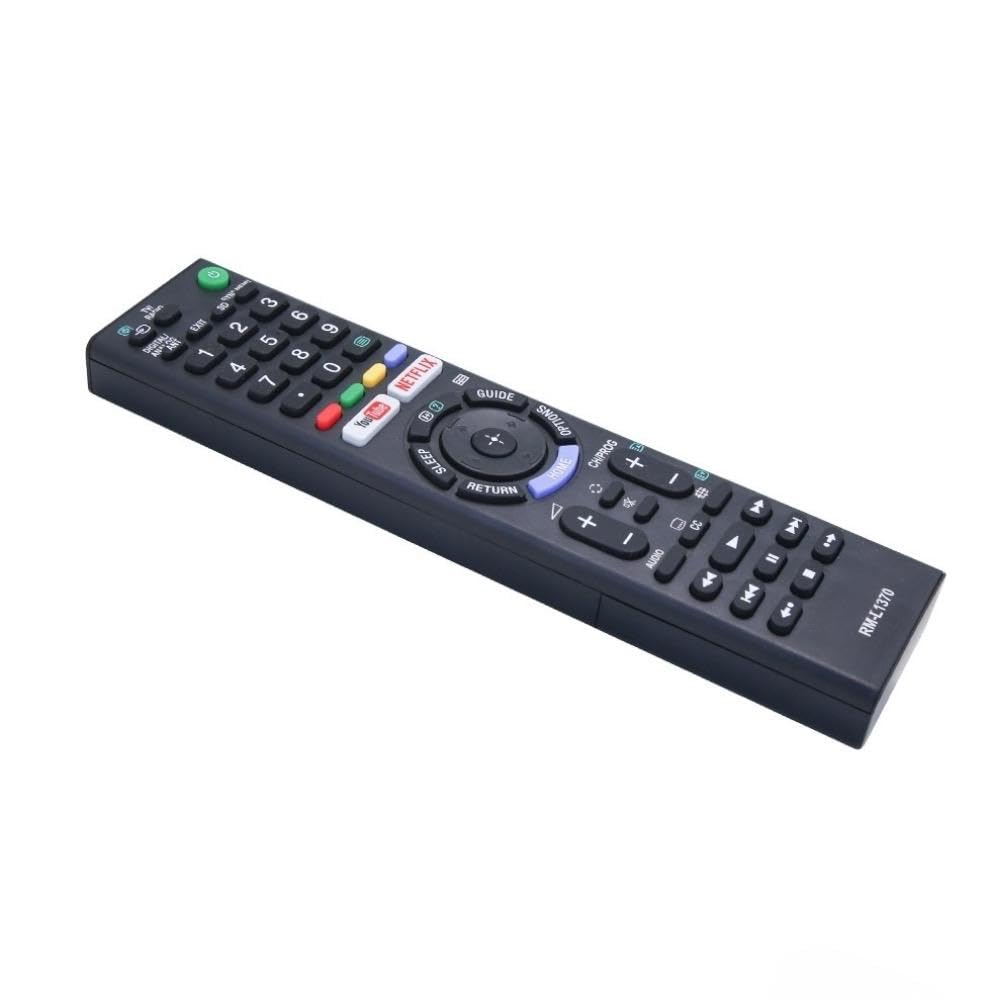
Image: A detailed list of Sony TV remote models that are compatible with the Ditec RM-L 1370.
It is recommended to compare the appearance of this remote with your original remote for visual confirmation of compatibility.
5. Техникалык тейлөө
5.1 Батареяны алмаштыруу
When the remote control's performance degrades or it stops responding, replace the batteries with two new AAA alkaline batteries. Always replace both batteries at the same time. Do not mix old and new batteries or different types of batteries.
5.2 Тазалоо
Пультту тазалоо үчүн жумшак, кургак чүпүрөктү колдонуңуз. Суюк тазалоочу каражаттарды, чачыраткычтарды же абразивдүү материалдарды колдонбоңуз, анткени алар пульттун бетине же ички компоненттерине зыян келтириши мүмкүн.
6. Кыйынчылыктарды
- Пульт жооп бербей жатат:
- Батареялар туура полярдуулук менен туура салынганын текшериңиз.
- Эски батарейкаларды жаңысына алмаштырыңыз.
- Алыстан башкаруу пульту менен телевизордун инфракызыл кабыл алгычынын ортосунда эч кандай тоскоолдуктар жок экенин текшериңиз.
- Натыйжалуу иштөө диапазонунда экениңизди текшериңиз (50 футка чейин).
- Атайын баскычтар иштебейт:
- Some advanced functions or TV-specific features might not be supported by a universal replacement remote.
- Ensure the TV is powered on and functioning correctly.
7. Техникалык шарттар
| Өзгөчөлүк | Деталь |
|---|---|
| Бренд | Ditec |
| Модел | RM-L 1370 |
| Шайкеш түзмөктөр | Sony Bravia LCD, LED, UHD, OLED, QLED 4K Ultra HD Smart Android TVs |
| Туташтыргыч түрү | Инфракызыл (IR) |
| Батареялар талап кылынат | 2 x AAA (киргизилген эмес) |
| Өзгөчөлүктөр | Ergonomic design, YouTube & Netflix Hotkeys |
| Продукциянын өлчөмдөрү | 3 x 3 x 12 см |
| Элемент Салмагы | 80 г |
| Келип чыккан өлкө | Кытай |
8. Колдоо
For assistance with compatibility or any questions regarding your Ditec RM-L 1370 remote control, you may contact support by sending a picture of your old remote or your device's brand name and model number to +91 9924350801. This will help in verifying compatibility or addressing specific queries.

Image: Information on how to contact support for compatibility checks or questions.


