1. Киришүү
This manual provides essential information for the safe and efficient operation of your WOLFBOX Level 2 EV Charger (Model E50). Please read this manual thoroughly before installation and use to ensure proper functionality and to prevent damage or injury. Keep this manual for future reference.
The WOLFBOX Level 2 EV Charger is a high-power electric vehicle charging station designed for residential and commercial use. It features a smart display, RFID card access, Wi-Fi connectivity for app control, and a durable, weather-resistant design suitable for both indoor and outdoor installations.
2. Коопсуздук маалыматы
ЭСКЕРТҮҮ: Installation and servicing of this equipment must be performed by qualified, licensed personnel only. Improper installation or use can result in electric shock, fire, or serious injury.
- Always disconnect power before installing or servicing the charger.
- Ensure the electrical circuit meets the specified requirements (200-240V AC, 70A or greater circuit breaker).
- Do not operate the charger if it is damaged, wet, or shows signs of malfunction.
- Иштеп жаткан учурда балдарды жана үй жаныбарларын заряддоочу жерден алыс кармаңыз.
- Do not use extension cords or adapters with this charger.
- The charger is designed for electric vehicles only. Do not use it for other purposes.
- Жергиликтүү электрдик коддорго ылайык туура жерге туташтырууну камсыз кылыңыз.
3. Пакеттин мазмуну
Пакетти ачканда бардык буюмдар бар экенин жана бузулбаганын текшериңиз:

Image: Components included in the WOLFBOX Level 2 EV Charger package.
- WOLFBOX Level 2 EV Charger Unit (Model E50)
- Charging Cable (25 feet) with J1772 Connector
- Дубалга орнотуу кронштейн
- Туташтыргыч кармагыч
- Management Card (1 PC)
- RFID бөгөттөө картасы (2 PCS)
- User Manual
- Amperage Label
- Plastic Expansion Bolts M10 (2 PCS)
- Plastic Expansion Bolts M6 (5 PCS)
- Self-tapping Screw M6*50mm (2 PCS)
- Self-tapping Screw M4*40mm (5 PCS)
- Machine Screw M4*6mm (3 PCS)
4. Продукттун өзгөчөлүктөрү жана компоненттери
The WOLFBOX E50 charger integrates advanced features for a convenient and efficient charging experience.
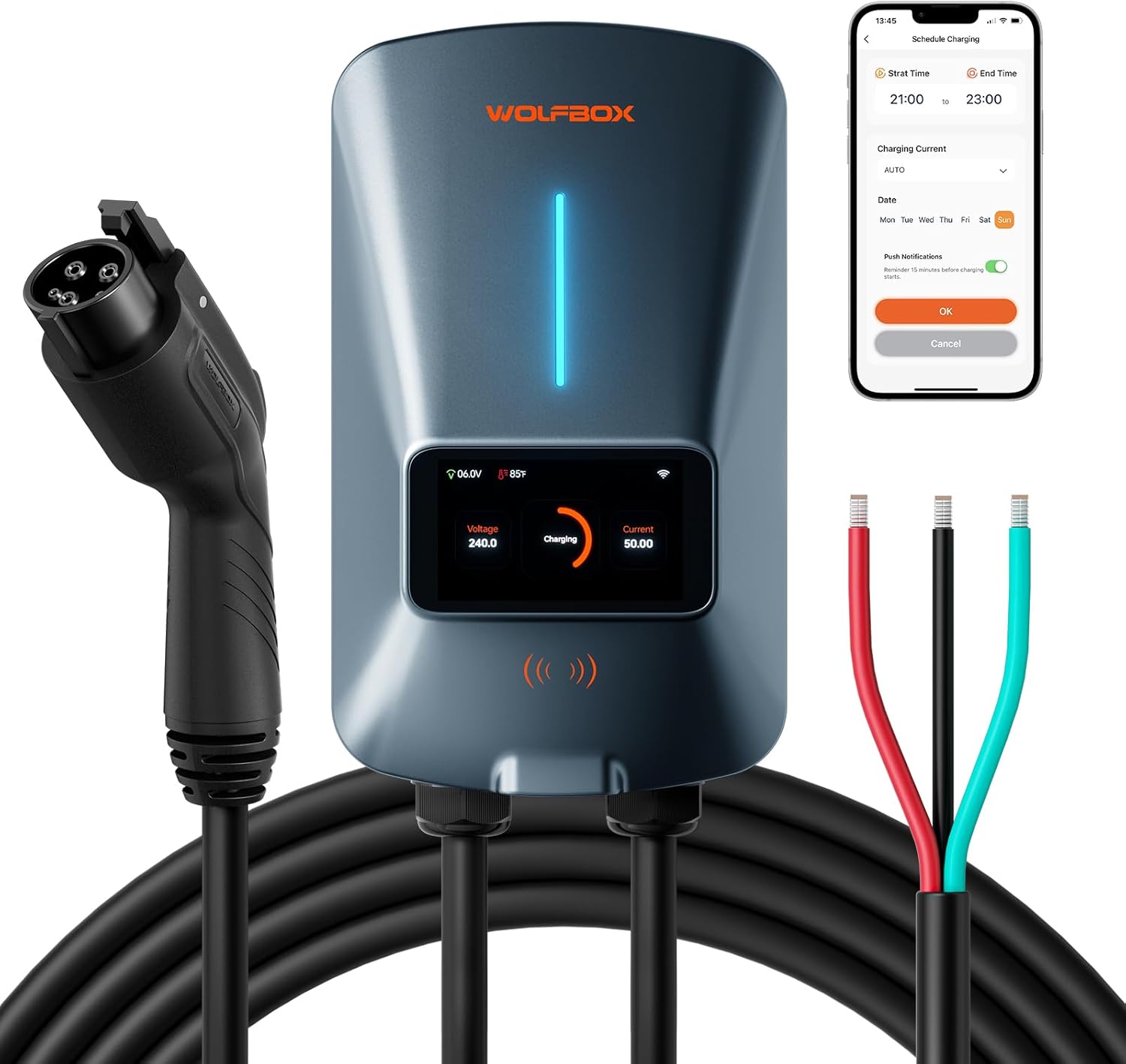
Сүрөт: бүттүview of the WOLFBOX Level 2 EV Charger, showing the main unit, charging cable, hardwire connections, and a smartphone displaying the app interface.
4.1. Негизги блок
- 4.3-inch Smart LCD Display: Provides real-time charging data including voltage, current, power, temperature, and charging duration.
- LED Flowing Light Strip: Indicates charging status visually.
- RFID окугуч: For secure access and activation using RFID cards.
- Wi-Fi модулу: Enables smart control and monitoring via the dedicated mobile application.
- Бышык Casing: NEMA 4 protection and IP66 rating ensure resistance to water, dust, extreme cold (-22°F), and high heat (122°F), suitable for outdoor installation.

Сүрөт: Жакын план view of the WOLFBOX EV Charger's 4.3-inch smart LCD display and the LED flowing light strip.
4.2. Charging Cable and Connector
- 25-foot Cable: камсыз кылат ampар кандай унаа токтотуучу жай кырдаалдарына жетүү мүмкүнчүлүгү.
- J1772 туташтыргычы: Standard connector compatible with most electric vehicles in North America.
4.3. Safety and Protection Features
- Жерден коргоо
- Ашыкча ток коргоо
- Агышуу токунан коргоо
- Термикалык коргоо
- Жогорку Voltage Коргоо
- Low Voltage Коргоо
- Ашыкча заряддан коргоо
- Lightning Protection
- Интегралдык толкундан коргоо

Image: Visual representation of the various electrical protection features integrated into the WOLFBOX EV Charger.
5. Орнотуу жана орнотуу
The WOLFBOX Level 2 EV Charger is designed for hardwired installation. It is strongly recommended that installation be performed by a certified electrician to ensure compliance with all local electrical codes and safety standards.

Image: An electrician performing the hardwired installation of an EV charger, emphasizing the need for professional setup.
5.1. Орнотууга чейинки текшерүү тизмеси
- Электр камсыздоо: Ensure a dedicated 200-240V AC circuit is available.
- Ажыраткыч: A 70A or greater circuit breaker is required.
- Жайгашкан жери: Choose a suitable indoor or outdoor location, considering cable reach (25ft) and protection from direct impact. The unit is waterproof and dustproof (NEMA 4, IP66).
- Куралдар: Gather necessary tools for electrical work and mounting.
5.2. Заряддоочу түзүлүштү орнотуу
- Select a sturdy wall surface capable of supporting the charger's weight.
- Use the provided wall mount bracket as a template to mark drilling points.
- Drill holes and insert appropriate expansion bolts.
- Securely attach the wall mount bracket to the wall.
- Mount the charger unit onto the bracket.
- Install the connector holder next to the charger for convenient cable storage.
5.3. Электр туташуу (катуу зымдуу)
This step must be performed by a qualified electrician.
- Автоматтык өчүргүчтөгү негизги кубат менен камсыздоону өчүрүңүз.
- Connect the charger's input wires (L1, L2, Ground) to the corresponding terminals in your electrical panel.
- Бардык байланыштар бекем жана коопсуз экендигин текшериңиз.
- Туура жерге туташтырууну текшериңиз.
- Once connections are complete, restore power to the circuit.
6. Иштөө нускамалары
The WOLFBOX EV Charger offers flexible charging options:

Image: Three methods of charging with the WOLFBOX EV Charger: Direct Charge, App Plan Charging, and RFID Card usage.
6.1. Plug and Play (Direct Charge)
- Заряддагыч күйгүзүлгөнүн текшериңиз.
- Plug the J1772 connector firmly into your electric vehicle's charging port.
- The charger will automatically initiate charging. The LCD display will show real-time charging data.
- To stop charging, unplug the connector from your vehicle.
6.2. RFID Card Activation
The RFID card provides secure access, preventing unauthorized use.
- Plug the J1772 connector into your electric vehicle's charging port.
- Hold the provided RFID card near the RFID reader area on the charger unit.
- The charger will activate and begin charging.
- To stop charging, tap the RFID card again or unplug the connector.
6.3. Adjustable Current
The charger supports adjustable current output from 16A to 50A. This can be adjusted via the mobile application to suit your vehicle's needs or to manage power consumption.

Image: A user adjusting the charging current settings on the WOLFBOX mobile application, demonstrating flexible power management.
7. Колдонмо башкаруу
The WOLFBOX EV Charger can be controlled and monitored remotely using its dedicated mobile application, available for both iOS and Android devices. Connect the charger to your home Wi-Fi network (2.4 GHz 802.11 b/g/n) for full functionality.

Image: A smartphone screen displaying the WOLFBOX app interface, highlighting features like scheduling, current adjustment, remote monitoring, and real-time notifications.
7.1. Key App Features
- Заряддоо графиги: Set specific start and end times for charging sessions to take advantagэлектр энергиясынын эң жогорку тарифтери.
- Учурдагы тууралоо: Easily select your desired charging current (16A-50A).
- Алыстан байкоо: View real-time charging status, power, voltage, current, and temperature from anywhere.
- Реалдуу убакыт эскертмелери: Receive alerts regarding charging status, completion, or any issues.
- Comprehensive Charging Data: Access detailed charging statistics and graphs over time for energy management.
- Жекелештирилген орнотуулар: Customize temperature and cost units, input vehicle details for tailored insights, and control the indicator light.
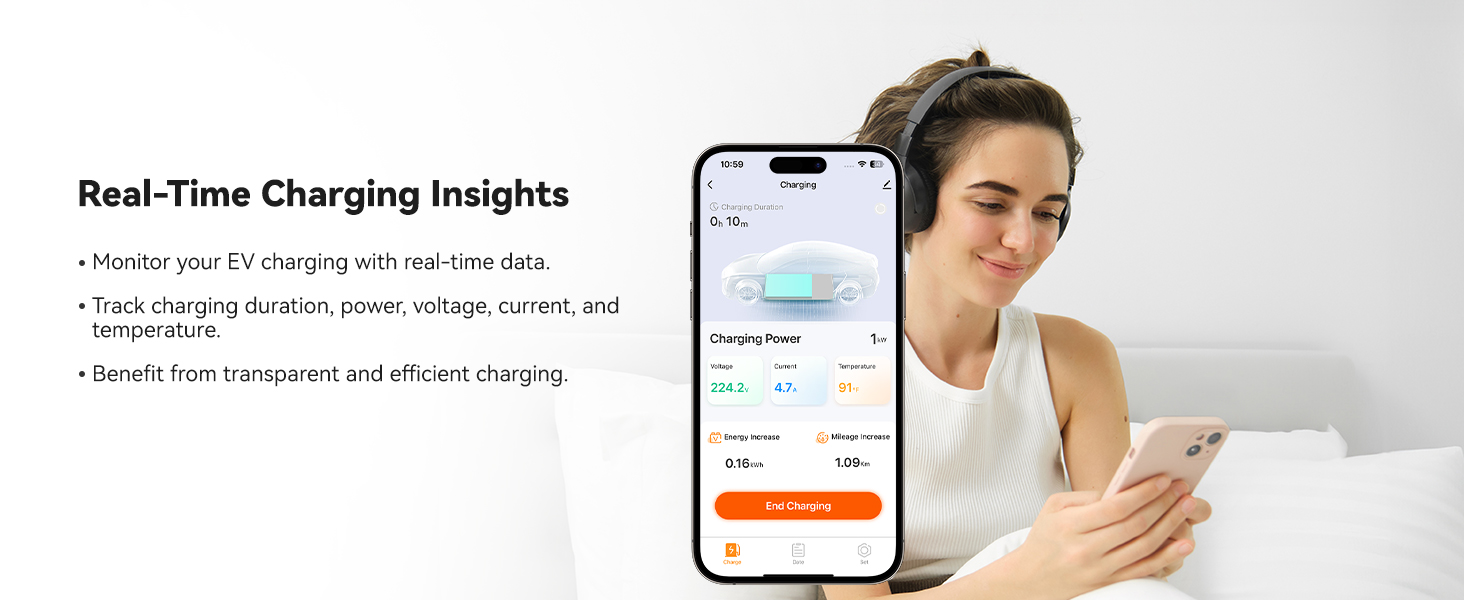
Сүрөт: Колдонуучу viewing real-time charging insights on the WOLFBOX mobile app, showing data like charging duration, power, voltage, жана температура.
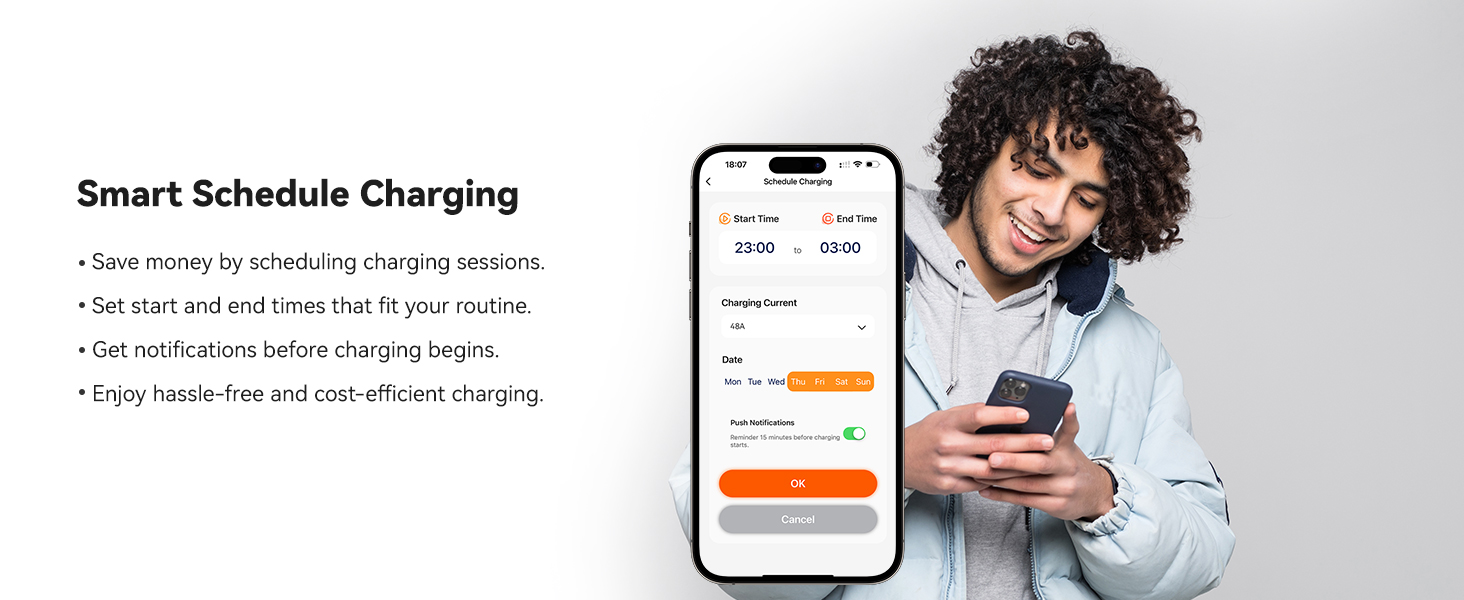
Image: A user setting up a smart charging schedule on the WOLFBOX mobile app, demonstrating the ability to define start and end times for charging sessions.
8. Техникалык тейлөө
Regular maintenance ensures the longevity and optimal performance of your WOLFBOX EV Charger.
- Тазалоо: Wipe the charger unit and cable with a soft, damp cloth. Do not use abrasive cleaners or solvents. Ensure the unit is dry before use.
- Кабелдик текшерүү: Periodically inspect the charging cable and connector for any signs of wear, cuts, or damage. If damage is found, discontinue use and contact customer support.
- Туташтыргычка кам көрүү: Keep the J1772 connector clean and free of debris. Store it in the provided holder when not in use to protect it from elements.
- Программалык камсыздоонун жаңыртуулары: Ensure the charger's firmware is up-to-date via OTA (Over-The-Air) updates through the mobile app for improved performance and new features.
9. Кыйынчылыктарды
If you encounter issues with your WOLFBOX EV Charger, refer to the following common troubleshooting steps:
| Көйгөй | Мүмкүн себеп | Чечим |
|---|---|---|
| Заряддагыч күйбөй жатат | No power from circuit breaker; Loose electrical connections; Internal fault. | Check circuit breaker; Verify electrical connections (consult electrician); Contact customer support. |
| Заряддоо башталбай жатат | Connector not fully inserted; Vehicle not ready to charge; RFID card not recognized; App scheduling conflict. | Ensure connector is fully seated; Check vehicle's charging status; Re-tap RFID card; Verify app schedule settings. |
| Жай кубаттоо ылдамдыгы | Amperage setting too low in app; Vehicle's charging limit; Power supply issue. | Тууралоо amperage setting in the app to a higher value (up to 50A); Check vehicle's charging settings; Consult electrician for power supply verification. |
| Wi-Fi туташуу көйгөйлөрү | Туура эмес Wi-Fi сырсөзү; Маршрутизатор өтө алыс; 5 ГГц тармагы тандалды. | Re-enter Wi-Fi password; Move router closer or use a Wi-Fi extender; Ensure you are connecting to a 2.4 GHz network. |
| Display shows "Stop Reason" with a code | Internal error or protection activation. | Unplug and re-plug the charger from the vehicle. If the issue persists, power cycle the charger by turning off and on its dedicated circuit breaker. Note the specific code and contact customer support if the problem continues. |
| Charger is hot to the touch | Normal operation under heavy load; Poor ventilation; Overload. | Some heat is normal. Ensure adequate airflow around the unit. If excessively hot or accompanied by unusual smells, immediately disconnect power and contact customer support. |
For issues not listed here or if troubleshooting steps do not resolve the problem, please contact WOLFBOX Customer Support.
10. Техникалык шарттар
Detailed technical specifications for the WOLFBOX Level 2 EV Charger (Model E50):

Image: A table summarizing the technical specifications of the WOLFBOX EV Charger.
| Өзгөчөлүк | Спецификация |
|---|---|
| Модель номери | E50 |
| Power Output | 12 кВт чейин |
| Current Output | 16A/24A/32A/40A/48A/50A (Adjustable) |
| Тtage | 200-240 В AC |
| Circuit Breaker Rating | 70A or Greater |
| Коопсуздук сертификаттары | CSA, FCC, Energy Star |
| Коргоо рейтинги | NEMA 4 protection, IP66 |
| Монтаж түрү | Дубалга орнотуу |
| Шайкештик | SAE J1772-A11 EVs/PHEVs in NA (Tesla requires an adapter) |
| Орнотуу | Indoor/Outdoor, Hardwired |
| Кабелдин узундугу | 25 фут |
| Өлчөмдөрү (H x W x D) | 12.68" x 7.46" x 4.76" |
| Салмагы | 13.45 фунт |
| Wi-Fi | 2.4 Ghz 802.11 b/g/n |
| Upgrade Capability | OTA (Over-The-Air updates) |
11. Шайкештик
The WOLFBOX Level 2 EV Charger is compatible with all electric vehicles (EVs) and plug-in hybrid electric vehicles (PHEVs) that use the SAE J1772 charging standard in North America.

Image: Illustrates the compatibility of the WOLFBOX EV Charger with various electric vehicle brands, including Tesla, Ford, Chevrolet, Hyundai, Nissan, Benz, Audi, KIA, Toyota, Jeep, Volvo, and BMW.
11.1. Tesla Vehicles
For Tesla owners, an adapter is required to connect the J1772 charging cable to your vehicle. Please contact WOLFBOX customer service to inquire about obtaining a compatible Tesla adapter (e.g., Adapter ASIN: B0CLLTWG2S).

Image: A Tesla adapter shown with a WOLFBOX EV Charger, indicating the need for an adapter for Tesla vehicles.
12. Кепилдик жана колдоо
WOLFBOX is committed to providing reliable products and excellent customer service.
- Кепилдик: The WOLFBOX Level 2 EV Charger comes with a 36-month warranty.
- Кардарларды колдоо: Dedicated 24/7 customer support is available to assist you with any questions or issues.
- Өмүр бою жардам: WOLFBOX offers lifetime assistance for the product.
- OTA жаңыртуулары: Benefit from continuous improvements and new features through Over-The-Air firmware updates.
For support, please refer to the contact information provided in your product packaging or visit the official WOLFBOX webсайт.


