1. Introduction and Overview
The ATTACK SHARK AK680 is a compact 60% wired mechanical gaming keyboard designed for both gaming and office use. It features a 68-key layout, hot-swappable switches, RGB rainbow backlighting, and anti-ghosting capabilities. The keyboard is constructed with high-quality ABS injection molding and includes EVA sound control for a quieter typing experience.

Image 1.1: The ATTACK SHARK AK680 60% Wired Mechanical Gaming Keyboard in Red&White, showcasing its compact design and keycap layout.
Негизги өзгөчөлүктөрү:
- Portable 60% Layout: Compact 68-key design for space-saving and portability.
- Ыкчам алмаштыруучу которгучтар: Supports 3-pin mechanical switches, allowing for easy customization without soldering.
- Кызыл которгучтар: Features linear red switches for smooth, light, and silent keystrokes, ideal for fast response.
- UV Printing & EVA Sound Control: Durable UV printed keycaps and internal EVA sandwich foam for reduced typing noise.
- Full Anti-Ghosting: Ensures all key presses are registered accurately, even during rapid input.
- RGB Rainbow Backlit: Offers 19 dynamic lighting effects with adjustable brightness and speed.
- Программалануучу: Customizable macros and keybindings via user-friendly software.
- Алынуучу Type-C кабели: For easy connectivity and portability.

Сүрөт 1.2: Бүттүview of the AK680 keyboard highlighting its compact layout, full-key hotswap, EVA sandwich, sleeve switches, mixed color lighting, and anti-ghosting features.
2. Пакеттин мазмуну
Орнотууну улантуудан мурун, таңгактагы бардык буюмдардын бар экенин текшериңиз.
- ATTACK SHARK AK680 Mechanical Keyboard x1
- Type-C USB кабели x1
- Extra Red Switches x2
- Баскыч капкагын тарткыч x1
- Которгуч тартуучу x1
- Колдонуучунун колдонмосу x1

Image 2.1: Visual representation of the items included in the AK680 keyboard package: keyboard, Type-C cable, two extra red switches, keycap puller, switch puller, and user manual.
3. Орнотуу
The AK680 keyboard is designed for simple plug-and-play operation, compatible with Windows, Mac, and Linux systems.
- Locate the detachable Type-C USB cable provided in the package.
- Connect the Type-C end of the cable to the port on the keyboard.
- Connect the USB-A end of the cable to an available USB port on your computer or gaming console.
- The keyboard will be automatically recognized by your operating system and ready for use. No additional drivers are typically required.

Image 3.1: The keyboard connected via its detachable Type-C USB cable, illustrating the plug-and-play setup.
4. Иштөө нускамалары
4.1 RGB жарыгын башкаруу
The AK680 features 19 dynamic RGB rainbow lighting effects. Use the following key combinations to control the backlighting:
- FN + \ |: Ар кандай жарык эффекттери аркылуу айланыңыз.
- FN + ↑: Жарыктыкты жогорулатуу.
- FN + ↓: Жарыктыкты азайтыңыз.
- FN + ←: Жарыктын ылдамдыгын азайтыңыз.
- FN + →: Жарыктын ылдамдыгын жогорулатыңыз.
4.2 Программалануучу функциялар
The keyboard supports extensive customization through dedicated software. This allows users to:
- Макросторду түзүңүз жана дайындаңыз.
- Redefine key functions.
- Customize lighting effects beyond the default modes.
Please refer to the official ATTACK SHARK website for software download and detailed instructions on programming the keyboard.
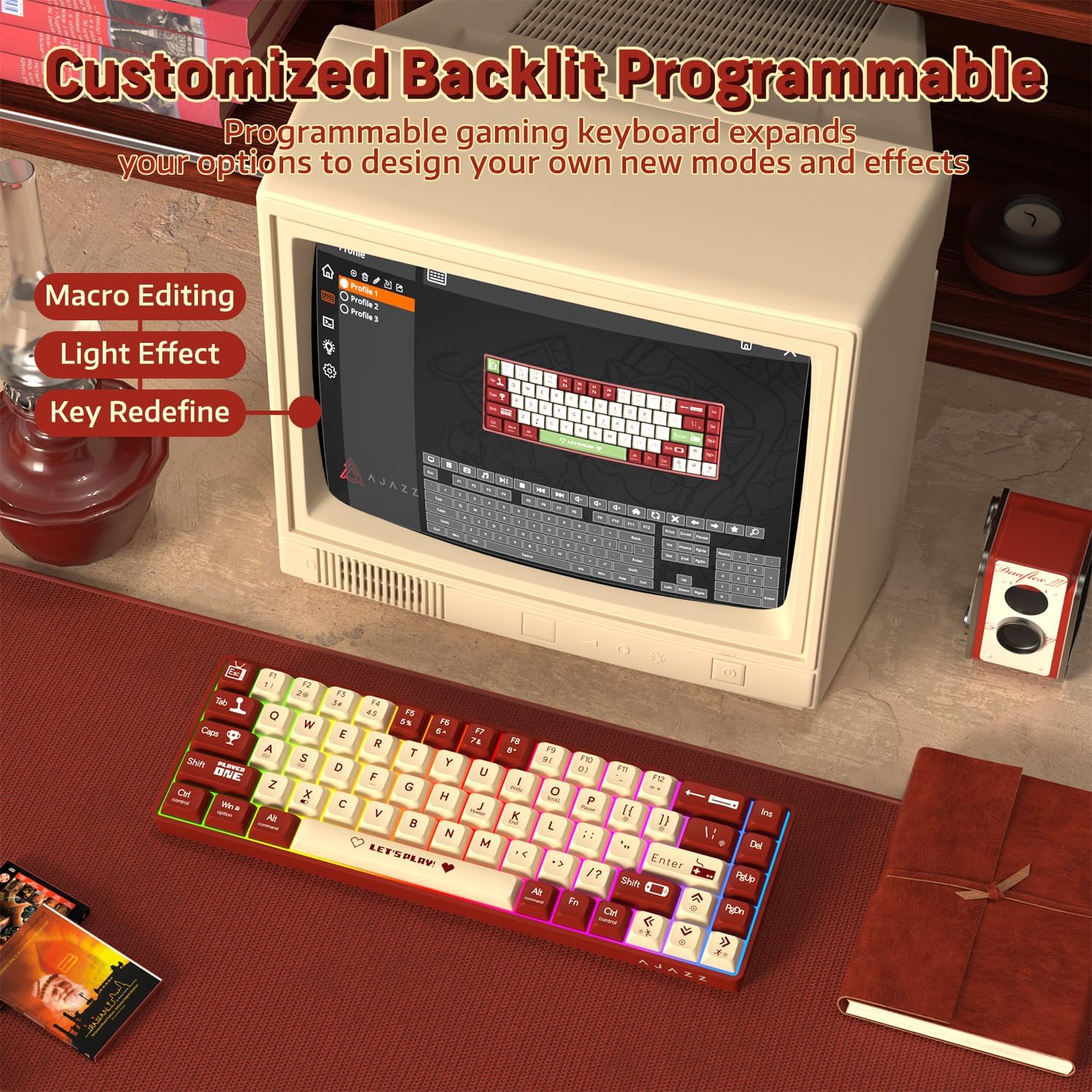
Image 4.1: The AK680 keyboard demonstrating its programmable features, including macro editing, light effect customization, and key redefinition.
4.3 Ыкчам алмаштыруучу которгучтар
The AK680 allows for easy replacement of 3-pin mechanical switches without soldering. This feature enables users to customize their typing feel.
- Using the provided keycap puller, gently remove the desired keycap.
- Using the provided switch puller, carefully grip the switch from its top and bottom clips.
- Аны PCBден алып салуу үчүн өчүргүчтү түз өйдө тартыңыз.
- Align the pins of the new 3-pin switch with the holes on the PCB.
- Gently press the new switch into place until it clicks securely. Ensure the pins are not bent.
- Баскычтын капкагын кайра бекитиңиз.

Сүрөт 4.2: Жакын пландан view of the hot-swappable switches on the AK680 keyboard, showing the ease of installation and removal for customized user experience.
4.4 Арбактарга каршы
The AK680 features full key anti-ghosting, meaning that all simultaneous key presses will be registered accurately. This is particularly beneficial for fast-paced gaming and typing, preventing missed inputs or conflicts.

Image 4.3: Illustration of the full keys anti-ghosting feature, ensuring accurate registration of multiple simultaneous key presses.
4.5 Продукт видеосу бүттүview
Video 4.4: An official product video from ATTACK SHARK US showcasing the AK680 60% Wired Mechanical Gaming Keyboard in use, highlighting its design and typing experience.
5. Техникалык тейлөө
Proper maintenance ensures the longevity and optimal performance of your AK680 keyboard.
- Клавиатураны тазалоо: жумшак колдонуу, damp cloth to wipe down the keycaps. For deeper cleaning, remove keycaps using the provided keycap puller and clean them with mild soap and water. Ensure they are completely dry before reattaching.
- Баскычтоптун корпусун тазалоо: Use a soft, dry cloth to wipe the keyboard body. Avoid using harsh chemicals or abrasive materials.
- Чаңды тазалоо: Баскыч капкактары менен өчүргүчтөрдүн ортосундагы чаңды жана калдыктарды тазалоо үчүн кысылган абаны колдонуңуз.
- Кабельге кам көрүү: Зыяндын алдын алуу үчүн, ажыратылуучу Type-C кабелин курч ийилүүдөн же ашыкча тартуудан качыңыз.
6. Кыйынчылыктарды
If you encounter issues with your AK680 keyboard, refer to the following common troubleshooting steps:
| Көйгөй | Мүмкүн себеп | Чечим |
|---|---|---|
| Баскычтоп жооп бербей жатат / Кубат жок | Loose cable connection, faulty USB port, or system issue. |
|
| Арткы жарык иштебейт же туура эмес | Lighting settings are off or set to a very low brightness. |
|
| Difficulty removing/installing switches | Improper use of switch puller or tight fit. |
|
| Ачкычтар катталбай жатат / Арбактар көрүнүп жатат | Software conflict or rare hardware issue. |
|
7. Техникалык шарттар
| Өзгөчөлүк | Деталь |
|---|---|
| Модель номери | AK680 |
| Макет | 60% (68 ачкычтуу) |
| Байланыш | Wired (Detachable Type-C USB Cable) |
| Которуу түрү | Mechanical (Red Switch, Hot-Swappable 3-pin) |
| Арткы жарыктандыруу | RGB Rainbow (19 effects) |
| Anti-Ghosting | Толук ачкыч Анти-Гостинг |
| Материал | ABS (акрилонитрил бутадиен стирол) |
| Үн башкаруу | EVA Sandwich Foam |
| Клавиатура капкагын басып чыгаруу | UV Printing |
| Keycap Profile | XDA Height |
| Шайкеш OS | Windows, Mac, Linux |
| Пакеттин өлчөмдөрү | 13 x 5.2 x 1.65 дюйм |
| Элемент Салмагы | 1.29 фунт |
| Өндүрүүчү | ATTACK SHARK |
| Келип чыккан өлкө | Кытай |
8. Кепилдик жана колдоо
ATTACK SHARK products are manufactured to high quality standards. For specific warranty information, please refer to the warranty card included with your product or visit the official ATTACK SHARK webсайт.
For further assistance, technical support, or to inquire about replacement parts, please contact ATTACK SHARK customer service through their official channels or visit the Amazon'догу ATTACK SHARK дүкөнү.


