1. Киришүү
Welcome to the user manual for your new realme 12x 5G smartphone. This guide provides essential information on setting up, operating, maintaining, and troubleshooting your device. The realme 12x 5G is designed to offer a seamless mobile experience with its advanced features and robust performance.
This smartphone features a Dimensity 6100+ 6nm chipset for 5G connectivity, a 45W SUPERVOOC Charge with a 5000 mAh battery, a 12.07 cm (6.72 inch) 120 Hz FHD+ Display, a 50 MP AI camera, and dual stereo speakers. Its ultra-slim 7.69 mm profile and lightweight 188g body ensure portability and comfort.
2. Пакеттин мазмуну
Сураныч, төмөнкү нерселер үчүн кутучаны белгилеңиз:
- Телефон
- Заряддагыч
- USB маалымат кабели
- SIM чыгаруучу курал
- Коопсуздук колдонмосу
- Quick колдонмо
- TPU коргоочу кап
3. Түзмөк бүттүview
The realme 12x 5G features a sleek design with an ultra-slim 7.69 mm profile and a lightweight 188g body, making it comfortable to hold and carry. The device is equipped with a 12.07 cm (6.72 inch) 120 Hz FHD+ Display for clear and smooth visuals.
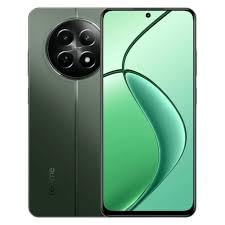
Image: realme 12x 5G Smartphone, showcasing its design and display. Note: This image is a small thumbnail and may not show full detail.
Көрүү үчүнview of the realme 12x 5G, please watch the official product video below:
Видео: расмий бүттүview of the realme 12x 5G, highlighting its key features and design.
4. Орнотуу колдонмосу
4.1 SIM картаны салуу
- Түзмөгүңүздүн капталындагы SIM карта салгычын табыңыз.
- SIM чыгаруучу куралды лотоктун жанындагы кичинекей тешикке кыстарыңыз жана лоток чыкканча акырын басыңыз.
- Nano-SIM картаңызды(ларыңызды) жана/же microSD картаңызды алтын контакттары ылдый каратып салгычка салыңыз. Алардын туура отурганын текшериңиз.
- Аспаптын ичине лотокту чыкылдагыча этияттык менен түртүңүз.
4.2 Күйгүзүү/өчүрүү
- Күйгүзүү үчүн: Press and hold the Power button (usually on the right side) until the realme logo appears on the screen.
- Өчүрүү үчүн: Кубат баскычын басып, кармап туруңуз, андан кийин экранда пайда болгон параметрлерден "Өчүрүү" дегенди тандаңыз.
- Кайра баштоо үчүн: Кубат баскычын басып, кармап туруңуз, андан кийин параметрлерден "Кайра баштоо" тандаңыз.
4.3 Баштапкы конфигурация
Биринчи жолу күйгүзгөндө, түзмөгүңүздү орнотуу үчүн экрандагы көрсөтмөлөрдү аткарыңыз:
- Каалаган тилди жана аймакты тандаңыз.
- Интернетке кирүү үчүн Wi-Fi тармагына туташыңыз.
- Google аккаунтуңуз менен кириңиз же жаңысын түзүңүз.
- Экран кулпусун (PIN код, графикалык ачкыч, сырсөз, манжа изи же жүзүнөн таануу) жөндөңүз.
- Review жана шарттарды кабыл алуу.
5. Негизги операция
5.1 Навигация
Your realme 12x 5G supports both gesture navigation and traditional navigation buttons. You can customize your preferred navigation method in the device settings.
- Башкы экран: Swipe up from the bottom (gesture) or tap the Home button.
- Артка: Swipe from the left or right edge (gesture) or tap the Back button.
- Акыркы колдонмолор: Swipe up from the bottom and hold (gesture) or tap the Recent Apps button.
5.2 Заряддоо
The device supports 45W SUPERVOOC Charge. Use the provided charger and USB data cable for optimal charging speed. The 5000 mAh battery provides extended usage time.
5.3 Байланыш
The realme 12x 5G is equipped with a Dimensity 6100+ 6nm chipset, enabling fast 5G connectivity. It also supports Wi-Fi for internet access and Cellular for mobile data and calls.
5.4 Иштөө жана муздатуу
With 6GB RAM, the device offers seamless multitasking. A vapour chamber cooling system is integrated to maintain optimal performance during intensive use, preventing overheating.
6. Камеранын өзгөчөлүктөрү
The realme 12x 5G features a versatile camera system to capture various moments:
- Негизги арткы камера: 50 MP AI camera for detailed photos.
- Secondary Rear Camera: 2 MP camera for additional imaging capabilities.
- Алдыңкы камера: 8 MP selfie shooter for clear self-portraits and video calls.
Access the Camera app from your home screen or app drawer. Explore various modes such as Photo, Video, Portrait, Night, and more to enhance your photography.
7. Техникалык шарттар
Below are the detailed technical specifications for the realme 12x 5G:
| Өзгөчөлүк | Спецификация |
|---|---|
| Операция системасы | Android |
| RAM | 6 ГБ |
| Пакеттин өлчөмдөрү | 25.1 x 17.8 x 6.7 см |
| Батареялар | 1 литий-иондук батарейка (кошулган) |
| Элемент моделинин номери | 12X |
| Зымсыз байланыш технологиялары | Уюлдук, Wi-Fi |
| Connectivity Technologies | Wi-Fi |
| Өзгөчөлүктөр | (6.72 inch) Full HD+ Display, 5000 mAh Battery, 50MP + 2MP | 8MP Front Camera, Dimensity 6100+ Processor |
| Башка дисплей өзгөчөлүктөрү | Зымсыз |
| Түзмөктүн интерфейси - Негизги | Сенсордук экран |
| Резолюция | 1080 x 2400 |
| Камеранын башка өзгөчөлүктөрү | Алдыңкы, Арткы |
| Аудио Jack | USB |
| Форма фактору | Смартфон |
| Түс | Жашыл |
| Батарея кубаттуулугунун рейтинги | 5000 миллионamp Саат |
| Телефон менен сүйлөшүү убактысы | 6 саат |
| Элемент Салмагы | 188 г |
| CPU модели | Snapdragon (Note: Description mentions Dimensity 6100+ 6nm chipset, please refer to device for exact CPU) |
| CPU ылдамдыгы | 2.2 ГГц |
8. Кыйынчылыктарды
If you encounter issues with your realme 12x 5G, try the following basic troubleshooting steps:
- Түзмөк күйбөй жатат: Батарея заряддалганын текшериңиз. Заряддагычты туташтырыңыз жана кайра күйгүзүү аракетинен мурун бир нече мүнөт күтүңүз.
- Колдонмолор бузулуп/тоңуп жатат: Close the app and reopen it. If the issue persists, clear the app's cache and data in Settings > Apps. As a last resort, uninstall and reinstall the app.
- Тармакка туташуу маселелери: Check if Airplane Mode is off. Restart your device. Verify your SIM card is properly inserted. Reset network settings in Settings > System > Reset options.
- Жай аткаруу: Close unnecessary background apps. Clear cache regularly. Ensure your device software is up to date.
- Батареянын бат түгөнүп калышы: Reduce screen brightness, disable unnecessary features like GPS or Bluetooth when not in use, and identify power-hungry apps in battery settings.
For more complex issues, refer to the official realme support webсайтка же кардарларды тейлөөгө кайрылыңыз.
9. Кепилдик жана колдоо
Your realme 12x 5G smartphone comes with a manufacturer's warranty. Please refer to the warranty card included in your package for specific terms and conditions, including warranty period and coverage details.
Техникалык колдоо, тейлөө же кошумча суроолор боюнча, расмий realme колдоо кызматына кайрылыңыз webсайтына же кардарларды тейлөө жардам телефонуна кайрылыңыз. Колдоо издеп жатканда сатып алганыңыздын далилин колуңузда кармаңыз.


