1. Киришүү
The Motorola CM300d is a robust UHF 40W digital mobile radio designed for reliable and cost-effective communication. This radio facilitates efficient communication, coordination, and collaboration for various professional applications. It combines traditional two-way radio functionality with advanced analog and digital technology, offering enhanced voice quality, extended range, and improved battery life. The CM300d is built for durability, featuring an IP54 rating for splashproof and virtually dustproof performance, ensuring operation in challenging environments.
2. Кутуда эмне бар
Upon unpacking your Motorola CM300d, please verify that all the following components are included:
- Motorola CM300d Digital 40W UHF Mobile Radio Unit
- PMMN4090 Standard Microphone
- RLN6469 Mounting Bracket
- HKLN4137 Power Cable
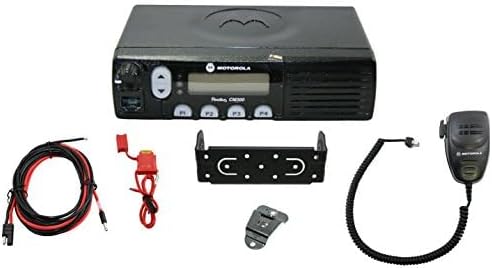
3. Орнотуу
Follow these steps for the initial setup of your CM300d mobile radio:
- Радиону орнотуу: Securely attach the RLN6469 Mounting Bracket to a stable surface in your vehicle or desired location. Ensure the bracket is positioned to allow for proper ventilation and access to controls.
- Installing the Radio: Slide the CM300d radio unit into the mounted bracket until it clicks into place.
- Электр кабелин туташтыруу: Connect the HKLN4137 Power Cable to the radio's power input port. Connect the other end of the power cable to a suitable 12V DC power source, ensuring correct polarity.
- Микрофонду туташтыруу: Plug the PMMN4090 Standard Microphone into the designated microphone port on the front of the radio.
- Антенна туташуу: Connect a compatible UHF antenna (not included) to the antenna connector on the rear of the radio. Ensure the connection is tight and secure.
- Баштапкы күйгүзүү: Once all connections are secure, turn the radio on using the power/volume knob. The digital display should illuminate.
4. Иштөө нускамалары
This section outlines the basic operation of your Motorola CM300d mobile radio.
- Күйгүзүү/өчүрүү жана үнүн чыгаруу: Rotate the power/volume knob clockwise to turn the radio on and increase volume. Rotate counter-clockwise to decrease volume and turn the radio off.
- Канал тандоо: Use the channel up/down buttons (typically located near the display) to navigate through the 5 available channels. The selected channel will be shown on the digital display.
- Өткөрүп берүү: To transmit, press and hold the Push-To-Talk (PTT) button on the microphone. Speak clearly into the microphone. Release the PTT button to listen.
- Кабыл алуу: When a signal is received on your selected channel, the radio will automatically unmute, and you will hear the incoming transmission.
- Digital and Analog Modes: The CM300d supports both analog and digital communication. The radio will automatically detect and adapt to the incoming signal type or can be programmed for specific modes per channel.
- Жыштык диапазону: The radio operates within a frequency range of 400-470 MHz.
- Сүйлөө диапазону: Under optimal conditions, the maximum talking range is approximately 3 miles. Environmental factors can affect this range.
5. Техникалык тейлөө
Proper maintenance ensures the longevity and optimal performance of your CM300d radio.
- Тазалоо: жумшак колдонуу, damp cloth to clean the exterior of the radio. Avoid using harsh chemicals or abrasive cleaners. Ensure the radio is off and disconnected from power before cleaning.
- Курчап турган чөйрөнү коргоо: The radio has an International Protection Rating of IP54, meaning it is protected against dust ingress and splashing water from any direction. While durable, avoid submerging the radio in water or exposing it to extreme conditions beyond its rating.
- Туташуу текшерүүлөрү: Periodically inspect all cable connections (power, microphone, antenna) to ensure they are secure and free from damage.
- Сактагыч: Узак мөөнөткө пайдаланылбаганда, радиону түз күн нурунан жана өтө температурадан алыс салкын, кургак жерде сактаңыз.
6. Кыйынчылыктарды
If you encounter issues with your CM300d radio, try the following basic troubleshooting steps:
- Кубат жок:
- Ensure the power cable is securely connected to both the radio and the power source.
- Кубат булагынын иштешин текшериңиз.
- Verify the power/volume knob is turned on and adjusted appropriately.
- No Audio (Receiving):
- Үн көлөмүн жогорулатыңыз.
- Ensure the correct channel is selected.
- Check the microphone connection.
- Cannot Transmit:
- Ensure the PTT button on the microphone is fully pressed.
- Verify the antenna is properly connected.
- Check if the channel is busy or if there are any transmission restrictions.
- Начар аудио сапаты:
- Check antenna connection and ensure it is suitable for UHF frequencies.
- Move to an area with fewer obstructions if operating at the edge of the radio's range.
- Ensure the microphone is clean and free from debris.
If these steps do not resolve the issue, please contact Motorola Solutions customer support for further assistance.
7. Техникалык шарттар
| Өзгөчөлүк | Спецификация |
|---|---|
| Модель номери | CM300d |
| Бренд | Motorola Solutions |
| Элемент Салмагы | 5.02 фунт |
| Пакеттин өлчөмдөрү | 12.8 x 9.25 x 3.19 дюйм |
| Каналдардын саны | 5 |
| Өзгөчө өзгөчөлүк | Санариптик дисплей |
| Жыштык диапазону | 400-470 МГц |
| Сүйлөшүү диапазону максималдуу | 3 миль |
| Сууга туруктуулук деңгээли | Water Repellent |
| Эл аралык коргоо рейтинги | IP54 |
| Камтылган компоненттер | Mounting bracket, Microphone |
| Шайкеш түзмөктөр | Motorola UHF radios, other FRS devices, compatible microphones and accessories |
| Дата биринчи жеткиликтүү | 3-апрель, 2024-жыл |
8. Кепилдик жана колдоо
The Motorola CM300d Digital Mobile Radio comes with a 1-year warranty from the date of purchase, covering manufacturing defects. For warranty claims, technical support, or further inquiries, please contact Motorola Solutions customer service directly. Refer to the official Motorola Solutions website or your purchase documentation for specific contact information and detailed warranty terms.
Кошумча ресурстар жана колдоо алуу үчүн, төмөнкү дарекке кириңиз Amazonдагы Motorola Solutions дүкөнү.


