1. Киришүү
This manual provides detailed instructions for the installation, operation, and maintenance of your OLUMAT Smart Lock with Handle, Model B28. This keyless entry door lock offers multiple access methods including fingerprint, passcode, key fob, smartphone app, and traditional physical key, enhancing security and convenience for your home or property.

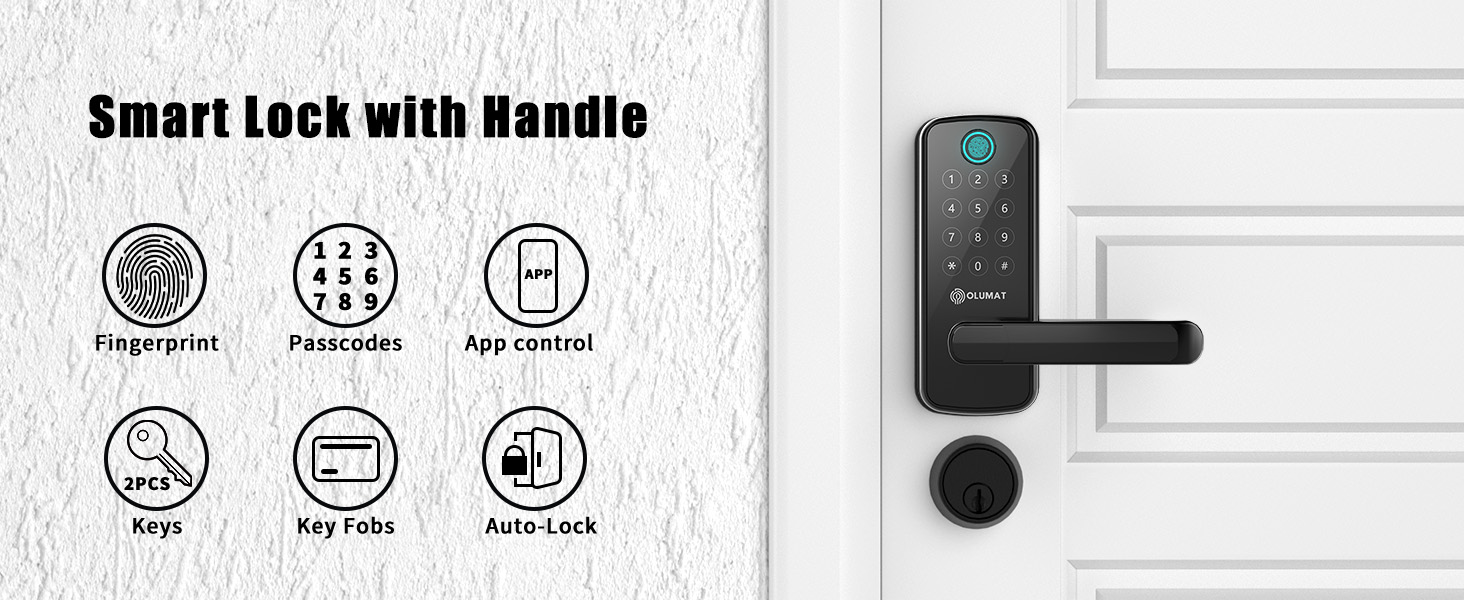
Сүрөт 1.1: OLUMAT Smart Lock with Handle B28. This image displays the complete smart lock unit, highlighting its various components and included accessories like key fobs and physical keys.
2. Пакеттин мазмуну
Орнотууну баштоодон мурун бардык компоненттер бар экендигин текшериңиз:
- OLUMAT Smart Lock Handle (Exterior Unit with Keypad and Fingerprint Sensor)
- OLUMAT Smart Lock Handle (Interior Unit)
- Latch Bolt
- Strike Plate
- Орнотуу жабдуулары (бурамалар, шпиндельдер)
- Физикалык ачкычтар (2)
- Ачкычтар (2)
- Орнотуу шаблону
- User Manual
Note: A Wi-Fi Gateway is an optional accessory, sold separately, and is required for remote control and voice assistant integration.
3. Орнотуу боюнча колдонмо
The OLUMAT Smart Lock B28 is designed for easy installation on most standard American front doors, typically requiring only a Philips screwdriver. No additional drilling or wiring is usually necessary. The door handle is reversible to accommodate both left-handed and right-handed door configurations.
3.1. Эшиктин шайкештиги
Эшигиңиз төмөнкү мүнөздөмөлөргө жооп берерин текшериңиз:
- Эшик калыңдыгы: 1.30" – 1.97" (33mm – 50mm)
- Тешик диаметри: 2.13" (54мм)
- Тешиктин арткы бөлүгү: 2.36" (60mm) or 2.76" (70mm)
This lock is not compatible with storm doors due to the handle size. It is recommended to install this lock above an existing deadbolt lock if one is present.

Сүрөт 3.1: Door Size Compatibility. This diagram illustrates the required door dimensions for proper installation of the smart lock, including thickness, bore hole diameter, and backset measurements.

Сүрөт 3.2: Product Dimensions. This image provides precise measurements of the smart lock components, aiding in pre-installation checks and ensuring proper fit.
3.2. Handle Reversibility
The handle can be adjusted for left-handed or right-handed door operation. Refer to the detailed instructions in the included installation template for specific steps on reversing the handle direction if needed.
Сүрөт 3.3: Adjustable Handle. This image illustrates how the smart lock handle can be configured for either left-handed or right-handed door installations.
3.3. Орнотуу кадамдары
- Remove your existing door hardware.
- Install the latch bolt into the door edge.
- Install the exterior smart lock unit, ensuring the spindle passes through the latch bolt.
- Ички монтаждоо плитасын орнотуңуз.
- Кабелди сырткы блоктон ички блокко туташтырыңыз.
- Install the interior smart lock unit.
- Insert batteries (4 x AA, not included) into the interior unit.
- Test the lock functionality.
4. Иштөө нускамалары
The OLUMAT Smart Lock B28 offers multiple convenient ways to unlock your door.
4.1. Кулпуну ачуу ыкмалары
- Манжа изи: Катталган манжаңызды сенсорго коюңуз.
- Өткөрүүчү код: Enter your programmed code on the keypad.
- Ачкыч фоб: Present the key fob to the designated area on the lock.
- Смартфондук колдонмо: Use the OLUMAT Home app to unlock remotely.
- Физикалык ачкыч: Use the provided physical key as a backup.

Сүрөт 4.1: Multiple Ways to Unlock. This image visually explains the various methods available for accessing your property with the smart lock.
4.2. OLUMAT Home App Control
The OLUMAT Home app allows for comprehensive management of your smart lock. You can remotely lock/unlock, set up door codes, and view real-time access logs. This feature is particularly useful for homeowners and rental property managers.

Сүрөт 4.2: Lock Management. This image demonstrates the OLUMAT Home app on a smartphone and a web interface on a laptop, both used for managing the smart lock.
4.3. Remote Access and Voice Control (with Wi-Fi Gateway)
To enable remote control from anywhere and integrate with voice assistants like Amazon Alexa or Google Assistant, a separate OLUMAT Wi-Fi Gateway is required. Once paired, you can lock/unlock your door, generate temporary passcodes, and check lock status via the app or voice commands.

Сүрөт 4.3: Voice Control Integration. This image illustrates the smart lock's compatibility with Amazon Alexa and Google Assistant, requiring an optional Wi-Fi gateway for voice commands.
Сүрөт 4.4: Remote Passcode Generation. This image demonstrates the ability to generate and share temporary passcodes remotely via the app, useful for visitors or deliveries.
4.4. Коопсуздук өзгөчөлүктөрү
- Автоматтык кулпулоо: The lock can be configured to automatically lock after a set period, providing peace of mind.
- Уурулукка каршы ойготкуч: An alarm will sound if multiple incorrect fingerprint attempts are made or if tampринг аныкталат.
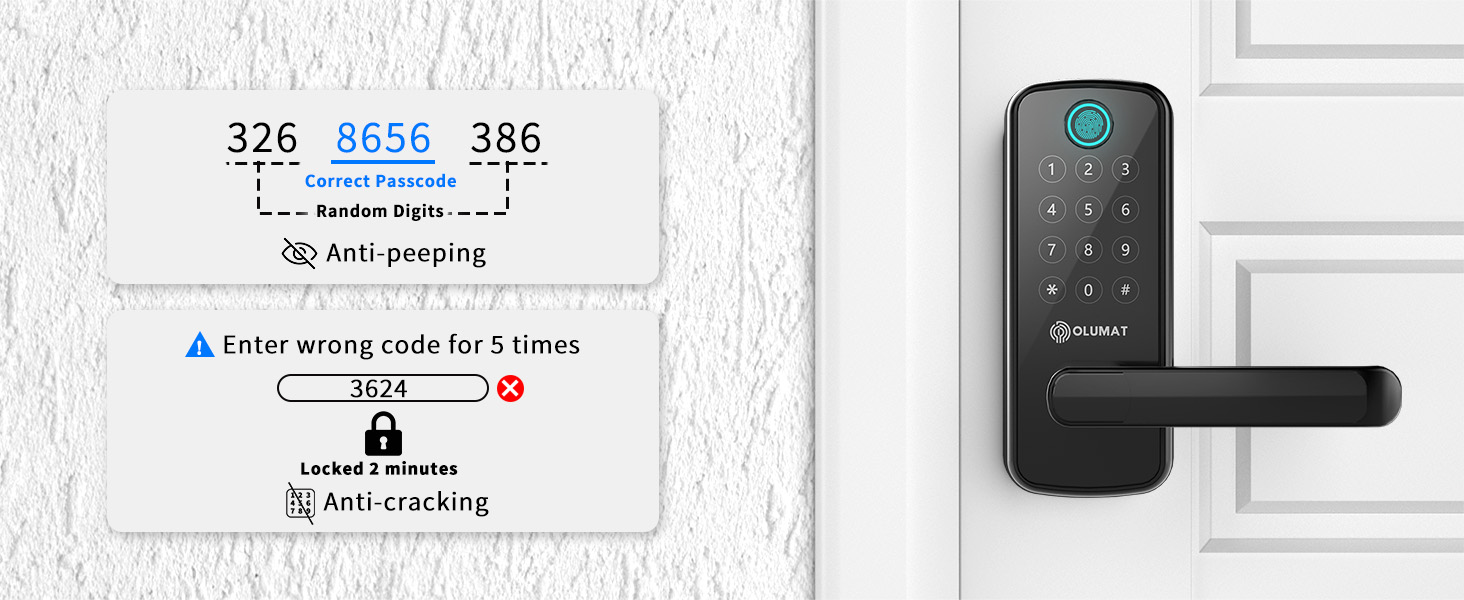
- Карап чыгууга каршы сырсөз: You can enter random digits before or after your actual passcode to prevent others from guessing your code.
- Anti-Cracking Lockout: After several incorrect passcode attempts, the lock will temporarily disable the keypad to prevent unauthorized access.

Сүрөт 4.5: Auto-Locking and Anti-Theft Alarm. This image highlights the automatic locking function and the visual alert for the anti-theft alarm.

Сүрөт 4.6: Anti-Peeping and Anti-Cracking Features. This image explains how to use the anti-peeping function with random digits and the lock's response to multiple incorrect passcode entries.
5. Техникалык тейлөө
Үзгүлтүксүз тейлөө акылдуу кулпууңуздун узак мөөнөттүү жана оптималдуу иштешин камсыз кылат.
- Тазалоо: Кулпунун сыртын жумшак, кургак чүпүрөк менен сүртүңүз. Капталына же электрондук компоненттерге зыян келтириши мүмкүн болгон абразивдүү тазалоочу каражаттарды же эриткичтерди колдонбоңуз.
- Батареяны алмаштыруу: The lock requires 4 AA batteries. Replace them promptly when the low battery indicator appears to ensure continuous operation.
- Программалык камсыздоонун жаңыртуулары: Periodically check the OLUMAT Home app for available firmware updates to ensure your lock has the latest features and security enhancements.
- Механикалык текшерүү: Occasionally check that all screws are secure and the handle operates smoothly.
6. Кыйынчылыктарды
If you encounter issues with your OLUMAT Smart Lock, refer to the following common problems and solutions:
| Көйгөй | Мүмкүн себеп | Чечим |
|---|---|---|
| Fingerprint reader not working consistently | Wet or dirty fingers; improper placement; sensor obstruction. | Ensure fingers are clean and dry. Place finger centrally on the sensor. Clean the sensor surface. Re-register fingerprint if issue persists. |
| Колдонмонун туташуу маселелери | Poor Wi-Fi signal; Wi-Fi Gateway not connected; app outdated. | Check Wi-Fi signal strength. Ensure Wi-Fi Gateway is powered on and connected. Update the OLUMAT Home app. Restart the app or your phone. |
| Lock not responding to keypad/fingerprint | Low batteries; keypad locked due to multiple incorrect entries. | Replace batteries. Wait for the lockout period to expire if the anti-cracking feature was triggered. Use the physical key as a backup. |
| Tampering alarm sounds unexpectedly | False alert; sensor sensitivity. | Check for any physical disturbances near the lock. If persistent, consult customer support for potential sensor adjustment. |
| Lock mechanism feels loose or broken | Loose screws; internal component damage. | Tighten visible screws. If rattling or significant damage is present, contact customer support. |
7. Техникалык шарттар
| Өзгөчөлүк | Деталь |
|---|---|
| Бренд | ОЛУМАТ |
| Модель аты | B28 |
| Кулпу түрү | Biometric, Keypad, Key Fob, App, Physical Key |
| Өзгөчөлүктөр | Auto-Lock, Anti-Theft Alarm, Anti-Peeping, Anti-Cracking |
| Материал | Цинк |
| Түс | Black Smart Lock |
| Элементтин өлчөмдөрү (L x W x Y) | 7 x 2.81 x 1.21 дюйм |
| Элемент Салмагы | 3.88 фунт |
| Connectivity Protocol | Wi-Fi (requires optional gateway) |
| Башкаруу ыкмасы | App, Keypad, Fingerprint, Key Fob, Voice (with gateway) |
| Controller Type | Amazon Alexa, Google Assistant (with gateway) |
| Power Source | 4 x AA батарейкалар (киргизилген эмес) |
| UPC | 659675626864 |
8. Кепилдик жана колдоо
OLUMAT provides the following support for your Smart Lock B28:
- Акчаны кайтарып берүү кепилдиги: 30-day money-back guarantee from the date of purchase.
- Продукт Кепилдиги: 1-year product warranty from the date of purchase.
- Кардарларды колдоо: Lifetime customer support is available.
For technical assistance, warranty claims, or any questions regarding your OLUMAT Smart Lock, please refer to the contact information provided in your product packaging or visit the official OLUMAT webсайт.


