1. Киришүү
The EPOMAKER EK98 is a versatile and customizable mechanical keyboard designed for both gaming and professional use. It features a compact 1800 layout with 97 keys, tri-mode connectivity (Bluetooth 5.0, 2.4GHz wireless, and USB-C wired), hot-swappable switches, and vibrant RGB backlighting. This manual provides detailed instructions to help you set up, operate, and maintain your EK98 keyboard.

Figure 1: EPOMAKER EK98 Wireless Tri-Mode Mechanical Keyboard
2. Пакеттин мазмуну
Сураныч, пакетте төмөнкү нерселерди текшериңиз:
- EPOMAKER EK98 Mechanical Keyboard
- Баскыч капкагын тарткыч
- USB кабели
- Mechanical Switch (x3)
- User Manual

2-сүрөт: Пакеттин мазмуну
3. Продукт бүтүп калдыview
The EK98 keyboard is engineered with several features to enhance your typing and gaming experience:
- Прокладканы орнотуунун дизайны: Incorporates Latex Sandwich Foam and a flexible PC plate to reduce reverberations and provide a comfortable typing feel.
- 1800 Layout (97 Keys): A compact design that retains essential keys like the numpad, F-keys, and arrow keys for efficiency.
- Tri-Mode туташуу: Offers versatile connection options including Bluetooth 5.0, 2.4GHz wireless, and USB-C wired.
- Ыкчам алмаштыруучу которгучтар: Equipped with a hot-swappable PCB for easy replacement or customization of 3/5-pin mechanical switches without soldering.
- RGB жарыктандыруу: Features 16.8 million color RGB backlight effects with south-facing LEDs for better illumination and compatibility with Cherry profile баскычтар.
- Programmable Software: Customize macros, assign functions, and create personalized lighting profiles.
- Dye-Sub PBT Keycaps: Crafted from high-quality PBT material with a Cherry profile for durability, fade resistance, and ergonomic typing comfort.

Figure 3: Key Features of EPOMAKER EK98

Figure 4: 1800 Layout and Dimensions
4. Орнотуу
4.1 Байланыш режимдери
The EK98 supports three connection types:
- USB-C зымдуу: Берилген USB-C кабелин колдонуп, клавиатураны түзмөгүңүзгө түздөн-түз туташтырыңыз.
- 2.4 ГГц зымсыз: Insert the 2.4GHz USB dongle into your device. The keyboard will automatically connect.
- Bluetooth 5.0: Pair the keyboard with up to three Bluetooth-enabled devices.

Figure 5: Three Connection Modes
4.2 Операциялык системанын шайкештиги
The keyboard is compatible with both Windows and Mac operating systems. Use the appropriate key combinations to switch between modes:
- FN + A: Windows режими
- FN + S: Mac режими

Figure 6: Switching between Windows and Mac Modes
Video 1: EPOMAKER EK98 Wireless Gaming Keyboard - Unboxing. This video demonstrates the unboxing process of the EK98 keyboard, showcasing its initial appearance and included accessories.
Video 2: EPOMAKER EK98 Wireless Gaming Keyboard. This video provides a general overview of the EK98 keyboard, highlighting its design and features.
5. Операция
5.1 RGB арткы жарык эффекттери
The EK98 features multiple stunning RGB backlight effects. You can easily switch between effects and control brightness and speed using key combinations. The south-facing LEDs ensure optimal illumination.

Figure 7: RGB Backlight in action
5.2 Программаланган ачкычтар
Utilize the EPOMAKER programmable software to customize your keyboard. This allows you to:
- Create and assign macros to specific keys.
- Негизги функцияларды кайра картага түшүрүү.
- Develop personalized lighting profiles.

8-сүрөт: Программалануучу программалык интерфейс
5.3 Ыкчам алмаштыруучу которгучтар
The EK98 features a hot-swappable PCB, enabling you to easily change mechanical switches (3-pin or 5-pin) without soldering. This allows for personalized tactile feedback and sound.
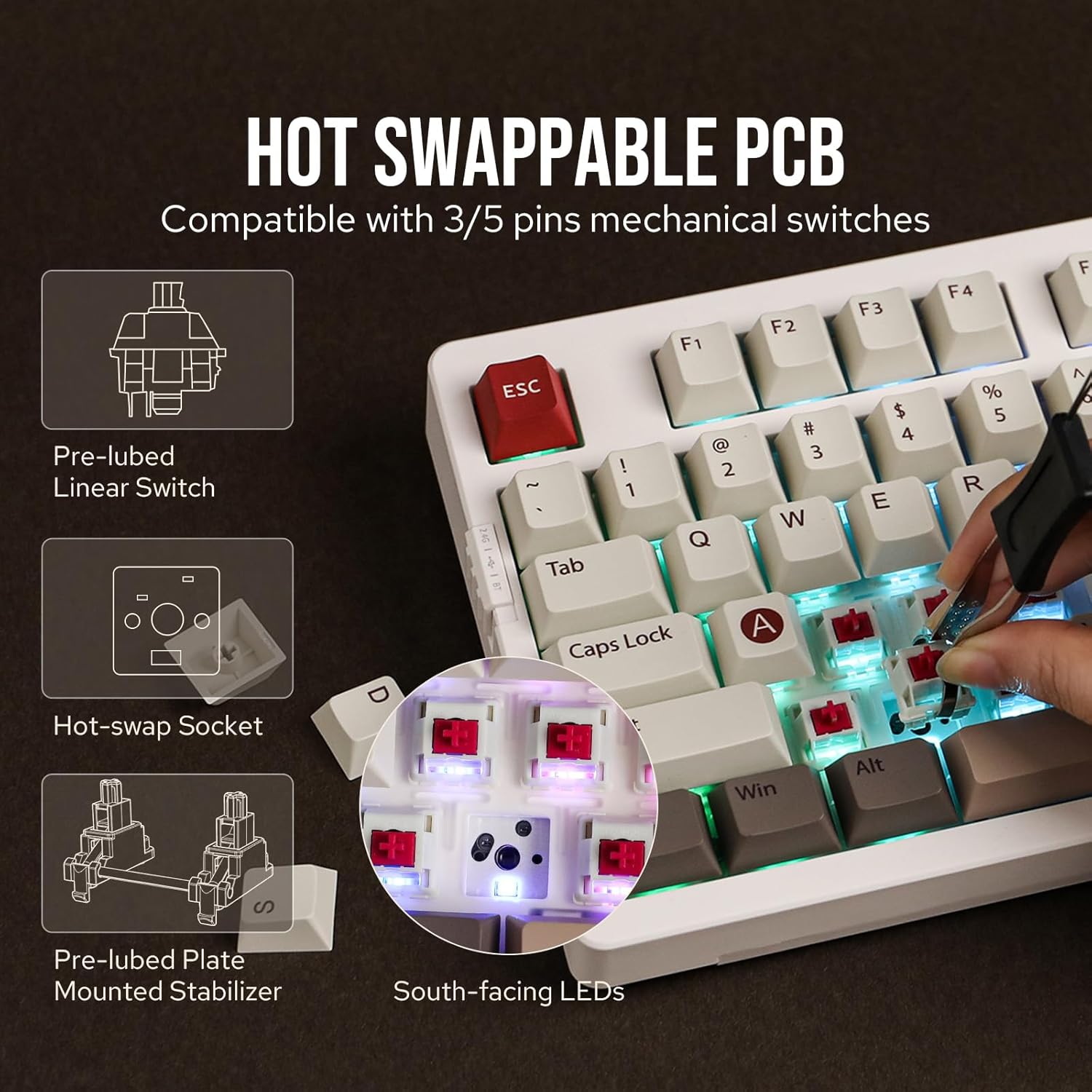
9-сүрөт: Ысык алмаштыруучу которгуч механизми
6. Техникалык тейлөө
6.1 Тазалоо
To maintain optimal performance and appearance, regularly clean your keyboard. Use a soft, dry cloth to wipe down the keycaps and chassis. For deeper cleaning, you can remove keycaps using the provided keycap puller and use compressed air to clear debris from beneath the switches.
6.2 Которгучту жана клавиатураны алмаштыруу
The hot-swappable design allows for easy replacement of switches and keycaps. Use the keycap puller to gently remove keycaps. For switches, use the switch puller to carefully extract the switch from the PCB. Align new switches and press them firmly into place until they click. Ensure pins are not bent during insertion.
7. Кыйынчылыктарды
- Туташуу маселелери: Ensure the keyboard is charged. For 2.4GHz, verify the dongle is securely inserted. For Bluetooth, ensure the keyboard is in pairing mode and visible to your device. Try re-pairing if issues persist.
- Ачкычтар жооп бербейт: Check if the keyboard is properly connected (wired, 2.4GHz, or Bluetooth). If a specific key is not working, try hot-swapping the switch with one of the spare switches provided.
- RGB Backlight Problems: Use the programmable software or keyboard shortcuts to adjust brightness, speed, and effects. Ensure the keyboard is not in a low-power mode that might disable lighting.
- Батареяны төгүү: Adjust RGB brightness and sleep settings to optimize battery life.
8. Техникалык шарттар
| Өзгөчөлүк | Деталь |
|---|---|
| Бренд | EPOMAKER |
| Модель номери | EK98 |
| Байланыш технологиясы | 2.4G зымсыз, Bluetooth, USB-C |
| Keyboard Description | Оюн-зоок, механикалык |
| Өзгөчөлүктөр | Арткы жарыктандырылган, ысык алмаштырылуучу, программалануучу баскычтар, кайра заряддалуучу |
| Баскычтоптун арткы жарыгы | RGB |
| Шайкеш түзмөктөр | Оюн консолу, ноутбук, компьютер, смартфон, планшет |
| Продукциянын өлчөмдөрү | 15.18 x 5.72 x 1.61 дюйм |
| Элемент Салмагы | 3.06 фунт |
9. Кепилдик жана колдоо
For warranty information, technical support, or any product-related inquiries, please visit the official EPOMAKER webсайтка же түздөн-түз кардарларды тейлөөгө кайрылыңыз. Кепилдик дооматтар үчүн сатып алуу дүмүрчөгүңүздү сактаңыз.


