Introduction
Thank you for choosing the Spigen ArcField 3-in-1 Wireless Charging Station. This device is designed to efficiently charge your compatible iPhone, Apple Watch, and AirPods simultaneously. Please read this manual carefully to ensure proper use and to maximize the performance of your charging station.
Пакеттин мазмуну
Пакетиңизде бардык буюмдар бар экенин текшериңиз:
- Spigen ArcField 3-in-1 Wireless Charging Station
- 30W USB-C дубал заряддагыч
- 6.6ft USB-C to USB-C Cable

Image: The Spigen ArcField 3-in-1 Wireless Charging Station shown with its 30W USB-C wall charger and 6.6ft USB-C to USB-C cable.
Орнотуу колдонмосу
- Кубат адаптерин туташтыруу: Plug the provided 30W USB-C Wall Charger into a power outlet.
- USB-C кабелин туташтыруу: Insert one end of the 6.6ft USB-C to USB-C cable into the wall charger and the other end into the USB-C port on the back of the Spigen ArcField charging station.
- Жайгашкан жери: Place the charging station on a flat, stable surface. The anti-slip rubber feet on the base will help keep it secure.
The charging station is now ready for use. An indicator light on the front will illuminate to confirm it is powered on.
Видео: Анимацияланганview demonstrating the Spigen ArcField Wireless Charger's features and functionality.
Иштөө нускамалары
The Spigen ArcField charging station allows for simultaneous charging of up to three devices:
1. Charging Your iPhone (MagSafe)
- Place your MagSafe-compatible iPhone (iPhone 12 series or newer) onto the vertical charging pad. The magnetic connection will securely hold your device in place.
- The station delivers up to 15W fast wireless charging for your iPhone.
- Your iPhone can be charged in both portrait and landscape orientations, allowing for features like Nightstand Mode.

Image: An iPhone magnetically attached to the vertical charging pad, displaying a charging indicator.
2. Apple саатыңызды кубаттоо
- Drape your Apple Watch over the dedicated Apple Watch charging puck on the side.
- The station provides up to 5W charging for your Apple Watch.
3. Charging Your AirPods (Qi)
- Place your AirPods (with wireless charging case) or any other Qi-compatible earbuds onto the horizontal charging pad at the base of the station.
- This pad delivers up to 5W wireless charging.
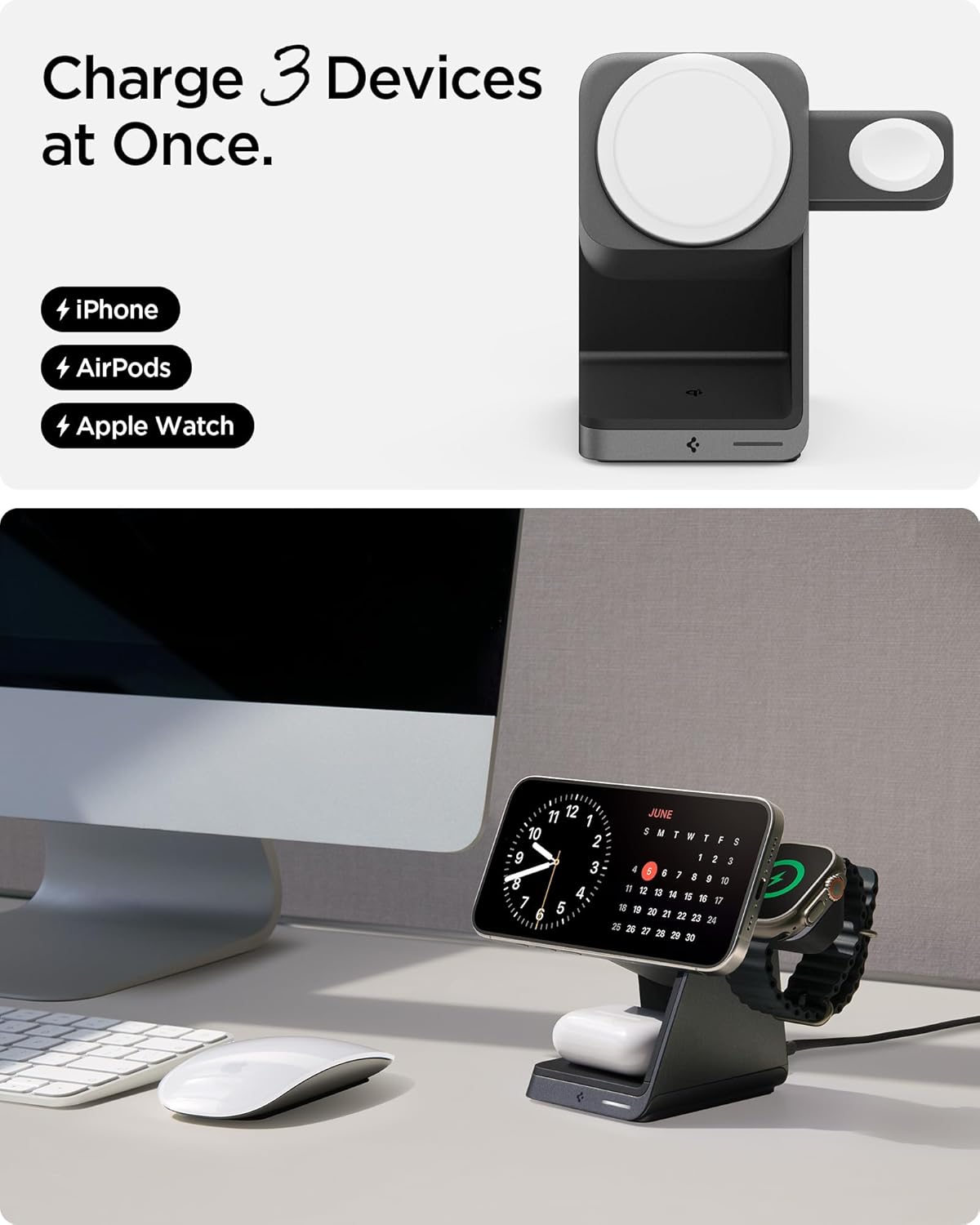
Image: An Apple Watch charging on its dedicated puck and AirPods charging on the base pad.
Бир эле учурда кубаттоо
All three devices can be charged simultaneously without compromising charging speed for each device, thanks to the included 30W power adapter.

Image: The charging station with an iPhone, Apple Watch, and AirPods all actively charging.
MagFit Plus Accessory Storage
The Spigen ArcField features MagFit Plus, a dedicated magnetic area on the back of the vertical charging pad for securely storing MagSafe accessories like wallets or card holders. This area does not provide charging functionality.

Image: The charging station with a MagSafe wallet attached to the MagFit Plus area on the back.
Коопсуздук өзгөчөлүктөрү
The Spigen ArcField 3-in-1 Wireless Charging Station incorporates advanced safety features to protect your devices:
- AirBoost: Optimizes wireless power delivery to ensure efficient charging.
- Ашыкча ысып кетүүдөн коргоо: Prevents the charging station and your devices from overheating during charging.
- Intelligent Safety: Automatically adjusts current based on device demand, ensuring safe and stable charging.
Техникалык тейлөө
To ensure the longevity and optimal performance of your charging station:
- Keep the charging surfaces clean and free of dust or debris. Use a soft, dry cloth for cleaning.
- Аппаратты экстремалдык температуранын же нымдуулуктун таасиринен сактаңыз.
- Do not disassemble or attempt to repair the charging station yourself.
Проблемаларды чечүү
- Түзмөк кубатталбай жатат:
- Ensure the charging station is properly connected to a working power outlet using the provided adapter and cable.
- Verify that your device is correctly aligned on the charging pad. For MagSafe, ensure a secure magnetic connection.
- Remove any thick cases or metallic objects from your device that might interfere with wireless charging.
- Confirm your device is wireless charging compatible.
- Жай кубаттоо:
- Ensure you are using the original 30W USB-C Wall Charger and cable provided with the product.
- Түзмөгүңүздүн кубаттоочу тактага туура жайгашышын текшериңиз.
- Background apps or heavy usage during charging can affect speed.
- Индикатор жарыгы күйгөн жок:
- Check all cable connections and ensure the power adapter is securely plugged into the outlet.
- Башка электр розеткасын колдонуп көрүңүз.
Техникалык шарттар
| Өзгөчөлүк | Деталь |
|---|---|
| Модель номери | PF2203 |
| Киргизүү көлөмүtage | 240 вольт |
| Жалпы USB порттору | 1 (USB түрү C) |
| Ватtage | 30 watts (total output) |
| iPhone Charging Output | Up to 15W (MagSafe) |
| Apple Watch Charging Output | 5 Вт чейин |
| AirPods/Qi Charging Output | 5 Вт чейин |
| Шайкеш түзмөктөр | iPhone 12-17 Series, AirPods Pro (3rd/4th gen), AirPods Pro, Apple Watch Ultra/10/9/8/7/6/SE series, MagSafe Accessories |
| Камтылган компоненттер | 30W USB-C Wall Charger, 6.6ft USB-C to USB-C Cable |
| Өзгөчөлүктөр | Charging Indicator, Magnetic, MagSafe Compatible, Travel, Wireless Charging |
| Элемент Салмагы | 1.41 фунт |
| Пакеттин өлчөмдөрү | 5.39 x 5.16 x 4.02 дюйм |
Кепилдик маалымат
Spigen offers a 24-month hassle-free warranty for the ArcField 3-in-1 Wireless Charging Station. Please retain your proof of purchase for warranty claims. For detailed warranty terms and conditions, please visit the official Spigen webсайтка же кардарларды колдоо менен байланышыңыз.
Кардарларды колдоо
If you encounter any issues or have questions regarding your Spigen ArcField 3-in-1 Wireless Charging Station, please contact Spigen customer support through their official webсайт же продукт таңгагында көрсөтүлгөн байланыш маалыматы.


