1. Продукт бүтүп калдыview
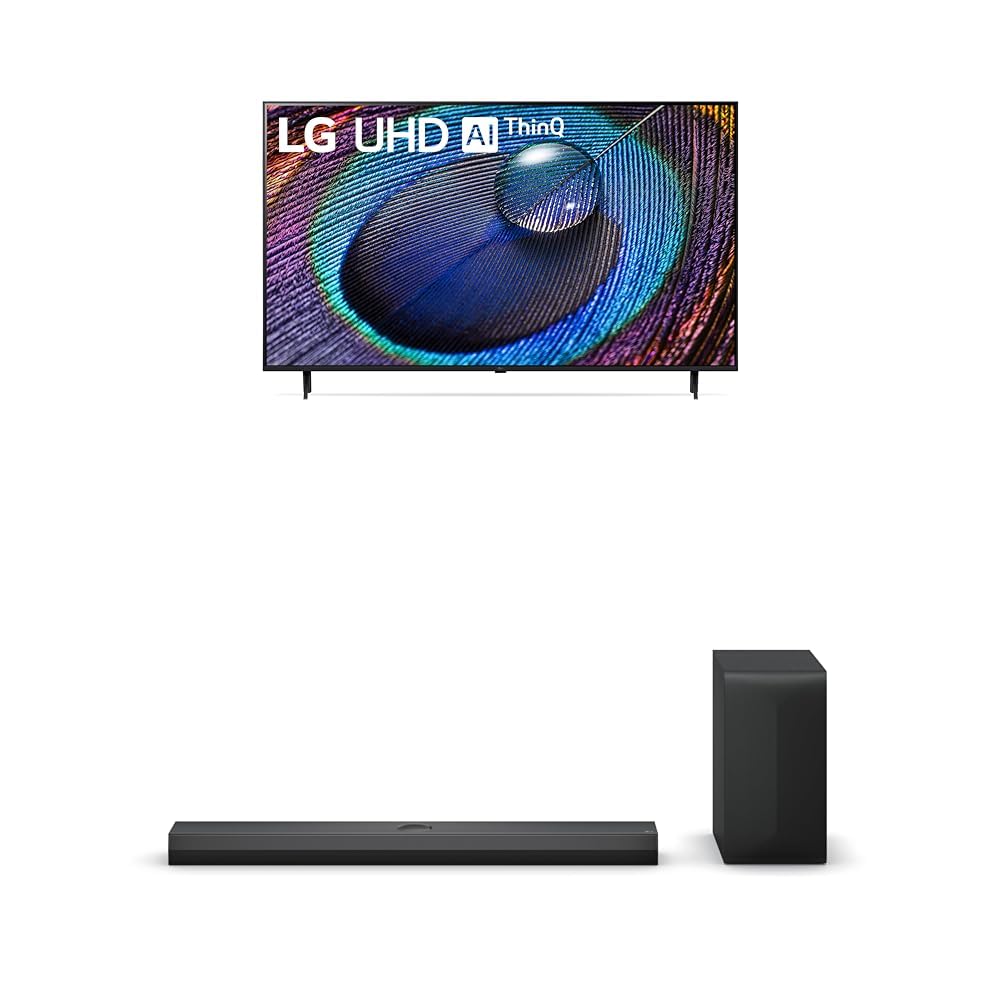
The LG 50-Inch Class UR9000 Series 4K Smart TV offers an immersive home cinema experience with its 3840 x 2160 resolution and AI-Powered 4K upscaling. Enjoy enhanced picture detail and improved sound, along with a suite of smart features including Alexa Built-in, Bluetooth, Wi-Fi, USB, and Ethernet connectivity. This model is designed for optimal viewing and integration into your home entertainment system.
Негизги өзгөчөлүктөрү:
- Home Cinema Experience: Enjoy movies and TV shows upscaled to 4K for a sharper image and more lifelike details. FILMMAKER MODE ensures content is viewed as the director intended. HDR10 Pro provides extended contrast for vibrant visuals.
- a5 AI Processor Gen6: This AI-powered processor enhances picture detail and improves sound, upscaling content to 4K and adjusting color and picture contrast based on room lighting for optimal settings.
- LG QNED Matching: While a great sound enhancer for any LG TV, its smaller width and depth allows it to nest perfectly beneath a stand-mounted QNED TV. It is also fully compatible with the LG QNED Synergy Bracket for wall mounting.
- Crest Design: Features LG’s new crest design for a sleek and stylish look. The metal grill helps keep dust and debris out for worry-free audio enjoyment.
2. Кутуда эмне бар
Upon unpacking your LG UR9000 Series 4K Smart TV, ensure all components are present:
- LG 50-Inch Class UR9000 Series 4K Smart TV
- Телевизордук стенд
- Алыстан башкаруу
- Электр кабели
- Documentation (User Manual, Quick Start Guide, Warranty Information)
3. Орнотуу
3.1 Стендди бекитүү
- Телевизордун экранын кылдаттык менен ылдый каратып жумшак, тегиз жерге коюңуз.
- Телевизордун астыңкы монтаждоо тешиктери менен сыналгы станогун тууралаңыз.
- Берилген бурамалар менен стендди бекитиңиз. Анын бекем орнотулгандыгын текшериңиз.
3.2 Дубалга орнотуу (кошумча)
If you choose to wall mount your TV, ensure you use a VESA-compatible wall mount (sold separately) and follow the instructions provided with the wall mount. Professional installation is recommended for safety.
3.3 Кубатты туташтыруу
- Кубат кабелин телевизордун кубат киргизүү портуна туташтырыңыз.
- Электр кабелинин экинчи учун жерге туташтырылган электр розеткасына сайыңыз.
3.4 Тышкы түзмөктөрдү туташтыруу
The LG UR9000 Series TV offers multiple connectivity options:
- HDMI: Connect Blu-ray players, gaming consoles, or soundbars using HDMI cables. The TV supports multiple HDMI inputs.
- USB: Медиа ойнотуу үчүн USB дисктерин туташтырыңыз.
- Ethernet: Туруктуу интернет байланышы үчүн роутериңизден Ethernet кабелин сыналгынын LAN портуна туташтырыңыз.
- Bluetooth: Connect compatible wireless devices such as headphones or soundbars.
3.5 Баштапкы орнотуу
- Пультту колдонуп сыналгы күйгүзүңүз.
- Тилди, өлкөнү жана убакыт алкагын тандоо үчүн экрандагы көрсөтмөлөрдү аткарыңыз.
- Connect to your Wi-Fi network or confirm your Ethernet connection.
- Accept the terms and conditions and perform any available software updates.
- Set up your Alexa Built-in features as prompted.
4. LG Smart TV'ңизди иштетүү
4.1 Алыстан башкарууну колдонуу
The LG remote control features dedicated buttons for popular streaming services like Netflix, Disney+, and Prime Video for quick access. It also includes a scroll wheel and a mouse-like pointer function for intuitive navigation of the WebOS интерфейси.
4.2 Smart TV интерфейсинде навигация (WebOS)
The WebOS interface provides a user-friendly experience. Use the remote's directional buttons or pointer to select apps, settings, and content. The home screen displays trending content and your installed applications.
4.3 Accessing Apps
Pre-installed apps include Netflix, Prime Video, Hulu, and YouTube. Additional apps can be downloaded from the LG Content Store. Simply select the app icon from the home screen to launch.
4.4 Screen Mirroring and AirPlay
You can display content from your mobile device directly on your TV screen. Use the built-in screen mirroring feature for Android devices or AirPlay for Apple devices. This allows you to share photos, videos, or even workout routines on a larger display.
4.5 Voice Control with Alexa Built-in
Utilize the integrated Alexa voice assistant for hands-free control. Press the microphone button on your remote and speak commands to change channels, adjust volume, search for content, or control smart home devices.
4.6 Оюн функциялары
The TV's AI-Powered 4K and 60Hz refresh rate provide a responsive gaming experience. Connect your gaming consoles via HDMI for high-quality visuals and smooth gameplay.
5. Техникалык тейлөө
5.1 Телевизорду тазалоо
- Тазалоодон мурун дайыма сыналгыдан ажыратыңыз.
- Экранды жана алкакты акырын сүртүү үчүн жумшак, кургак микрофибер чүпүрөктү колдонуңуз.
- өжөр белгилери үчүн, жеңил гampчүпүрөккө суу же атайын экран тазалагыч (катуу химиялык заттардан алыс болуңуз).
5.2 Программалык камсыздоо жаңыртуулары
Regularly check for and install software updates to ensure optimal performance, security, and access to the latest features. Updates can usually be found in the TV's settings menu under 'Support' or 'About This TV'.
6. Кыйынчылыктарды
6.1 Күч жок
- Ensure the power cable is securely plugged into both the TV and the electrical outlet.
- Башка аспапка сайып, розетка иштеп жатканын текшериңиз.
- Башка электр розеткасын колдонуп көрүңүз.
6.2 No Picture / Poor Picture Quality
- Туура киргизүү булагы тандалганын текшериңиз (мисалы, HDMI 1, HDMI 2).
- Check all cable connections (HDMI, antenna, etc.) for looseness or damage.
- Сыналгынын менюсунда сүрөт жөндөөлөрүн (жарыктык, контраст, түс) тууралаңыз.
- Эгерде тышкы түзмөк колдонулуп жатса, анын күйгүзүлүп, туура иштеп жатканын текшериңиз.
6.3 Үн жок / Үн сапаты начар
- Телевизордун жана туташкан тышкы аудио түзмөктөрдүн үнүн жогорулатыңыз.
- Check audio output settings in the TV's menu to ensure the correct output (e.g., TV Speakers, Optical, Bluetooth) is selected.
- Бардык аудио кабельдер коопсуз туташтырылганын текшериңиз.
6.4 Алыстан башкаруу иштебейт
- Пульттагы батарейкаларды алмаштырыңыз.
- Пульт менен сыналгынын сенсорунун ортосунда эч кандай тоскоолдук жок экенин текшериңиз.
- Try re-pairing the remote control if it's a smart remote (refer to the TV's on-screen guide for instructions).
7. Техникалык шарттар
| Өзгөчөлүк | Деталь |
|---|---|
| Бренд | LG |
| Модел | UR9000 сериясы |
| Screen Size | 50 дюйм |
| Дисплей технологиясы | LED |
| Резолюция | 4K (3840 x 2160) |
| Жаңыртуу ылдамдыгы | 60 Гц |
| Өзгөчөлүктөр | Alexa Built-in, AI-Powered 4K, FILMMAKER MODE, HDR10 Pro, Flat Screen |
| Байланыш технологиясы | Bluetooth, Ethernet, USB, Wi-Fi |
| Колдоого алынган Интернет кызматтары | Browser, YouTube (and various streaming apps) |
| Камтылган компоненттер | Тирөөч, телевизор, пульт, электр кабели |
| Түс | Кара |
| Биринчи жеткиликтүү күн | 8-апрель, 2024-жыл |
8. Кепилдик жана колдоо
For detailed warranty information and customer support, please refer to the warranty card included in your product packaging or visit the official LG website. You can also contact LG customer service for assistance with any product-related inquiries or technical support.