1. Introduction and Overview
The AOPEN 32S1U PRO is a versatile 31.5-inch 4K UHD Touch Rollable Smart Device designed to provide an outstanding visual and interactive experience. With its built-in wheels, integrated Android system, and touch capabilities, it functions as a large tablet, smart monitor, TV, conferencing display, and even a drawing tablet. Its portability and comprehensive features make it suitable for both work and home environments.

Image: The AOPEN 32S1U PRO Rollable Smart Device in its upright position, showcasinанын чоң дисплейи жана жарашыктуу дизайны.
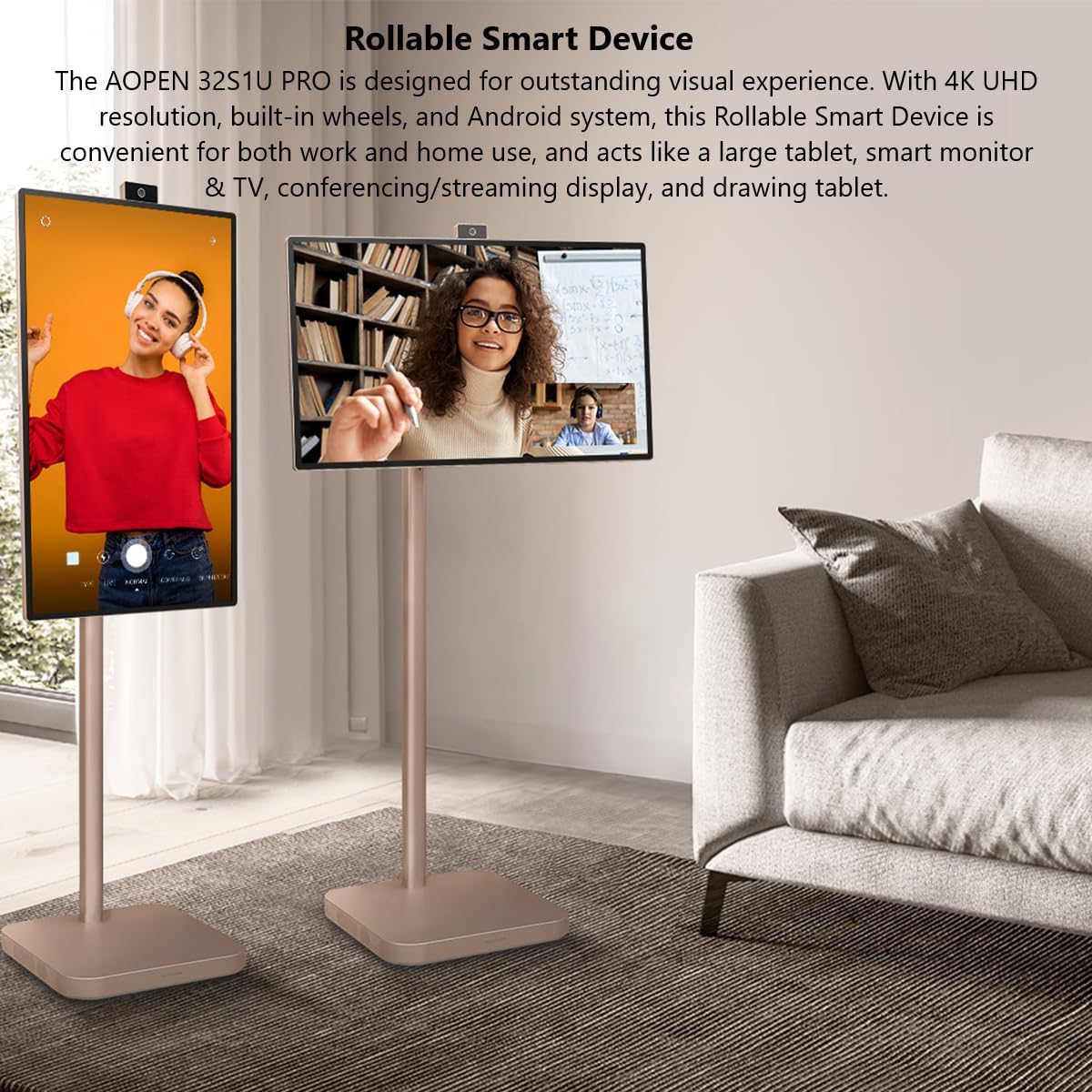
Image: Two AOPEN 32S1U PRO devices, one in landscape orientation and another in portrait, demonstrating its versatile display modes in a living room setting.
2. Пакеттин мазмуну
Before beginning assembly, please ensure all components are present:
- AOPEN 32S1U PRO Display
- Ассамблея
- Электр кабели
- 8M Magnetic Camera
- Mini HDMI Cable
- USB Type-C кабели
3. Орнотуу
3.1 Ассамблея
- Бардык компоненттерди кутудан кылдаттык менен чыгарыңыз.
- Attach the display panel to the stand assembly following the instructions provided in the quick start guide (not included in this manual). Ensure all screws are securely fastened.
- Электр шнурун аппаратка жана розеткага туташтырыңыз.
3.2 First Power On and Initial Setup
- Аны күйгүзүү үчүн түзмөктө жайгашкан кубат баскычын басыңыз.
- Follow the on-screen prompts to complete the initial Android system setup, including language selection, time zone, and Google account login.
3.3 Тармактык туташуу
To access online features and the Google Play Store, connect the device to a Wi-Fi network:
- Түзмөктө "Орнотуулар" менюсуна өтүңүз.
- "Тармак жана Интернет" же "Wi-Fi" тандаңыз.
- Тизмеден каалаган Wi-Fi тармагын тандап, суралса, сырсөздү киргизиңиз.
- The device will connect to the internet.
4. Иштөө нускамалары
4.1 Негизги башкаруу каражаттары
The device features physical buttons for power and volume, typically located on the side or bottom of the display. The primary interaction is through the 10-point touchscreen.
4.2 Сенсордук экранда навигация
Navigate the Android interface by tapping, swiping, and pinching on the screen, similar to a large tablet. The 10-point touch technology allows for precise control and multi-finger gestures.
4.3 Дисплейди тууралоо
The AOPEN 32S1U PRO offers flexible adjustments for optimal viewing:
- Пивот: Rotate the screen up to 90 degrees for vertical (portrait) or horizontal (landscape) orientation.
- Бийиктигин тууралоо: Adjust the screen height by 7.87 inches (200mm) to find your most comfortable viewпозиция.
- Россия: Tilt the screen from -18° to 18° to reduce glare and improve viewбурчтар.
- Айлануучу: Swivel the display +/-30° to share content with others in the room.
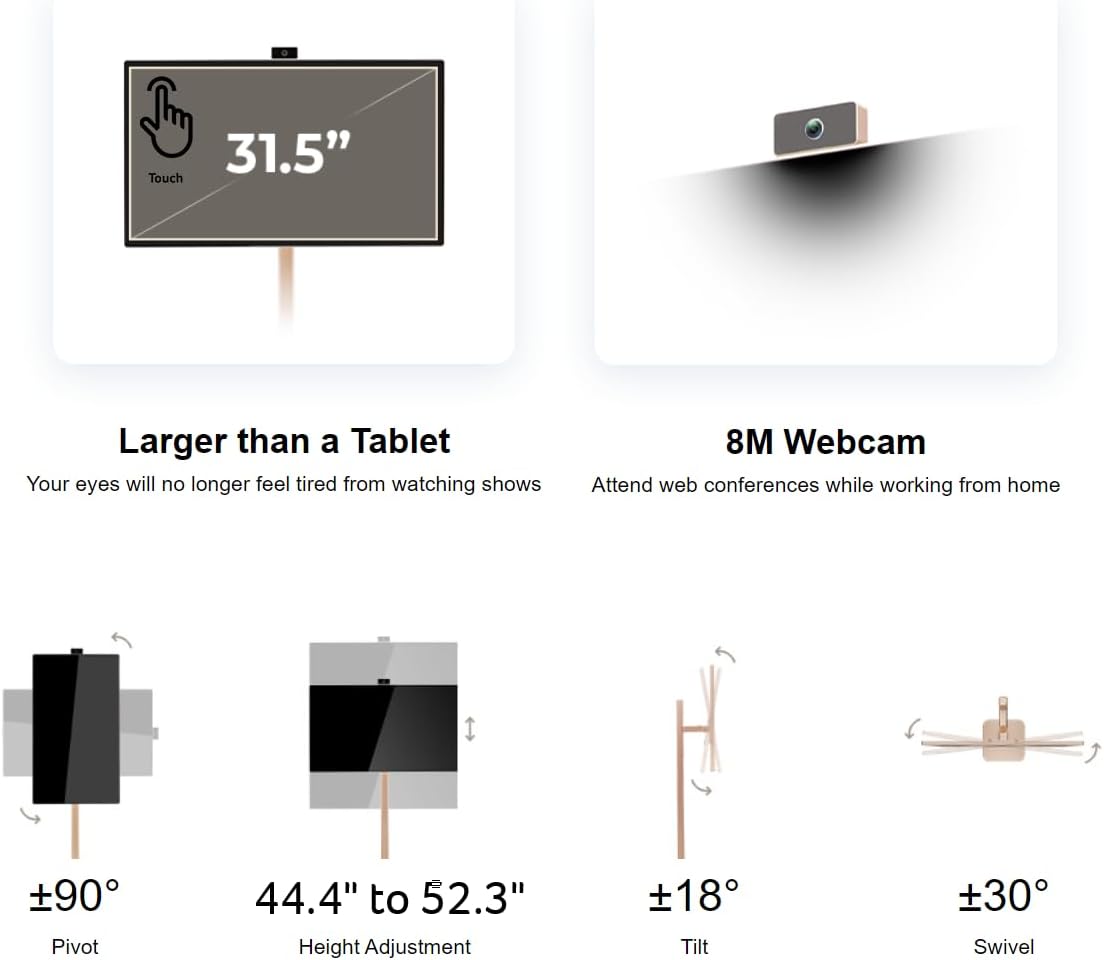
Image: Diagrams illustrating the pivot (±90°), height adjustment (44.4" to 52.3"), tilt (±18°), and swivel (±30°) capabilities of the AOPEN 32S1U PRO.
4.4 Using the 8M Magnetic Camera
The included 8M Magnetic Wireless Camera can be attached to various points on the perimeter of the display. It can also be removed completely if not needed. This camera, along with the 4-array microphone and 2 x 10W speakers, enhances video calls and interactive experiences.
4.5 Зымсыз проекция
The device supports wireless content mirroring from both mobile devices (Android/iOS) and PCs (Mac/Windows).

Image: A diagram showing mobile projection from iPhone, Android phone, and tablet, and PC projection from Macbook, laptop, and desktop PC to the AOPEN 32S1U PRO.
4.6 Батареяны башкаруу
The AOPEN 32S1U PRO features a built-in lithium-ion battery providing up to 4 hours of usage. To charge, connect the power cord to the device and a power outlet. A light on the base indicates battery status.
4.7 Тышкы түзмөктөрдү туташтыруу
The device includes the following ports:
- 1 x USB 3.1 (Type-C) port (Gen 1 up to 5 Gbps): Supports data transfer, 10W power delivery, and DisplayPort over USB-C.
- 1 x Mini HDMI port: Тышкы видео булактарын туташтыруу үчүн.
Mini HDMI and USB Type-C cables are included in the package.
4.8 Google Play Store and Applications
With full access to the Google Play Store, you can download and install a wide range of applications, including streaming services like Netflix and YouTube, productivity tools, and games. The device operates like a large Android tablet.
4.9 MPP 2.0 Pen Support
The AOPEN 32S1U PRO is compatible with MPP 2.0 pens (not included), allowing for precise drawing, note-taking, and interactive use, transforming it into a large graphics tablet.
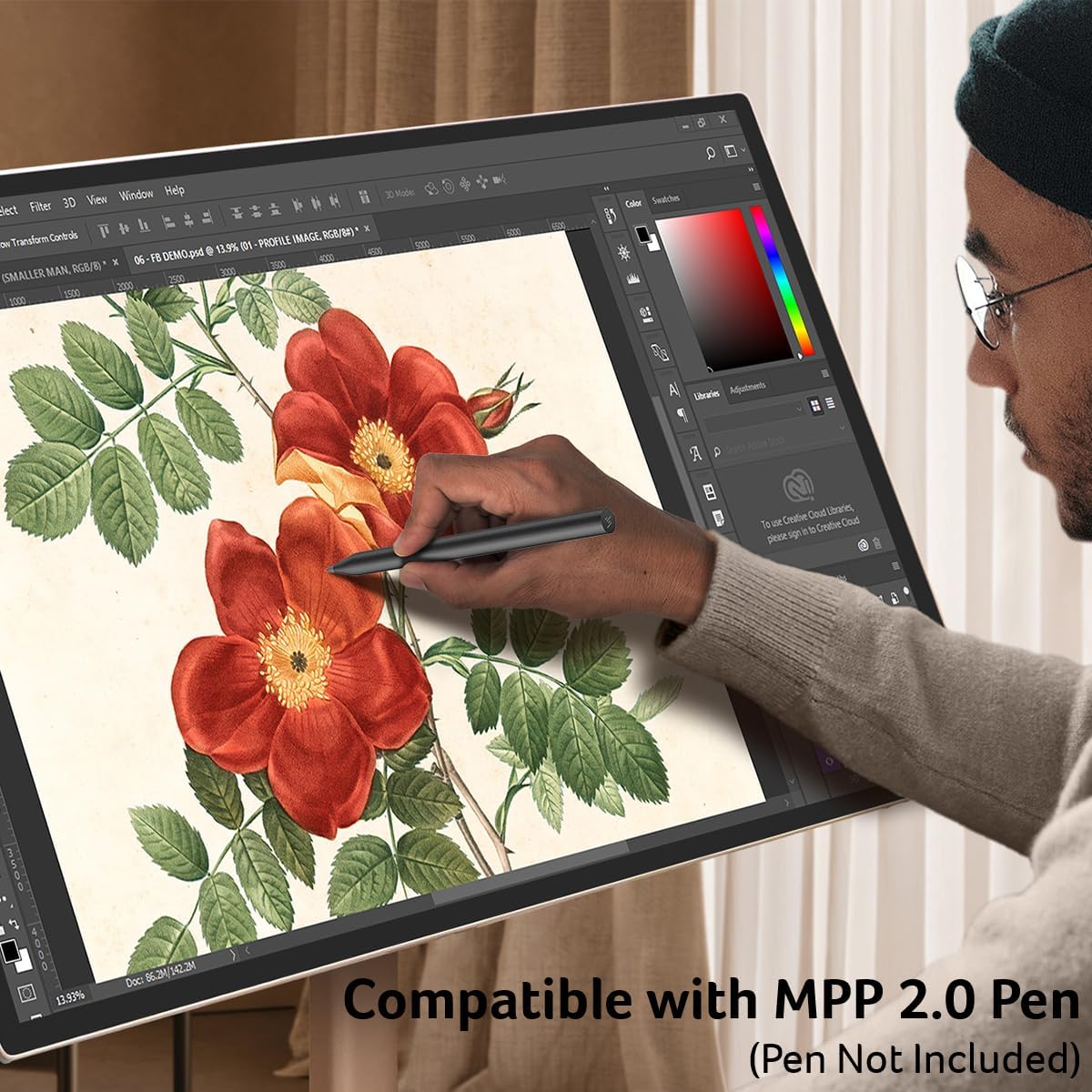
Image: A person using an MPP 2.0 compatible pen on the AOPEN 32S1U PRO display for digital art, highlighting its drawing tablet capabilities.
4.10 Mobility and Usage Scenarios
Thanks to its built-in wheels, the device can be easily moved between rooms. Its versatile design supports various usage scenarios:
- Көңүл ачуу: Watch movies, stream videos, or play games from anywhere in your home.
- Өндүрүмдүүлүк: Use it for video conferencing, presentations, or as a large interactive display for work.
- Чыгармачылык: Utilize its touch and pen support for digital art and design.
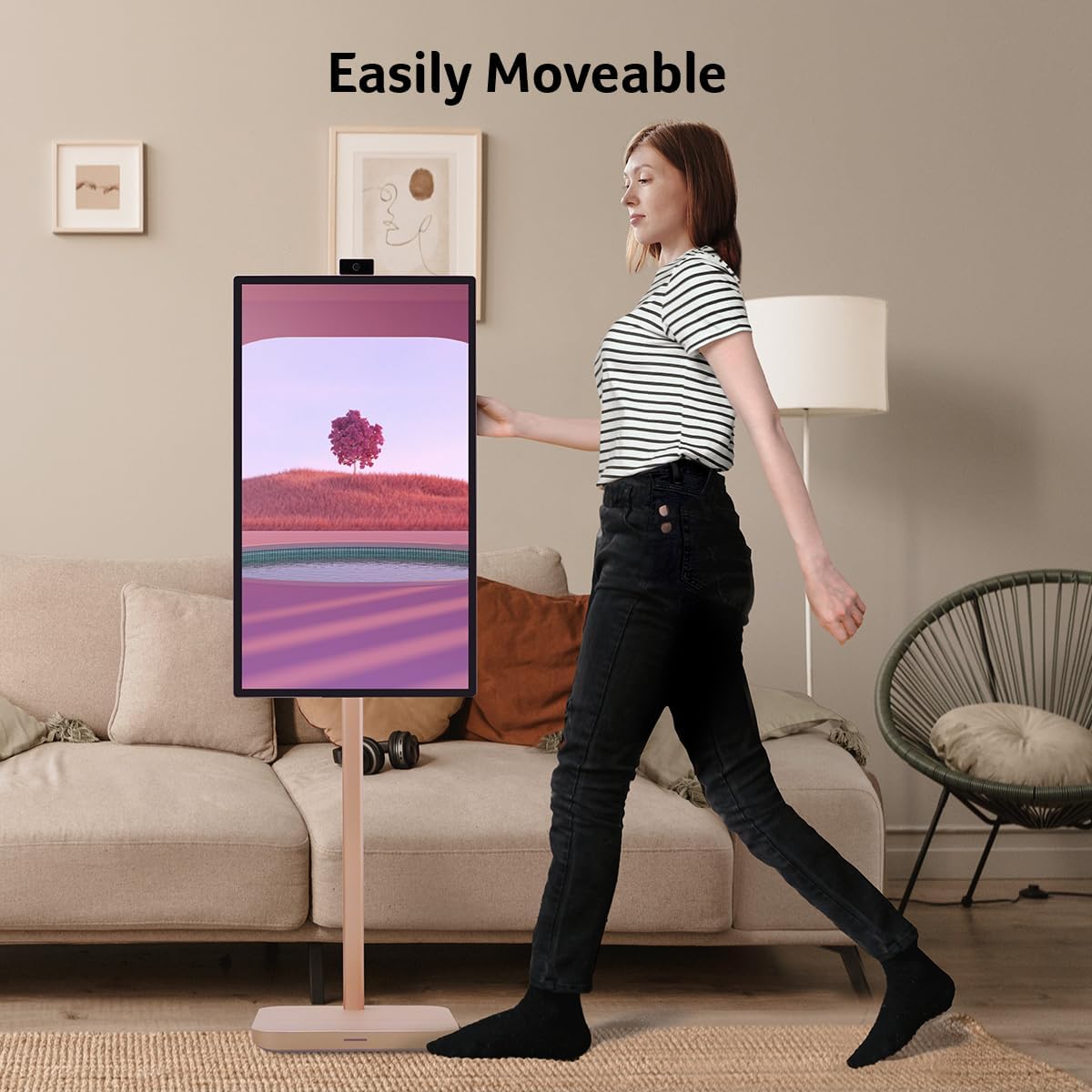
Image: A person easily pushing the AOPEN 32S1U PRO device across a room, demonstrating its portability with built-in wheels.

Image: A collage of images showing the AOPEN 32S1U PRO being used in various settings: during yoga, in bed, in a meeting, for studying, and while cooking, highlighting its adaptability.
5. Кароо жана тейлөө
- Экранды тазалоо: Бир аз жумшак, түксүз кездемени колдонуңуз dampсуу же экран тазалоочу эритме менен эритиңиз. Катуу химиялык заттардан же абразивдүү материалдардан алыс болуңуз.
- Cleaning the Stand and Base: кургак же бир аз аарчып аарчыңызamp кездеме.
- Сактагыч: Аппаратты түз күн нурунан жана экстремалдык температурадан алыс салкын, кургак жерде сактаңыз.
- Батареяга кам көрүү: Батареянын иштөө мөөнөтүн оптималдаштыруу үчүн, батареяны тез-тез толук зарядсыздандырбаңыз. Түзмөктү үзгүлтүксүз кубаттап туруңуз.
6. Көйгөйлөрдү чечүү боюнча колдонмо
| Көйгөй | Мүмкүн себеп | Чечим |
|---|---|---|
| Түзмөк күйбөйт. | No power, low battery, power button issue. | Ensure power cord is securely connected and outlet is active. Charge the device for at least 30 minutes. Try holding the power button for 10-15 seconds. |
| Сенсордук экран жооп бербейт. | Software glitch, screen dirty, temporary issue. | Restart the device. Clean the screen with a soft, lint-free cloth. If persistent, perform a factory reset (data will be lost). |
| Wi-Fi'га туташпай жатат. | Incorrect password, router issue, out of range. | Double-check Wi-Fi password. Restart your router. Move the device closer to the Wi-Fi router. |
| Poor video call quality. | Weak internet connection, camera/mic obstruction. | Ensure stable internet connection. Check if the camera or microphone is obstructed. Adjust camera position. |
| Батарея бат эле түгөнөт. | High screen brightness, many apps running, aging battery. | Экран жарыктыгын азайтыңыз. Колдонулбаган колдонмолорду жабуу. Фондук дайындарды колдонууну чектөө. |
7. Техникалык шарттар
| Өзгөчөлүк | Спецификация |
|---|---|
| Модель номери | UM.JS1AA.001 |
| Screen Size | 31.5 дюйм |
| Резолюция | 4K UHD (3840 x 2160) |
| Touch Technology | 10-point Touch |
| Операция системасы | Android System (Google Play Store Support) |
| Процессор | 8 Процессорлор |
| Камера | 8M Magnetic Wireless Camera |
| Аудио | 4-Array Microphone, 2 x 10W Speakers |
| Зымсыз байланыш | Wi-Fi 6, Bluetooth |
| Батарея | Built-in Lithium-Ion (Up to 4 hours usage) |
| Түс | Champагне |
| Өлчөмдөрү (LxWxH) | 15.2 x 28.8 x 48.3 дюйм |
| Элемент Салмагы | 30.5 фунт |
| Порттар | 1 x USB 3.1 Type-C (Gen 1, 10W PD, DP Alt Mode), 1 x Mini HDMI |
| Жаңыртуу ылдамдыгы | 60Hz |
| Түс гаммасы | DCI-P3 95% |
| HDR колдоо | HDR 10 |
8. Кепилдик боюнча маалымат жана колдоо
This product is manufactured by Acer under the AOPEN brand. For specific warranty terms and conditions, please refer to the warranty card included with your purchase or visit the official AOPEN support webсайт. Кепилдик дооматтар үчүн сатып алганыңыздын далилин сактаңыз.
For technical support, troubleshooting assistance beyond this manual, or service inquiries, please contact AOPEN customer support through their official channels.


