1. Киришүү
This instruction manual provides essential information for the safe and efficient use of your NIIMBOT D110M Bluetooth Label Maker. Please read this manual thoroughly before operating the device and retain it for future reference. The NIIMBOT D110M is a compact, wireless thermal label printer designed for various organizational tasks in home, office, and school environments.

Image 1.1: The NIIMBOT D110M Label Maker, a roll of blank labels, and three example labels showing a barcode, 'Biscuits', and 'Tools'.
2. Пакеттин мазмуну
Төмөндө тизмеленген нерселердин баары пакетиңизге камтылганын текшериңиз. Эгерде кандайдыр бир нерселер жок болсо же бузулса, кардарларды колдоо менен байланышыңыз.

Image 2.1: The complete package contents for the NIIMBOT D110M, neatly arranged.
- NIIMBOT D110M Label Maker
- User Manual
- C түрүндөгү кубаттоочу кабель
- Таңгактоочу куту
- Label Paper Roll (12x40mm)
3. Продукт бүтүп калдыview жана өзгөчөлүктөрү
The NIIMBOT D110M is designed for ease of use and portability, featuring advanced thermal printing technology.
Негизги өзгөчөлүктөрү:
- Bluetooth байланышы: Seamless wireless connection to smartphones via the NIIMBOT app.
- Термикалык басып чыгаруу: Utilizes BPA-Free Direct Thermal Technology, eliminating the need for ink or toner.
- Жогорку чечим: 203 DPI for clear and crisp print quality.
- Портативдик дизайн: Compact and lightweight, powered by a built-in 1500mAh rechargeable Lithium-Ion battery.
- Тез кубаттоо: Fully charged in approximately 2 hours via Type-C cable.
- Батареянын узак иштөө мөөнөтү: Up to 5 hours of continuous printing on a full charge.
- Интеллектуалдык идентификация: Built-in RFID chip automatically recognizes label types for simplified setup.
- Туруктуу энбелгилер: Compatible labels are waterproof, oil-proof, abrasion-resistant, and fade-resistant.

Image 3.1: Visual representation of the NIIMBOT D110M's key features, including text printing, scanning, inkless operation, portability, high-speed printing, and Bluetooth connectivity.

Image 3.2: Details on the D110M's upgraded battery performance, highlighting its 1500mAh capacity, charging time, and print speed.
4. Орнотуу
4.1 Аппаратты заряддоо
Before first use, fully charge the label maker. Connect the provided Type-C charging cable to the device and a compatible USB power adapter. The indicator light will show charging status.
4.2 Этикетка кагазын орнотуу
- Этикетка бөлүмүнүн капкагын ачыңыз.
- Insert the label roll with the printing surface facing upwards, ensuring the first label extends slightly out of the printing slot.
- Close the cover securely. The device's RFID chip will automatically detect the label type.
4.3 Колдонмону жүктөп алуу жана Bluetooth туташуусу
- Download the "NIIMBOT" app from your smartphone's app store (available for iOS and Android).
- Turn on the NIIMBOT D110M label maker by pressing the power button. The indicator light will illuminate.
- Смартфонуңузда Bluetooth'ду иштетиңиз.
- Open the NIIMBOT app and follow the on-screen instructions to connect to your D110M device. The device name typically appears as "D110_XXXX".
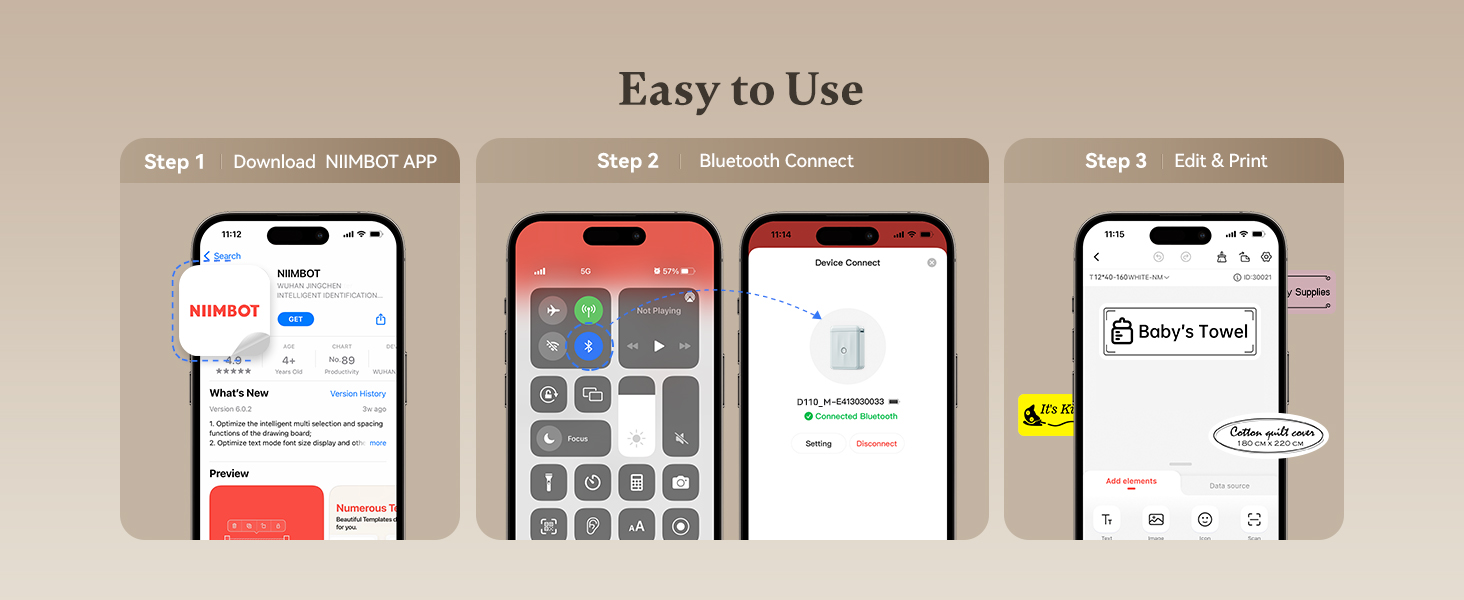
Image 4.1: A visual guide to the three-step setup process: downloading the app, connecting via Bluetooth, and then editing and printing labels.
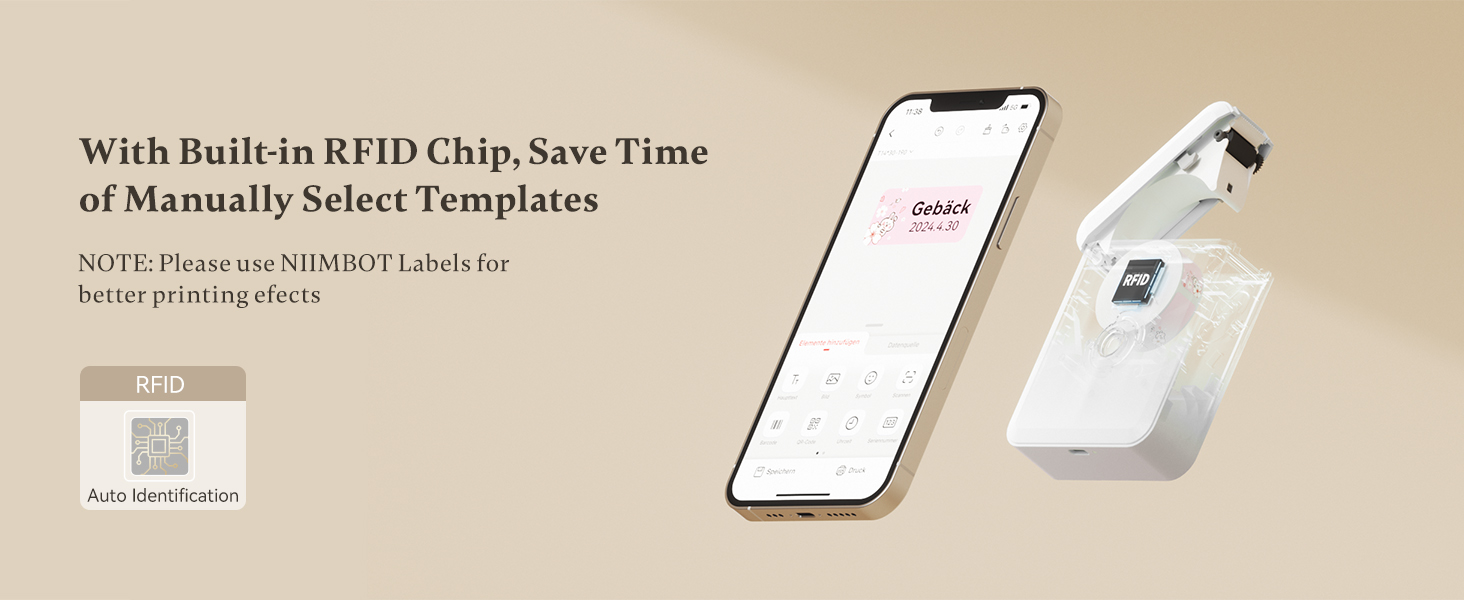
Image 4.2: The NIIMBOT app interface on a smartphone, demonstrating the automatic label identification feature via the built-in RFID chip.
5. Иштөө нускамалары
5.1 Белгилерди түзүү жана түзөтүү
Once connected, use the NIIMBOT app to design your labels. The app offers various templates, fonts, symbols, and customization options.
- Select a template or start a new label design.
- Enter text, add icons, barcodes, or QR codes.
- Adjust font size, style, and alignment.
- Preview your label before printing.

Image 5.1: The NIIMBOT app displaying options for personalizing labels, including different categories of icons and templates.
5.2 Этикеткаларды басып чыгаруу
After designing your label, tap the print button in the app. You can choose to print a single label or multiple copies (batch printing).
- Ensure the label maker has sufficient battery and label paper.
- Confirm the label design in the app.
- Tap "Print" and select the number of copies.
- The label will print rapidly from the device.

Image 5.2: Illustration of different printing modes available with the D110M, including real-time printing and reprinting previous labels.
5.3 Белгилердин колдонулушу
The NIIMBOT D110M is versatile for various labeling needs:
- Үйдү уюштуруу: Labeling storage bins, kitchen containers, spice jars, and personal items.
- Office колдонуу: Уюштуруу files, folders, cables, and office supplies.
- Мектеп буюмдары: Naming school items, books, and craft materials.
- Чекене: Бааны түзүү tags and product labels for small businesses.

Сүрөт 5.3: Мисamples of the D110M label maker's versatility across different categories like toys, kitchen, pricing, cosmetics, and personal items.

Image 5.4: Demonstrations of label durability, showcasing resistance to water, grease, abrasion, and fading.
6. Техникалык тейлөө
6.1 Басып чыгаруу башын тазалоо
To ensure optimal print quality, regularly clean the print head. Use a cotton swab lightly dampened with isopropyl alcohol to gently wipe the print head surface. Allow it to dry completely before use.
6.2 Батареяга кам көрүү
To prolong battery life, avoid fully discharging the device frequently. Charge the device regularly, even if not in constant use. Store the device in a cool, dry place.
6.3 Этикеткаларды сактоо
Store label rolls in a cool, dry place away from direct sunlight and heat to prevent degradation of the thermal material.
7. Кыйынчылыктарды
If you encounter issues with your NIIMBOT D110M, refer to the following common problems and solutions:
| Көйгөй | Мүмкүн себеп | Чечим |
|---|---|---|
| Түзмөк күйбөйт | Батарея аз | Түзмөктү Type-C кабели аркылуу кубаттаңыз. |
| Bluetooth аркылуу туташуу мүмкүн эмес | Телефондо Bluetooth өчүк; Түзмөк табылбай жатат; Колдонмодо көйгөй бар | Ensure phone Bluetooth is on. Restart the label maker. Restart the NIIMBOT app. |
| Басып чыгаруунун сапаты начар / Басып чыгаруунун сапаты начар | Dirty print head; Incorrect label orientation; Low battery | Clean the print head. Ensure label paper is inserted correctly. Charge the device. |
| Энбелгилер туура эмес азыктандырылган | Label roll improperly installed; Obstruction | Re-install the label roll, ensuring it's straight. Check for any debris in the paper path. |
| App does not recognize label type | Non-NIIMBOT labels; RFID chip issue | Ensure you are using genuine NIIMBOT labels. Restart the device and app. |
8. Техникалык шарттар
Detailed technical specifications for the NIIMBOT D110M Label Maker:
- Модел: D110M (Item model number: D110-M-New)
- Басып чыгаруу технологиясы: Термикалык
- Басып чыгаруу чечими: 203 DPI
- Басып чыгаруу ылдамдыгы: 30 мм/с
- Байланыш: Bluetooth
- Шайкеш түзмөктөр: Смартфондор (Android, iOS)
- Кубат булагы: 1500mAh Lithium-Ion Battery (rechargeable)
- Заряддоо интерфейси: C түрүндөгү USB
- Продукциянын өлчөмдөрү: 0.8 x 2.7 x 3.9 дюйм
- Элемент Салмагы: 10.9 унция
- Сыя Түсү: Monochrome (Black text only)
- Өзгөчө өзгөчөлүгү: Portable, RFID Automatic Label Identification
9. Кепилдик жана колдоо
9.1 Кепилдик маалыматы
The NIIMBOT D110M Label Maker comes with a Limited Warranty. Please refer to the warranty card included in your package or contact NIIMBOT customer service for specific terms and conditions.
9.2 Кардарларды колдоо
For further assistance, technical support, or inquiries regarding your product, please visit the official NIIMBOT webсайтка же продуктунун таңгагында көрсөтүлгөн байланыш маалыматына кайрылыңыз.
Колдонуучунун колдонмосунун электрондук версиясын жүктөп алууга болот: Колдонуучунун колдонмосу (PDF)


