1. Киришүү
This manual provides instructions for the ALLIMITY AH59-02146M and AH59-02146L replacement remote controls. These remotes are designed to be compatible with various Samsung Micro Component Multimedia Systems, offering a direct replacement without the need for complex setup or programming.
2. Коопсуздук маалыматы
- Батареяларды балдар жетпеген жерде сактаңыз.
- Эски жана жаңы батарейкаларды же ар кандай типтеги батареяларды аралаштырбаңыз.
- Эгер алыстан башкаруу куралы узак убакыт бою колдонулбаса, батарейкаларды алып салыңыз.
- Avoid exposing the remote to extreme temperatures or direct sunlight.
3. Пакеттин мазмуну
Сиздин пакетиңиз төмөнкү нерсени камтышы керек:
- 1 x ALLIMITY Replacement Remote Control (Model AH59-02146M or AH59-02146L)
Эскертүү: AAA батарейкалары камтылган эмес жана өзүнчө сатып алынышы керек.
4. Орнотуу
4.1 Батареяны орнотуу
- Пульттун артындагы батарея отсегин табыңыз.
- Батарея уясынын капкагын ылдый жылдырыңыз жана аны алып салыңыз.
- Оң (+) жана терс (-) терминалдары бөлүмдүн ичиндеги белгилер менен туура дал келишин камсыз кылып, эки (2) AAA батарейканы салыңыз.
- Батарея бөлүкчөсүнүн капкагын бекем чыккыча ордуна жылдырыңыз.

Сүрөт: Артка view of the remote control with the battery cover removed, illustrating the battery insertion points for two AAA batteries.

Сүрөт: Артка view батареясынын капкагы бекем жабылган абалда алыстан башкаруу пультунун
The remote control is now ready for use. No programming or pairing is required.
5. Операция
5.1 Негизги функционалдуулук
This replacement remote control functions identically to the original Samsung remote for compatible multimedia systems. Simply point the remote at your Samsung Micro Component Multimedia System and press the desired button.

Сүрөт: алдыңкы view of the ALLIMITY replacement remote control, displaying its full button layout.
5.2 Compatible Samsung Systems
The ALLIMITY AH59-02146M / AH59-02146L remote control is compatible with the following Samsung Micro Component Multimedia System models:
- MM-C530D
- MM-D530D
- MM-DG35-EUR
- MMC550D
- MMC430D
- MMC530D
- MM-D430D
- MM-DG351
- MM-DG35IRS
- MM-DG36
- MM-C330D
- MM-DG25
- MMC330D
- MMDG25
- MM-C550D
- MM-C430D
- MM-DG35
- MM-DG36l
- REMOCON-ASSY
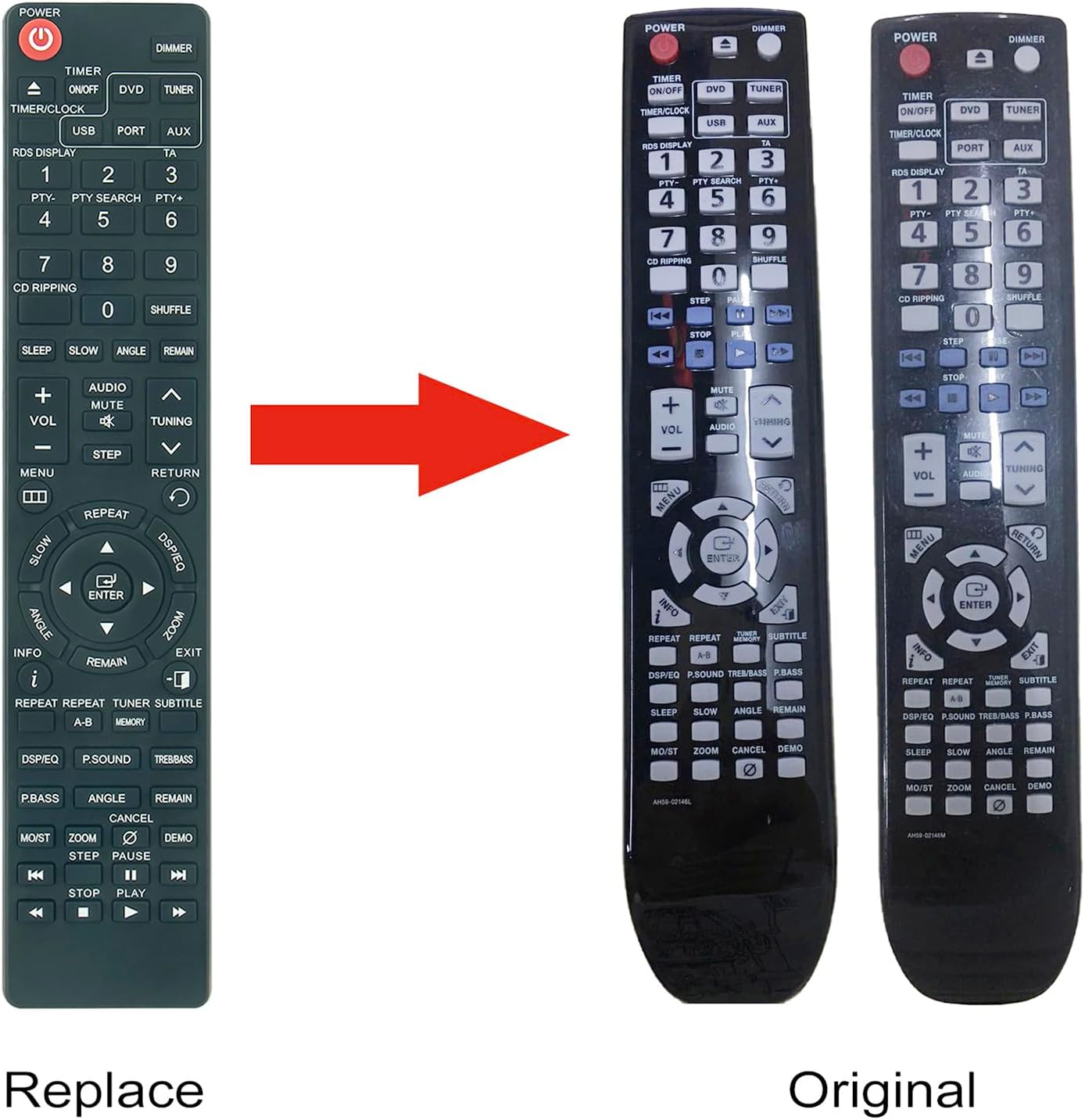
Image: A visual comparison between the ALLIMITY replacement remote and an original Samsung remote, demonstrating their similar design and button layout.
6. Техникалык тейлөө
6.1 Тазалоо
To clean the remote control, gently wipe it with a soft, dry cloth. Do not use liquid cleaners or abrasive materials, as these may damage the surface or internal components.
6.2 Батареяны алмаштыруу
If the remote control's performance degrades or it stops responding, replace the batteries. Follow the battery installation steps outlined in Section 4.1. Always replace both batteries at the same time with new AAA alkaline batteries.
7. Кыйынчылыктарды
| Көйгөй | Мүмкүн себеп | Чечим |
|---|---|---|
| Алыстан жооп бербей жатат | Өлүк же туура эмес салынган батарейкалар. | Туура полярдуулукту камсыз кылуу менен батарейкаларды жаңы AAA батарейкалары менен алмаштырыңыз. |
| Пульттун диапазону чектелген | Weak batteries or obstruction between remote and system. | Replace batteries. Ensure a clear line of sight to the multimedia system's IR receiver. |
| Атайын баскычтар иштебей жатат | Button malfunction or system incompatibility. | Verify your Samsung system model is listed in the compatible models. If issues persist, contact customer support. |
8. Техникалык шарттар
- Модель номерлери: AH59-02146M, AH59-02146L
- Бренд: АЛЛИМ
- Кубат булагы: 2 x AAA Батареялар (киргизилген эмес)
- Өлчөмдөрү: Болжол менен 6 x 2 x 0.6 дюйм (15.24 x 5.08 x 1.52 см)
- Элемент Салмагы: Болжол менен 2 унция (56.7 грамм)
- Түсү: Кара
- Өзгөчө өзгөчөлүгү: Программалоо талап кылынбайт
- Шайкеш түзмөктөр: Samsung Micro Component Multimedia Systems (refer to Section 5.2 for specific models)
9. Кепилдик жана колдоо
For warranty information or technical support, please refer to the seller's policy or contact the retailer from whom the product was purchased. Keep your purchase receipt as proof of purchase.


