1. Киришүү
This manual provides essential instructions for setting up, operating, maintaining, and troubleshooting your TRIGKEY Mini PC S6 Pro. The S6 Pro is a compact desktop computer featuring an AMD Ryzen 7 7735HS processor, designed for various tasks from daily computing to demanding applications and gaming.
The device supports high-performance computing with its 8-core, 16-thread processor, advanced integrated graphics, and high-speed DDR5 RAM. It offers extensive connectivity options including Wi-Fi 6, Bluetooth 5.2, 2.5G LAN, and multiple display outputs for a versatile user experience.
2. Пакеттин мазмуну
Төмөндө тизмеленген нерселердин баары пакетиңизге камтылганын текшериңиз:
- TRIGKEY Mini PC S6 Pro
- User Manual
- VESA орнотуу кронштейни
- HDMI кабелдери
- Power Adapter (Output: 19V/5.26A)

Image: Included accessories for the TRIGKEY Mini PC S6 Pro, including the user manual, VESA mount, HDMI cables, and power adapter.
3. Продукт бүтүп калдыview
The TRIGKEY Mini PC S6 Pro features a compact design with essential ports for connectivity and expansion.

Image: Diagram illustrating the front and rear interfaces of the TRIGKEY Mini PC S6 Pro, including power button, USB ports, HDMI, DP, Type-C, and LAN.
Front Panel Interfaces:
- Кубат баскычы: Аппаратты күйгүзүү же өчүрүү үчүн.
- 3.5 мм аудио уячасы: For headphones or microphones.
- Type-C (10Gbps): For data transfer and display output.
- USB 3.2 (10Gbps) x 2: High-speed data transfer ports.
- CLR CMOS: Button to clear CMOS settings (use with caution).
Rear Panel Interfaces:
- Туруктуу кубат киргизүү: Кубат адаптерин бул жерге туташтырыңыз.
- HDMI2.0: For display output.
- DP 1.4: For display output.
- USB 2.0 (480 Мбит/сек): Стандарттык USB порту.
- USB 4.0 (40Gbps): Жогорку ылдамдыктагы маалыматтарды берүү жана дисплей чыгаруу.
- LAN 2.5G: Зымдуу тармак туташуусу үчүн.
4. Орнотуу нускамалары
4.1 Баштапкы туташуу
- Дисплейди туташтыруу: Use an HDMI or DisplayPort cable to connect your monitor(s) to the corresponding ports on the Mini PC. The device supports triple display output via HDMI, DP, and Type-C/USB 4.0.
- Перифериялык түзүлүштөрдү туташтыруу: Клавиатураңызды, чычканыңызды жана башка USB түзмөктөрүңүздү жеткиликтүү USB портторуна сайыңыз.
- Тармакка туташуу: For a wired connection, plug an Ethernet cable into the 2.5G LAN port. For wireless, ensure your Wi-Fi network is available.
- Туташуу кубаты: Insert the power adapter cable into the DC power input port on the Mini PC, then plug the adapter into a power outlet.
4.2 Кубат күйгүзүлдү
Press the Power Button located on the front panel of the Mini PC. The power indicator light will illuminate, and the system will begin to boot up.
5. Operating System and Storage
5.1 Pre-installed Operating System
The TRIGKEY Mini PC S6 Pro comes with a pre-activated OS (Operating System) installed. Upon first boot, follow the on-screen instructions to complete the initial setup of the operating system.
5.2 Installing Other Operating Systems
The Mini PC supports various operating systems, including WOS and Ubuntu. To install a different OS, you will typically need to:
- Create a bootable USB drive with your desired OS installation media.
- Access the BIOS/UEFI settings during startup (usually by pressing Del or F2).
- Configure the boot order to prioritize the USB drive.
- Follow the on-screen instructions of the OS installer.
5.3 Сактагычты кеңейтүү
The Mini PC supports expansion of its internal storage. You can add a 2.5-inch SSD or HDD (up to 2TB) to increase your storage capacity. Refer to the detailed instructions in the included user manual for physical installation steps.
6. Байланыш
6.1 Зымсыз байланыш
The S6 Pro is equipped with Wi-Fi 6 for high-speed wireless internet access, offering speeds up to 2400 Mbps, which is significantly faster than Wi-Fi 5. It also features Bluetooth 5.2 for seamless connection to wireless peripherals such as keyboards, mice, and audio devices.
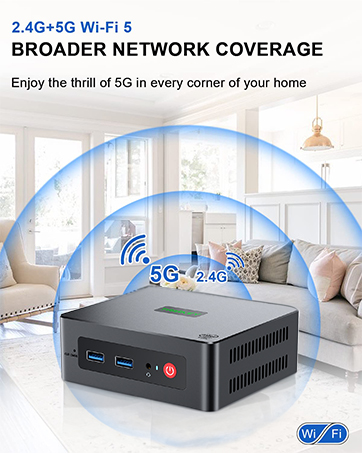
Image: Representation of wireless network coverage, illustrating the device's Wi-Fi capabilities.
6.2 Зымдуу тармак
A 2.5G LAN port is provided for a stable and high-speed wired network connection, suitable for applications requiring consistent bandwidth.
6.3 Көп дисплейлүү колдоо
The Mini PC supports triple display output at 4K resolution with refresh rates up to 120Hz/160Hz via its HDMI, DisplayPort (DP), and Type-C/USB 4.0 interfaces. This allows for enhanced productivity by extending your desktop across multiple screens.
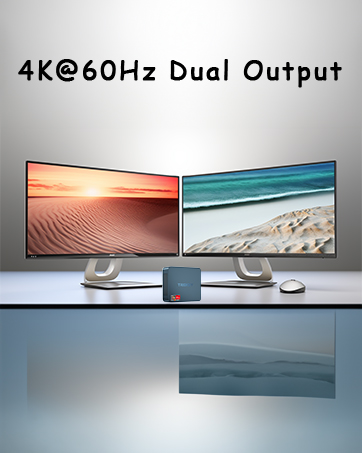
Image: Illustration of a multi-monitor setup, demonstrating the Mini PC's capability to connect to multiple displays.
7. Performance Features
7.1 AMD Ryzen 7 7735HS Processor
The S6 Pro is powered by the AMD Ryzen 7 7735HS processor, featuring 8 cores and 16 threads with a base clock frequency of 3.20 GHz and a maximum turbo frequency of 4.75 GHz. This processor utilizes the 'Zen 3+' architecture for improved single-core performance and power efficiency.

Image: Detailed specifications of the AMD Ryzen 7 7735HS processor, highlighting its core count, clock speeds, and architecture.
7.2 DDR5 RAM
The system is equipped with 32GB of DDR5 5600MHz RAM, supporting up to 64GB in dual-channel configuration. DDR5 memory provides higher bandwidth and improved performance compared to previous generations.
7.3 Integrated Graphics
The Mini PC features integrated AMD Radeon Graphics with 12 cores and a clock speed of 2200 MHz, capable of handling daily design tasks and most low-power games, while delivering high-definition visuals.
7.4 Жылуулук диссипациясы
An optimized heat dissipation system with a dedicated system fan accelerates airflow, providing efficient cooling for the RAM and SSD. This design helps maintain stable performance during extended use.

Image: Diagram illustrating the internal heat dissipation system, showing the system fan and airflow for cooling the RAM and SSD.
8. Техникалык тейлөө
8.1 Жалпы тазалоо
To ensure optimal performance and longevity, regularly clean the exterior of the Mini PC with a soft, dry cloth. Use compressed air to gently clear dust from ventilation openings to prevent overheating. Ensure the device is powered off and unplugged before cleaning.
8.2 Вентиляция
Always place the Mini PC in a well-ventilated area. Avoid blocking the air vents on the sides and back of the device. Do not place the PC on soft surfaces that could obstruct airflow.
9. Кыйынчылыктарды
Бул бөлүмдө сиздин Mini PC менен кездешиши мүмкүн болгон жалпы көйгөйлөр каралат.
9.1 Күч жок
- Кубат адаптери Мини компьютерге жана иштеген электр розеткасына бекем туташып турганын текшериңиз.
- Электр розеткасынын иштешин башка аспап менен текшерүү аркылуу текшериңиз.
- Электр адаптеринде көрүнгөн зыяндын бар-жоктугун текшериңиз.
9.2 Display Output жок
- Монитор күйгүзүлгөнүн жана туура киргизүү булагына (HDMI, DP же Type-C) коюлганын текшериңиз.
- Ensure display cables are securely connected to both the Mini PC and the monitor.
- Try using a different display cable or monitor to rule out faulty equipment.
9.3 Тармакка туташуу маселелери
- текст: Check if the Ethernet cable is properly connected to the LAN port and your router/modem. Verify router status.
- Зымсыз: Ensure Wi-Fi is enabled in the operating system. Check if the correct Wi-Fi network is selected and the password is entered correctly. Restart your router/modem.
9.4 Audio Output Issues
- Check volume settings in the operating system and on your connected audio device.
- Ensure the correct audio output device is selected in your sound settings.
- If experiencing issues with sound configuration when switching between programs or headphones, this may indicate a hardware-related sound card behavior. Ensure drivers are up to date.
10. Техникалык шарттар
| Өзгөчөлүк | Спецификация |
|---|---|
| Бренд | TRIGKEY |
| Элемент моделинин номери | S6 6600H (Series: S6 Pro 7735HS) |
| Операция системасы | OS (Supports WOS, Ubuntu) |
| Процессор бренди | AMD |
| Процессордун түрү | AMD Ryzen 7 |
| Процессордун модели | AMD Ryzen 7 7735HS |
| Процессордун ылдамдыгы | 4.75 ГГц (максималдуу турбо) |
| Өзөктөрдүн саны | 8 |
| RAM | 32 ГБ DDR5 |
| Maximum Memory | 64 ГБ |
| Катуу дисктин өлчөмү | 500 ГБ |
| Катуу диск технологиясы | SSD |
| Катуу диск интерфейси | SSD |
| Резолюция | 4K Ultra HD (3840 x 2160) |
| Графикалык чипсет бренди | AMD |
| Графикалык картанын сүрөттөлүшү | Интеграцияланган |
| GPU / Graphics Coprocessor | Интегралдык графика |
| Графикалык RAM түрү | SO-DIMM |
| Процессор розеткасы | FP7 |
| Байланыш түрү | Wi-Fi |
| Зымсыз технология түрү | Bluetooth (BT5.2), Wi-Fi (Wi-Fi 6) |
| Аппараттык интерфейс | Ethernet (2.5G), HDMI, DisplayPort, USB (USB 3.2, USB 2.0, USB 4.0), Type-C |
| HDMI портторунун саны | 1 |
| Туташтыргыч түрү | HDMI, DP, USB, Ethernet, Type-C |
| Түзмөктүн шайкештиги | Monitor, Printer, Headset, Speaker, Television, Smartphone |
| Пакеттин өлчөмдөрү | 16 x 13.7 x 10.6 см |
| Элемент Салмагы | 1.13 килограмм |
| Продукт үчүн атайын колдонуу | Multimedia, Daily Use, Education |
| PC түрү | Мини PC |
11. Кепилдик жана колдоо
TRIGKEY provides comprehensive support for your Mini PC S6 Pro:
- Бир жылдык кепилдик: Your purchase is covered by a one-year warranty from the date of purchase.
- 24/7 Кардарларды тейлөө: Personalized customer service is available 7 days a week, 24 hours a day.
- Өмүр бою техникалык колдоо: Enjoy lifetime technical assistance for your product.
For further assistance or inquiries, please refer to the contact options provided by TRIGKEY.
Image: Icons representing various TRIGKEY customer support channels, including email, consultation, website, and technical support.


