Introduction
This manual provides detailed instructions for the setup, operation, and maintenance of your MageGee V560 Wireless Gaming Keyboard and Mouse Combo. Please read this manual thoroughly before use to ensure optimal performance and longevity of your device.

Image: The MageGee V560 Wireless Gaming Keyboard and Mouse Combo, featuring a blue, white, and purple color scheme, with the USB receiver visible.
Пакеттин мазмуну
Пакетте бардык буюмдар бар экенин текшериңиз:
- MageGee V560 зымсыз баскычтоп
- MageGee Wireless Mouse
- 2.4GHz USB Receiver (stored in mouse battery compartment)
- USB-C заряддоо кабели
- User Manual

Image: Contents of the MageGee V560 package, including the keyboard, mouse, USB receiver, charging cable, and user manual.
Орнотуу нускамалары
- USB кабыл алгычты табыңыз: Open the battery cover of the wireless mouse. The 2.4GHz USB receiver is stored inside the compartment next to the mouse battery slot.
- Кабылдагычты туташтыруу: USB ресиверди компьютериңиздеги жеткиликтүү USB портуна сайыңыз.
- Түзмөктөрдү күйгүзүү: Ensure both the keyboard and mouse are powered on. The devices are plug-and-play and should connect automatically.
- Баштапкы төлөм: For optimal performance, it is recommended to fully charge both the keyboard and mouse before first use. Use the provided USB-C charging cable.

Image: Illustration showing the 2-in-1 USB receiver connecting the keyboard and mouse wirelessly to a laptop.
Иштөө нускамалары
Баскычтоптун функциялары
- RGB жарыгын башкаруу:
- Басыңыз FN + INS арткы жарыкты күйгүзүү же өчүрүү үчүн.
- Басыңыз FN + PgUp or FN + PgDn to adjust the 3-level backlight brightness.
- Басыңыз FN + 1 / 2 / 3 / 4 / 5 to switch between different backlight modes. Note: Backlight settings are not saved after power off.
- Мультимедиялык кыска жолдор: колдонуу FN key in combination with F1-F12 keys for quick access to multimedia functions such as volume control, media playback, and more.
- Эргономикалык дизайн: The keyboard features a stepped layout and foldable brackets at the bottom, allowing you to adjust the typing angle for comfort during extended use.
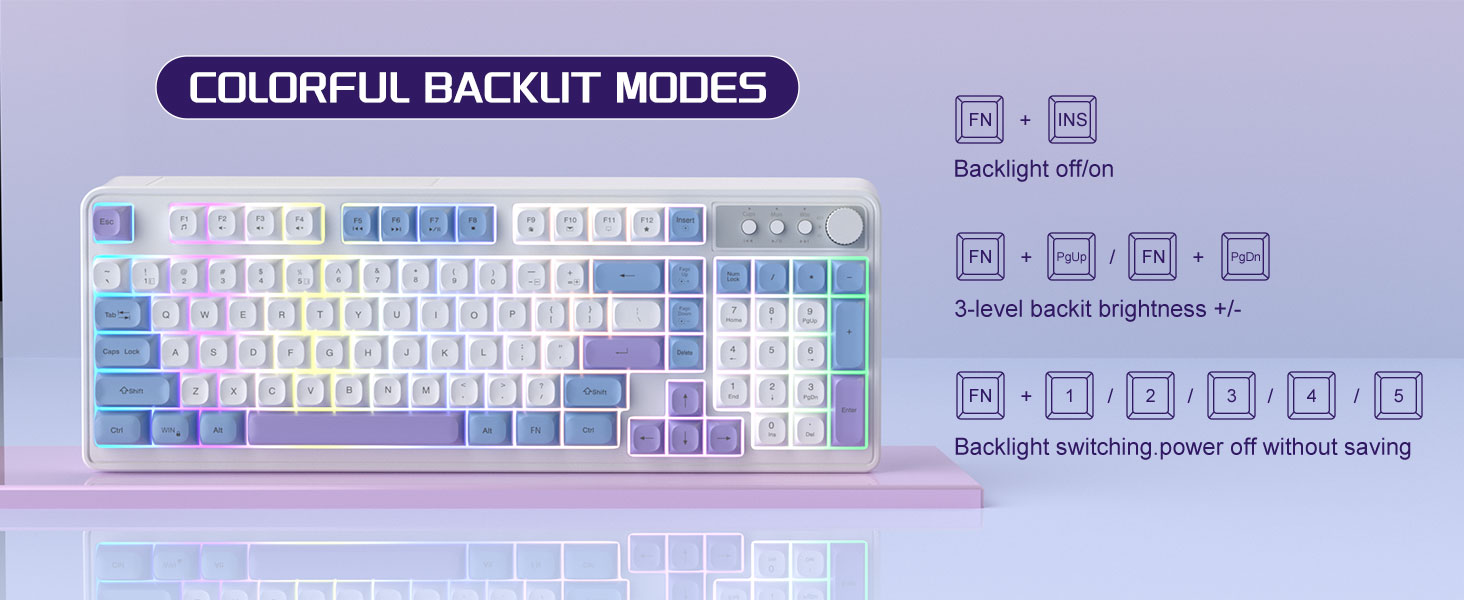
Image: The MageGee V560 keyboard displaying various colorful backlit modes, with instructions for controlling them.

Image: A visual representation of the 16 multimedia shortcuts available on the MageGee V560 keyboard, activated via the FN key.
Чычкан функциялары
- DPI жөндөө: The mouse supports 6 levels of DPI adjustment (600-3200 DPI). Press the DPI button (usually located below the scroll wheel) to cycle through the sensitivity settings. Internal indicator lights will show the current DPI level.
- Дем алуу үчүн арткы жарык: The mouse features 7 dazzling color breathing backlights. This lighting is automatic and indicates mouse activity.

Image: The MageGee V560 mouse highlighting its DPI settings (1000, 1200, 1600 DPI) and showing the USB-C charging port.
Заряддоо жана батареянын иштөө мөөнөтү
- Both the keyboard and mouse are rechargeable. Use the provided USB-C charging cable to charge them.
- Keyboard Standby Time: 365 күнгө чейин.
- Mouse Standby Time: 270 күнгө чейин.
- Автоматтык уйку функциясы: The devices automatically enter sleep mode after a period of inactivity to conserve battery power and extend battery life.

Image: An illustration demonstrating the intelligent auto-sleep feature of the MageGee V560 combo, which conserves battery life.
Шайкештик
The MageGee V560 Wireless Gaming Keyboard and Mouse Combo is compatible with the following operating systems:
- Win2000
- XP утуңуз
- Мени жең
- Vista
- Win7
- Win8
- Win10
- Android
- Linux
- Mac OS
Проблемаларды чечүү
If you encounter issues with your MageGee V560 combo, please refer to the following common solutions:
- Түзмөк туташпай жатат:
- USB кабыл алгычтын иштеген USB портуна бекем сайылганын текшериңиз.
- Баскычтоптун да, чычкандын да күйүк экенин текшериңиз.
- Check the battery levels of both devices and charge if necessary.
- USB ресиверди башка USB портуна сайып көрүңүз.
- Кечигүү же байланыш үзүлүшү:
- Ensure the devices are within the 33 ft (10 meter) operating range of the USB receiver.
- Башка 2.4 ГГц зымсыз түзмөктөрдөн (мисалы, Wi-Fi роутерлери, зымсыз телефондор) келүүчү тоскоолдуктарды азайтыңыз.
- Charge the devices to ensure sufficient power.
- Keys Not Registering / Mouse Not Responding:
- Recharge the keyboard and mouse.
- USB кабыл алгыч туура туташтырылганын текшериңиз.
- Компьютериңизди өчүрүп күйгүзүңүз.
- Арткы жарык маселелери:
- Баскычтоп кубатталганын текшериңиз.
- Колдонуу FN + INS арткы жарыкты күйгүзүү/өчүрүү үчүн.
- менен жарыктыгын тууралаңыз FN + PgUp/PgDn.
Техникалык шарттар
| Бренд | MageGee |
| Модел | V560 |
| Байланыш технологиясы | 2.4GHz Зымсыз |
| Өзгөчөлүктөр | RGB lighting, rechargeable keyboard and mouse, ergonomic design |
| Шайкеш түзмөктөр | Personal Computer (Win2000, Win XP, Win ME, Vista, Win7, Win8, Win10, Android, Linux, Mac OS) |
| Элемент Салмагы | 1.87 фунт |
| Пакеттин өлчөмдөрү | 16.61 x 9.21 x 1.73 дюйм |
| Өндүрүүчү | MAGEGEE |
Техникалык тейлөө
- Тазалоо: Клавиатураны жана чычканды тазалоо үчүн жумшак, кургак чүпүрөктү колдонуңуз. Өтө кир болсо, бир азamp кездемени колдонсо болот, бул түзмөккө суюктуктун кирбешин камсыз кылат.
- Сактагыч: Түзмөктөрдү күн нурунан жана экстремалдык температурадан алыс салкын, кургак жерде сактаңыз.
- Батареяга кам көрүү: Avoid fully discharging the batteries frequently. Charge them regularly to maintain battery health.
Кепилдик жана колдоо
Бул продукт менен келет 1 жылдык кепилдик сатып алынган күндөн тартып.
For any questions or support needs, please contact MageGee customer service via Amazon email. We aim to respond within 12 hours and provide a satisfactory solution.


