Introduction
Welcome to the world of remote-controlled flight with your new SYMA X990 RC Helicopter. This manual provides essential information for safe operation, setup, and maintenance of your helicopter. Please read it thoroughly before first use to ensure optimal performance and longevity of your product.

The SYMA X990 RC Helicopter, featuring a sleek design and its accompanying remote control.
Пакеттин мазмуну
Төмөндө тизмеленген нерселердин баары пакетиңизде бар экенин текшериңиз:
- Helicopter (with included battery) x 1
- Алыстан башкаруу x 1
- х 1 кабелин түзүлүшү
- X 1 бурагыч
- Колдонуучунун колдонмосу x 1
- Таңгактоо кутучасы x 1
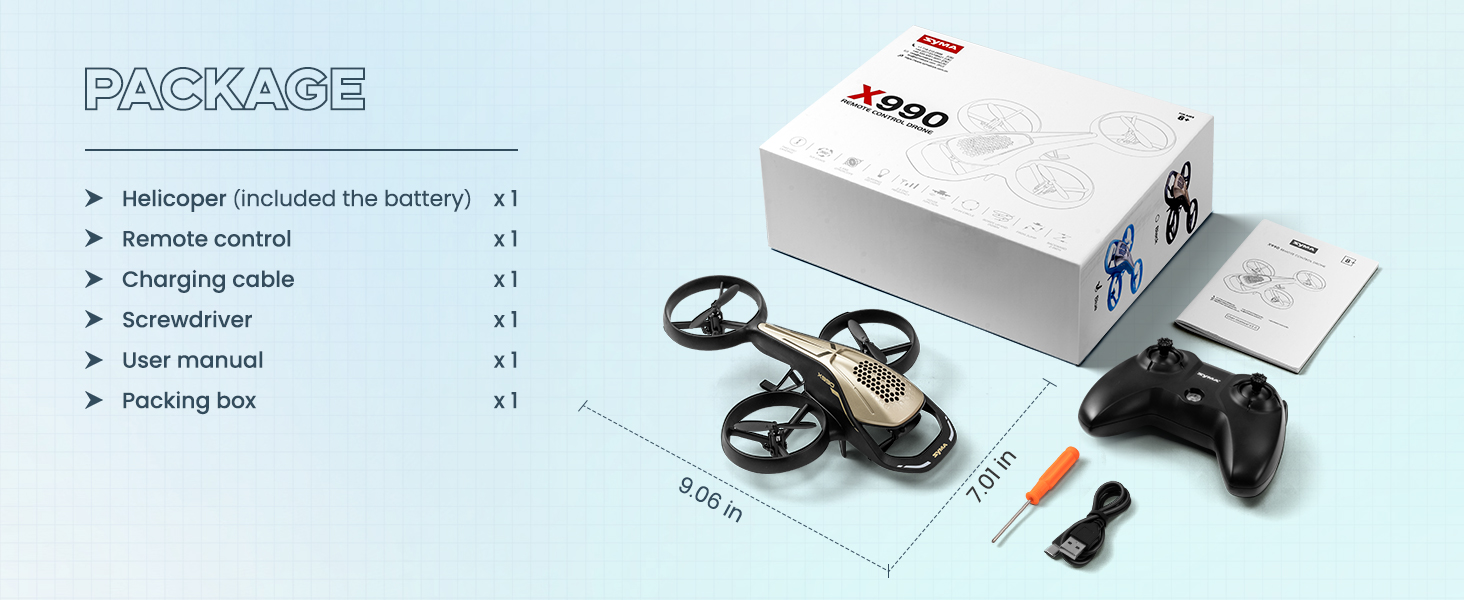
A visual representation of the SYMA X990 package contents, including the helicopter, remote control, charging cable, screwdriver, and user manual.
Жайгашуу
1. Тик учактын батареясын кубаттоо
Connect the included USB charging cable to the helicopter and a compatible USB power source (e.g., computer USB port, USB wall adapter). The charging indicator light will turn off once fully charged. Ensure the helicopter is powered off during charging.

The SYMA X990 helicopter being charged via its USB cable, connected to a laptop.
2. Алыстан башкаруунун батареяларын орнотуу
The remote control requires 4 AAA batteries (not included). Use the provided screwdriver to open the battery compartment, insert the batteries with correct polarity, and close the compartment.
3. Pairing the Helicopter and Remote Control
- Тик учакты тегиз, түз жерге коюңуз.
- Turn on the helicopter's power switch. The lights on the helicopter will flash.
- Алыстан башкаруу пультунун кубат которгучун күйгүзүңүз.
- Push the left joystick (throttle) all the way up, then pull it all the way down. The lights on the helicopter will stop flashing, indicating successful pairing.

The SYMA X990 helicopter ready for one-key take-off from a designated landing pad.
Иштөө нускамалары
Негизги учуу башкаруу
- Дроссель (Сол джойстикти өйдө/ылдый): Controls ascent and descent.
- Багыт (оң жактагы джойстик): Алдыга, артка, солго жана оңго кыймылды башкарат.
- Бир ачкыч менен учуп чыгуу/конуу: Press the designated button on the remote for automatic take-off or landing.
- Бийиктикти кармоо: The helicopter will automatically maintain its altitude, making it easier to control.
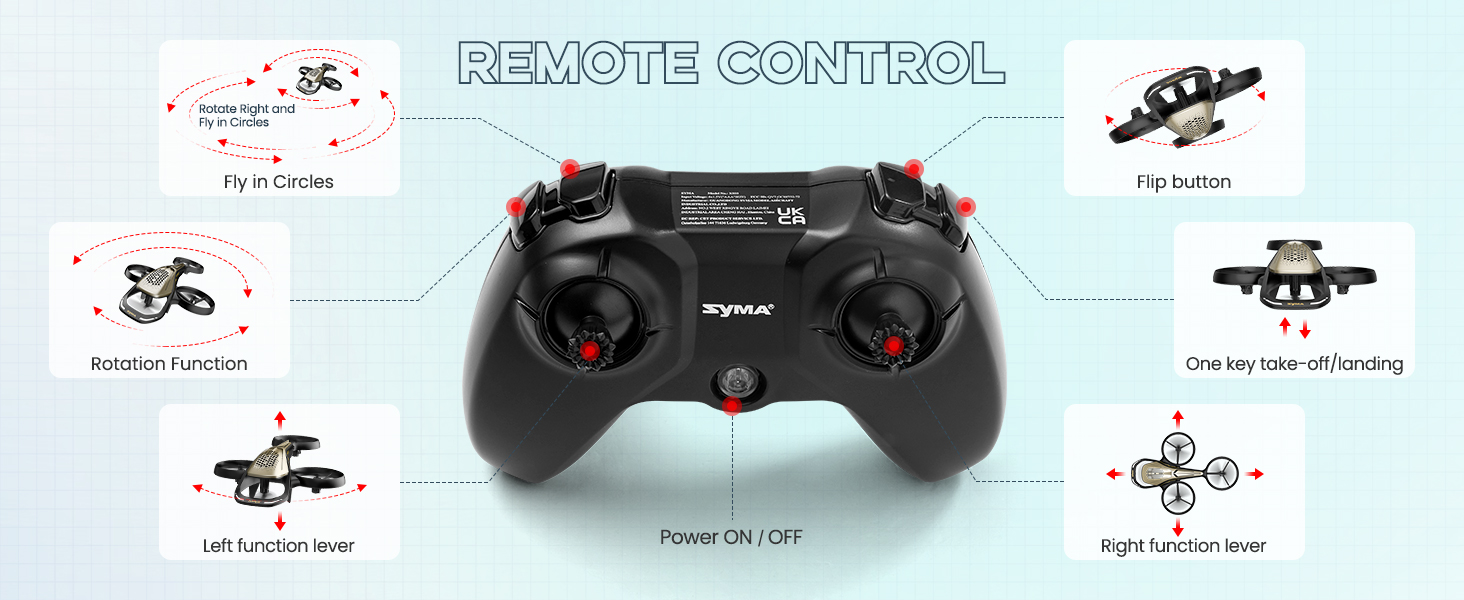
Detailed diagram of the remote control, highlighting various functions such as flip button, one-key take-off/landing, and joystick controls.
Advanced Stunt Tricks
The SYMA X990 is capable of performing various aerobatic functions:
- 360° Barrel Rolls: Execute impressive flips in the air.
- Corkscrew Spins: Perform rotational maneuvers.
- High-Leap Launches: Rapid ascent.
- Fade-Away Landings: Smooth, controlled descents.
- Banked Loops: Circular flight paths.
- "Z" Back: Specific backward movement.

Illustrations of the six aerobatic functions the SYMA X990 can perform, including forward jump, side-to-side rotation, flying circle, turn left and right up and down, 3D flips, and "Z" back.
Коопсуздук эрежелери
Adhering to these safety guidelines will help prevent injury and damage to the product:
- The product contains small parts and is recommended for ages 8 years and up.
- Always operate the helicopter in open spaces, away from people, animals, and obstacles.
- Do not fly near power lines, trees, or water.
- Ensure the propeller protection ring is intact before each flight to protect fingers.
- Avoid flying in strong winds, as this can affect control and stability.
- Айланып турганда винттерге тийбеңиз.
- Иш учурунда балдарды көзөмөлдөңүз.

The SYMA X990 helicopter alongside a test report, emphasizing its child-friendly and safe design.

The SYMA X990 in flight above children, illustrating its safety features like 360° flips, flying circle, rotary ascent, and night light.
Техникалык тейлөө
- Тазалоо: Use a soft, dry cloth to clean the helicopter. Do not use water or chemical cleaners.
- Сактагыч: Store the helicopter and remote control in a cool, dry place, away from direct sunlight and extreme temperatures.
- Батареяга кам көрүү: Fully charge the helicopter battery before long-term storage. Remove batteries from the remote control if not used for extended periods.
- Пропеллер текшерүү: Regularly check propellers for damage or wear. Replace if necessary.
Проблемаларды чечүү
| Көйгөй | Мүмкүн себеп | Чечим |
|---|---|---|
| Тик учак пультка жооп бербейт. | Not paired, low battery (helicopter or remote), out of range. | Re-pair the helicopter and remote. Charge helicopter battery. Replace remote control batteries. Ensure within operating range. |
| Тик учак башаламан учат же ылдый жылып кетет. | Not calibrated on a level surface, damaged propeller, strong wind. | Ensure helicopter is placed on a flat surface before pairing. Check propellers for damage and replace if needed. Avoid flying in windy conditions. |
| Кыска учуу убактысы. | Батарея толук заряддалган эмес, эскирип калган. | Ensure battery is fully charged before use. Battery life naturally decreases over time; consider replacement if performance significantly degrades. |
Техникалык шарттар
- Продукциянын өлчөмдөрү: 9.06 x 7.01 x 2.56 дюйм
- Элемент Салмагы: 13.1 унция
- Модель номери: EX990
- Өндүрүүчүнүн сунуштаган жашы: 8 жаш жана андан жогору
- Батареялар: 1 литий-иондук батарейка талап кылынат (кошулган)
- Өндүрүүчү: Syma
Кепилдик жана колдоо
For warranty information or technical support, please contact SYMA customer service. SYMA is committed to providing high-quality products and support to its customers.
- Телефон: +1 (718) 312-0558 (АКШ)
- Электрондук почта: usa@symatoys.com (АКШ)

SYMA customer service contact details for support inquiries.