CHUWI GemiBook Plus ноутбугунун колдонуучу колдонмосу
Model: CHUWI GemiBook Plus (HEROBOOK)
15.6 inch Laptop Computer, 8GB LPDDR5 256GB SSD, Intel N100, Windows 11
1. Киришүү
This manual provides essential information for the proper setup, operation, maintenance, and troubleshooting of your CHUWI GemiBook Plus laptop. Please read this manual thoroughly before using your device to ensure optimal performance and longevity.

Сүрөт 1.1: Алдыңкы view of the CHUWI GemiBook Plus laptop, showcasing its 15.6-inch display with system specifications like 8GB DDR5 RAM, 256GB SSD, Intel N100 processor, and Windows 11 Home operating system.
2. Кутуда эмне бар
Пакетте бардык буюмдар бар экенин текшериңиз:
- CHUWI GemiBook Plus Laptop
- Charger set (Power Adapter and Cable)
- Көп тилдүү колдонмо
- шайкештик сертификаты
3. Продукт бүтүп калдыview
3.1 Негизги өзгөчөлүктөрү
- Процессор: 12th Gen Intel Alder Lake N100 CPU (up to 3.4GHz)
- Эстутум: 8GB LPDDR5 RAM (4800 MHz)
- Сактагыч: 256GB SSD (expandable up to 1TB via M.2 2280 SSD slot)
- Дисплей: 15.6-inch FHD IPS screen (1920 × 1080p, 16:9 aspect ratio)
- Графика: 12-муундагы Intel процессорлору үчүн Intel UHD графикасы
- Операция системасы: Windows 11 Home
- Байланыш: Wi-Fi 6, Bluetooth 5.2, HDMI, USB 3.0, Type-C, RJ45 Ethernet
- Батарея: 38Wh for 6 to 8 hours of usage
- Дизайн: Lightweight (1.74kg) and thin (19mm) with 180° opening hinge
- Коопсуздук: Physical camera switch for privacy

Сүрөт 3.1: An overview of the CHUWI GemiBook Plus's key features, including its 15.6-inch IPS screen, 12th Gen Intel Alder Lake-N100 processor, 38Wh Li-ion battery, FHD resolution, 12th Gen Intel UHD Graphics, 8GB LPDDR5 RAM, 256GB M.2 SSD, and WiFi6+BT5.2 connectivity.
3.2 Порттор жана туташтыргычтар
Familiarize yourself with the various ports and connectors on your laptop:

Image 3.2: Diagram illustrating the various ports on the CHUWI GemiBook Plus laptop. On one side, it shows the charging port, HDMI port, USB-A 3.0 port, Type-C port, and Audio Jack. On the other side, it displays another Type-C port, USB-A 2.0 port, USB-A 3.0 port, RJ45 LAN Port, and a lock slot.
- Заряддоо порту: Кубат адаптерин бул жерге туташтырыңыз.
- HDMI порту: Тышкы дисплейлерге туташуу үчүн.
- USB-A 3.0 порттору: шайкеш түзмөктөр менен жогорку ылдамдыктагы маалыматтарды берүү үчүн.
- USB-A 2.0 порту: Стандарттык USB түзмөктөр үчүн.
- Type-C порттору: Versatile ports for data, display, and power delivery (check specific functionality).
- Аудио Jack: Наушник же тышкы динамиктер үчүн.
- RJ45 LAN порту: Зымдуу тармак туташуусу үчүн.
- Lock Slot: For security cable locks.
4. Баштоо (Орнотуу)
4.1 Баштапкы күйгүзүү
- Connect the charger to the laptop's charging port and a power outlet.
- Ноутбуктун капкагын ачыңыз.
- Адатта клавиатуранын панелинде жайгашкан кубат баскычын басыңыз.
- Windows 11 орнотуу процессин аягына чыгаруу үчүн экрандагы көрсөтмөлөрдү аткарыңыз, анын ичинде тилди тандоо, тармакка туташуу жана колдонуучу аккаунтун түзүү.
4.2 Wi-Fiга туташуу
- During Windows setup, you will be prompted to connect to a network. Select your Wi-Fi network from the list.
- Керек болсо Wi-Fi сырсөзүн киргизиңиз.
- Эгер кийинчерээк орнотсоңуз, тапшырмалар тилкесиндеги Wi-Fi сөлөкөтүн чыкылдатып, тармакты тандап, туташыңыз.
5. Иштөө нускамалары
5.1 Баскычтоп жана сенсордук такта
The GemiBook Plus features a full-size keyboard and a large touchpad for comfortable interaction.

Сүрөт 5.1: Жакын план view of the CHUWI GemiBook Plus laptop's full-size keyboard and large touchpad, highlighting its ergonomic design for comfortable typing.
- Баскычтоп: Use for typing and system commands. Function keys (Fn) combined with F1-F12 keys provide additional shortcuts (e.g., volume, brightness).
- Сенсордук такта: Supports multi-touch gestures for navigation, scrolling, and zooming.
5.2 Дисплей
The 15.6-inch FHD IPS screen offers vibrant visuals. The laptop supports a 180° opening angle for flexible viewing.
5.3 Webcam and Privacy
The laptop includes a webcam for video calls and conferencing. A physical camera switch is provided to block the camera lens, ensuring privacy when not in use.
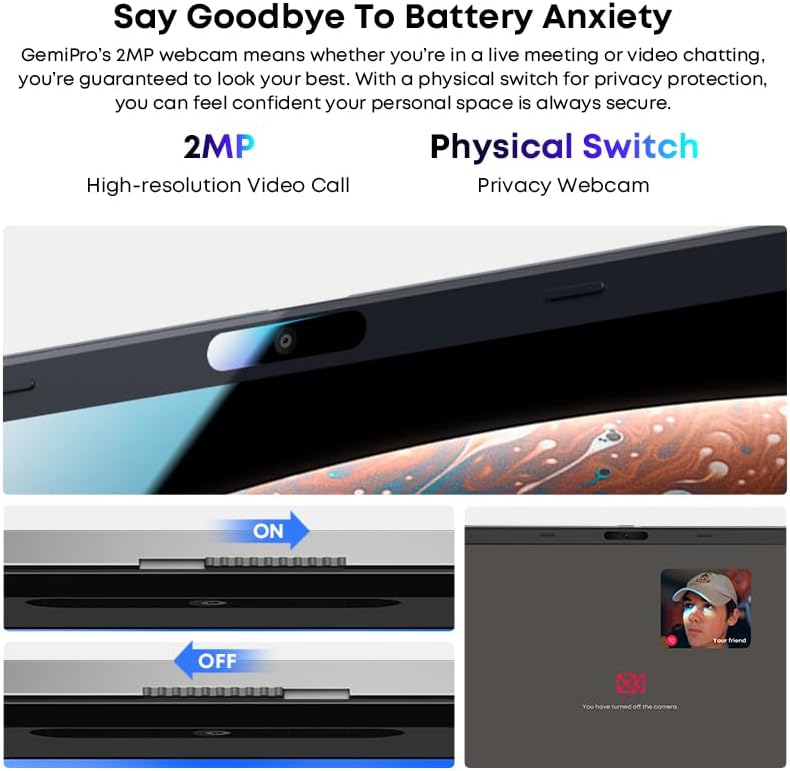
Image 5.2: Close-up of the CHUWI GemiBook Plus webcam with a physical privacy switch. The image shows the switch in both 'ON' (camera exposed) and 'OFF' (camera covered) positions, demonstrating how to physically block the camera lens for enhanced privacy.
5.4 Зымсыз байланыш
The GemiBook Plus supports Wi-Fi 6 and Bluetooth 5.2 for fast and stable wireless connections.

Image 5.3: A visual representation of the CHUWI GemiBook Plus's seamless wireless experience, highlighting Wi-Fi 6, Bluetooth 5.2, Ethernet RJ45, and HD Camera features. A user is shown participating in a video call on the laptop.
- Wi-Fi 6: Provides faster internet speeds and improved network efficiency compared to previous Wi-Fi standards.
- Bluetooth 5.2: Наушник, чычкан жана клавиатура сыяктуу зымсыз перифериялык түзүлүштөрдү туташтыруу үчүн.
6. Батареяны башкаруу
The laptop is equipped with a 38Wh battery, providing approximately 6 to 8 hours of usage on a full charge. A full recharge typically takes about 3 hours.
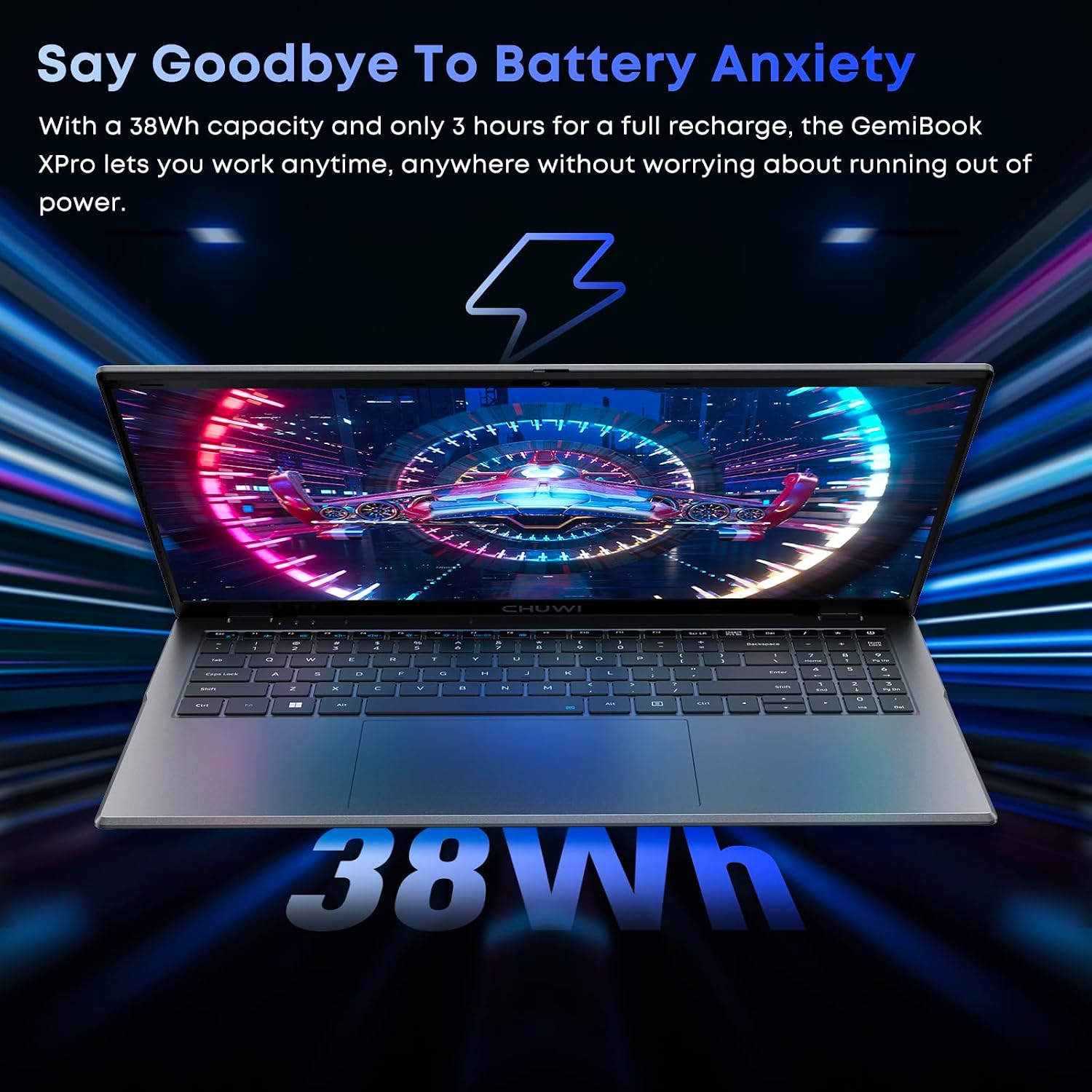
Image 6.1: The CHUWI GemiBook Plus laptop displayed with a visual representation of its 38Wh battery capacity, emphasizing its ability to provide extended usage without frequent recharging.
- Заряддоо: Connect the provided charger to the laptop and a power outlet. The charging indicator light will typically show the charging status.
- Батареяга кам көрүү: Батареянын иштөө мөөнөтүн узартуу үчүн, батареянын тез-тез толук зарядын жоготуп алуудан алыс болуңуз. Ноутбукту көпкө чейин колдонбогондо салкын, кургак жерде сактаңыз.
7. Техникалык тейлөө жана кам көрүү
- Тазалоо: Экранды жана сыртын тазалоо үчүн жумшак, мамыксыз чүпүрөктү колдонуңуз. Өжөр тактар үчүн бир аз сүртүңүзampчүпүрөккө суу же экран тазалоочу каражат. Катуу химиялык заттардан алыс болуңуз.
- Сактагыч: When not in use, store the laptop in a protective sleeve or bag to prevent scratches and dust accumulation.
- Температура: Operate the laptop within recommended temperature ranges. Avoid exposing it to extreme heat or cold.
- Вентиляция: Ашыкча ысып кетүүнүн алдын алуу үчүн желдетүү тешиктери жабылбагандыгын текшериңиз.
8. Кыйынчылыктарды
8.1 Жалпы маселелер жана чечимдер
| Маселе | Мүмкүн чечим |
|---|---|
| Ноутбук күйбөйт | Ensure the power adapter is securely connected and the outlet is working. Try a different power outlet. If the battery is completely drained, it may take a few minutes to respond after connecting the charger. |
| Wi-Fi байланышы жок | Check if Wi-Fi is enabled in Windows settings. Restart your router and modem. Ensure you are entering the correct Wi-Fi password. |
| Жай аткаруу | Close unnecessary applications. Check for background processes consuming resources. Ensure Windows is updated. Consider running a disk cleanup. |
| Screen is blank or flickering | Adjust screen brightness. Connect to an external monitor to check if the issue is with the laptop screen. Restart the laptop. |
| Webкамера иштебейт | Ensure the physical camera switch is in the 'ON' position. Check privacy settings in Windows to allow apps access to the camera. Update camera drivers. |
9. Техникалык шарттар
| Өзгөчөлүк | Спецификация |
|---|---|
| Туруктуу экранды көрсөтүү өлчөмү | 15.6 дюйм |
| Screen Resolution | 1920 x 1080 пиксел (FHD) |
| Процессор | Intel Alder Lake N100 (up to 3.4 GHz) |
| RAM | 8 ГБ LPDDR5 |
| Катуу диск | 256 GB SSD (M.2 2280, expandable to 1TB) |
| Графикалык сопроцессор | Intel UHD графикасы |
| Операция системасы | Windows 11 |
| Зымсыз түрү | Wi-Fi 6, Bluetooth 5.2 |
| USB 3.0 порттордун саны | 2 |
| Батареянын орточо иштөө мөөнөтү | 6 Hours (38Wh) |
| Элемент Салмагы | 3.7 фунт (болжол менен 1.74 кг) |
| Продукциянын өлчөмдөрү | 14 x 0.78 x 9.5 дюйм (болжол менен 35.5 x 1.98 x 24.1 см) |
| Түс | Silver |
10. Кепилдик жана колдоо
10.1 Кепилдик мөөнөтү
The CHUWI GemiBook Plus laptop comes with a 1 жылдык кепилдик, valid immediately after purchase.
10.2 Кардарларды колдоо
CHUWI offers lifetime factory professional support and 24-hour online support. For any issues or inquiries, please contact CHUWI customer service. They aim to provide professional and timely assistance.


