Turtle Beach TBK-2002-01-US

Turtle Beach Vulcan II TKL Pro Magnetic Mechanical RGB Gaming Keyboard User Manual

Model: TBK-2002-01-US

Introduction

This manual provides detailed instructions for the setup, operation, and maintenance of your Turtle Beach Vulcan II TKL Pro Magnetic Mechanical RGB Gaming Keyboard. This keyboard is designed for high-performance gaming and offers extensive customization options through its analog Hall-Effect switches and accompanying software.
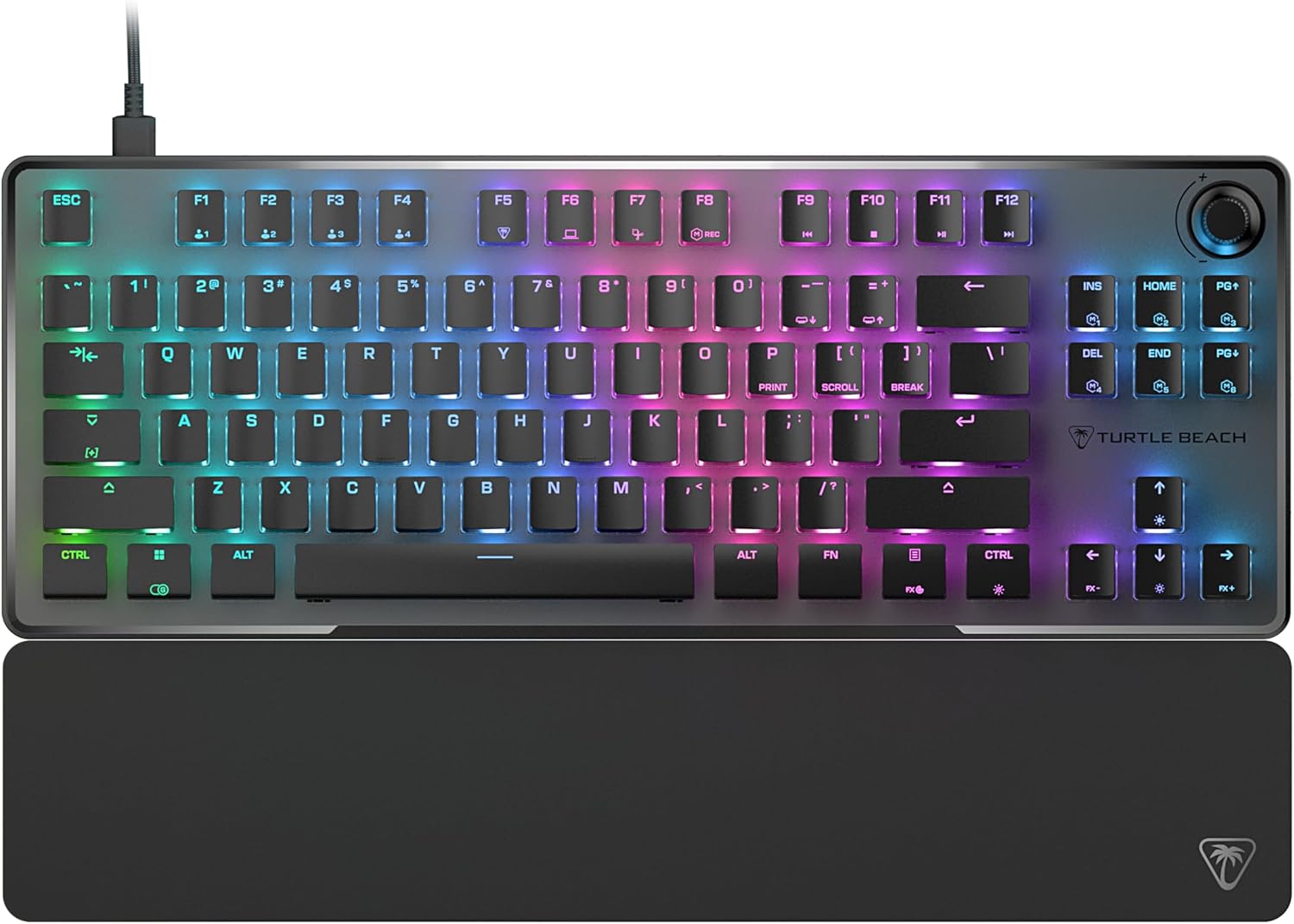
Жогорудан төмөн view of the Turtle Beach Vulcan II TKL Pro keyboard with RGB lighting and detachable palm rest.

Image: The Turtle Beach Vulcan II TKL Pro keyboard, showcasing its tenkeyless design, RGB lighting, and included palm rest.

Пакеттин мазмуну

Продукцияңыздын таңгагында бардык элементтер бар экенин текшериңиз:

  • Turtle Beach Vulcan II TKL Pro Keyboard
  • USB-C - USB-A кабели
  • Алакан
  • Quick Start Guide
Diagram showing the keyboard, USB cable, and palm rest as package contents.

Image: Visual representation of the items included in the Vulcan II TKL Pro package: the keyboard, USB-C to USB-A cable, and palm rest.

Жайгашуу

  1. Баскычтопту туташтыруу: Insert the USB-C end of the provided cable into the port on the back of the Vulcan II TKL Pro keyboard. Connect the USB-A end to an available USB port on your PC or laptop.
  2. Алакан таянычын бекитиңиз: Align the palm rest with the front edge of the keyboard and attach it for ergonomic support during use.
  3. Install Swarm II Software: For full customization and access to advanced features, download and install the Turtle Beach Swarm II desktop software from the official Turtle Beach website. This software allows you to adjust RGB lighting, key actuation points, assign macros, and more.
  4. Баштапкы конфигурация: Once the software is installed, launch it to configure your keyboard settings, including lighting effects, key assignments, and actuation preferences.

Негизги өзгөчөлүктөрү жана иштеши

Analog Hall-Effect Magnetic Switches

The Vulcan II TKL Pro features ultra-responsive magnetic switches, pre-lubed for smooth key presses and rated for a 150 million click lifecycle. This Hall-Effect technology enables advanced features such as Rapid Trigger and adjustable multi-point actuation.

Diagram illustrating the internal components of an Analog Hall-Effect Magnetic Switch.

Image: A cutaway diagram of the Analog Hall-Effect Magnetic Switch, showing the magnetic sensor and the mechanism that allows for precise actuation detection.

Rapid Trigger Performance

The Rapid Trigger setting eliminates downtime between key presses, allowing for continuous and repeated key actuation with minimal finger lifting. This feature enhances movement control, responsiveness, and aiming speed in games.

Diagram comparing fixed vs. dynamic active/reset points for key actuation, highlighting Rapid Trigger.

Image: A comparison diagram showing how Rapid Trigger allows for dynamic active/reset points (0.1mm to 4.0mm) on the Vulcan II TKL Pro, unlike regular keyboards with fixed points, enabling faster repeated inputs.

Per Key Sensitivity Adjustment

Adjust the actuation point of each key individually or globally, from 0.1mm to 4mm. Shorter travel provides faster response for quick actions, while longer travel allows for more deliberate and precise control. Each key supports 40 preset heights and up to three inputs per key, configurable via the keyboard or Swarm II software.

Diagram showing adjustable actuation points from 0.1mm to 4.0mm for a key switch.

Image: A detailed diagram illustrating the adjustable actuation range of the key switches, from 0.1mm to 4.0mm, allowing for customized sensitivity.

AIMO Intelligent RGB Lighting

AIMO lighting technology provides smooth and vibrant RGB lighting effects with double the refresh rate of standard gaming keyboards. It can sync with other compatible AIMO-enabled products. Per-key RGB customization is available, and five on-board profiles allow saving custom lighting effects and key reassignments.

Keyboard and mouse with synchronized AIMO RGB lighting.

Image: The Vulcan II TKL Pro keyboard and a compatible gaming mouse displaying synchronized, vibrant AIMO Intelligent RGB lighting effects.

Advanced Customization with Swarm II Software

The Swarm II desktop software is essential for unlocking the full potential of your keyboard. It allows for comprehensive adjustments including RGB lighting, assigning up to three different inputs per key, adjusting key actuation points, enabling Rapid Trigger, and recording/assigning macro functions. It also supports controller emulator features for analog stick and trigger control in games.

Screenshot of the Swarm II software interface on a monitor, showing keyboard customization options.

Image: A monitor displaying the Turtle Beach Swarm II software interface, demonstrating the extensive customization options available for the Vulcan II TKL Pro keyboard.

Easy-Shift [+] Button Duplicator

This technology adds a secondary function to compatible keys. By holding down a designated modifier key, you can instantly access a second layer of commands, which is fully customizable within the Swarm II software.

Keyboard key highlighted to show Easy-Shift [+] functionality.

Image: A close-up of the keyboard with a key highlighted, illustrating the Easy-Shift [+] feature that allows for a secondary function on compatible keys.

Өркүндөтүлгөн Анти-Гостинг

Optimized for gamers, the advanced anti-ghosting technology ensures that every keystroke is reliably registered, even when multiple keys are pressed simultaneously, preventing missed inputs during intense gaming sessions.

3rd Party Keycap Compatible

The Vulcan II TKL Pro comes with T-shaped ABS keycaps and is designed to be fully compatible with third-party keycaps, allowing users to further customize their keyboard's aesthetic and feel.

Tenkeyless Form Factor

The compact tenkeyless (TKL) design removes the numeric keypad, providing more desk space for mouse movement and allowing for a more natural and comfortable playing position, which can improve aiming accuracy in games.

Push-to-Mute Volume Wheel

A built-in dial allows for convenient on-the-fly control of master volume. Simply push the dial to quickly mute or unmute audio.

Туруктуу дизайн

The keyboard features a sand-blasted anodized aluminum top plate for structural integrity and resistance to wear and tear. The double kickstand design provides stable positioning, and the included soft palm rest ensures comfort during extended use.

Техникалык тейлөө

  • Тазалоо: Use a soft, dry cloth to wipe down the keyboard surface. For deeper cleaning, gently remove keycaps (if comfortable) and use compressed air to clear debris from beneath. Avoid using harsh chemicals or abrasive materials.
  • Кабельге кам көрүү: Ensure the USB cable is not excessively bent or kinked to prevent damage.
  • Сактагыч: Узак мөөнөткө колдонулбаганда, клавиатураны өтө температурадан алыс, таза, кургак чөйрөдө сактаңыз.

Проблемаларды чечүү

КөйгөйМүмкүн чечим
Баскычтоп жооп бербей жатат
  • USB кабели клавиатурага жана компьютерге бекем туташып турганын текшериңиз.
  • Баскычтопту башка USB портуна туташтырууга аракет кылыңыз.
  • Компьютериңизди өчүрүп күйгүзүңүз.
RGB жарыгы иштебейт же туура эмес
  • Ensure the Swarm II software is installed and running.
  • Check lighting settings within the Swarm II software.
  • Update the keyboard firmware via Swarm II.
Ачкычтар катталбайт же эки жолу терилбейт
  • Кысылган аба менен жабыркаган ачкычтын тегерегин тазалаңыз.
  • Adjust the actuation point for the specific key in Swarm II.
  • Эң акыркы драйверлер жана микропрограммалык камсыздоо орнотулганын текшериңиз.
Swarm II software not detecting keyboard
  • Reinstall the Swarm II software.
  • Иштөө тутумуңуз жаңыртылганын текшериңиз.
  • Кедерги болушу мүмкүн болгон антивирус же брандмауэр программаларын убактылуу өчүрүңүз.

Техникалык шарттар

ӨзгөчөлүкДеталь
Модель номериTBK-2002-01-US
БайланышUSB-A (Зымдуу)
Которуу түрүAnalog Hall-Effect Magnetic Switches
Иш-аракет пункту0.1ммден 4.0ммге чейин жөнгө салынат
Keycap Compatibility3rd Party Keycap Compatible (T-shaped ABS keycaps)
ЖарыктандырууAIMO Intelligent RGB (Per-key customizable)
Форма факторуТилексиз (TKL)
On-Board Profiles5
Салмагы1.38 фунт (болжол менен 0.62 кг)
Өлчөмдөрү (LxWxH)14.41 x 8.58 x 1.26 дюйм (болжол менен 36.6 x 21.8 x 3.2 см)
Power SourceUSB менен иштейт

Кепилдик жана колдоо

For detailed warranty information and technical support, please refer to the Quick Start Guide included with your product or visit the official Turtle Beach support website. Product registration may be required to activate your warranty.

Онлайн колдоо: www.turtlebeach.com/pages/support

Тектеш документтер - TBK-2002-01-US

Preview Turtle Beach Vulcan II Mechanical Gaming Keyboard Quick Start Guide
A quick start guide for the Turtle Beach Vulcan II mechanical gaming keyboard, detailing its features, specifications, package contents, and setup instructions in multiple languages.
Preview Turtle Beach VelocityOne Flightstick Колдонуучунун колдонмосу
Turtle Beach VelocityOne Flightstick үчүн комплекстүү колдонуучу колдонмосу, анын өзгөчөлүктөрү, жөндөөлөрү, иштеши, жөндөөлөрү жана PC жана XBOX оюндары үчүн шайкештик маалыматы.
Preview Turtle Beach ATOM Controller Quick Start Guide
Turtle Beach ATOM контроллерин орнотуу жана колдонуу боюнча кыска нускама, башкаруу элементтерин, смартфондун тиркемесин, кубат, Bluetooth жупташтыруу, кубаттоо жана ченемдик маалыматты камтыйт.
Preview Turtle Beach Recon 50X Оюн гарнитурасы Quick Start Guide
Xbox One, PC, Mac жана PS4 боюнча Turtle Beach Recon 50X оюн гарнитурасын орнотуу боюнча кыскача колдонмо. Саптык башкаруу элементтери, пакеттин мазмуну жана ченемдик укуктук актыларга ылайык келүү жөнүндө маалыматты камтыйт.
Preview Turtle Beach Scout Air™ True Wireless Bluetooth кулакчындары Ыкчам баштоо колдонмосу
Turtle Beach Scout Air™ True Wireless Bluetooth кулакчындары менен тез баштаңыз. Бул колдонмо жөндөөнү, туташууну, башкарууну, кубаттоону жана үзгүлтүксүз аудио үчүн спецификацияларды камтыйт.
Preview Turtle Beach Elite 800 Transmitter Contact Pins алмаштыруу боюнча колдонмо
Turtle Beach Elite 800 өткөргүчүндөгү заряддоо төөнөгүчтөрүн кантип алмаштыруу боюнча этап-этабы менен колдонмо.