Introduction
Welcome to the user manual for your new MageGee SKY98 Mechanical Gaming Keyboard. This 96% layout keyboard features a gasket-mounted structure, 5-layer sound dampening, hot-swappable switches, and vibrant RGB backlighting, designed for an enhanced typing and gaming experience on both Windows and Mac systems. This manual provides detailed instructions on setup, operation, maintenance, and troubleshooting to help you get the most out of your keyboard.

1-сүрөт: Бүттүview of the MageGee SKY98 Mechanical Gaming Keyboard. This image displays the full keyboard layout, highlighting its compact 96% design with a dedicated numeric keypad, function row, and navigation keys. The keycaps are a combination of Prussian Blue and darker blue, with visible RGB backlighting.
Орнотуу колдонмосу
Follow these steps to set up your MageGee SKY98 keyboard for the first time.
1. Зымдуу туташуу
- Locate the detachable USB Type-C cable included in the package.
- Connect the Type-C end of the cable to the USB-C port on the back or side of the SKY98 keyboard.
- Connect the USB-A end of the cable to an available USB port on your computer (desktop PC or laptop).
- Баскычтоп плагин жана ойнотуу болуп саналат жана операциялык тутумуңуз тарабынан автоматтык түрдө таанылышы керек.

2-сүрөт: Connecting the detachable USB Type-C cable to the keyboard. This image shows the USB-C port on the keyboard and the cable being inserted, illustrating the wired connection method.
2. System Compatibility (Windows/Mac)
The SKY98 keyboard supports both Windows and Mac operating systems.
- Windows жана Mac режимдеринин ортосунда которулуу үчүн, баскычын басыңыз FN + Башкы бет.
- The keyboard will adjust its key mappings to optimize for the selected operating system.
Иштөө нускамалары
1. Keyboard Layout and N-Key Rollover
The SKY98 features a 96% layout with 99 keys, providing a compact design while retaining essential keys including a numeric keypad. It supports 100% anti-ghosting with N-Key Rollover (NKRO), ensuring every keystroke is registered accurately, even during rapid, simultaneous key presses.
3-сүрөт: The 96% layout of the SKY98 keyboard, illustrating its compact form factor that includes a full numeric pad and function keys, designed to save desktop space.
2. RGB жарыгын башкаруу
The keyboard features stunning RGB backlighting with various modes and customization options.
- Күйгүзүү/өчүрүү: Use the dedicated switch on the left side of the keyboard to quickly turn the backlight on or off.
- Режимдерди өзгөртүү: Басыңыз FN + DEL to cycle through 18 built-in backlight modes.
- Жарыктыкты жөндөө: Басыңыз FN + ↑ (Up Arrow) жарыктыгын жогорулатуу үчүн жана FN + ↓ (Down Arrow) жарыктыгын азайтуу үчүн.
- Ылдамдыкты жөндөө: Басыңыз FN + ← (Left Arrow) to decrease animation speed, and FN + → (Right Arrow) to increase animation speed.
- Gaming Backlight Effects: Access 6 sets of default gaming backlight effects by pressing FN + 1 аркылуу FN + 6.
- Custom Backlight: To record a customized light effect, press FN + Артка. Follow the keyboard's indicators to set your preferred lighting.

4-сүрөт: Detail of the backlight switch located on the side of the keyboard, allowing for quick control of the RGB lighting.
3. Ыкчам алмаштыруучу которгучтар
The SKY98 keyboard features hot-swappable sockets, allowing you to easily change switches without soldering. It is compatible with most 3-pin or 5-pin mechanical switches.
- Included Switches: The keyboard comes with pre-lubed MageGee Blue Whale Switches, known for their responsive and creamy typing feel.
- Которуштурууну алып салуу: Use the included switch puller tool to gently grip the switch and pull it straight up from the PCB.
- Которуу орнотуу: Жаңы өчүргүчтүн төөнөгүчтөрүн платадагы тешиктер менен тегиздеңиз. Которгучту ордуна чыкылдаган үн чыкканча акырын басыңыз. Төөнөгүчтөрдүн ийилбегенин текшериңиз.
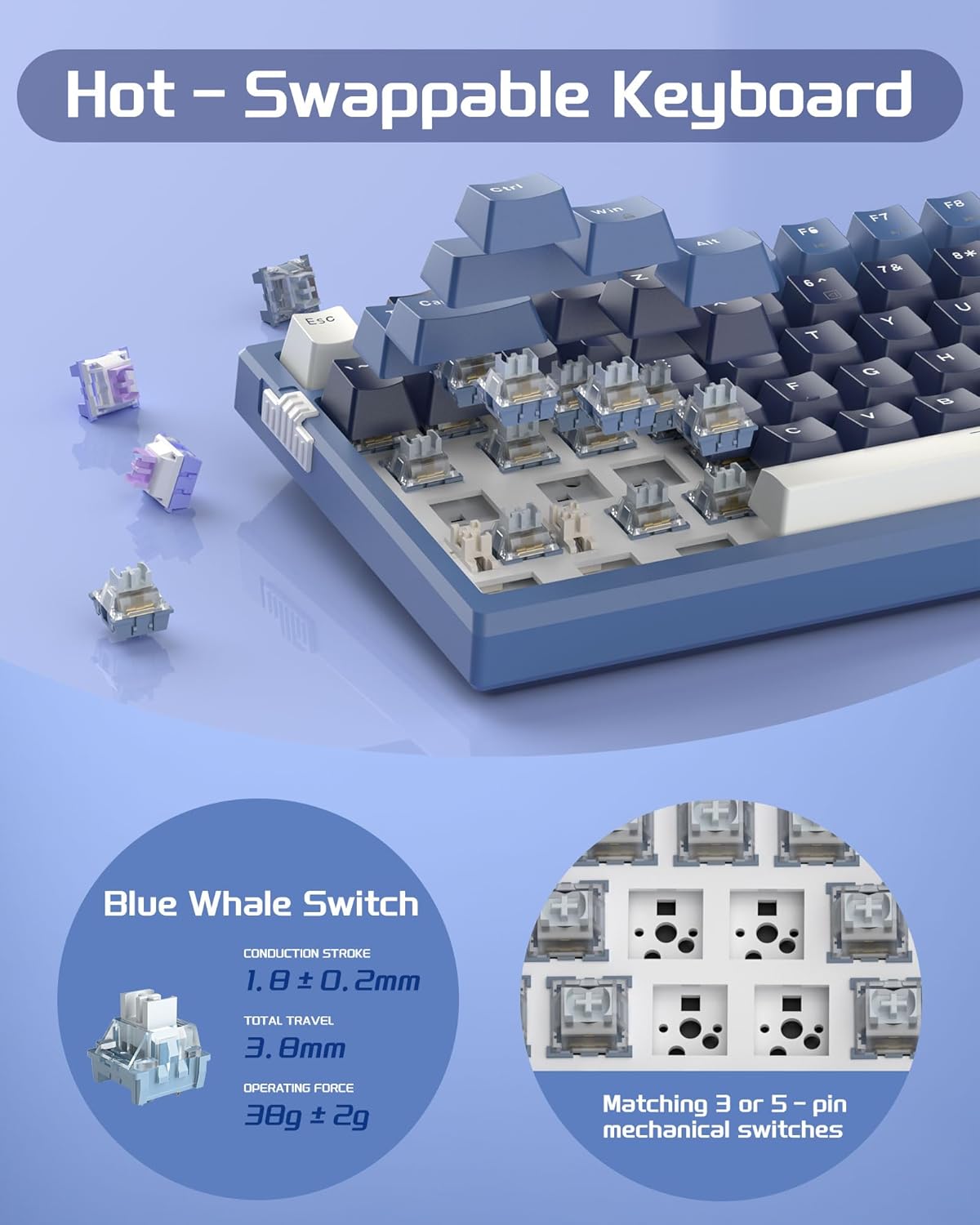
5-сүрөт: Illustration of the hot-swappable switch design. This image shows the keyboard with some keycaps and switches removed, revealing the sockets where switches can be easily inserted or extracted. Details of the Blue Whale Switch are also provided.
4. Gasket-Mounted Structure and Sound Dampэning
The SKY98 employs a gasket-mounted design and a 5-layer sound-absorbing filling system to provide a soft, elastic typing feel and pure sound.
- Прокладка орнотуу: The positioning plate is suspended between the upper and lower shells with gaskets, reducing direct contact and absorbing typing vibrations and noise.
- 5-Layer Filling: Internal layers include IXPE foam pad, PORON foam, diaphragm, EVA soundproofing foam, and a silicone absorbing pad. These layers minimize hollow sounds and enhance typing comfort.

6-сүрөт: жарылды view diagram of the keyboard's internal structure, detailing the gasket mount and the five sound-dampening layers: positioning plate, IXPE foam pad, PORON foam, diaphragm, PCB board, EVA soundproofing foam, and silicone pad.
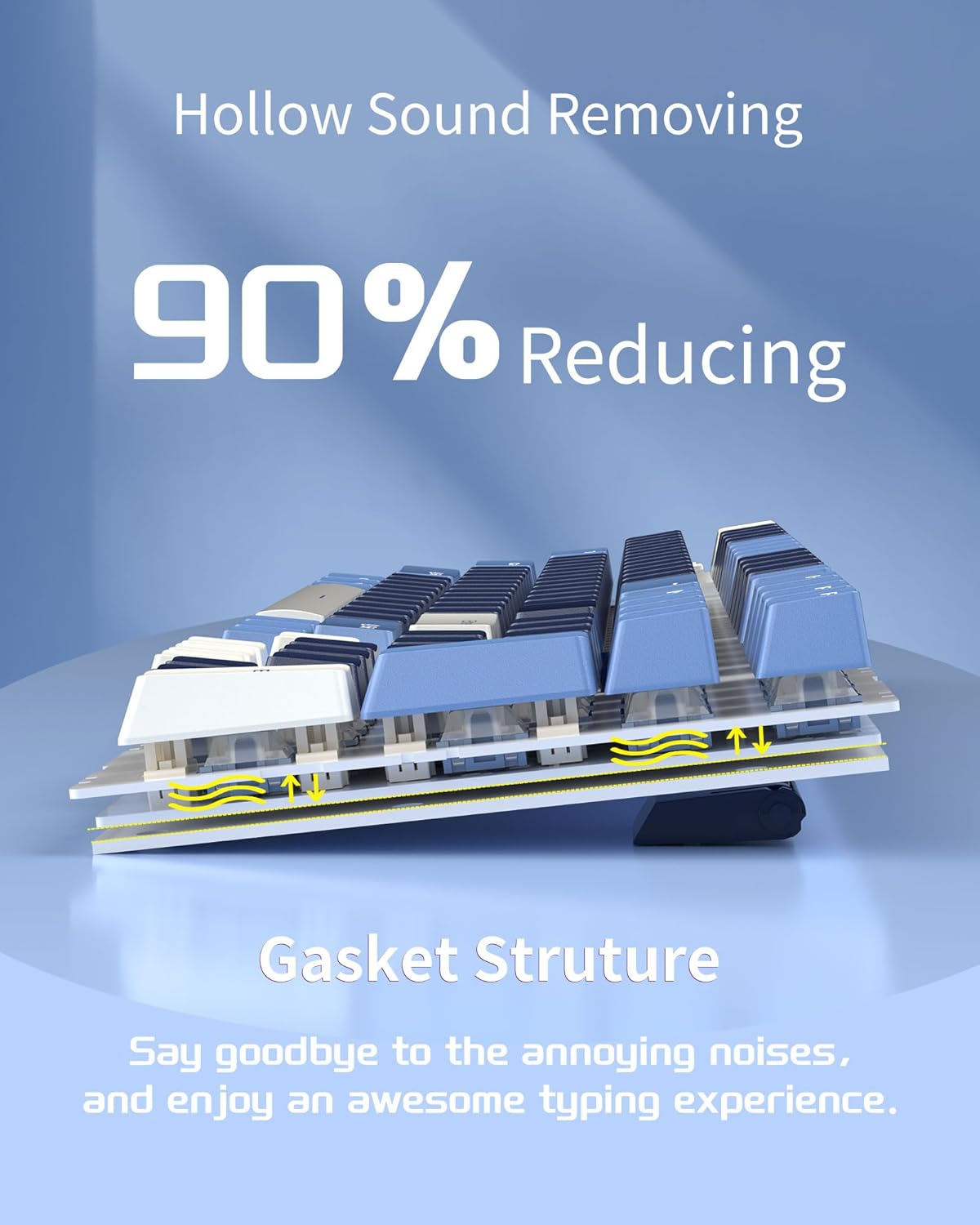
7-сүрөт: Visual representation of how the gasket structure reduces hollow sounds by cushioning the typing impact, leading to a quieter and more pleasant typing experience.
5. Adjustable Foot Pads
Баскычтоп 2-секtage adjustable foot pads on the underside, allowing you to set the typing angle to your preference for ergonomic comfort.
8-сүрөт: Detail showing the 2-stage adjustable foot pads, which can be extended to provide different typing angles for improved ergonomics.
Техникалык тейлөө
Туура тейлөө клавиатураңыздын узак мөөнөттүү жана оптималдуу иштешин камсыз кылат.
1. Тазалоо
- Жалпы тазалоо: Use a soft, dry cloth to wipe down the keycaps and keyboard frame regularly.
- Терең тазалоо: For dust and debris under the keycaps, use a keycap puller (not included, but often comes with switch puller) to remove keycaps. Use compressed air to blow out debris. Wipe the exposed plate with a slightly damp cloth (ensure it's not dripping wet) and dry thoroughly before replacing keycaps.
- Суюктуктардан алыс болуңуз: Do not spray cleaning solutions directly onto the keyboard. If necessary, apply a small amount of cleaner to a cloth first.
2. Которуу жана клавиатура алмаштыруу
Thanks to the hot-swappable design, individual switches and keycaps can be replaced if damaged or for customization. Refer to the "Hot-Swappable Switches" section under Operating Instructions for detailed steps on switch replacement.
Проблемаларды чечүү
If you encounter issues with your MageGee SKY98 keyboard, refer to the following common solutions.
| Көйгөй | Мүмкүн себеп | Чечим |
|---|---|---|
| Keyboard not responding / Not detected by computer | Бош USB туташуу, туура эмес USB порт, драйвер маселеси. |
|
| RGB Backlighting not working or stuck | Backlight switch off, software glitch, specific key issue. |
|
| Certain keys not registering or double-typing | Dust/debris under keycap, faulty switch, bent switch pin. |
|
| Keyboard feels "hollow" or noisy | Not a common issue for this model due to design, but could be perceived. |
|
Техникалык шарттар
| Өзгөчөлүк | Деталь |
|---|---|
| Модел | SKY98 |
| Бренд | MageGee |
| Макет | 96% (99 ачкыч) |
| Байланыш | Wired USB Type-C (detachable cable) |
| Которуу түрү | MageGee Blue Whale Switch (Pre-lubed, Linear) |
| Ыкчам алмаштырылуучу | Yes (Compatible with 3-pin/5-pin switches) |
| Монтаждоо стили | Прокладка орнотуу |
| Үн Дampэning | 5-Layer (IXPE, PORON, Diaphragm, EVA, Silicone) |
| Арткы жарыктандыруу | RGB (18 modes, 6 gaming effects, customizable) |
| N-Key Rollover | 100% Anti-ghosting |
| Шайкеш OS | Windows, Mac |
| Өлчөмдөр | 16.18 x 7.24 x 2.01 дюйм |
| Элемент Салмагы | 2.48 фунт |
| Материал | IXPE, PORON, EVA, Silicone (internal layers) |
Кепилдик жана колдоо
For warranty information and technical support, please contact MageGee customer service.
- Өндүрүүчү: MageGee
- Please refer to the product packaging or the official MageGee website for the most up-to-date warranty terms and contact information.


