Introduction
This manual provides detailed instructions for setting up, operating, and maintaining your AJAZZ A3060 Wireless Keyboard and Mouse Combo. Please read this manual carefully before use to ensure optimal performance and longevity of your product.
Пакеттин мазмуну
- 1 x AJAZZ A3060 Wireless Keyboard
- 1 x AJAZZ A3060 Wireless Mouse
- 1 x USB 2.4G Receiver

Image: The AJAZZ A3060 wireless keyboard and mouse combo, shown with the compact USB receiver.
Жайгашуу
1. Батареяны орнотуу
- Баскычтоп үчүн: Locate the battery compartment on the underside of the keyboard. Insert two (2) AAA batteries, ensuring correct polarity.
- Чычкан үчүн: Locate the battery compartment on the underside of the mouse. Insert one (1) AA battery, ensuring correct polarity.
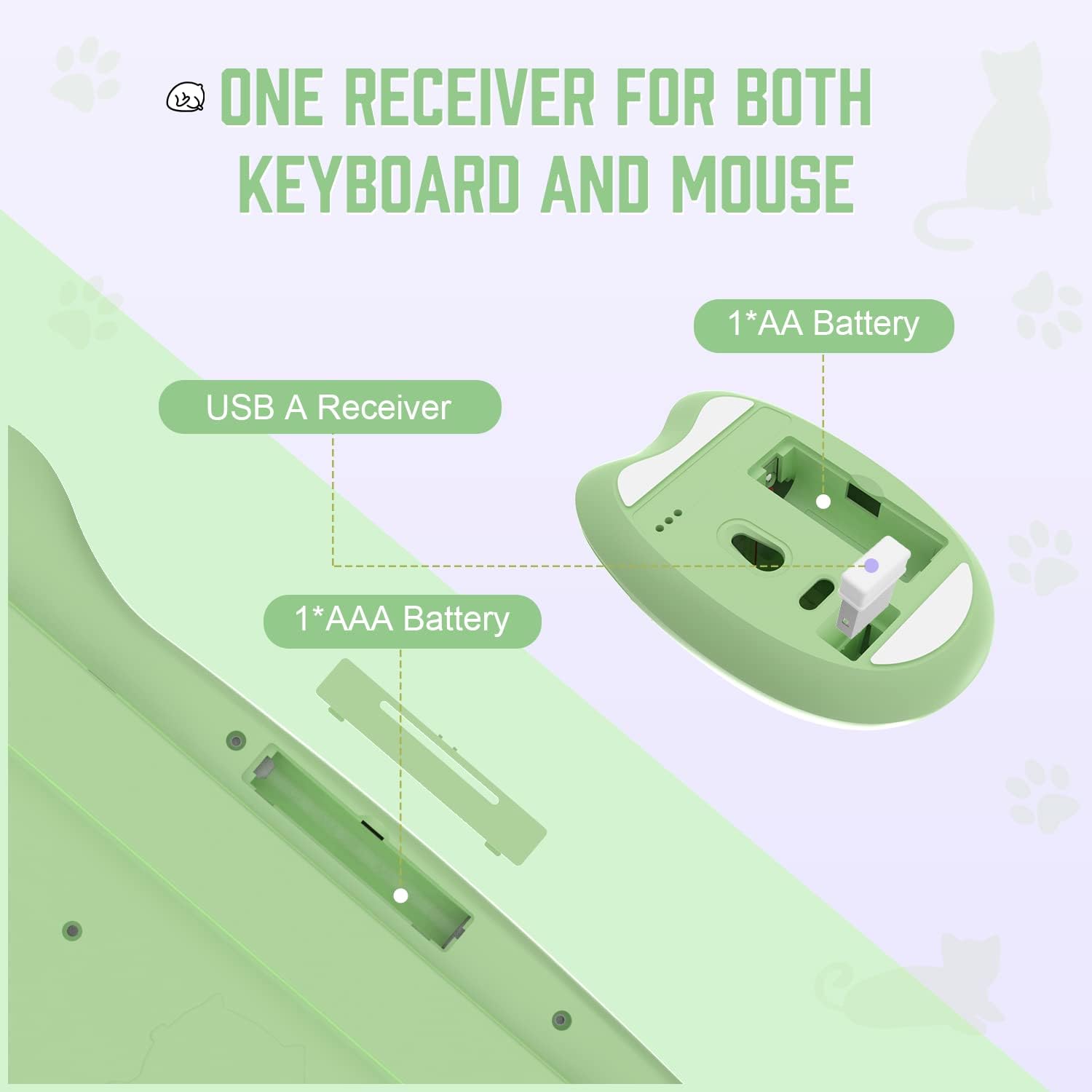
Image: Diagram illustrating the battery compartments for the keyboard (2x AAA) and mouse (1x AA), and the location of the USB receiver storage within the mouse.
2. USB кабылдагычты туташтыруу
- Take out the USB receiver from its storage slot on the underside of the mouse.
- Plug the USB receiver into an available USB-A port on your computer or compatible device.
- Ensure the mouse power switch (located on the underside) is in the 'ON' position.
- The keyboard and mouse should automatically connect to your device. No additional drivers are required.

Image: Visual guide demonstrating the six steps for connecting the wireless keyboard and mouse to a USB-A device, including receiver removal, plugging in, battery insertion, and power activation.
Иштөө нускамалары
Баскычтоптун функциялары
The AJAZZ A3060 keyboard features 84 keys with a retro round keycap design, providing a tactile and responsive typing experience. It includes dedicated media keys for enhanced control.
- Медиа ачкычтары: The function keys (F1-F12) have secondary media control functions. These can typically be accessed by pressing the 'Fn' key simultaneously with the desired F-key.
- Индикатор жарыктары: Located in the upper right corner of the keyboard. One light indicates uppercase/lowercase switching (Caps Lock), and the other indicates low battery or 2.4G connection status.

Image: An illustration of the AJAZZ A3060 keyboard highlighting the media key functions (F1-F12) and the indicator lights for Caps Lock and battery/connection status.
Чычкан функциялары
The ergonomic cat-shaped mouse is designed for comfort and features adjustable DPI settings.
- DPI жөндөө: The mouse features a DPI button, typically located near the scroll wheel. Press this button to cycle through three adjustable DPI levels: 800, 1600, and 3200. This allows you to customize cursor sensitivity.
- Кубат которгучу: An ON/OFF switch is located on the underside of the mouse to conserve battery life when not in use.

Image: A visual representation of the AJAZZ A3060 mouse, highlighting its ergonomic design and the three adjustable DPI settings (800, 1600, 3200).
Энергияны үнөмдөө режими
The combo is equipped with an intelligent power-saving feature. After a period of inactivity, the devices will automatically enter sleep mode to conserve battery. To wake them up, simply click any key on the keyboard or move/click the mouse.
A low battery indicator will alert you when it's time to replace the batteries.
Шайкештик
The AJAZZ A3060 Wireless Keyboard and Mouse Combo offers broad compatibility with various operating systems and devices, ensuring versatile use.
- Операциялык системалар: Compatible with Windows XP, Windows 7, Windows 8, Windows 10, and macOS.
- Түзмөктөр: Suitable for use with PCs, laptops, Smart TVs, workstations, projectors, and tablets.

Сүрөт: An overview showing the AJAZZ A3060 keyboard and mouse compatible with Smart TVs, PCs, Laptops, Macs, Workstations, and Projectors, and suitable for Windows operating systems.
Техникалык тейлөө
To ensure the longevity and optimal performance of your AJAZZ A3060 combo, follow these maintenance guidelines:
- Тазалоо: Баскычтоптун жана чычкандын беттерин тазалоо үчүн жумшак, кургак чүпүрөктү колдонуңуз. өжөр кир үчүн, бир аз гamp чүпүрөктү колдонсо болот, бирок аппаратка ным кирбеши керек.
- Батареяны алмаштыруу: Replace batteries promptly when the low battery indicator appears to avoid interruptions in use. Always use new, high-quality batteries of the specified type (AAA for keyboard, AA for mouse).
- Сактагыч: When not in use for extended periods, turn off the mouse using its power switch and store the USB receiver in its designated slot to prevent loss.
- Суюктуктардан алыс болуңуз: Ички компоненттерге зыян келтирбөө үчүн, шаймандарды суюктуктардан алыс кармаңыз.
Проблемаларды чечүү
- Байланыш жок/жооп бербей жатат:
- USB кабыл алгычтын иштеген USB портуна бекем сайылганын текшериңиз.
- Check if the mouse power switch is in the 'ON' position.
- Replace the batteries in both the keyboard and mouse with fresh ones.
- Try plugging the USB receiver into a different USB port on your device.
- Move the keyboard and mouse closer to the USB receiver (within 10 meters).
- Lagging/Delayed Response:
- Ensure there are no other 2.4GHz wireless devices causing interference nearby.
- Батареянын деңгээлин текшерип, аз болсо алмаштырыңыз.
- Чычкан курсорунун кыймылындагы көйгөйлөр:
- Чычкандын астындагы оптикалык сенсорду тазалаңыз.
- Чычканды ылайыктуу бетте колдонуп жатканыңызды текшериңиз (өтө жарык чагылдырбаган же тунук эмес).
- Adjust the DPI setting to your preference.
Техникалык шарттар
| Модел | A3060 |
| Туташуу түрү | 2.4 ГГц зымсыз (USB кабыл алуучу) |
| Зымсыз диапазон | 10 метрге чейин (33 фут) |
| Баскычтоптун жайгашуусу | 84 Ачкычтар |
| Баскычтоптун батареясы | 2 x AAA Батареялар (киргизилген эмес) |
| Чычкан батареясы | 1 x AA Батарея (киргизилген эмес) |
| Чычкан DPI | 800 / 1600 / 3200 (Жөнгө салынуучу) |
| Баскычтоптун өлчөмдөрү | Болжол менен 13.6 дюйм x 6 дюйм x 1.1 дюйм |
| Чычкандын өлчөмдөрү | Approx. 4.1 in x 2.7 in |
| Продукт Салмагы | Approx. 730 grams (package weight) |
| Келип чыккан өлкө | Кытай |

Image: Detailed dimensions of the AJAZZ A3060 wireless keyboard and mouse, showing measurements in inches.
Кепилдик жана колдоо
Кепилдик маалыматы жана техникалык колдоо үчүн, сатып алууңуз менен бирге берилген документтерди караңыз же сатуучу/өндүрүүчү менен түз байланышыңыз. Ар кандай кепилдик дооматтары үчүн сатып алганыңыздын далилин сактаңыз.


