1. Киришүү
This manual provides comprehensive instructions for the installation, operation, and maintenance of your DieseRC Smart WiFi 2-Channel Relay Module with Bluetooth Transmitter. This device allows for remote control of various electrical appliances via Wi-Fi, Bluetooth, and voice commands through compatible smart home systems.

Image 1.1: The DieseRC Smart WiFi 2-Channel Relay Module and its accompanying Bluetooth remote control.
2. Продукт бүтүп калдыview
The DieseRC Smart WiFi Relay Module is designed for versatile control of electrical devices. It features two independent relays, Wi-Fi connectivity for app control, Bluetooth for remote control, and compatibility with voice assistants.
2.1 Негизги өзгөчөлүктөрү
- Зымсыз туташуу: Supports 2.4 GHz Wi-Fi for remote control via the eWelink app.
- Bluetooth башкаруу: Includes a Bluetooth transmitter for local remote operation.
- Үн менен башкаруу: Колсуз иштөө үчүн Amazon Alexa жана Google Home менен шайкеш келет.
- Dual Relays: Two independent 10A relays with Normally Open (NO), Common (COM), and Normally Closed (NC) terminals.
- Ийкемдүү кубаттуулук киргизүү: Operates on DC 5V or DC 7V-48V.
- Компакт дизайн: Dimensions of 60x32x17 mm (2.4x1.3x0.7 inches) for easy integration.
- Бир нече иштөө режимдери: Configurable as toggle mode or inching mode.
2.2 Компонентти идентификациялоо

Сүрөт 2.1: Детальдуу view of the relay module showing terminals and indicators.
- NO (Normally Open) Pin: Contact is open when the relay is de-energized.
- COM (Common) Pin: Common terminal for the relay contact.
- NC (Normally Closed) Pin: Contact is closed when the relay is de-energized.
- Relay Indicator Light: Illuminates when the corresponding relay is active.
- Open the key / Pairing button: Used for pairing with the eWelink app and Bluetooth remote.
- WiFi Network Indicator Light: Wi-Fi байланышынын абалын көрсөтөт.
- Input USB 5V/0.5A: Micro USB port for 5V DC power input.
- +V / -V Terminals: Screw terminals for DC 7V-48V power input.
3. Техникалык шарттар
| Өзгөчөлүк | Спецификация |
|---|---|
| Модель номери | EW748 |
| Бренд | DieseRC |
| Өлчөмдөрү (L x W x Y) | 60 x 32 x 17 мм (2.4 x 1.3 x 0.7 дюйм) |
| Салмагы | 118 грамм (болжол менен) |
| Киргизүү көлөмүtage | DC 5V (via USB) or DC 7V-48V (via screw terminals) |
| Учурдагы рейтинг | Ар бир реледе 10А |
| Байланыш түрү | Normally Open (NO), Common (COM), Normally Closed (NC) |
| Зымсыз байланыш | Wi-Fi 2.4 ГГц, Bluetooth |
| Колдонмонун шайкештиги | eWelink (Android & iOS) |
| Voice Assistant шайкештиги | Amazon Alexa, Google Home |
| Иштөө режимдери | Toggle Mode, Inching Mode |
| Сертификация | CE |
4. Орнотуу
4.1 Модулду кубаттандыруу
The module can be powered in two ways:
- USB 5V: Connect a standard Micro USB cable to the USB port on the module and a 5V/0.5A power adapter.
- DC 7V-48V: Connect the positive (+) and negative (-) wires of your DC power supply to the corresponding +V and -V screw terminals on the module. Ensure correct polarity.

Image 4.1: Powering the module via USB 5V or DC 7V-48V terminals.
4.2 eWelink App Installation and Pairing
- Download the eWelink App: Төмөнкү QR кодун сканерлеңиз же кириңиз http://app.coolkit.cc/dl.html to download the eWelink app for your Android or iOS device.
- Катталуу/Кирүү: Open the eWelink app and create an account or log in if you already have one.
- Жупташтыруу режимине кирүү: Power on the DieseRC module. Press and hold the "Open the key / Pairing button" on the module for approximately 5-7 seconds until the Wi-Fi indicator light blinks rapidly.
- Колдонмого түзмөк кошуу: In the eWelink app, tap the "+" icon to add a new device. Follow the on-screen instructions to select "Quick Pairing Mode" or "Compatible Pairing Mode" as needed.
- Wi-Fi'га туташуу: Enter your 2.4GHz Wi-Fi network name (SSID) and password when prompted. The module does not support 5GHz Wi-Fi.
- Толук жупташтыруу: Once connected, the Wi-Fi indicator light on the module will stop blinking and remain solid. The device will appear in your eWelink app.

Image 4.2: QR code for eWelink app download.
4.3 Bluetooth алыстан жупташтыруу
The included Bluetooth remote control (RM2.4G) is pre-paired with the module. If re-pairing is necessary:
- Модуль күйгүзүлгөнүн текшериңиз.
- Press and hold the pairing button on the module until the Wi-Fi indicator light blinks.
- Press any button on the Bluetooth remote. The module's indicator light should confirm successful pairing.
5. Иштөө нускамалары
5.1 eWelink App Control
Once paired, you can control the module from anywhere using the eWelink app:
- Open the eWelink app and select your device.
- You will see virtual buttons for each relay (e.g., Channel 1, Channel 2). Tap to toggle the relay on/off.
- The app allows for scheduling, timers, and sharing control with family members.

Image 5.1: Remote control of devices via the eWelink app.
5.2 Үн менен башкаруу (Alexa/Google Home)
To enable voice control, link your eWelink account with Amazon Alexa or Google Home:
- Alexa же Google Home колдонмосун ачыңыз.
- "Өндүмдөр жана оюндар" (Alexa) же "Google менен иштейт" (Google Башкы бетине) өтүңүз.
- Издөө "eWelink" and enable the skill/service.
- Link your eWelink account using your credentials.
- Discover devices. Your DieseRC module will appear.
- Эми сиз үн буйруктарын колдоно аласыз, мисалы:
- "Alexa, turn on Channel 1."
- "Hey Google, turn off Channel 2."

Image 5.2: Voice control integration with smart home assistants.
5.3 Bluetooth алыстан башкаруу
Use the included Bluetooth remote for local control:
- Press buttons 1 or 2 to control the respective relays.
- "ALL ON" and "ALL OFF" buttons control both relays simultaneously.
6. Иштөө режимдери
The module supports two main operating modes, configurable via the eWelink app:
- Которуу режими: Each press of the button (app, voice, or remote) will switch the relay state (ON to OFF, or OFF to ON). This is suitable for lights or devices that need to stay on until manually turned off.
- Инч режими (учурдагы): The relay will turn ON for a set duration (e.g., 0.5 seconds) after a button press, then automatically turn OFF. This is ideal for momentary actions like garage door openers or electric locks. The duration can be configured in the eWelink app.

Image 6.1: The module can be configured to act as a momentary switch (push button) or a toggle switch (rocker switch).
7. Электр схемасы
Маанилүү: Ensure power is disconnected before performing any wiring. If you are unsure about electrical wiring, consult a qualified electrician.
7.1 Relay Contact Configuration

Image 7.1: Illustration of NO, COM, and NC terminals for each relay.
- NO (Normally Open) to COM: The circuit is open when the relay is off and closes when the relay is on.
- NC (Normally Closed) to COM: The circuit is closed when the relay is off and opens when the relay is on.
7.2 Чыгample Wiring Scenarios
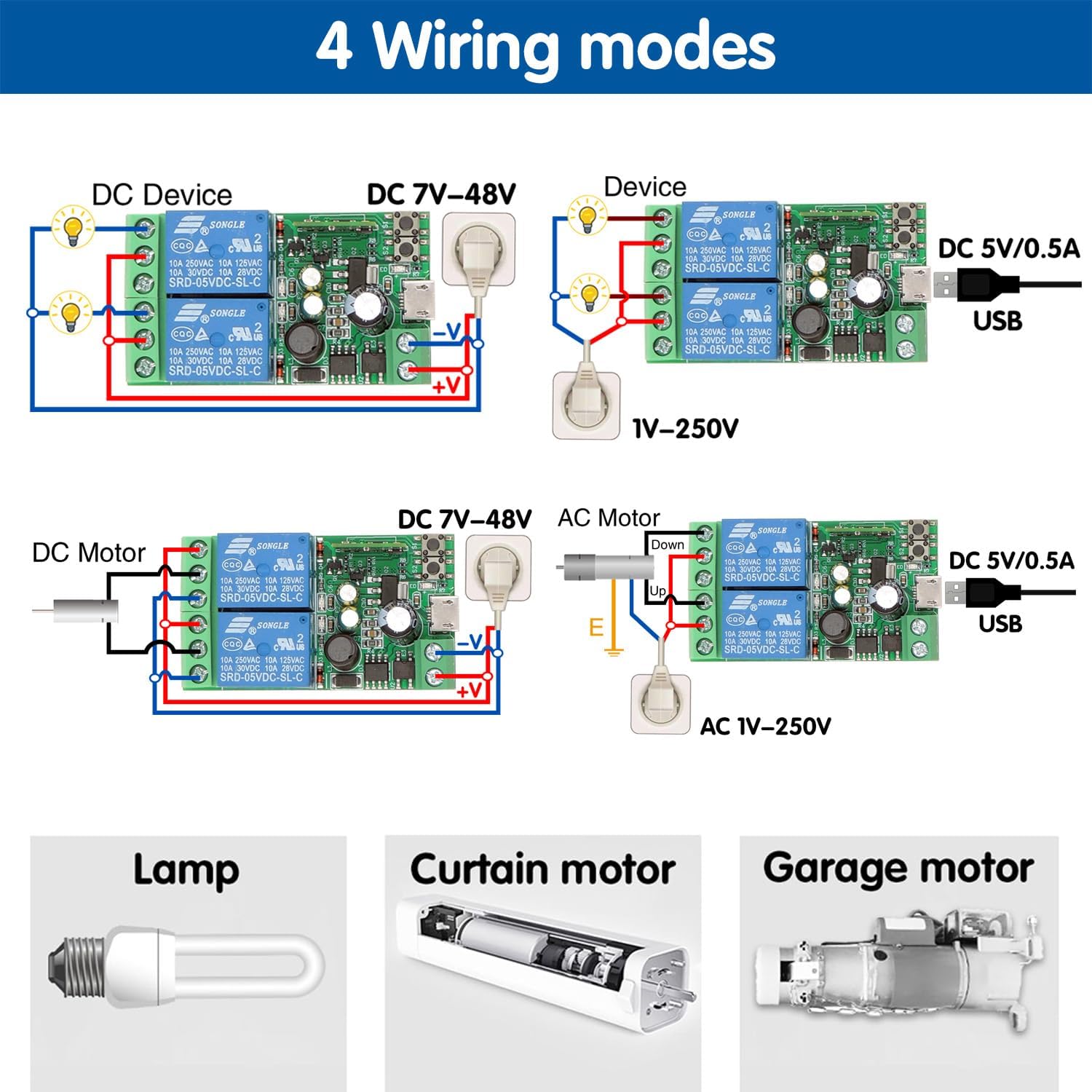
Image 7.2: Various wiring configurations for different applications.
- DC Device (DC 7V-48V): Connect the DC power supply to the module's +V and -V terminals. Connect the device's power input to the relay's COM and NO terminals.
- AC Device (1V-250V): Power the module via USB 5V. Connect the AC power source to the device and route one of the AC lines through the relay's COM and NO terminals.
- DC Motor (DC 7V-48V): For controlling a DC motor, two relays can be used for forward/reverse or on/off control, depending on the motor type and desired functionality.
- Garage Door/Curtain Motor: The module can be integrated into existing control circuits for garage doors or curtain motors, typically using the inching mode to simulate a momentary button press.
For specific applications, refer to the device's wiring requirements and ensure compatibility with the relay's specifications (10A, 250VAC/30VDC).
8. Техникалык тейлөө
- Модулду кургак чөйрөдө, нымдуулуктан жана өтө жогорку температурадан алыс кармаңыз.
- Модулду түз күн нуруна же коррозияга дуушар кылуучу заттарга дуушар кылбаңыз.
- Коопсуздук үчүн зымдардын туташууларын үзгүлтүксүз текшерип туруңуз.
- Ensure the power supply matches the module's specifications.
- Periodically check for eWelink app updates to ensure optimal performance and security.
9. Кыйынчылыктарды
- Модуль күйбөйт:
- Check power connections (USB 5V or DC 7V-48V).
- Ensure the power adapter provides sufficient voltage and current (at least 0.5A).
- Wi-Fi'га туташпай жатат:
- Ensure your Wi-Fi network is 2.4GHz. The module does not support 5GHz.
- Wi-Fi сырсөзүңүздүн туура экенин текшериңиз.
- Place the module closer to your Wi-Fi router during pairing.
- Reset the module by holding the pairing button until the Wi-Fi indicator blinks rapidly, then try pairing again.
- Колдонмо башкаруу иштебей жатат:
- Интернет байланышыңызды текшериңиз.
- Ensure the module's Wi-Fi indicator is solid, indicating a stable connection.
- Restart the eWelink app.
- Үн менен башкаруу жооп бербей жатат:
- Verify that your eWelink account is correctly linked to Alexa/Google Home.
- Ensure the device is discovered in your Alexa/Google Home app.
- Үн буйруктарыңыздын тактыгын текшериңиз.
- Bluetooth remote not working:
- Пульттун батареялары иштеп жатканын текшериңиз.
- Re-pair the remote with the module as described in Section 4.3.
10. Кепилдик жана колдоо
For warranty information and technical support, please refer to the product packaging or contact DieseRC customer service through the retailer where the product was purchased. You can also visit the official DieseRC webкошумча жардам үчүн сайт.


