Продукт бүттүview
The ELECTROPRIME HOPESTAR A6 Max is a robust and portable Bluetooth speaker designed for outdoor use, featuring IPX6 water resistance. It delivers powerful audio with high-fidelity speakers and supports various playback modes including Bluetooth, AUX, USB disk, and TF card. Its durable design and integrated lanyard make it an ideal companion for travel and outdoor activities.
Негизги өзгөчөлүктөрү
- Bluetooth V5.1 туташуусу: Ensures stable and efficient wireless audio streaming.
- IPX6 суу өткөрбөйт дизайн: Provides protection against strong jets of water, suitable for outdoor parties and rainy conditions.
- High-Fidelity Speakers: Delivers natural and delicate sound reproduction.
- Бир нече ойнотуу режимдери: Supports Bluetooth, standard 3.5mm AUX input, USB disk, and TF card playback.
- Audio Format колдоо: Decodes MP3, WAV, WMA, FLAC, and APE music formats.
- Эстутум функциясы: Resumes transmission from breakpoints for seamless playback.
- Жөнгө салынуучу аудио башкаруу каражаттары: Allows adjustment of microphone volume, microphone reverberation, and master volume.
- Портативдик дизайн: Features a convenient lanyard for easy carrying.
- Батареянын узак иштөө мөөнөтү: Equipped with a 12000mAh lithium-ion battery for extended playing time.
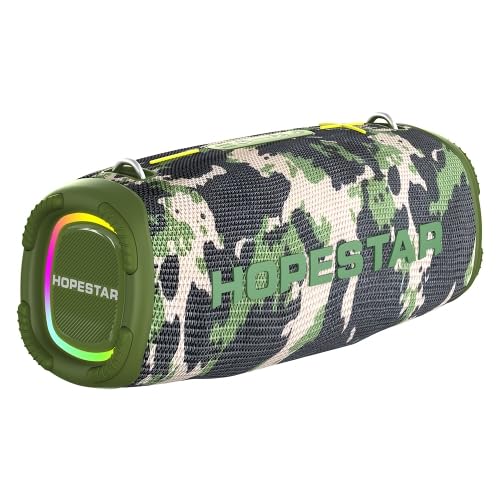
Figure 1: The ELECTROPRIME HOPESTAR A6 Max Portable Bluetooth Speaker, showcasing its camouflage design and integrated RGB lighting.
Пакеттин мазмуну
Сураныч, кутудан чыгарганда пакеттин мазмунун текшериңиз, бардык буюмдар бар жана жакшы абалда.
- ELECTROPRIME HOPESTAR A6 Max Bluetooth Speaker
- USB заряддоо кабели
- 3.5 мм AUX аудио кабели
- User Manual
Жайгашуу
1. Динамикти кубаттоо
- Берилген USB заряддоо кабелин динамиктин заряддоо портуна туташтырыңыз.
- Connect the other end of the USB cable to a 5V 2A USB power adapter (not included) or a computer's USB port.
- Заряддоо индикатору кубаттоо учурунда күйөт жана толук заряддалгандан кийин өчөт.
- Толук кубаттоо адатта болжол менен 6-7 саатты талап кылат.
2. Күйгүзүү / Өчүрүү
- Күйгүзүү үчүн: Press and hold the Power button for a few seconds until you hear an audible prompt and the indicator lights illuminate.
- Өчүрүү үчүн: Press and hold the Power button again for a few seconds until you hear an audible prompt and the indicator lights turn off.
3. Bluetooth Жупташтыруу
- Ensure the speaker is powered on and in Bluetooth pairing mode (indicated by a flashing blue light). If not, briefly press the Mode button to switch to Bluetooth mode.
- Мобилдик түзмөгүңүздө (смартфон, планшет ж.б.) Bluetooth иштетип, жеткиликтүү түзмөктөрдү издеңиз.
- Select "HOPESTAR A6 Max" from the list of found devices.
- Once successfully paired, you will hear a confirmation sound, and the Bluetooth indicator light will remain solid blue.
- Эгерде түзмөк байланыштын алкагында болсо жана Bluetooth иштетилген болсо, динамик күйүп турганда акыркы жупташтырылган түзмөккө автоматтык түрдө кайра туташат.
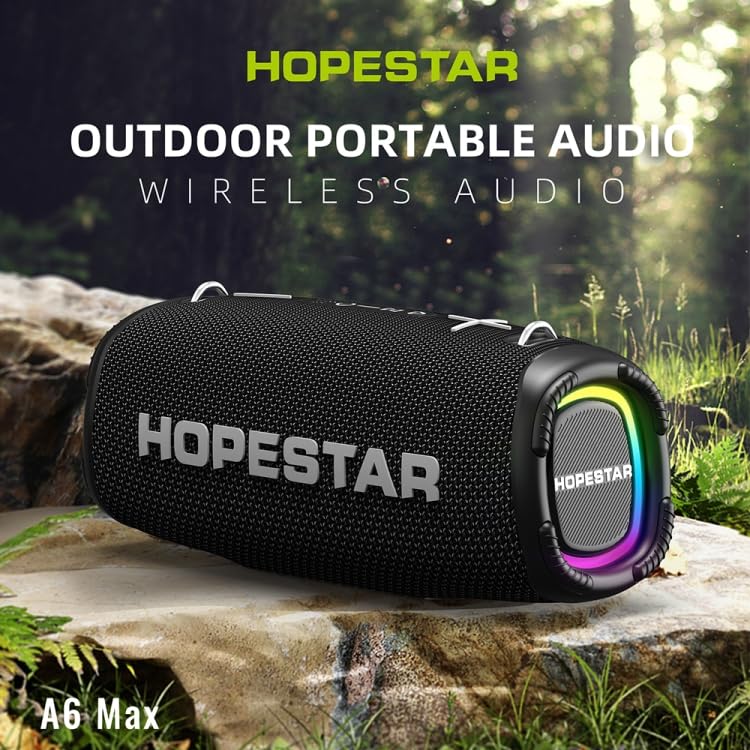
Figure 2: The HOPESTAR A6 Max speaker positioned outdoors, highlighting its portability and suitability for various environments.
Иштөө нускамалары
1. Bluetooth ойнотуу
After successful Bluetooth pairing, you can play audio from your connected device. Use your device's controls or the speaker's buttons for playback control.
2. AUX киргизүү
- Connect one end of the 3.5mm AUX audio cable to the speaker's AUX input port.
- Connect the other end to the audio output jack of your external audio device (e.g., MP3 player, computer).
- The speaker will automatically switch to AUX mode, or you may need to press the Mode button to select AUX.
3. USB Disk / TF Card Playback
- Insert a USB flash drive or a TF (microSD) card containing MP3, WAV, WMA, FLAC, or APE audio files динамиктеги тиешелүү портко.
- The speaker will automatically detect the storage device and begin playing music. If not, press the Mode button to switch to USB/TF card mode.
4. Чыныгы зымсыз стерео (TWS) жупташтыруу
To achieve a stereo sound experience, you can pair two HOPESTAR A6 Max speakers together.
- Эки динамик тең күйгүзүлгөнүн жана эч кандай Bluetooth түзмөгүнө туташкан эмес экенин текшериңиз.
- On one speaker (this will be the primary speaker), press and hold the TWS button (often indicated by two interlocking circles or a similar icon) until you hear a prompt.
- Негизги динамик кошумча динамикти издейт. Туташтырылгандан кийин, сиз ырастоо үнүн угасыз.
- Эми, "Bluetooth жупташтыруу" бөлүмүндө сүрөттөлгөндөй, мобилдик түзмөгүңүздү негизги динамикке Bluetooth аркылуу туташтырыңыз. Аудио эки динамик аркылуу тең стерео режиминде ойнотулат.
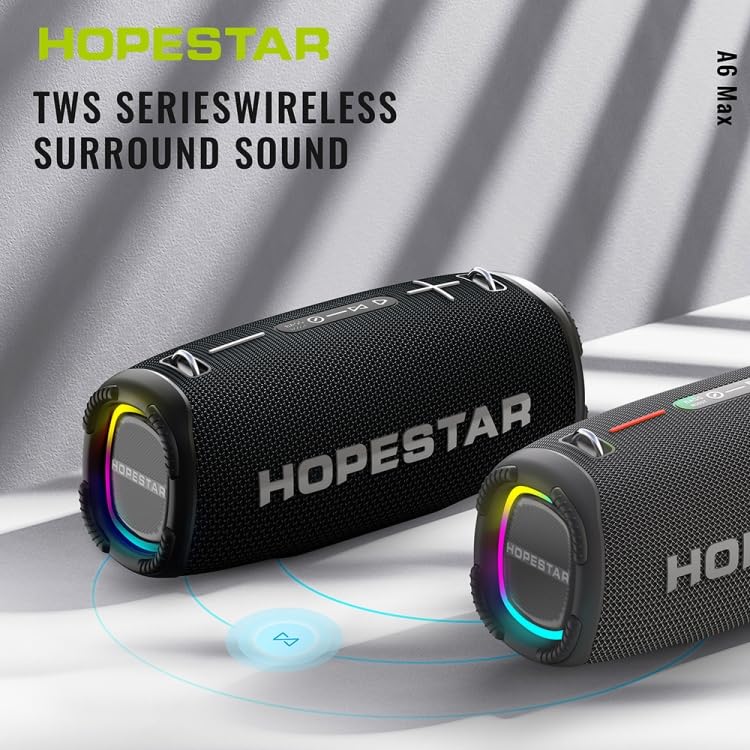
Figure 3: Two HOPESTAR A6 Max speakers wirelessly connected, illustrating the True Wireless Stereo (TWS) function for enhanced audio.
5. Чалууларды башкаруу
- Чакырууга жооп берүү: Briefly press the Play/Pause button when an incoming call rings.
- Чакырууну аяктоо: Briefly press the Play/Pause button during a call.
- Чакырууну четке кагуу: Кирүүчү чалуу учурунда Ойнотуу/Тынытуу баскычын 2 секунд басып туруңуз.
6. Volume and Track Control
- Көлөмү: Briefly press the "+" button.
- Үнүн азайтуу: Briefly press the "-" button.
- Кийинки трек: "+" баскычын басып, кармап туруңуз.
- Мурунку трек: "-" баскычын басып, кармап туруңуз.
Техникалык тейлөө
Тийиштүү техникалык тейлөө сиздин динамиктин узак мөөнөттүү иштешин жана оптималдуу иштешин камсыз кылат.
1. Тазалоо
- Wipe the speaker's surface with a soft, damp кездеме.
- Do not use abrasive cleaners, alcohol, benzene, or other chemical solvents, as these may damage the surface or internal components.
- Ensure all ports are dry before charging or connecting cables after exposure to water.
2. Сактоо
- Динамикти түз күн нурунан жана өтө температурадан алыс салкын, кургак жерде сактаңыз.
- Эгер батарейканы узак убакытка сактасаңыз, анын иштөө мөөнөтүн сактоо үчүн аны бир нече ай сайын болжол менен 50% га чейин кубаттап туруңуз.
3. Сууга туруктуулук (IPX6)
- The speaker is rated IPX6, meaning it is protected against powerful water jets. It is suitable for use in rainy conditions or near splashes.
- Жок динамикти сууга чөмүлтүңүз.
- Ensure the charging port and other covers are securely closed before exposing the speaker to water.
Проблемаларды чечүү
Динамикиңизде көйгөйлөргө туш болсоңуз, төмөнкү жалпы көйгөйлөрдү жана аларды чечүү жолдорун караңыз:
| Көйгөй | Мүмкүн себеп | Чечим |
|---|---|---|
| Динамик күйбөйт. | Батареянын аздыгы; Кубат баскычы туура басылган жок. | Charge the speaker fully. Press and hold the Power button firmly for a few seconds. |
| Bluetooth аркылуу жупташтыруу мүмкүн эмес. | Динамик жупташтыруу режиминде эмес; Түзмөктүн Bluetooth функциясы өчүк; Динамиктен өтө алыс; Тоскоолдук жаралууда. | Ensure speaker is in Bluetooth pairing mode (flashing blue light). Enable Bluetooth on your device. Move device closer to speaker. Avoid strong electromagnetic interference. |
| Динамиктен үн жок. | Үн өтө төмөн; Туура эмес киргизүү режими; Түзмөк аудио ойнотпой жатат. | Increase speaker and device volume. Press Mode button to select correct input (Bluetooth, AUX, USB/TF). Ensure audio is playing on your connected device. |
| Үндүн бузулушу. | Volume too high; Low battery; Poor audio source. | Reduce volume on both speaker and device. Charge the speaker. Try a different audio source or file. |
| TWS жупташтыруу ишке ашпай калды. | Speakers already paired to a device; Too far apart. | Ensure both speakers are disconnected from any Bluetooth devices. Place speakers close to each other during TWS pairing. |
Техникалык шарттар
Detailed technical specifications for the ELECTROPRIME HOPESTAR A6 Max Bluetooth Speaker:
| Bluetooth версиясы | V5.1 |
| Өткөрмө аралык | 10 метрге чейин (33 фут) |
| Чыгуу күчү | 50W x 1 (main speaker), 15W x 2 (side speakers) |
| Ойнотуу убактысы | 6-7 hours (at moderate volume) |
| Жыштык диапазону | 80Гц - 15КГц |
| Динамик конфигурациясы | 1 x 119mm (4 ohm 50W), 2 x 78mm (4 ohm 15W) |
| Киргизүү күчү | DC 5V 2A |
| Батарея түрү | 18650 литий-иондук батарейка |
| Батарея сыйымдуулугу | 12000mAh |
| Аудио киргизүү интерфейси | Standard 3.5mm Headphone Jack (Stereo) |
| Supported Playback Modes | U disk, TF card, AUX, Bluetooth |
| Колдоого алынган музыка форматтары | MP3, WAV, WMA, FLAC, APE |
| Өлчөмдөрү (L x W x Y) | 162 мм x 380 мм x 146 мм (6.38 дюйм x 14.96 дюйм x 5.75 дюйм) |
| Салмагы | Болжол менен 4.50 кг (9.93 фунт) |
| Суу өткөрбөйт рейтинги | IPX6 |
Кепилдик жана колдоо
ELECTROPRIME products are manufactured with high-quality standards. This product comes with a standard manufacturer's warranty against defects in materials and workmanship from the date of purchase.
For warranty claims, technical support, or any inquiries, please contact your retailer or the ELECTROPRIME customer service team. Please retain your proof of purchase for warranty validation.
Note: Warranty terms and conditions may vary based on region and retailer. Please refer to the specific warranty information provided at the time of purchase.
Байланыш маалыматы:
- Өндүрүүчү: ELECTROGADGETSSTORE
- Электрондук почта: support@electroprime.com (Example email, please refer to actual product documentation for official contact.)
- Webсайт: www.electroprime.com (Example website, please refer to actual product documentation for official contact.)