Introduction
Welcome to the user manual for your Timex Activity Tracker Watch, model TW5M60800. This digital quartz watch features a durable brass case, a comfortable khaki silicone strap, and a green dial. Designed for daily wear, it includes activity tracking functions and is water-resistant up to 30 meters. This manual provides essential information for setting up, operating, maintaining, and troubleshooting your watch to ensure optimal performance.

1-сүрөт: Фронт view of the Timex Activity Tracker Watch TW5M60800. This image displays the digital green dial, the brass case, and the khaki silicone strap.
Жайгашуу
1. Баштапкы активдештирүү
Your watch may come with a plastic battery saver tab. Gently pull and remove this tab from the side of the watch to activate the battery and power on the device.
2. Убакыт жана дата орнотуу
The Timex Activity Tracker Watch typically features multiple buttons for setting.
- табыңыз РЕЖИМ button (usually on the bottom left). Press it repeatedly to cycle through display modes until you reach the time setting mode (often indicated by flashing digits).
- колдонуу SET or ЖӨНДӨӨ button (usually top left or right) to select the digit you wish to change (hours, minutes, year, month, day).
- колдонуу START/STOP or LAP/RESET button (usually on the right side) to increase the value of the selected digit.
- Бардык орнотуулар туура болгондон кийин, басыңыз РЕЖИМ орнотуу режиминен чыгуу үчүн кайра баскычын басыңыз.
2-сүрөт: Side view of the watch, illustrating the placement of control buttons on the brass case. These buttons are used for navigating menus and adjusting settings.
3. Боону тууралоо
The watch features a silicone strap with a traditional buckle clasp. Adjust the strap to a comfortable fit on your wrist, ensuring it is snug but not too tight to allow for accurate activity tracking.
Иштөө нускамалары
1. Убакыттын негизги көрсөткүчү
In the default mode, the watch displays the current time (hours, minutes, seconds) and often the day of the week.
2. Accessing Activity Tracker Functions
басыңыз РЕЖИМ button to cycle through various functions. Look for modes labeled "Activity," "Steps," "Distance," or "Calories."
- Кадамдар: Басылган кадамдардын жалпы санын көрсөтөт.
- Аралык: Болжолдуу басып өткөн аралыкты көрсөтөт.
- Калориялар: Күйгүзүлгөн болжолдуу калорияларды көрсөтөт.
- Күнүмдүк максат: Some models allow setting a daily step goal. Refer to the on-screen prompts for setting and tracking.
To reset daily activity data, typically hold down a specific button (e.g., RESET or LAP) while in an activity tracking mode. Consult the watch's on-screen prompts for exact instructions.
3. Сууга туруктуулук
This watch is water-resistant to 30 meters (3 ATM). This means it is suitable for everyday use and can withstand splashes or brief immersion in water. It is жок suitable for swimming, showering, or diving. Avoid pressing buttons while the watch is wet or submerged.
Техникалык тейлөө
1. Саатыңызды тазалоо
To clean the watch case and strap, use a soft, damp cloth. For the silicone strap, a mild soap solution can be used, then rinse thoroughly with clean water and dry completely. Avoid using harsh chemicals or abrasive materials, as these can damage the watch's finish.
2. Батареяны алмаштыруу
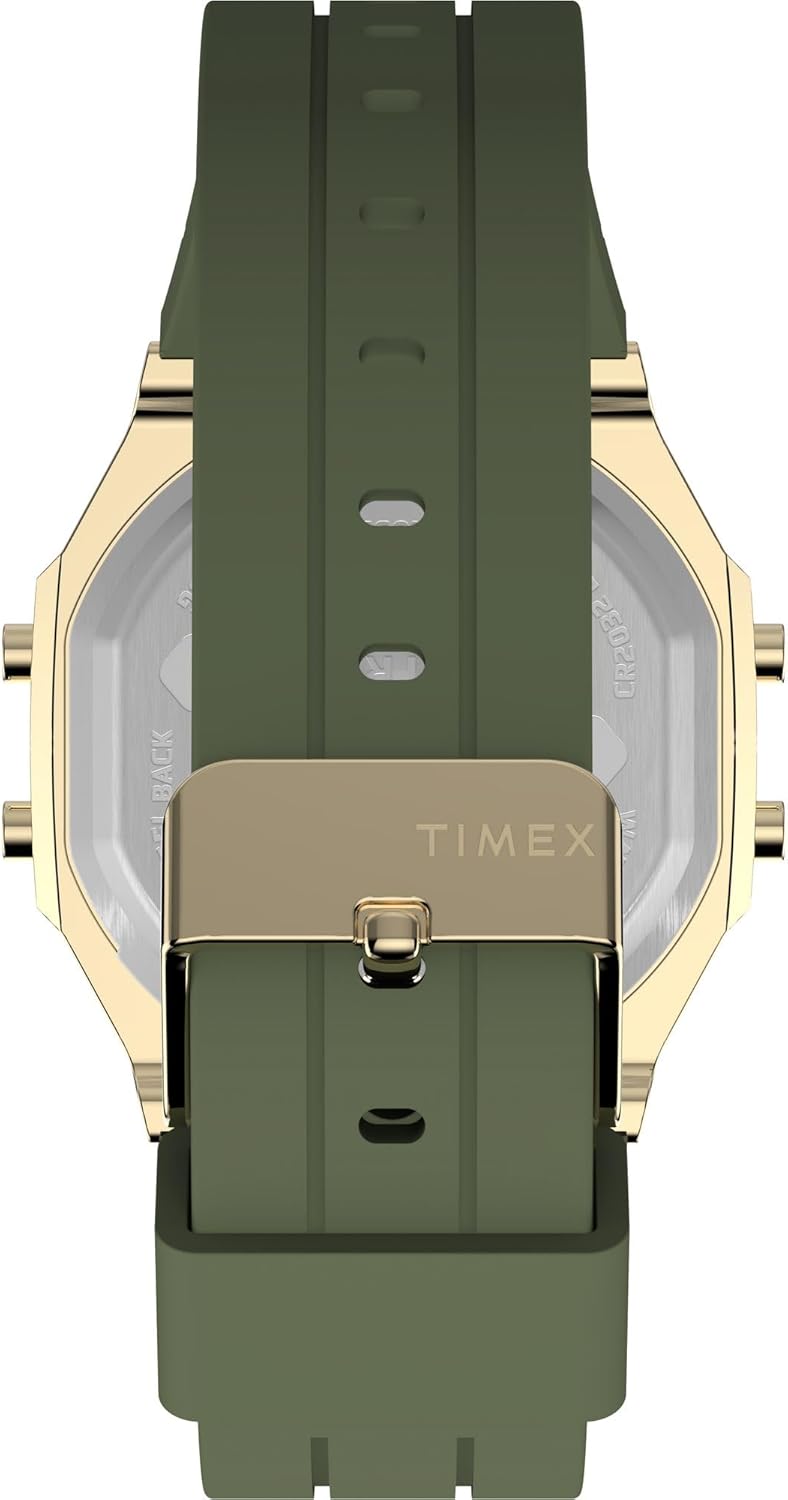
The watch is powered by a CR2032 battery. When the display dims or stops functioning, it's time to replace the battery.
- Carefully remove the back cover of the watch using a small screwdriver or a specialized watch tool.
- Note the orientation of the old battery before removing it.
- Жаңы CR2032 батареясын оң (+) тарабын өйдө каратып салыңыз.
- Replace the back cover, ensuring it is securely fastened to maintain water resistance.
It is recommended to have battery replacement performed by a qualified watch technician to ensure proper sealing and water resistance.

3-сүрөт: Арткы view of the watch, displaying the stainless steel back with "TIMEX ACTIVITY TRACKER" engraving, battery type (CR2032), and water resistance rating.
3. Сактоо
Колдонулбай турган учурда, саатыңызды салкын, кургак жерде, күн нуру түз тийбеген жана өтө жогорку температурадан алыс сактаңыз.
Проблемаларды чечүү
| Көйгөй | Мүмкүн себеп | Чечим |
|---|---|---|
| Дисплей бош же күңүрт. | Батарея аз же өлүк. | Replace the CR2032 battery. Ensure the battery saver tab is removed. |
| Туура эмес убакыт же дата. | Убакыт/дата туура эмес коюлган же баштапкы абалга келтирилген. | Орнотуулар бөлүмүндөгү "Убакытты жана датаны орнотуу" көрсөтмөлөрүн аткарыңыз. |
| Activity tracking data is inaccurate. | Watch not worn properly, or sensor obstruction. | Ensure the watch is worn snugly on the wrist. Clean the back sensor area. |
| Баскычтар жооп бербейт. | Watch may be in a locked mode or battery issue. | Try a soft reset (if applicable, by holding all buttons for a few seconds). Check battery. |
Техникалык шарттар
| Өзгөчөлүк | Деталь |
|---|---|
| Модель номери | TW5M60800 |
| Дисплей түрү | Санарип |
| Кыймыл түрү | Кварц |
| Power Source | Батарея (CR2032) |
| Иштин материалы | Жез |
| Иштин диаметри | 40 миллиметр |
| Case Thickness | 10 миллиметр |
| Кристалл материалы | Акрил |
| Боо материалы | Силикон |
| Боонун түсү | Хаки |
| Терүү түсү | Жашыл |
| Суу каршылык | 30 метр (3 банкомат) |
| Класс түрү | Buckle |
| Бөлүм | Unisex Чоңдор |
Кепилдик жана колдоо
For detailed warranty information, please refer to the warranty card included with your product packaging or visit the official Timex website. For further assistance or technical support, please contact Timex customer service through their official channels.


