1. Киришүү
Сатып алганыңыз үчүн рахматasing the Bobtot K701S 5.1/2.1 Channel Surround Sound System. This system is designed to provide a powerful and immersive audio experience for your home entertainment. With 800W peak power and a 6.5-inch subwoofer, it delivers clear, dynamic sound. This manual will guide you through the setup, operation, and maintenance of your new sound system.

Image 1.1: Bobtot K701S 5.1/2.1 Channel Surround Sound System with subwoofer, satellite speakers, and remote control.
2. Маанилүү коопсуздук нускамалары
Please read and follow these safety instructions carefully before operating the system to prevent electric shock, fire, or damage to the unit.
- Бул шайманды жамгырга же нымга тийгизбеңиз.
- Эч кандай желдетүүчү тешиктерди жаап албаңыз. Өндүрүүчүнүн көрсөтмөлөрүнө ылайык орнотуу.
- Радиаторлор, жылуулук регистрлери, мештер же башка аппараттар (анын ичинде) сыяктуу жылуулук булактарынын жанына орнотпоңуз ampкөтөргүчтөр) жылуулукту пайда кылуучу.
- Электр шнурунун басылып кетүүсүнөн же кысып калуудан сактаңыз, өзгөчө сайгычтарда, розеткаларда жана алар аппараттан чыга турган жеринде.
- Өндүрүүчү тарабынан көрсөтүлгөн тиркемелерди/аксессуарларды гана колдонуңуз.
- Бул аппаратты чагылгандуу бороондордо же узак убакыт бою колдонбогондо электр розеткасынан ажыратыңыз.
- Бардык тейлөөнү квалификациялуу тейлөө кызматкерлерине тапшырыңыз. Аппарат кандайдыр бир жол менен бузулганда тейлөө талап кылынат.
3. Пакеттин мазмуну
Кутучаны этияттык менен ачып, бардык буюмдардын бар экенин жана жакшы абалда экенин текшериңиз. Эгерде кандайдыр бир буюмдар жок болсо же бузулуп калса, кардарларды тейлөө кызматына кайрылыңыз.
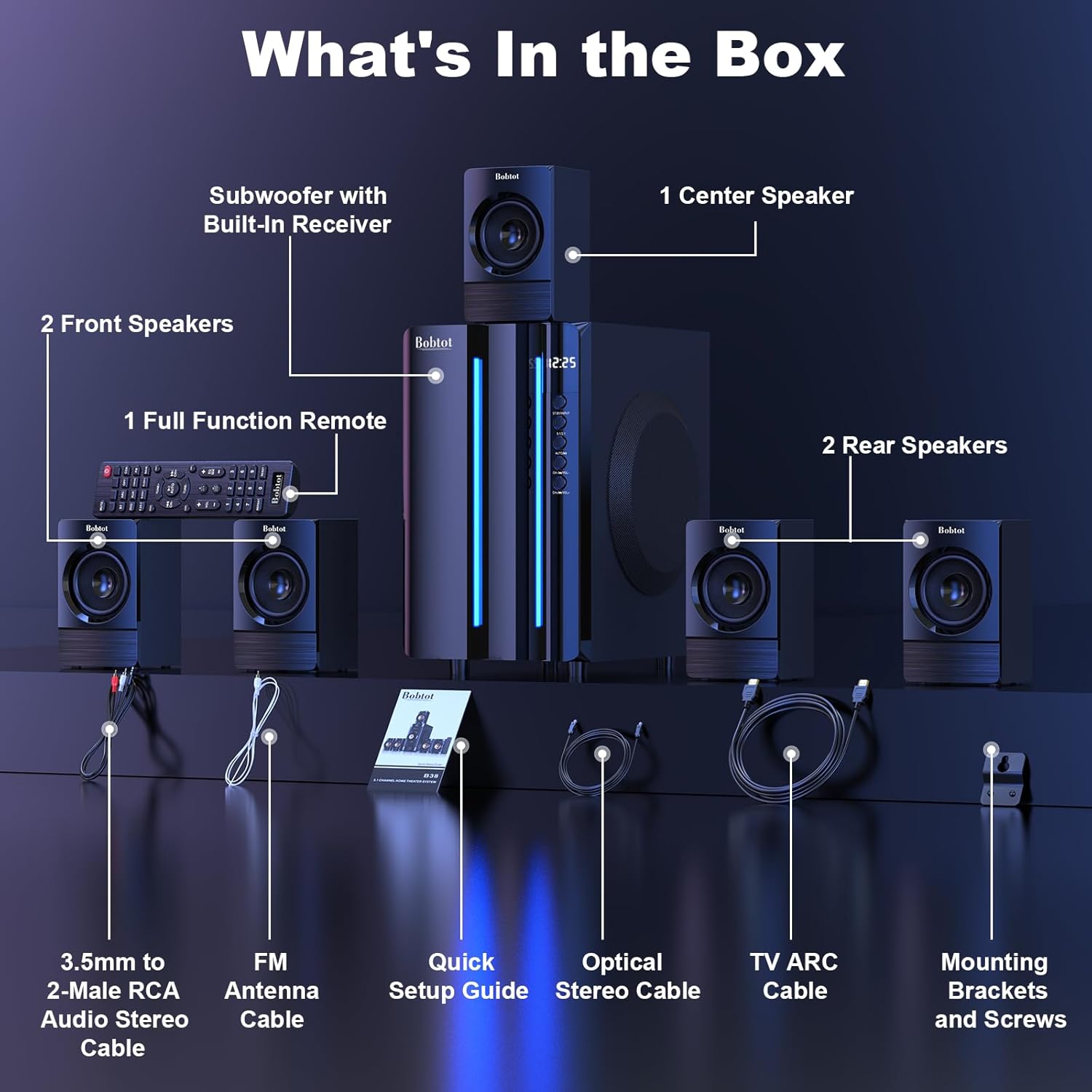
Image 3.1: Visual representation of all items included in the Bobtot K701S package.
- 1 x Subwoofer with Built-in Receiver
- 1 x Борбордук спикер
- 2 x Front Speakers
- 2 x Rear Speakers
- 1 x Full Function Remote Control
- 1 x 3.5mm to 2-Male RCA Audio Stereo Cable
- 1 x FM Antenna Cable
- 1 x Ыкчам орнотуу боюнча колдонмо
- 1 x Optical Stereo Cable
- 1 x TV ARC Cable (HDMI)
- 1 x коаксиалдык кабель
- 1 х AUX кабели
- 1 x RCA кабели
- Монтаждоо кронштейндери жана буроолор
- Колдонуучунун Колдонмосу (бул документ)
4. Components Overview
4.1 Subwoofer (Main Unit)
The subwoofer houses the main receiver and amplifier for the entire system. It features a 6.5-inch driver for deep bass and includes all input/output ports.

Сүрөт 4.1: Детальдуу view of the 6.5-inch subwoofer, highlighting its internal components.
4.2 Спутниктик динамиктер
The system includes five satellite speakers: one center, two front (left/right), and two rear (left/right). These speakers are wired and connect directly to the subwoofer unit.
4.3 Алыстан башкаруу
The full-function remote control allows you to manage power, input modes, volume, channel selection, and other settings from a distance.
5. Системаны орнотуу
Follow these steps to set up your Bobtot K701S surround sound system.
5.1 Динамиктин туташуусу
The five satellite speakers come with integrated cables. Connect each speaker to the corresponding "Audio Output" slot on the rear of the subwoofer unit. The cables are color-coded or labeled for easy identification (e.g., FL for Front Left, FR for Front Right, CEN for Center, SL for Surround Left, SR for Surround Right).
- Front Center and L/R speakers: Cables are approximately 13 feet long.
- Rear L/R speakers: Cables are approximately 31 feet long.
Place all speakers in the same room for optimal surround sound performance.

Image 5.1: Recommended speaker placement for a 5.1 channel surround sound experience.
5.2 Power On and Initial Test
- Connect the subwoofer to a power outlet using the provided power cable.
- Кубат которгучу менен сабвуферди күйгүзүңүз.
- Press the power button on the remote control or the front panel.
- Test the remote control functionality.
- Switch to "BT" (Bluetooth) mode and connect your mobile device to "B701D" via Bluetooth to ensure audio playback.
5.3 Тышкы түзмөктөрдү туташтыруу
Choose the appropriate input mode and connect your external device (e.g., TV, projector, DVD player, game console) to the subwoofer using the corresponding audio cables provided.
- Ensure the cable is securely plugged into the correct input slot on the subwoofer.
- Select the matching input mode on the system (e.g., HDMI ARC, OPT, COA, AUX, USB, DVD).

Сүрөт 5.2: Бүттүview of the rear panel connections and supported multimedia inputs.
6. Иштөө нускамалары
6.1 Алыстан башкаруу функциялары
The remote control provides full command over your sound system. Always press the power button before selecting an input mode when turning on the unit.

Image 6.1: Detailed diagram of the remote control buttons and their functions.
- Күйгүзүү/өчүрүү: Системаны күйгүзөт же өчүрөт.
- Input Mode Select: Buttons for BT, ARC, OPT, COA, DVD, AUX, USB/SD, FM to switch between audio sources.
- 5.1/2.1 Channel Select: Toggles between 5.1 surround sound and 2.1 stereo mode (in 2.1 mode, only the two front speakers play).
- Үндү көзөмөлдөө (VOL +/-): Жалпы системанын үнүн тууралайт.
- Mic Volume Adjustment (MIC +/-): Adjusts the volume for connected microphones (supports wireless/wired microphones).
- Echo Control (ECHO +/-): Микрофондор үчүн жаңырык эффектин тууралайт.
- TUNE +/-: FM радиосун тууралоо үчүн.
- CH +/-: For FM radio channel selection.
- Үнсүз: Аудио чыгышынын үнүн өчүрөт же ачат.
6.2 Киргизүү режимдери
The Bobtot K701S supports various input methods:
- Bluetooth (BT): Смартфондорго, планшеттерге жана башка Bluetooth иштетилген түзмөктөргө зымсыз туташуу үчүн.
- HDMI ARC: Connects to your TV's HDMI ARC port for high-quality audio transmission and TV remote control integration.
- Оптикалык (OPT): Digital audio input for TVs, game consoles, and other devices with an optical output.
- Coaxial (COA): Digital audio input, similar to optical, for compatible devices.
- AUX: Analog audio input using a 3.5mm or RCA cable for a wide range of devices.
- USB/SD: Аудио ойнотуу fileтүздөн-түз USB дисктерден же SD карталарынан.
- FM радиосу: Радиостанцияларды угуу үчүн орнотулган FM тюнери.
- DVD: Dedicated input for DVD players.
6.3 Channel Configuration (5.1 / 2.1)
The system offers two channel modes: 5.1 and 2.1. You can switch between these modes using the remote control or the front panel. In 5.1 mode, all five satellite speakers and the subwoofer are active, providing a full surround sound experience. In 2.1 mode, only the two front speakers and the subwoofer are active, suitable for stereo audio.
7. Connectivity Guide
This section details how to connect various devices to your sound system.
7.1 Bluetooth байланышы
- Press the "BT" button on the remote control or front panel to select Bluetooth mode. The display will show "BT".
- Мобилдик түзмөгүңүздө Bluetooth иштетип, жеткиликтүү түзмөктөрдү издеңиз.
- Select "B701D" from the list to pair. Once connected, you will hear a confirmation sound.
7.2 HDMI ARC туташуусу
- Connect one end of the HDMI ARC cable to the "HDMI ARC" port on the subwoofer.
- Connect the other end to the "HDMI ARC" port on your TV.
- Select "ARC" input mode on the sound system.
- Сыналгыңыздын аудио чыгышы HDMI ARC же тышкы динамиктерге коюлганын текшериңиз.
7.3 Optical/Coaxial Connection
- Connect an optical or coaxial cable from your device's digital audio output to the corresponding "OPT" or "COA" input on the subwoofer.
- Select "OPT" or "COA" input mode on the sound system.
- Ensure your device's audio output is set to PCM (Pulse-code modulation) for optical/coaxial connections, as some devices may default to other formats not supported by the system.
7.4 AUX туташуусу
- Use the provided 3.5mm to 2-Male RCA cable or a standard RCA cable.
- Connect the cable from your device's audio output (e.g., headphone jack, RCA L/R output) to the "AUX" input on the subwoofer.
- Select "AUX" input mode on the sound system.
7.5 USB/SD ойнотуу
- USB флэш-дискти же аудиону камтыган SD картаны салыңыз files into the respective port on the subwoofer.
- Select "USB/SD" input mode. The system will automatically begin playing compatible audio files.
7.6 FM радиосу
- Connect the FM antenna cable to the "FM ANTENNA" port on the subwoofer. Extend the antenna for better reception.
- Select "FM" input mode.
- Use the "TUNE +/-" or "CH +/-" buttons on the remote to scan for and select radio stations.
8. Техникалык шарттар
| Өзгөчөлүк | Спецификация |
|---|---|
| Модель номери | K701S |
| Динамик түрү | Спутник |
| Көлөмдүү үн каналынын конфигурациясы | 5.1 |
| Чокусу чыгаруу күчү | 800 Ватт |
| Сабвуфердин диаметри | 6.5 дюйм |
| Frequency Response | 20 KHz |
| Зымсыз байланыш технологиясы | Bluetooth 5.0 |
| Байланыш технологиясы | Bluetooth, HDMI ARC, Optical, Coaxial, AUX, USB, DVD, FM |
| Башкаруу ыкмасы | Алыстан башкаруу |
| Power Source | Электр зымдары |
| Киргизүү көлөмүtage | 120 вольт |
| Продукциянын өлчөмдөрү (L x W x Y) | 31.8 x 19.8 x 33 см |
| Элемент Салмагы | 6.56 килограмм |
| Материал | Wood (MDF), Acrylonitrile Butadiene Styrene (ABS) |
| Өзгөчө өзгөчөлүк | Бас Ampжашоо |
9. Кыйынчылыктарды
If you encounter issues with your Bobtot K701S system, refer to the following common problems and solutions:
9.1 Үн жок
- Күчтү текшерүү: Ensure the system is powered on and the power cable is securely connected.
- Үн деңгээли: Increase the master volume on the system and your connected device.
- Киргизүү режими: Verify that the correct input mode is selected on the system (e.g., BT, ARC, OPT).
- Кабелдик байланыштар: Ensure all audio cables are securely connected to both the system and the source device.
- Булак түзмөктүн чыгышы: Check the audio output settings on your source device (e.g., TV, DVD player) to ensure it's sending audio to the correct output port and format (e.g., PCM for optical/coaxial).
9.2 Үн сапатынын начардыгы / бурмалоо
- Үн деңгээли: Reduce the volume if it's too high, causing distortion.
- Кабелдин бүтүндүгү: Аудио кабелдеринде бузулуу же бош байланыш бар-жоктугун текшериңиз.
- Спикердин жайгашуусу: Ensure speakers are placed correctly and not obstructed.
- Булактын сапаты: Башка аудио булагы менен сыноо же file to rule out issues with the original content.
9.3 Алыстан башкаруу иштебейт
- Батареялар: Пульттагы батарейкаларды алмаштырыңыз.
- Көрүү сызыгы: Ensure there is a clear line of sight between the remote and the system's IR receiver.
- Аралык: Пультту анын натыйжалуу диапазонунда иштетиңиз.
9.4 Bluetooth туташуу маселелери
- Жупташтыруу режими: Система Bluetooth жупташтыруу режиминде экенин текшериңиз.
- Түзмөктүн жакындыгы: Keep your Bluetooth device within a few meters of the system.
- Интерференция: Тоскоолдукка алып келиши мүмкүн болгон башка зымсыз түзмөктөрдөн алыс болуңуз.
- Түзмөктү унут: On your mobile device, "forget" or "unpair" the "B701D" and attempt to reconnect.
10. Кароо жана тейлөө
- Тазалоо: Use a soft, dry cloth to clean the surfaces of the system. Do not use liquid cleaners or aerosols.
- Вентиляция: Ensure the subwoofer has adequate ventilation and is not placed in an enclosed space that could restrict airflow.
- Жайгашкан жери: Системаны түз күн тийген жерге, жылуулук булактарынын жанына же нымдуулугу жогору жерлерге коюудан алыс болуңуз.
- Өчүрүү: Turn off and unplug the system when not in use for extended periods.
11. Кепилдик жана Кардарларды колдоо
Bobtot is committed to providing a positive customer experience. If you encounter any issues with your B701D Home Surround Sound System, please refer to this user manual for initial troubleshooting.
For further assistance, please contact Bobtot customer support through the Amazon buyer-seller messaging service. Our support team is available to help you with any questions or concerns you may have.


