1. Киришүү
This manual provides essential information for setting up, operating, and maintaining your Vibox VI-162 Gaming PC. This entry-level gaming PC is designed for casual gamers, featuring integrated graphics capable of running less demanding titles and indie games efficiently. It is an ideal system for beginners or those seeking an affordable computer with potential for future upgrades.

Image 1.1: The complete Vibox VI-162 gaming PC bundle, including the tower, 22-inch monitor, keyboard, mouse, and headset.
2. Кутуда эмне бар
Сураныч, пакетиңизде төмөнкү нерселердин бардыгы бар экенине ынаныңыз:
- Vibox VI-162 Gaming PC Tower
- 22 дюймдук монитор
- Баскычтоп
- Чычкан
- Кубат кабели(лери)
- Display Cable (HDMI/DisplayPort)
- RGB Lighting Accessories (if applicable)
3. Орнотуу нускамалары
3.1 Пакеттен чыгаруу
- Алардын таңгагынан кылдаттык менен бардык компоненттерди алып салыңыз.
- Place the PC tower on a stable, flat surface with adequate ventilation.
- Remove any protective films or internal packaging materials from the PC tower.
3.2 Перифериялык түзүлүштөрдү туташтыруу
- Монитор: Connect the monitor to the PC's graphics output port (HDMI or DisplayPort) using the provided cable. Ensure the monitor's power cable is also connected to a power outlet.
- Баскычтоп жана чычкан: Connect the keyboard and mouse to the available USB ports on the rear or front of the PC tower.
- Күч: Connect the PC's power cable to the power supply unit (PSU) at the rear of the PC, then plug it into a wall outlet.
- Тармак: For wired internet, connect an Ethernet cable to the LAN port on the rear of the PC. For wireless internet, ensure the Wi-Fi antenna (if provided) is securely attached.
- Аудио: Connect your headset or speakers to the appropriate audio jacks (headphone/microphone) on the front or rear panel.

Image 3.1: Front panel connectivity of the Vibox VI-162 PC, showing ports for headphones, microphone, USB 2.0, USB 3.0, RGB control, reset, and power buttons.
3.3 Биринчи жүктөө
- Press the power button on the front of the PC tower.
- Мониторуңузду күйгүзүңүз.
- The system will boot into the pre-installed Linux Mint operating system. Follow the on-screen prompts for initial setup, such as language selection, time zone, and user account creation.
- Once the setup is complete, your PC is ready for use.
4. Иштөө нускамалары
4.1 Операциондук система
Your Vibox VI-162 PC comes with Linux Mint pre-installed. Linux Mint is a user-friendly and efficient operating system, ideal for maximizing system resources during gaming and general use. It offers a robust platform with strong community support and regular updates.
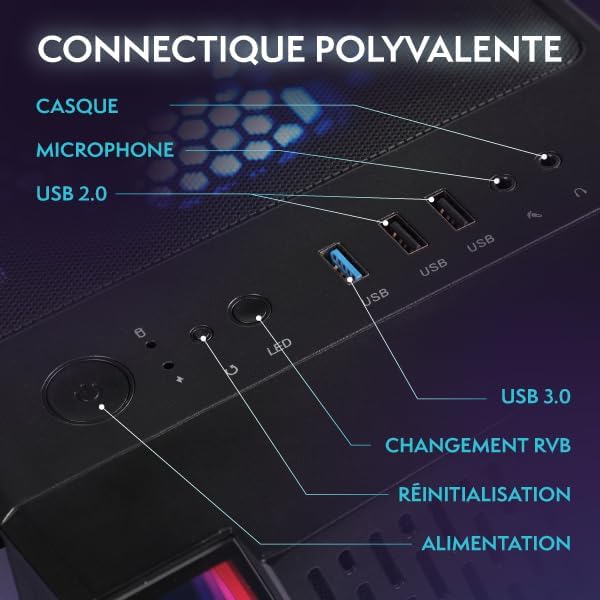
Image 4.1: Key features of the Linux Mint operating system, including its lightweight design, user-friendly interface, and support for gaming platforms like Steam, Lutris, and Proton.
You have the flexibility to install your preferred operating system if desired. Refer to the specific installation guide for your chosen OS.
4.2 Оюн жана аткаруу
The PC is equipped with an AMD Ryzen 3 3200G processor and integrated Radeon Vega 8 graphics, suitable for less demanding games and indie titles. For optimal performance, ensure your graphics drivers are up to date.
Сүрөт 4.2: Ички view of the Vibox VI-162 PC tower, showcasing the motherboard and CPU cooler.
4.3 RGB жарыкты башкаруу
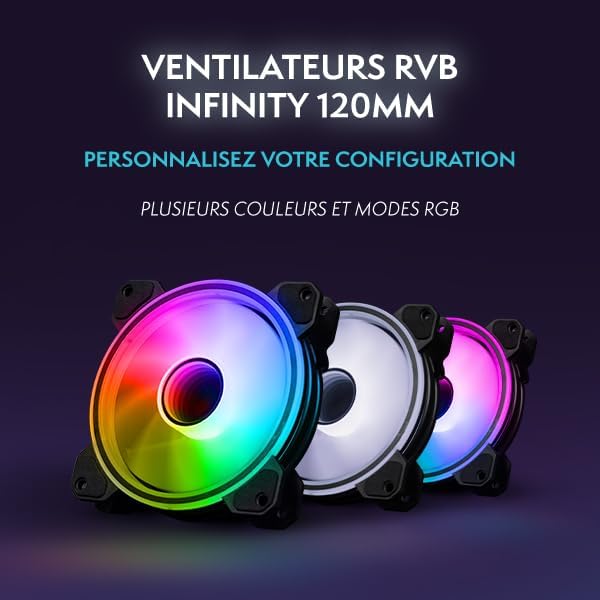
The PC tower features customizable RGB lighting. Use the dedicated RGB change button on the front panel (refer to Image 3.1) to cycle through different colors and lighting modes. For more advanced control, consult the motherboard or case manufacturer's software documentation if available.
5. Техникалык тейлөө
5.1 Тазалоо
- Сырткы: Use a soft, dry, anti-static cloth to clean the exterior surfaces of the PC tower and monitor. Avoid abrasive cleaners.
- Чаң: Мезгил-мезгили менен кысылган абаны желдетүү торлорунан жана ички тетиктерден чаңдан тазалоо үчүн колдонуңуз. Тазалоодон мурун компьютердин өчүрүлгөнүн жана розеткадан ажыратылганын текшериңиз.
5.2 Вентиляция
Ensure the PC has adequate airflow. Do not block the ventilation openings on the front, rear, top, or sides of the tower. Proper ventilation helps prevent overheating and maintains system stability.
6. Кыйынчылыктарды
This section addresses common issues you might encounter with your Vibox VI-162 PC.
6.1 Күч жок
- Кубат кабелинин компьютерге да, розеткага да бекем туташтырылганын текшериңиз.
- Ensure the power switch on the PSU (located at the rear of the PC) is in the 'ON' position.
- Дубал розеткасынын иштешин текшерүү үчүн башка аспап менен сынап көрүңүз.
6.2 Монитордо дисплей жок
- Verify that the monitor is powered on and its power cable is connected.
- Ensure the display cable (HDMI/DisplayPort) is securely connected to both the PC and the monitor.
- Confirm the monitor's input source is set correctly (e.g., HDMI 1, DisplayPort).
6.3 Перифериялык түзүлүштөр жооп бербей жатат
- Try connecting the keyboard or mouse to a different USB port.
- Компьютерди өчүрүп күйгүзүңүз.
- Ensure drivers for specific peripherals are installed and up to date (if required by the peripheral).
6.4 System Slowdown or Freezing
- Фондо иштеп жаткан керексиз тиркемелерди жабыңыз.
- SSD дискиңизде жетиштүү бош орун бар экенин текшериңиз.
- Ensure the PC has proper ventilation to prevent thermal throttling.
- Update your operating system and drivers.
7. Техникалык шарттар
Detailed technical specifications for the Vibox VI-162 Gaming PC:
| Өзгөчөлүк | Спецификация |
|---|---|
| Бренд | Vibox |
| Өндүрүүчү | Vibox |
| Сериялар | VTX-2 |
| Продукциянын өлчөмдөрү | 37 x 20 x 46 см |
| Продукт моделинин номери | VI-162 |
| Түс | VTX-2 Black Bundle |
| Форма фактору | Tower |
| Screen Size (Monitor) | 22 дюйм |
| Screen Resolution (Monitor) | 1920 x 1080 пиксел |
| Maximum Resolution | 1920 x 1080 пиксел |
| Процессор өндүрүүчүсү | AMD |
| Процессордун түрү | Ryzen 3 3200G |
| Процессордун ылдамдыгы | 3.6 GHz (Max 4.0 GHz) |
| Процессор розеткасы | Розетка AM4 |
| Процессорлордун саны | 4 |
| RAM сыйымдуулугу | 16 ГБ |
| Эс тутум технологиясы | DDR4 |
| Компьютердин эс тутумунун түрү | DDR4 SDRAM |
| Maximum Supported Memory | 128 ГБ |
| Memory Clock Speed | 3200 МГц |
| Катуу дисктин сүрөттөмөсү | SSD |
| Катуу диск интерфейси | Катуу мамлекет |
| Сактоо сыйымдуулугу | 1 ТБ |
| Графикалык сопроцессор | AMD Radeon Vega 8 |
| Графикалык картанын бренди | AMD |
| Графикалык картанын сүрөттөлүшү | Интеграцияланган |
| Graphics Memory Type | Бөлүшүлгөн |
| Graphics RAM Capacity | 2 ГБ |
| Графикалык карта интерфейси | Интеграцияланган |
| Байланыш түрү | Wi-Fi |
| Зымсыз туташуу түрү | 802.11n |
| USB 2.0 порттордун саны | 3 |
| USB 3.0 порттордун саны | 3 |
| Оптикалык диск түрү | Жок |
| Power Source | DC |
| Аппараттык платформа | PC |
| Операция системасы | Linux |
| Продукт Салмагы | 15.6 кг |
| Белгилүү продуктуларды колдонуу | Image Editing, Video Editing, Video Games |
| Personal Computer Design Type | Компьютер мунарасы |
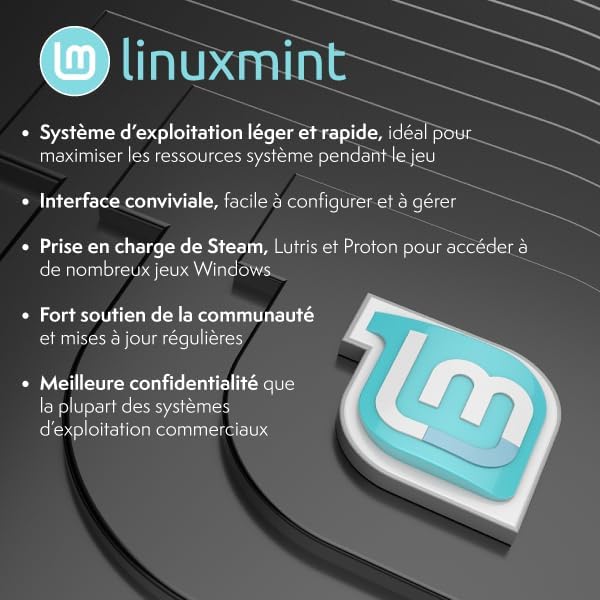
Image 7.1: Dimensions of the Vibox VI-162 PC tower: 46cm height, 38cm depth, and 20cm width.
8. Кепилдик жана колдоо
8.1 Кепилдик маалыматы
Your Vibox VI-162 PC is covered by a manufacturer's warranty. For specific details regarding warranty duration, terms, and conditions, please refer to the documentation included with your purchase or visit the official Vibox webсайт. Кепилдик дооматтар үчүн сатып алганыңыздын далилин сактаңыз.
8.2 Техникалык колдоо
If you encounter any issues not covered in the troubleshooting section or require further assistance, please contact Vibox customer support. You can typically find contact information on the official Vibox webсайт же сатуучу аркылуу.
Vibox Official Webсайт: www.vibox.co.uk (Эскертүү: URL may vary by region. Check your local Vibox website for the most accurate support information.)


