Introduction
The FREEWOLF M96 Wireless Gaming Keyboard is designed for versatile use, offering both Bluetooth and 2.4G wireless connectivity. It features a mechanical feel, RGB LED backlighting, a digital display screen, and durable PBT keycaps. This manual provides detailed instructions to help you set up, operate, and maintain your keyboard for optimal performance.
Продукт бүттүview
The FREEWOLF M96 keyboard combines advanced features with a user-friendly design. Key components include:
- Кош байланыш: Supports Bluetooth (BT1, BT2) and 2.4G wireless modes for seamless switching between multiple devices.
- Санарип дисплей экраны: Provides real-time information on battery capacity, connection mode, and charging status.
- Multimedia Control Knob: Allows for easy adjustment of volume and backlight settings.
- PBT баскычтоптору: Durable, spherical keycaps designed for comfortable typing and longevity.
- RGB LED арткы жарыгы: Customizable lighting effects to enhance your gaming or typing experience.
- Узак мөөнөттүү батарея: Equipped with a 3000 mAh battery for extended use.
- Эргономикалык дизайн: Features adjustable feet for optimal typing comfort.

Сүрөт: бүттүview of the FREEWOLF M96 Wireless Keyboard, highlighting its 90% US layout, PBT keycaps, Bluetooth/2.4G connectivity, LED backlight, 3000 mAh battery, multimedia knob, LED screen, and compatibility with Win/Mac/Linux/iOS/Android systems.

Сүрөт: Жакын план view of the PBT color blocking keycaps, emphasizing their durability and longer lifespan.
Жайгашуу
1. Баскычтопту заряддоо
Before first use, it is recommended to fully charge the keyboard. Connect the provided USB-C cable to the charging port on the keyboard and the other end to a USB power source (e.g., computer USB port, wall adapter).
- The digital display screen will indicate the charging status.
- Толук кубаттоо адатта бир нече саатка созулат.

Сүрөт: каптал view of the keyboard illustrating the power switch, Type-C charging port, and the 2.4G/BT1/BT2 mode switch. The Type-C port is for charging only and cannot be used for wired connection.
2. 2.4G зымсыз байланыш аркылуу туташуу
- Locate the 2.4G wireless receiver (USB dongle), usually stored in a compartment on the keyboard's underside.
- 2.4G кабыл алгычын компьютериңиздеги жеткиликтүү USB портуна сайыңыз.
- Slide the mode switch on the keyboard to the "2.4G" position.
- The keyboard should automatically connect to your device. The display screen will show the 2.4G connection status.
3. Bluetooth аркылуу туташуу
Клавиатура бир нече түзмөктөргө туташуу үчүн эки Bluetooth каналын (BT1 жана BT2) колдойт.
- Slide the mode switch on the keyboard to either "BT1" or "BT2" position.
- Түзмөгүңүздө (компьютер, планшет, смартфон) Bluetooth'ду иштетиңиз жана жаңы түзмөктөрдү издеңиз.
- Select "FREEWOLF M96" (or similar name) from the list of available devices.
- If prompted, enter the pairing code displayed on your device.
- Once connected, the digital display screen will show the active Bluetooth channel (BT1 or BT2).
To switch between connected Bluetooth devices, simply slide the mode switch to the desired BT1 or BT2 channel.
Video: Demonstrates the dual-mode connectivity of the FREEWOLF M96 Wireless Gaming Keyboard, showing how to switch between 2.4G wireless and Bluetooth connections (BT1, BT2) for seamless multi-device operation.
Иштөө нускамалары
1. Санарип дисплей экраны
The integrated electronic display provides essential information at a glance:
- Батарея сыйымдуулугу: Учурдагы батареянын пайызын көрсөтөтtage.
- Туташуу режими: Indicates whether the keyboard is in 2.4G, BT1, or BT2 mode.
- Кубаттоо абалы: Displays an icon when the keyboard is charging.
- Төмөн батарея көрсөткүчү: Alerts you when the battery is low.

Сүрөт: деталдуу view of the digital display screen on the FREEWOLF M96 keyboard, showing indicators for power display, connection status (2.4G, BT1, BT2), charging, and low battery.
2. Мультимедиа башкаруу баскычы
The knob located on the top right of the keyboard offers dual functionality:
- Default Function (Volume Control):
- Үнүн жогорулатуу үчүн сааттын жебеси боюнча буруңуз.
- Үндү азайтуу үчүн сааттын жебесине каршы буруңуз.
- Press the knob to mute/unmute audio.
- Жарыкты башкаруу:
- Press and hold the knob for five seconds to switch to backlight control mode.
- In backlight control mode:
- Rotate clockwise to increase backlight brightness.
- Rotate counter-clockwise to decrease backlight brightness.
- Press the knob to switch between different backlight effects/modes.

Image: Illustration of the advanced dial control, detailing its default functions for volume (volume up, volume down, mute) and its backlight control functions (backlight brightness up, backlight brightness down, light effect switching) when pressed and held for 5 seconds.
3. Backlight Control (Function Keys)
In addition to the knob, you can control the backlight using function key combinations:
- FN + N: Арткы жарык режимин которуштуруу
- FN + Up Arrow / Down Arrow: Арткы жарыктын жарыктыгын тууралоо
- FN + Left Arrow / Right Arrow: Арткы жарык ылдамдыгын тууралоо
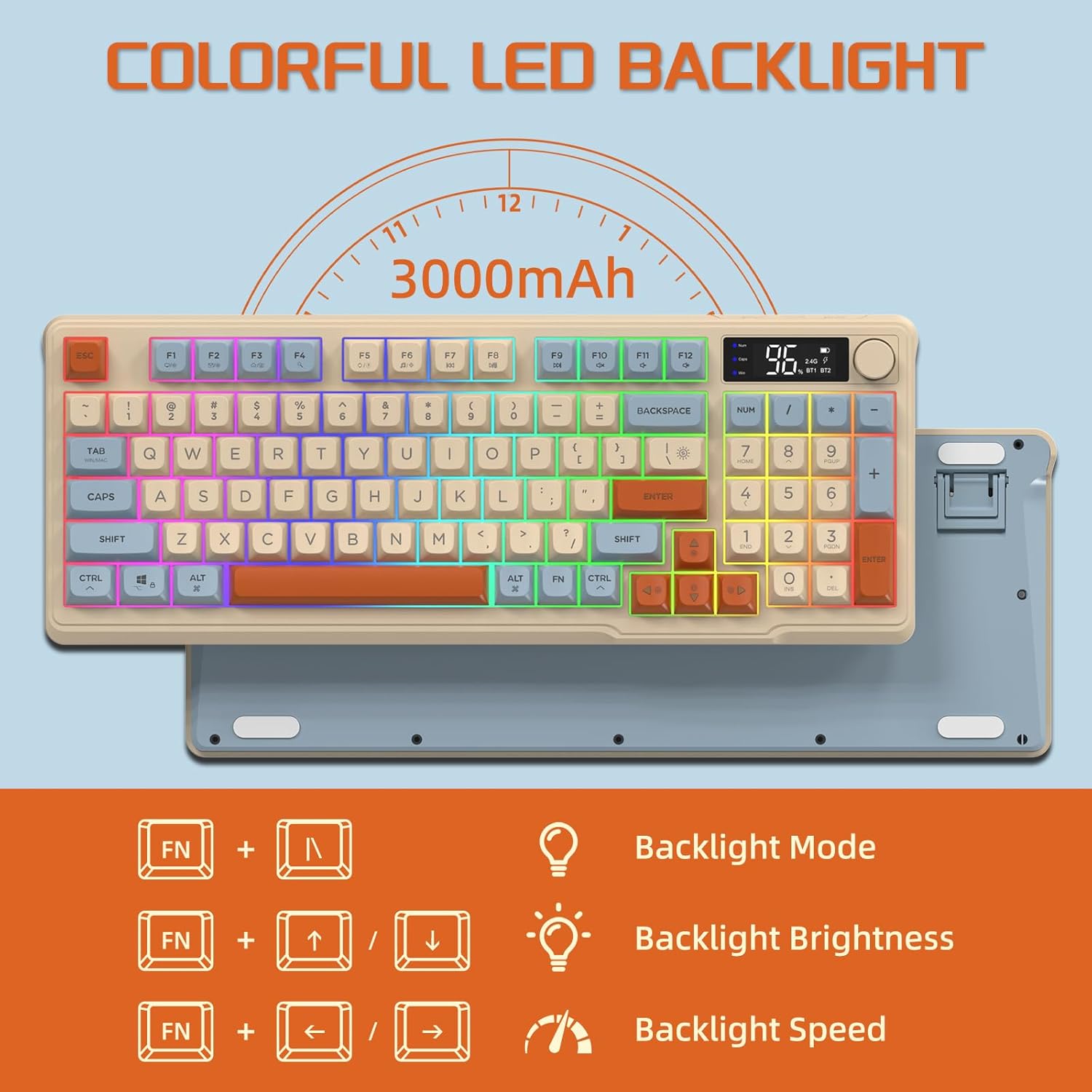
Image: The keyboard displaying the key combinations for controlling the colorful LED backlight, including changing backlight mode, brightness, and speed using the FN key with N, arrow keys.
4. Энергияны үнөмдөө режимдери
The keyboard is designed with power-saving features to extend battery life:
- Sleep Mode (3 minutes inactivity): After 3 minutes of inactivity, the keyboard enters sleep mode, and the backlight turns off.
- Deep Sleep Mode (10 minutes inactivity): After 10 minutes in sleep mode, the keyboard enters deep sleep. The first key press will be ignored to wake the keyboard, and the second key press will activate it.
5. Шайкештик
The FREEWOLF M96 keyboard is compatible with a wide range of operating systems, including Windows, Mac, and Linux, ensuring broad usability.
Техникалык тейлөө
1. Тазалоо
- Тазалоодон мурун клавиатураны өчүрүңүз.
- Бир аз жумшак, түксүз кездемени колдонуңуз dampбетти сүртүү үчүн суу же жумшак тазалоо эритмеси менен жабылган.
- For cleaning between keycaps, use compressed air or a small brush.
- Катуу химиялык заттарды же абразивдүү материалдарды колдонуудан алыс болуңуз.
2. Батареяга кам көрүү
- Батареяны бат-баттан толук кубаттап калуудан алыс болуңуз.
- Клавиатураны узак убакыт бою колдонбогондо салкын, кургак жерде сактаңыз.
- Use only the provided charging cable or a compatible USB-C cable.
Проблемаларды чечүү
| Көйгөй | Мүмкүн себеп | Чечим |
|---|---|---|
| Баскычтоп жооп бербей жатат. | Low battery; incorrect connection mode; receiver not plugged in (2.4G); Bluetooth not paired. | Charge the keyboard; switch to correct mode (2.4G/BT1/BT2); ensure 2.4G receiver is connected; re-pair Bluetooth. |
| Арткы жарык иштебейт. | Backlight turned off; low battery; brightness set to minimum. | Check backlight settings using the knob or FN key combinations; charge the keyboard. |
| Keys not registering or ghosting. | Software conflict; low battery; interference. | Restart your device; charge the keyboard; move closer to the receiver/device; check for driver updates. |
| Bluetooth байланышы туруксуз. | Interference; distance from device; low battery. | Reduce interference (other wireless devices); move keyboard closer to device; charge keyboard. |
Техникалык шарттар
| Өзгөчөлүк | Деталь |
|---|---|
| Бренд | FREEWOLF |
| Модель номери | M96 |
| Байланыш технологиясы | Bluetooth, 2.4G зымсыз |
| Keyboard Description | Mechanical feel with PBT keycaps |
| Ачкычтардын саны | 94 keys (US Layout) |
| Арткы жарык | RGB LED арткы жарык |
| Батарея сыйымдуулугу | 3000 мАч |
| Өзгөчөлүктөр | Electronic display, multimedia control knob, power saving modes |
| Шайкеш түзмөктөр | PC (Windows, Mac, Linux), iOS, Android |
| Түс | Blueberry (Myrtille) |
| Продукциянын өлчөмдөрү | 385mm (15.16 inch) x 145mm (5.71 inch) x 40mm (1.57 inch) |

Image: Diagram illustrating the product dimensions of the FREEWOLF M96 keyboard: 385mm (15.16 inches) length, 145mm (5.71 inches) width, and 40mm (1.57 inches) height.
Кепилдик жана колдоо
This FREEWOLF M96 Wireless Gaming Keyboard comes with a standard manufacturer's warranty. Please refer to the product packaging or the seller's information for specific warranty terms and conditions. For technical support or further assistance, please contact the retailer or manufacturer directly.
For the latest information and support, visit the official FREEWOLF webсайтка же кардарларды тейлөөгө кайрылыңыз.


