1. Киришүү
This manual provides essential information for the installation, operation, and maintenance of your Diyeeni LGA 1155 DDR3 Motherboard. Please read these instructions carefully before proceeding with installation to ensure proper functionality and to prevent damage.
Пакеттин мазмуну
- 1 x Diyeeni DDR3 Motherboard
- 1 x I/O Bracket
- 1 SATA кабелди х
- 1 x User Manual

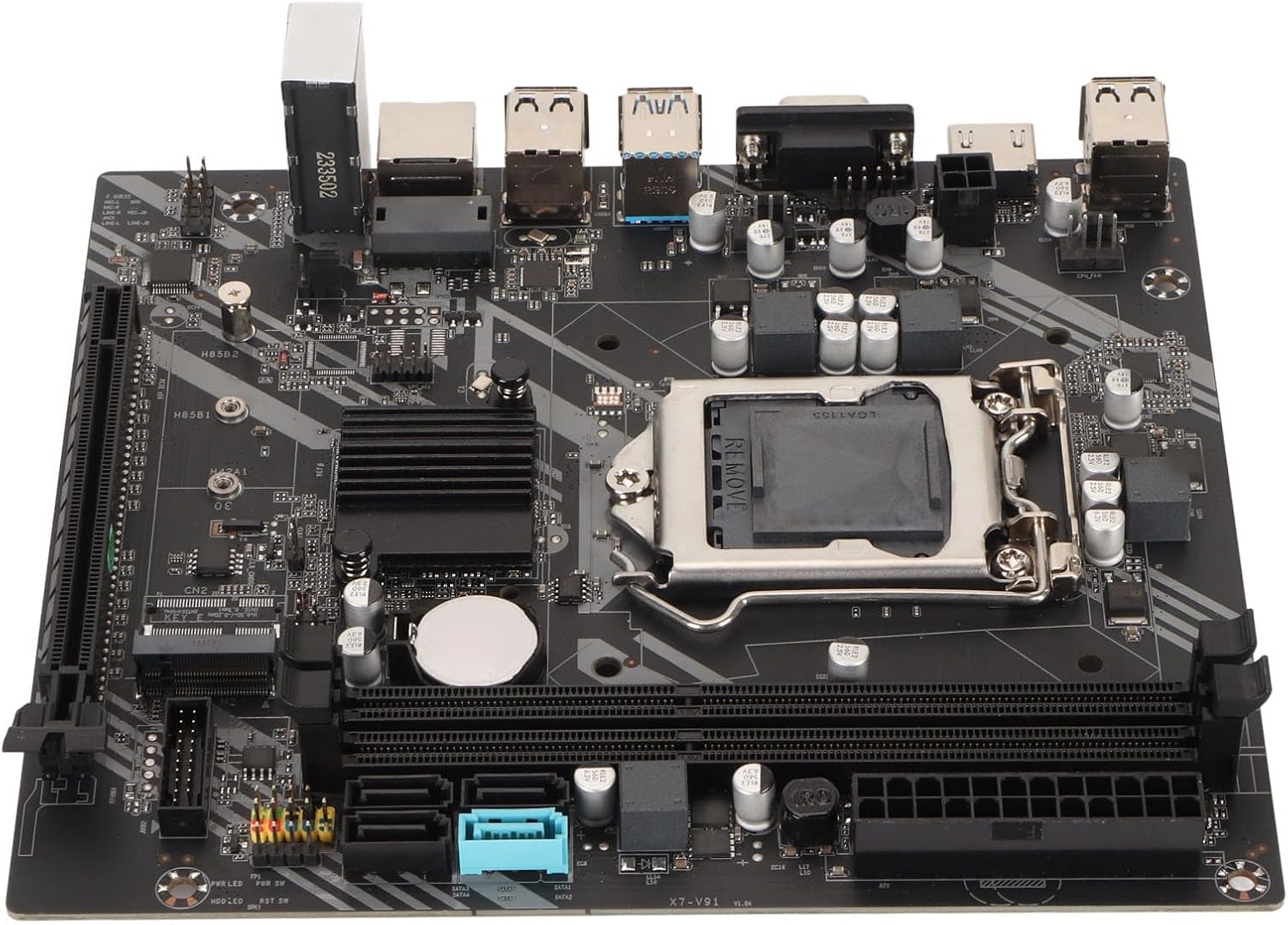
1.1-сүрөт: жогорудан ылдыйга view of the Diyeeni LGA 1155 DDR3 Motherboard.
2. Орнотуу жана орнотуу
Proper installation is crucial for the stability and performance of your computer system. Always handle the motherboard by its edges and avoid touching components directly to prevent electrostatic discharge (ESD) damage. It is recommended to wear an anti-static wrist strap during installation.
2.1 CPU орнотуу
- LGA 1155 CPU розеткасын энелик платадан табыңыз.
- CPU уячасынын капкагын ачуу үчүн жүктөө рычагын акырын басып, капталга тартыңыз.
- Carefully align the CPU with the socket, ensuring the gold triangle on the CPU matches the indicator on the socket. Do not force the CPU into the socket.
- Lower the load plate and secure it with the load lever.
Маанилүү: Incorrect CPU installation can bend pins, rendering the motherboard unusable. Verify CPU compatibility and alignment carefully.
Сүрөт 2.1: Жакын пландан view LGA 1155 CPU розеткасынын жана DDR3 эс тутум уячаларынын.
2.2 Эстутум (RAM) орнотуу
- DDR3 эс тутум уячаларынын эки учундагы клиптерди ачыңыз.
- DDR3 эстутум модулундагы оюкту эс уячасындагы ачкыч менен тууралаңыз.
- Эстутум модулунун эки учуна кысылганчалар орнотулганга чейин катуу басыңыз.
2.3 Сактагыч түзүлүштү орнотуу
- SATA дисктери: Connect SATA data cables from your storage devices (HDDs/SSDs) to the SATA 2.0 or SATA 3.0 interfaces on the motherboard. Connect SATA power cables from your power supply to the drives.
- M.2 NVMe SSD: Insert the M.2 NVMe SSD into the dedicated M.2 slot (PCIe channel) and secure it with the provided screw.
2.4 Graphics Card Installation (PCIe X16)
- Locate the PCIe X16 graphics card slot.
- Тийиштүү кеңейтүү уячасынын капкагын компьютериңиздин корпусунан алып салыңыз.
- Align your graphics card with the slot and press down firmly until it is seated correctly and the retention clip locks.
- Графикалык картаны бурама менен корпуска бекитиңиз.
2.5 Кубат туташтыруу
- Connect the 24-pin ATX power connector from your power supply to the 24-pin power interface on the motherboard.
- Кубат булагыңыздагы 4 пиндүү CPU кубат туташтыргычын CPU жанындагы 4 пиндүү кубат розеткасына туташтырыңыз.
2.6 Алдыңкы панель жана киргизүү/чыгаруу байланыштары
Connect the front panel headers (power button, reset button, HDD LED, power LED) and USB 2.0/3.0 headers to their respective pins on the motherboard. Refer to the motherboard's silkscreen labels for correct pin assignments.

2.2-сүрөт: Бурчтуу view of the motherboard, highlighting expansion slots and connectors.
3. Сиздин Motherboard иштетүү
Once all components are installed and connected, you can power on your system. The Diyeeni LGA 1155 DDR3 Motherboard provides a stable platform for your computing needs.
3.1 Integrated Graphics and Audio
This motherboard features an integrated graphics card and a 6-channel audio chip. For video output, connect your display to the VGA or HD Multimedia Interface (HDMI) port on the I/O panel. For audio, use the integrated audio jacks.

3.1-сүрөт: Детальдуу view of the I/O panel, including audio, LAN, and USB ports.
3.2 Байланыш
- USB порттору: Utilize the 4 x USB 2.0 and 2 x USB 3.0 ports for connecting peripherals.
- Тармак: The integrated RJ45 port provides reliable high-speed internet connectivity.
3.3 BIOS/UEFI орнотуу
To access the BIOS/UEFI setup utility, press the designated key (usually DEL or F2) during system startup. Here you can configure boot order, system time, and other advanced settings.
4. Техникалык тейлөө
To ensure the longevity and optimal performance of your motherboard, consider the following maintenance tips:
- Аны таза кармаңыз: Regularly clean dust from inside your PC case, especially around the motherboard and CPU cooler, using compressed air. Dust accumulation can lead to overheating.
- Туура желдетүү: Ensure your PC case has adequate airflow to dissipate heat generated by components.
- BIOS жаңыртуулары: Мезгил-мезгили менен өндүрүүчүнүн текшерүү website for BIOS/UEFI updates. Updates can improve compatibility, stability, and performance.
- Батареяны алмаштыруу: The motherboard uses a CR2032 button battery for the CMOS. If you experience issues with system time or BIOS settings resetting, the battery may need replacement.
5. Кыйынчылыктарды
Эгерде сиз эне платаңызда көйгөйлөргө туш болсоңуз, төмөнкү жалпы көйгөйлөрдү чечүү кадамдарын караңыз:
- Кубат жок/жүктөө жок:
- Check all power connections (24-pin ATX, 4-pin CPU) are securely seated.
- Электр менен камсыздоонун иштеп турганын жана күйүк экенин текшериңиз.
- Алдыңкы панелдин кубат баскычынын энелик платага туташуусун текшериңиз.
- Дисплей жок:
- Мониторуңуз туура видео чыгарууга туташып турганын текшериңиз (же интегралдык графика же атайын графикалык карта).
- Графикалык картаны жана RAM модулдарын кайра орнотуңуз.
- Бир гана RAM таякчасы менен жүктөөгө аракет кылыңыз.
- Системанын туруксуздугу/бузуулар:
- Процессордун муздаткычын туура орнотууну жана термикалык паста колдонууну текшериңиз.
- Ensure RAM modules are correctly seated and compatible.
- Update drivers for your components (chipset, graphics, audio).
- CPU Pin Damage: As noted by some users, incorrect CPU installation can lead to bent pins. Always align the CPU carefully with the socket's orientation marks and avoid applying excessive force. If pins are bent, professional repair may be required.
6. Техникалык шарттар
Below are the detailed technical specifications for the Diyeeni LGA 1155 DDR3 Motherboard:
| Өзгөчөлүк | Спецификация |
|---|---|
| Элемент түрү | DDR3 Motherboard |
| Материал | Printed Circuit Board |
| CPU платформасы | For Core 2nd and 3rd Gen |
| CPU розетка | LGA 1155 |
| Чипсет түрү | Intel H77 Express (Compatible with B75) |
| Memory Type | DDR3 1600/1333/1066 МГц |
| Memory Slots | 2 x DDR3 |
| Графикалык картанын уячасы | 1 x PCIe X16 |
| M.2 Slot | 1 x M.2 NVMe (PCIe Channel) |
| SATA интерфейстери | 3 x SATA 2.0, 1 x SATA 3.0 |
| USB 2.0 порттору | 4 (Rear I/O) + 1 x USB 2.0 Pin (Internal) |
| USB 3.0 порттору | 2 (Rear I/O) + 1 x USB 3.0 Pin (Internal) |
| Video Output | 1 x VGA Port, 1 x HD Multimedia Interface (HDMI) |
| LAN порт | 1 x RJ45 порту |
| Аудио чип | Integrated 6 Channel Sound Chip |
| Электр розеткалары | 1 x 4-Pin, 1 x 24-Pin |
| Энергия менен камсыздоо фазасы | 3 фазалык электр менен жабдуу |
| CMOS батареясы | 1 x CR2032 Button Battery (240mAh) |
| Өлчөмдөрү (болжол менен) | 27 x 21 x 5 см |
| Салмагы (болжол менен) | 528 г |
7. Кепилдик жана колдоо
For warranty information, technical support, and further assistance, please refer to the retailer where you purchased this product or visit the official Diyeeni brand store.
Diyeeni Store: https://www.amazon.ca/stores/Diyeeni/page/1195A89A-7EEE-4D74-A4F7-05DAA074380B