Introduction
Thank you for choosing the Dripex Mobile Standing Desk. This versatile workstation is designed to enhance your productivity and comfort by allowing seamless transitions between sitting and standing positions. It features integrated power outlets, USB ports, and LED strip lights for a modern and functional workspace. Please read this manual thoroughly before assembly and use to ensure proper operation and safety.
Коопсуздук маалыматы
Маанилүү: Please adhere to all safety guidelines to prevent injury or damage to the product.
- This product has a maximum weight capacity of 25 килограмм (55 фунт). Бул чектен ашпаңыз.
- Ассамблея талап кылынат. Монтаждоо учурунда бардык көрсөтмөлөрдү кылдаттык менен аткарыңыз.
- Due to the presence of caster wheels, the desk may require additional anchoring or careful placement to prevent unintended movement, especially on uneven surfaces.
- Ensure all electrical connections for the power outlets and strip lights are secure and properly plugged into a suitable power source.
- Боюңузду тууралоо учурунда балдарды жана үй жаныбарларын столдон алыс кармаңыз.
- Avoid placing liquids directly on the desk surface, especially near power outlets.
Пакеттин мазмуну
Монтаждоону баштоодон мурун, бардык компоненттер бар экенин жана бузулбаганын текшериңиз. Эгерде кандайдыр бир бөлүктөрү жок же бузулуп калса, кардарларды колдоо менен байланышыңыз.
- Desk frame components
- Two-tier desktop panels
- Caster wheels (4x)
- Power outlet unit with USB ports
- USB LED strip lights
- Монтаждоо жабдыктары (буроолор, болттар, аллен ачкычы)
- Колдонмо
Орнотуу жана чогултуу
Follow these steps to assemble your Dripex Mobile Standing Desk. It is recommended to assemble the desk on a soft, clean surface to prevent scratches.
- Компоненттерди таңгактан чыгаруу: Бардык бөлүктөрүн таңгактан этияттык менен алып чыгып, жайыңыз. Таңгактын ичиндегилердин тизмеси менен салыштырып көрүңүз.
- Негизги алкакты чогултуу: Connect the horizontal support bars to the vertical frame components using the provided hardware. Ensure all connections are secure.
- Кастер дөңгөлөктөрүн тиркөө: Insert and secure the four caster wheels into the designated holes at the bottom of the base frame. Ensure they are firmly in place.
- Жумушчу стол панелдерин орнотуу: Attach the lower and upper desktop panels to the vertical frame. The lower panel is typically fixed, while the upper panel allows for height adjustment.
- Mount Power Outlet Unit: Secure the power outlet unit to the designated area on the upper desktop panel. Connect its power cord.
- Install LED Strip Lights: Adhere the USB LED strip lights to the underside of the upper desktop panel or desired location. Connect the USB cable to the power outlet unit's USB port or another suitable USB power source.
- Акыркы текшерүүлөр: Ensure all screws and bolts are tightened. Test the height adjustment mechanism and the functionality of the power outlets and LED lights.
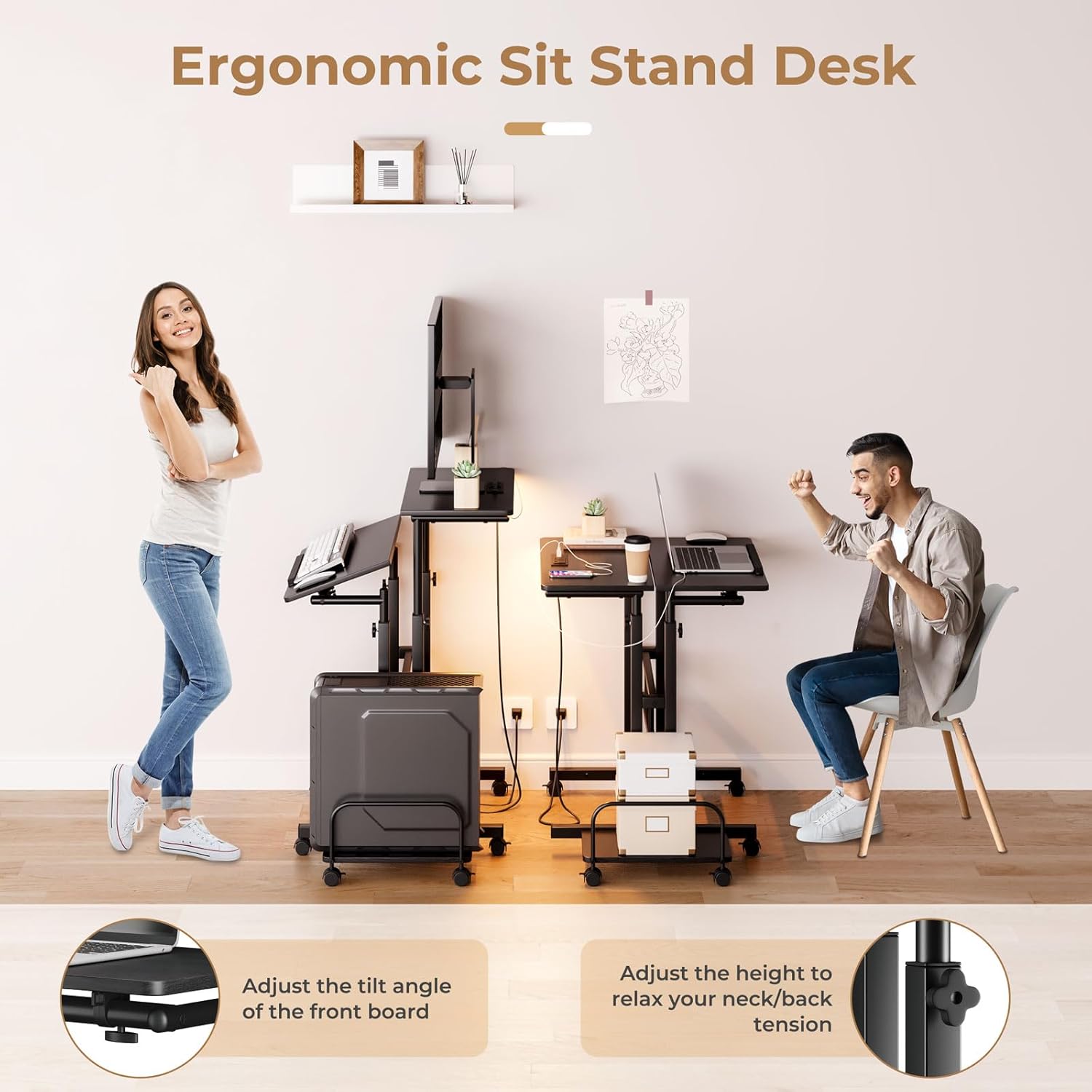
Image: Desk dimensions and components for assembly. The image shows the overall dimensions of the desk, including the two-tier design, adjustable height range (68-115cm), and the base structure with wheels.
Иштөө нускамалары
Үстөлдүн бийиктигин тууралоо
The desk features an adjustable height mechanism, allowing you to switch between sitting and standing positions. Locate the adjustment knobs or levers on the vertical frame. Loosen them, adjust the upper desktop to your desired height (between 26.4" and 45" or 68cm and 115cm), and then securely tighten the knobs/levers to lock the desk in place.

Image: Two individuals demonstrating the ergonomic sit-stand functionality of the desk. One person is standing, and another is sitting, highlighting the adjustable height feature and the tiltable front board.
Розеткаларды жана USB портторун колдонуу
Интеграцияланган кубат тилкеси түзмөктөрүңүз үчүн кубатка ыңгайлуу жетүүнү камсыз кылат.
- AC розеткалары: Plug your laptop, monitor, or other AC-powered devices into the two standard 120V/12A outlets.
- USB порттору: Use the two 5V/2A USB ports to charge your smartphone, tablet, or other USB-powered accessories.
- Ensure the desk's main power cord (5ft) is securely plugged into a wall outlet.
Operating LED Strip Lights
The USB LED strip lights offer customizable lighting effects.
- Connect the USB cable of the LED strip to a USB port on the desk's power unit or another USB power source.
- Use the inline controller buttons to change lighting effects, colors (RGB), and brightness.

Сүрөт: деталдуу view of the desk's power outlets (two AC, two USB) and the controller for the RGB LED light strip, demonstrating the integrated charging and lighting features.
Tilting the Front Board
The front section of the upper desktop can be tilted to provide an ergonomic angle for typing or drawing. Locate the tilt adjustment mechanism, adjust to your preferred angle, and secure it. An edge baffle is present to prevent items from sliding off.
Moving the Desk
The desk is equipped with 360-degree rotation wheels for easy mobility. Unlock the wheel brakes before moving the desk. Once in the desired position, engage the wheel brakes to secure the desk.

Image: An infographic illustrating various features of the desk, including the edge baffle, safety arc design, height adjustment mechanism, board angle adjustment, and 360-degree rotation wheels.
Техникалык тейлөө
Regular maintenance helps prolong the life of your desk.
- Тазалоо: Беттерди жумшак менен сүртүңүз, гamp кездеме. Катуу химиялык заттардан же абразивдүү тазалагычтардан алыс болуңуз.
- Байланыштарды текшерүү: Мезгил-мезгили менен бардык бурамалар менен болтторду текшерип туруңуз, алар бекем бойдон калууда. Керек болсо кайра тартыңыз.
- Электр компоненттери: Ensure the power cord and LED light connections are free from damage. Do not attempt to repair electrical components yourself.
Проблемаларды чечүү
Эгерде сиз столуңузда көйгөйлөргө туш болсоңуз, төмөнкү кеңири таралган көйгөйлөрдү жана чечимдерди караңыз.
- Desk is unstable or wobbly:
Ensure all assembly screws and bolts are fully tightened. Check that the desk is on a flat, even surface. Engage wheel brakes if the desk is moving unintentionally. - Wheels do not fit or roll smoothly:
Verify that the correct wheels are being installed in the designated slots. Ensure no debris is obstructing the wheel mechanism. If a wheel is defective, contact customer support for a replacement. - Height adjustment is difficult or stuck:
Loosen the adjustment knobs/levers sufficiently before attempting to change height. Ensure no objects are obstructing the adjustment mechanism. Do not force the adjustment. - Power outlets or USB ports are not working:
Check if the desk's main power cord is securely plugged into a functional wall outlet. Ensure the power outlet unit is properly connected to the desk. Test with a different device. - LED strip lights are not turning on:
Verify the USB connection of the LED strip to a working USB port. Check the inline controller for power and mode settings.
If the issue persists after attempting these solutions, please contact Dripex customer support for further assistance.
Техникалык шарттар
| Бренд | Dripex |
| Модель номери | XBD-WP324-P |
| Түс | Кара |
| Материал | Engineered Wood, Metal (Iron) |
| Продукциянын өлчөмдөрү | 59.94 x 59.94 x 67.82 см (23.6 x 23.6 x 26.7 дюйм) |
| Жөнгө салынуучу бийиктик диапазону | 68 - 115 см (26.4 - 45.3 дюйм) |
| Элемент Салмагы | 11.7 кг (25.8 фунт) |
| Максималдуу жүктөө жөндөмдүүлүгү | 25 кг (55 фунт) |
| Электр розеткалары | 2 стандарттуу AC розеткалары (120V/12A) |
| USB порттору | 2 USB порттору (5V/2A) |
| Электр шнурунун узундугу | 5 фут |
| Өзгөчөлүктөр | Adjustable Height, Built-In Power Outlet & USB Outlet, Ergonomic, Wheels, with Strip Lights |
Кардарларды колдоо
For any questions, concerns, or assistance with your Dripex Mobile Standing Desk, please do not hesitate to contact our customer support team. Refer to your purchase documentation or the Dripex official webбайланыш маалыматы үчүн сайт.


