1. Киришүү
The Mastech MS2203 is a professional 3-Phase Digital Power Clamp Meter designed for accurate measurement of electrical parameters in three-phase systems. This instrument features high sensitivity, True-RMS measurement, power factor correction, and a USB interface for data logging. This manual provides essential information for the safe and effective operation, maintenance, and troubleshooting of your MS2203 meter.
2. Коопсуздук маалыматы
Эсептегичтин коопсуз иштешин жана тейлөөсүн камсыз кылуу үчүн төмөнкү коопсуздук чараларын аткарыңыз:
- Ар дайым жергиликтүү жана улуттук коопсуздук эрежелерин сактаңыз.
- Эгерде ал бузулуп калса же сыноо өткөргүчтөрүнүн изоляциясы бузулса, эсептегичти колдонбоңуз.
- Ensure the rotary switch is in the correct position for the desired measurement before connecting to the circuit.
- Эч кандай функция үчүн максималдуу киргизүү рейтингинен ашпаңыз.
- Ток чынжырлары менен иштөөдө өтө этият болуңуз.
- Өлчөө учурунда манжаларыңызды сыноо өткөргүчтөрүндөгү манжа коргоочуларынын артында кармаңыз.
- Батареяны так көрсөткүчтөрдү камсыз кылуу үчүн батарейка аз индикатор пайда болгондо алмаштырыңыз.
3. Продукт бүтүп калдыview
The Mastech MS2203 is a versatile clamp meter capable of measuring AC voltage, AC current, frequency, active power, apparent power, reactive power, and power factor. It features a large LCD display with backlight, data hold, MAX/MIN recording, and a bar graph for quick visual indication.
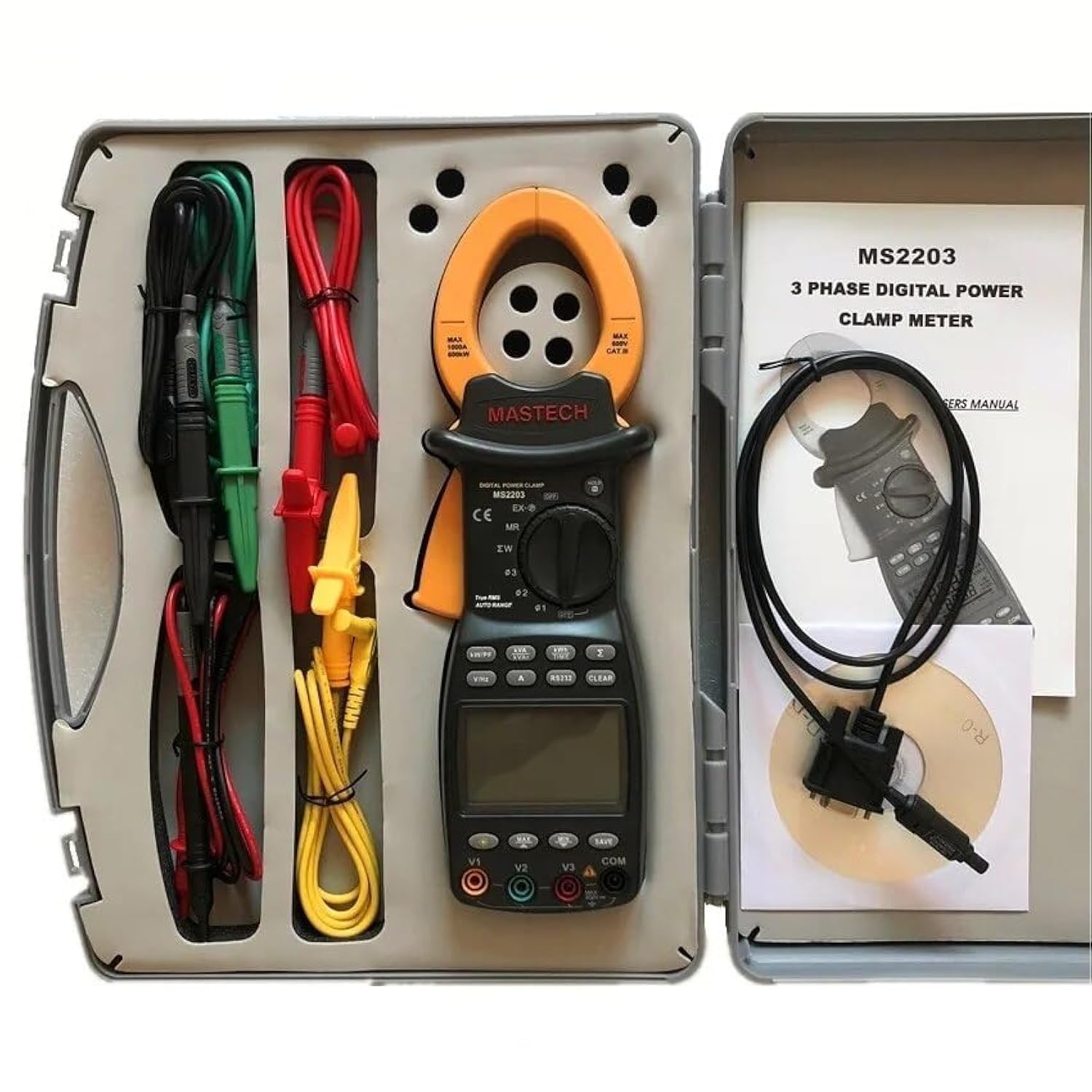
Image 3.1: The Mastech MS2203 3-Phase Digital Power Clamp Meter and its accessories, neatly organized within its protective carrying case. The kit includes the clamp meter, test leads, USB cable, and user manual.
Негизги өзгөчөлүктөрү:
- Көрсөтүү: 9999 саны
- Jaw Opening: Φ50mm/2.0"
- Auto & Manual Ranging
- Data Logging: 28 groups
- True Root Mean Square (True-RMS) measurement
- Bar Graph display
- MAX/MIN Measurement function
- Маалыматты кармоо функциясы
- Display Backlight for low-light conditions
- Батареянын аздыгын көрсөтүүчү индикатор
- RS232 Interface for Windows OS connectivity
4. Пакеттен чыгаруу жана мазмуну
Carefully unpack the meter and check for any damage. Verify that all items listed below are present. If any item is missing or damaged, contact your dealer immediately.

Image 4.1: An illustrative diagram detailing the contents included with the Mastech MS2203, such as the main unit, test leads, alligator clips, RS232 cable, software, carrying case, and batteries.
Пакеттин мазмуну:
- Mastech MS2203 3 фазалуу санариптик кубаттуулукamp Метр
- Test Leads (Red, Yellow, Green, Black)
- Alligator Clips
- RS232 Interface Cable
- PC data record graph software (CD-ROM)
- Ташуу кутусу
- Batteries (2 x LR44, included)
- Quick Start Guide
- Калибрлөө сертификаты
5. Орнотуу
5.1 Батареяны орнотуу
- Батарея уясынын капкагын эсептегичтин арткы жагында табыңыз.
- Бурагычты колдонуп, бурама(лар)ды бошотуп, капкакты алып салыңыз.
- Insert the two LR44 batteries, observing the correct polarity (+/-) as indicated inside the compartment.
- Батареянын капкагын ордуна коюңуз жана аны бурама(лар) менен бекитиңиз.
5.2 Сыноо өткөргүчтөрүн туташтыруу
Insert the banana plugs of the test leads into the appropriate input jacks on the meter. For most measurements, the common (COM) jack will be used with the black lead, and the V1, V2, V3, or A jacks will be used with the colored leads (red, yellow, green) depending on the measurement type and phase configuration.
5.3 USB/RS232 Interface Setup
To connect the meter to a computer for data logging and analysis:
- Install the provided PC data record graph software from the CD-ROM onto your Windows OS computer.
- Connect one end of the RS232 interface cable to the meter's RS232 port.
- Connect the other end of the cable to an available USB port on your computer (an RS232-to-USB adapter may be required if your computer lacks an RS232 port).
- Follow the software instructions to establish communication with the meter.
6. Иштөө нускамалары
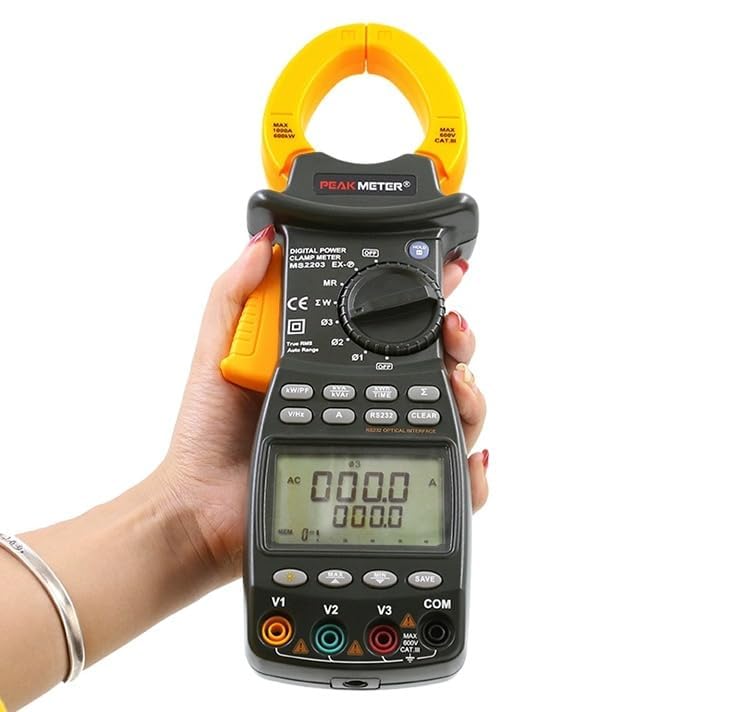
Image 6.1: The Mastech MS2203 in use, highlighting the digital display and the rotary selector for various measurement functions.
6.1 Күйгүзүү/өчүрүү
To power on the meter, rotate the function switch from the 'OFF' position to any desired measurement function. To power off, rotate the switch back to 'OFF'.
6.2 Функцияны тандоо
The rotary switch allows selection of different measurement modes. Ensure the switch is set to the appropriate function before taking a measurement.
6.3 Өлчөө процедуралары
AC учурдагы өлчөө:
- Rotate the function switch to the 'A' (AC Current) position.
- cl ачыңызamp триггерди басуу менен жаактарды.
- Enclose only one conductor of the circuit within the jaws. Ensure the jaws are fully closed.
- Дисплейдеги учурдагы маанини окуңуз.
AC Voltage Measurement (3-Phase):
- Rotate the function switch to the 'V' (AC Voltagд) кызмат орду.
- Connect the test leads to the V1, V2, V3, and COM input jacks.
- Connect the test leads to the respective phase conductors and neutral/ground of the 3-phase system.
- The meter will display the voltage readings for each phase.
Power Measurement (Active, Apparent, Reactive, Power Factor):
- Rotate the function switch to the 'W/PF' (Power/Power Factor) position.
- Сыноо өткөргүчтөрүн туташтырыңыз жанаamp the current jaws as required for 3-phase power measurement.
- The meter will display active power (W), apparent power (VA), reactive power (VAR), and power factor (PF).
6.4 Атайын функциялар
- Дайындарды кармоо: Дисплейдеги учурдагы көрсөткүчтү тоңдуруп коюу үчүн 'HOLD' баскычын басыңыз. Чыгаруу үчүн кайра басыңыз.
- MAX/MIN Measurement: Press the 'MAX/MIN' button to record the maximum and minimum values during a measurement session. Press again to cycle through MAX, MIN, and current readings.
- Маалыматтарды каттоо: The meter can store up to 28 groups of data. Refer to the detailed software manual for instructions on logging and retrieving data via the RS232 interface.
- Арткы жарык: Press the backlight button to illuminate the display for use in dimly lit environments.
- Чыныгы RMS: The MS2203 provides True-RMS measurements for accurate readings on non-sinusoidal waveforms.
7. Техникалык тейлөө
7.1 Тазалоо
Жарнама менен эсептегичти сүртүңүзamp кездеме жана жумшак жуугуч. Абразивдерди же эриткичтерди колдонбоңуз. Колдонуудан мурун эсептегич толугу менен кургатылганын текшериңиз.
7.2 Батареяны алмаштыруу
When the low battery indicator appears on the display, replace the batteries as described in Section 5.1. Remove batteries if the meter is not to be used for an extended period.
7.3 Сактоо
Store the meter in its carrying case in a cool, dry environment, away from direct sunlight and extreme temperatures.
8. Кыйынчылыктарды
- Дисплей жок: Check battery installation and charge. Ensure the rotary switch is not in the 'OFF' position.
- Туура эмес окуулар: Verify correct function selection and proper test lead connection. Ensure the clamp jaws are fully closed around a single conductor for current measurements. Check for low battery.
- No PC Communication: Ensure the RS232 cable is correctly connected and the software drivers are installed. Check COM port settings in the software.
9. Техникалык шарттар
Image 9.1: A detailed overview of the Mastech MS2203's technical specifications, including measurement ranges and display capabilities.
| Параметр | Нарк |
|---|---|
| Дисплей | 9999 эсеп |
| Жаак ачуу | 50 мм / 2.0" |
| AC Voltage | 600V |
| AC тогу | 1000A |
| Жыштык | 1000Hz |
| Активдүү күч | 600 кВт |
| Көрүнгөн күч | 600кВА |
| Реактивдүү күч | 600кВАР |
| Элемент моделинин номери | YQ-MS2203 |
| Продукциянын өлчөмдөрү | 7.87 x 5.91 x 9.84 дюйм |
| Элемент Салмагы | 1 килограмм (2.2 фунт) |
| Батареялар | 2 LR44 батарейкалар (киргизилген) |
10. Кепилдик жана колдоо
Mastech products are designed for reliability and performance. For warranty information, technical support, or service inquiries, please refer to the warranty card included with your product or visit the official Mastech website. Do not attempt to repair the meter yourself, as this may void the warranty and pose a safety risk.


